<!doctype html>
<html xmlns="http://www.w3.org/1999/xhtml" xmlns:v="urn:schemas-microsoft-com:vml" xmlns:o="urn:schemas-microsoft-com:office:office" lang="en-US" xml:lang="en-US">
  <head>
    <title data-ignore-plain-text>Learning in Hand Issue 65</title>
    <meta http-equiv="content-type" content="text/html; charset=utf-8">
    <meta name="viewport" content="width=device-width, initial-scale=1, maximum-scale=1">
    <meta name="format-detection" content="address=no">
    <!--[if (gte mso 9)|(IE)]>
    <style type="text/css" media="screen">
      li {
        text-indent: -1em;
      }
    </style>
    <![endif]-->
    <style type="text/css" media="all">
      body,
.section-text-area,
.section-text-area-wrapper,
.section-text-cell {
    overflow-wrap: break-word;
    word-wrap: break-word;
    -ms-word-break: break-all;
    word-break: break-word;
}
body {
    width: 100% !important;
    min-width: 100% !important;
    -ms-text-size-adjust: none;
    -webkit-text-size-adjust: none;
    mso-line-height-rule: exactly;
}
p {
    margin-block: 0;
}
@media only screen and (max-width:  593px ) {
    table#newsletter-table {
        border: 0 !important;
    }
    table#newsletter-email {
        width: 100% !important;
    }
    img.section-scaleable-image,
    img.section-empty-img {
        max-width: 100% !important;
        height: auto !important;
    }
    .bg-none {
        background: none !important;
    }
    .hauto {
        height: auto !important;
    }
    .show-desktop-only {
        display: none !important;
    }
    .show-mobile-only {
        display: block !important;
        float: none !important;
        line-height: auto !important;
        max-height: inherit !important;
        max-width: inherit !important;
        margin-top: 0px !important;
        overflow: visible !important;
        visibility: inherit !important;
        width: auto !important;
    }
    .stack-cell-wrap {
        display: block !important;
    }
    .stack-cell-up {
        display: table-header-group !important;
    }
    .stack-cell-down {
        display: table-footer-group !important;
    }
    .mw100p {
        max-width: 100% !important;
    }
    .section-horizontal-padding,
    .padding-mobile-both {
        padding-left: 22px !important;
        padding-right: 22px !important;
    }
    .padding-mobile-left {
        padding-left: 22px !important;
    }
    .padding-mobile-right {
        padding-right: 22px !important;
    }
    .text-left {
        text-align: left !important;
    }
    .text-right {
        text-align: right !important;
    }
    .w100p {
        width: 100% !important;
    }
}
.button-style-solid:hover,
.button-style-rounded:hover {
    opacity: .8 !important;
}
a:hover {
    text-decoration: none !important;
}
span.mail-merge-preview {
    border-bottom: 2px dotted currentColor;
    display: inline-block;
    line-height: 1em !important;
    margin-bottom: .125em !important;
}
table#newsletter-section-body .linked-site-title-link {
    color: #009cdb !important;
}
#header-header-section-stacked-top-0 .brand-name .linked-site-title-link {
    color: #777;
    text-decoration: none;
}
#footer-footer-section-stacked-bottom-0 .brand-name .linked-site-title-link {
    color: #777;
    text-decoration: none;
}
#footer-footer-section-stacked-bottom-0 .footer-text .linked-site-title-link {
    color: #009cdb;
}
#button-button-section-31 .button-style-outline:hover {
    background-color: #009cdb !important;
    border: 1px solid #009cdb !important;
}
#button-button-section-31 .button-style-outline:hover .button-section-label {
    color: #000 !important;
}

    </style>
    
    
    <!--[if mso]>
    <noscript>
      <xml>
        <o:OfficeDocumentSettings>
          <o:AllowPNG/>
          <o:PixelsPerInch>96</o:PixelsPerInch>
        </o:OfficeDocumentSettings>
      </xml>
    </noscript>
    <![endif]-->
    
    <!--[if (mso)|(mso 16)]>
      <style type="text/css">
        a {text-decoration: none;}
      </style>
    <![endif]-->
  </head>
  <body style="padding:0;margin:0;text-align:center;background-color:#ededed;">
    <table role="article" aria-label="Learning in Hand Issue 65" lang="en-US" cellpadding="0" cellspacing="0" border="0" align="center" id="newsletter-table" style="font-size:16px;font-weight:normal;width:100%;padding:0px;background-color:#ededed;border-top:44px solid #ededed;border-bottom:44px solid #ededed;margin:0 auto;text-align:center;table-layout:fixed;">
  <tbody><tr>
    <td align="center" valign="top" bgcolor="#EDEDED" id="newsletter-cell" style="font-size:1em;">
      <div data-ignore-plain-text class="newsletter-preview-text" style="color:transparent;display:none !important;height:0;max-height:0;max-width:0;opacity:0;overflow:hidden;mso-hide:all;visibility:hidden;width:0;">
        
            
            AI stickers, vibe-coded games, classroom tools, and ideas worth trying.   ͏   ͏   ͏   ͏   ͏   ͏   ͏   ͏   ͏   ͏   ͏   ͏   ͏   ͏   ͏   ͏   ͏   ͏   ͏   ͏   ͏   ͏   ͏   ͏   ͏   ͏   ͏   ͏   ͏   ͏   ͏   ͏   ͏   ͏   ͏   ͏   ͏   ͏   ͏   ͏   ͏   ͏   ͏   ͏   ͏   ͏   ͏   ͏   ͏   ͏   ͏   ͏   ͏   ͏   ͏   ͏   ͏   ͏   ͏   ͏   ͏   ͏   ͏   ͏   ͏   ͏   ͏   ͏   ͏   ͏   ͏   ͏   ͏   ͏   ͏   ͏   ͏   ͏   ͏   ͏   ͏   ͏   ͏   ͏   ͏   ͏   ͏   ͏   ͏   ͏   ͏   ͏   ͏   ͏   ͏   ͏   ͏   ͏   ͏   ͏   ͏   ͏   ͏   ͏   ͏   ͏   ͏   ͏   ͏   ͏   ͏   ͏   ͏   ͏   ͏   ͏   ͏   ͏   ͏   ͏   ͏   ͏   ͏   ͏   ͏   ͏   ͏   ͏   ͏   ͏   ͏   ͏   ͏   ͏   ͏   ͏   ͏   ͏   ͏   ͏   ͏   ͏   ͏   ͏   ͏   ͏   ͏   ͏   ͏   ͏   ͏   ͏   ͏   ͏   ͏   ͏   ͏   ͏   ͏   ͏   ͏   ͏   ͏   ͏   ͏   ͏   ͏   ͏   ͏   ͏   ͏   ͏   ͏   ͏   ͏   ͏   ͏   ͏   ͏   ͏   ͏   ͏   ͏   ͏   ͏   ͏   ͏   ͏   ͏   ͏   ͏   ͏   ͏   ͏   ͏   ͏   ͏   ͏   ͏   ͏   ͏   ͏   ͏   ͏   ͏   ͏   ͏   ͏   ͏   ͏   ͏   ͏   ͏   ͏   ͏   ͏   ͏   ͏   ͏   ͏   ͏   ͏   ͏   ͏   ͏   ͏   ͏   ͏   ͏   ͏   ͏   ͏   ͏   ͏   ͏   ͏   ͏   ͏   ͏   ͏   ͏   ͏   ͏   ͏   ͏   ͏   ͏   ͏   ͏   ͏   ͏   ͏   ͏   ͏   ͏
        
      </div>
      <table border="0" cellpadding="0" cellspacing="0" width="594" bgcolor="#FFFFFF" id="newsletter-email">
        <tbody><tr>
          <td align="center" valign="top" id="newsletter-email-wrapper" class="modern-sans">
            <table role="presentation" width="100%" cellpadding="0" cellspacing="0" border="0" id="newsletter-section-header">
              <tbody><tr>
                <td align="center" valign="middle" id="newsletter-section-header-cell">
                  
<div id="header-header-section-stacked-top-0">


<table role="presentation" width="100%" cellpadding="0" cellspacing="0" border="0" class="view-in-browser-table" style="background-color:#ededed;">
  <tbody><tr>
    <td align="right" valign="middle" class="section-text-area section-header-view-in-browser section-content-cell">
      <p class="view-in-browser" style="color:inherit;line-height:1.618em;margin:0 0 1.25em 0;font-weight:normal;margin-top:0;font-family:'DejaVu Sans Condensed', 'Liberation Sans', 'Nimbus Sans L', 'Helvetica Neue', Helvetica, Arial, sans-serif;letter-spacing:-.01em;font-size:11px;margin-bottom:11px;"><a href="#" class="view-in-browser-link" style="color:#009cdb !important;text-decoration-line:underline;text-decoration-color:#5E5E5E;"><span class="view-in-browser-link-text" style="font-size:inherit;font-weight:inherit;line-height:inherit;margin:0;color:#5E5E5E;">View in Browser</span></a></p>
    </td>
  </tr>
</tbody></table>


<table role="presentation" width="100%" cellpadding="0" cellspacing="0" border="0" bgcolor="#009CDB" class="section-content header-section header-section-stacked" style="background-color:#009cdb;">
  <tbody><tr>
    <td align="center" valign="middle" class="section-text-area section-content-cell" style="padding-top:22px;padding-right:22px;padding-bottom:22px;padding-left:22px;">


      <a class="brand-logo-link" href="https://learninginhand.com/" style="color:#009cdb !important;"><img class="brand-logo" src="https://images.squarespace-cdn.com/content/v1/50eca855e4b0939ae8bb12d9/410f2385-df7d-42a7-a349-9423d6c7484d/LIH_blue.png" height="110" alt="Learning in Hand with Tony Vincent" style="font-size:.6666666666666666em;display:block;border:0;text-decoration:none;line-height:0;font-weight:normal;font-family:'DejaVu Sans Condensed', 'Liberation Sans', 'Nimbus Sans L', 'Helvetica Neue', Helvetica, Arial, sans-serif;color:#777;height:auto;max-height:110px;max-width:100%;width:auto;"></a>


    </td>
  </tr>
</tbody></table>

</div>
                </td>
              </tr>
            </tbody></table>
            <table role="presentation" width="100%" cellpadding="0" cellspacing="0" border="0" id="newsletter-section-body">
              <tbody><tr>
                <td align="center" valign="top" width="100%" id="newsletter-section-body-cell">
                  
<div id="text-text-section-0">


<table role="presentation" width="100%" cellpadding="0" cellspacing="0" border="0" bgcolor="#C1D72E" class="text-section section-content">
  <tbody><tr>
    <td valign="top" class="section-text-area section-content-cell" style="padding-top:12px;padding-right:22px;padding-bottom:12px;padding-left:22px;color:#fff;background-color:#c1d72e;">
      <h3 style="color:inherit;margin:1.414em 0 .5em;font-weight:400;line-height:1.25em;font-size:2.25em;mso-line-height-alt:2.25em;margin-top:0;margin-bottom:0;font-family:'DejaVu Sans Condensed', 'Liberation Sans', 'Nimbus Sans L', 'Helvetica Neue', Helvetica, Arial, sans-serif;letter-spacing:0em;text-align:center;"><strong>Newsletter</strong></h3>
    </td>
  </tr>
</tbody></table>

</div>
<div id="text-text-section-1">


<table role="presentation" width="100%" cellpadding="0" cellspacing="0" border="0" bgcolor="transparent" class="text-section section-content">
  <tbody><tr>
    <td valign="top" class="section-text-area section-content-cell padding-mobile-both" style="padding-top:8px;padding-right:66px;padding-bottom:8px;padding-left:66px;color:#009cdb;background-color:transparent;">
      <p style="color:inherit;font-size:1em;line-height:1.618em;margin:0 0 1.25em 0;font-weight:normal;margin-top:0;margin-bottom:0;font-family:'DejaVu Sans Condensed', 'Liberation Sans', 'Nimbus Sans L', 'Helvetica Neue', Helvetica, Arial, sans-serif;letter-spacing:-.01em;text-align:center;" class="">Issue 65 • Date August 26, 2026</p>
    </td>
  </tr>
</tbody></table>

</div>
<div id="text-text-section-2">


<table role="presentation" width="100%" cellpadding="0" cellspacing="0" border="0" bgcolor="transparent" class="text-section section-content">
  <tbody><tr>
    <td valign="top" class="section-text-area section-content-cell padding-mobile-both" style="padding-top:22px;padding-right:66px;padding-bottom:0px;padding-left:66px;color:#272727;background-color:transparent;">
      <p class="" style="color:inherit;font-size:1em;line-height:1.618em;margin:0 0 1.25em 0;font-weight:normal;margin-top:0;font-family:'DejaVu Sans Condensed', 'Liberation Sans', 'Nimbus Sans L', 'Helvetica Neue', Helvetica, Arial, sans-serif;letter-spacing:-.01em;">This month I lead a series of AI literacy sessions for my local school district. Teachers registered for each session, so I knew approximately how many to expect. Sizes ranged from 6 to 60. The thing is, the conference center room had seating for 90.</p><p class="" style="color:inherit;font-size:1em;line-height:1.618em;margin:0 0 1.25em 0;font-weight:normal;font-family:'DejaVu Sans Condensed', 'Liberation Sans', 'Nimbus Sans L', 'Helvetica Neue', Helvetica, Arial, sans-serif;letter-spacing:-.01em;">My approach to AI literacy involves curiosity and conversation, so I wanted to make sure that people gathered at tables near the front. My first thought was to make <em>Reserved</em> signs to block off tables, but often people still sit at a reserved table, perhaps thinking it’s reserved for them?</p><p class="" style="color:inherit;font-size:1em;line-height:1.618em;margin:0 0 1.25em 0;font-weight:normal;font-family:'DejaVu Sans Condensed', 'Liberation Sans', 'Nimbus Sans L', 'Helvetica Neue', Helvetica, Arial, sans-serif;letter-spacing:-.01em;">I brainstormed various wording I could put on the signs. Instead of reserved, the signs read:</p><ul data-rte-list="default" style="padding-left:25px;"><li style="font-weight:normal;margin-top:0px;margin-bottom:0px;margin-left:15px;font-family:'DejaVu Sans Condensed', 'Liberation Sans', 'Nimbus Sans L', 'Helvetica Neue', Helvetica, Arial, sans-serif;"><p class="" style="color:inherit;font-size:1em;line-height:1.618em;margin:0 0 1.25em 0;font-weight:normal;margin-top:0;margin-bottom:0;font-family:'DejaVu Sans Condensed', 'Liberation Sans', 'Nimbus Sans L', 'Helvetica Neue', Helvetica, Arial, sans-serif;letter-spacing:-.01em;">Choose your seat. Just not at this table. Thank you.</p></li><li style="font-weight:normal;margin-top:0px;margin-bottom:0px;margin-left:15px;font-family:'DejaVu Sans Condensed', 'Liberation Sans', 'Nimbus Sans L', 'Helvetica Neue', Helvetica, Arial, sans-serif;"><p class="" style="color:inherit;font-size:1em;line-height:1.618em;margin:0 0 1.25em 0;font-weight:normal;margin-top:0;margin-bottom:0;font-family:'DejaVu Sans Condensed', 'Liberation Sans', 'Nimbus Sans L', 'Helvetica Neue', Helvetica, Arial, sans-serif;letter-spacing:-.01em;">Please do not sit at this table. You’ll find out why soon.</p></li><li style="font-weight:normal;margin-top:0px;margin-bottom:0px;margin-left:15px;font-family:'DejaVu Sans Condensed', 'Liberation Sans', 'Nimbus Sans L', 'Helvetica Neue', Helvetica, Arial, sans-serif;"><p class="" style="color:inherit;font-size:1em;line-height:1.618em;margin:0 0 1.25em 0;font-weight:normal;margin-top:0;margin-bottom:0;font-family:'DejaVu Sans Condensed', 'Liberation Sans', 'Nimbus Sans L', 'Helvetica Neue', Helvetica, Arial, sans-serif;letter-spacing:-.01em;">Walk past this table. Sit somewhere else. Thank you.</p></li><li style="font-weight:normal;margin-top:0px;margin-bottom:0px;margin-left:15px;font-family:'DejaVu Sans Condensed', 'Liberation Sans', 'Nimbus Sans L', 'Helvetica Neue', Helvetica, Arial, sans-serif;"><p class="" style="color:inherit;font-size:1em;line-height:1.618em;margin:0 0 1.25em 0;font-weight:normal;margin-top:0;margin-bottom:0;font-family:'DejaVu Sans Condensed', 'Liberation Sans', 'Nimbus Sans L', 'Helvetica Neue', Helvetica, Arial, sans-serif;letter-spacing:-.01em;">Keep calm. Choose a different table.</p></li><li style="font-weight:normal;margin-top:0px;margin-bottom:0px;margin-left:15px;font-family:'DejaVu Sans Condensed', 'Liberation Sans', 'Nimbus Sans L', 'Helvetica Neue', Helvetica, Arial, sans-serif;"><p class="" style="color:inherit;font-size:1em;line-height:1.618em;margin:0 0 1.25em 0;font-weight:normal;margin-top:0;margin-bottom:0;font-family:'DejaVu Sans Condensed', 'Liberation Sans', 'Nimbus Sans L', 'Helvetica Neue', Helvetica, Arial, sans-serif;letter-spacing:-.01em;">Congratulations! You found the table you should not sit at. Thank you for sitting elsewhere.</p></li><li style="font-weight:normal;margin-top:0px;margin-bottom:0px;margin-left:15px;font-family:'DejaVu Sans Condensed', 'Liberation Sans', 'Nimbus Sans L', 'Helvetica Neue', Helvetica, Arial, sans-serif;"><p class="" style="color:inherit;font-size:1em;line-height:1.618em;margin:0 0 1.25em 0;font-weight:normal;margin-top:0;margin-bottom:0;font-family:'DejaVu Sans Condensed', 'Liberation Sans', 'Nimbus Sans L', 'Helvetica Neue', Helvetica, Arial, sans-serif;letter-spacing:-.01em;">Choose a different table. It will be okay. Thank you.</p></li></ul>
    </td>
  </tr>
</tbody></table>

</div>
<div id="image-image-section-below-3">
<table role="presentation" width="100%" cellpadding="0" cellspacing="0" border="0" bgcolor="#FFFFFF" class="image-section below-layout section-content">


    <tbody><tr>
      <td>
        <table role="presentation" width="100%" cellpadding="0" cellspacing="0" border="0">
          <tbody><tr>
              
    <td class="show-desktop-only section-spacing-left" width="44"></td>
  

            <td align="left" valign="middle" class="section-image-cell section-content-cell section-hoverable-image" data-aspect="ORIGINAL" style="padding:0;">
              
  <img class="section-scaleable-image" src="https://images.squarespace-cdn.com/content/50eca855e4b0939ae8bb12d9/7a1ae1c8-521c-474d-adb2-1c4597f50cfe/Table+Signs.jpg?content-type=image%2Fjpeg&amp;format=750w" width="594" alt="" style="font-size:.6666666666666666em;display:block;border:0;text-decoration:none;line-height:0;background-color:transparent;font-weight:normal;height:auto;width:100%;max-width:100%;font-family:'DejaVu Sans Condensed', 'Liberation Sans', 'Nimbus Sans L', 'Helvetica Neue', Helvetica, Arial, sans-serif;">


            </td>
              
    <td class="show-desktop-only section-spacing-right" width="44"></td>
  

          </tr>
        </tbody></table>
      </td>
    </tr>


</tbody></table>

</div>
<div id="text-text-section-4">


<table role="presentation" width="100%" cellpadding="0" cellspacing="0" border="0" bgcolor="transparent" class="text-section section-content">
  <tbody><tr>
    <td valign="top" class="section-text-area section-content-cell padding-mobile-both" style="padding-top:18px;padding-right:66px;padding-bottom:22px;padding-left:66px;color:#272727;background-color:transparent;">
      <p class="" style="color:inherit;font-size:1em;line-height:1.618em;margin:0 0 1.25em 0;font-weight:normal;margin-top:0;margin-bottom:0;font-family:'DejaVu Sans Condensed', 'Liberation Sans', 'Nimbus Sans L', 'Helvetica Neue', Helvetica, Arial, sans-serif;letter-spacing:-.01em;">There were lots of comments about liking the signs. They also liked my <a href="https://makerworld.com/en/models/1325846-mini-traffic-cones-stackable" rel="nofollow" style="color:#009cdb !important;">3D printed traffic cones</a> and <a href="https://makerworld.com/en/models/1516722-card-holder#profileId-1588862" rel="nofollow" style="color:#009cdb !important;">card holders</a>. All this did the trick. Participants sat at tables at the front, and we did indeed have great conversations.</p>
    </td>
  </tr>
</tbody></table>

</div>
<div id="text-text-section-5">


<table role="presentation" width="100%" cellpadding="0" cellspacing="0" border="0" bgcolor="#FE2685" class="text-section section-content">
  <tbody><tr>
    <td valign="top" class="section-text-area section-content-cell padding-mobile-both" style="padding-top:12px;padding-right:66px;padding-bottom:12px;padding-left:66px;color:#fff;background-color:#fe2685;">
      <h4 style="color:inherit;margin:1.414em 0 .5em;font-weight:400;line-height:1.25em;font-size:1.5em;mso-line-height-alt:1.5em;margin-top:0;margin-bottom:0;font-family:'DejaVu Sans Condensed', 'Liberation Sans', 'Nimbus Sans L', 'Helvetica Neue', Helvetica, Arial, sans-serif;letter-spacing:.02em;">🤔 AI Attitudes</h4>
    </td>
  </tr>
</tbody></table>

</div>
<div id="text-text-section-6">


<table role="presentation" width="100%" cellpadding="0" cellspacing="0" border="0" bgcolor="#FFE8F1" class="text-section section-content">
  <tbody><tr>
    <td valign="top" class="section-text-area section-content-cell padding-mobile-both" style="padding-top:12px;padding-right:66px;padding-bottom:12px;padding-left:66px;color:#272727;background-color:#ffe8f1;">
      <p class="" style="color:inherit;font-size:1em;line-height:1.618em;margin:0 0 1.25em 0;font-weight:normal;margin-top:0;margin-bottom:0;font-family:'DejaVu Sans Condensed', 'Liberation Sans', 'Nimbus Sans L', 'Helvetica Neue', Helvetica, Arial, sans-serif;letter-spacing:-.01em;">I placed welcoming signs on the tables where I wanted my workshop participants to sit. The signs asked teachers to make name cards and choose a sticker that showed how they think or feel about AI.</p>
    </td>
  </tr>
</tbody></table>

</div>
<div id="image-image-section-below-7">
<table role="presentation" width="100%" cellpadding="0" cellspacing="0" border="0" bgcolor="#FFE8F1" class="image-section below-layout section-content">


    <tbody><tr>
      <td>
        <table role="presentation" width="100%" cellpadding="0" cellspacing="0" border="0">
          <tbody><tr>
              
    <td class="show-desktop-only section-spacing-left" width="44"></td>
  

            <td align="left" valign="middle" class="section-image-cell section-content-cell section-hoverable-image" data-aspect="ORIGINAL" style="padding:0;">
              
  <img class="section-scaleable-image" src="https://images.squarespace-cdn.com/content/50eca855e4b0939ae8bb12d9/808631f5-2b68-4d83-ac99-ab5715e729af/Welcome+Sign.png?content-type=image%2Fpng&amp;format=750w" width="594" alt="" style="font-size:.6666666666666666em;display:block;border:0;text-decoration:none;line-height:0;background-color:transparent;font-weight:normal;height:auto;width:100%;max-width:100%;font-family:'DejaVu Sans Condensed', 'Liberation Sans', 'Nimbus Sans L', 'Helvetica Neue', Helvetica, Arial, sans-serif;">


            </td>
              
    <td class="show-desktop-only section-spacing-right" width="44"></td>
  

          </tr>
        </tbody></table>
      </td>
    </tr>


</tbody></table>

</div>
<div id="text-text-section-8">


<table role="presentation" width="100%" cellpadding="0" cellspacing="0" border="0" bgcolor="#FFE8F1" class="text-section section-content">
  <tbody><tr>
    <td valign="top" class="section-text-area section-content-cell padding-mobile-both" style="padding-top:12px;padding-right:66px;padding-bottom:12px;padding-left:66px;color:#272727;background-color:#ffe8f1;">
      <p class="" style="color:inherit;font-size:1em;line-height:1.618em;margin:0 0 1.25em 0;font-weight:normal;margin-top:0;font-family:'DejaVu Sans Condensed', 'Liberation Sans', 'Nimbus Sans L', 'Helvetica Neue', Helvetica, Arial, sans-serif;letter-spacing:-.01em;">The colorful stickers represent an array of attitudes toward AI. For many teachers, choosing just one was hard because several resonated with them.</p><p class="" style="color:inherit;font-size:1em;line-height:1.618em;margin:0 0 1.25em 0;font-weight:normal;margin-bottom:0;font-family:'DejaVu Sans Condensed', 'Liberation Sans', 'Nimbus Sans L', 'Helvetica Neue', Helvetica, Arial, sans-serif;letter-spacing:-.01em;"><a href="https://learninginhand.com/s/AI-PD-Stickers-from-Tony-Vincent.pdf" rel="nofollow" style="color:#009cdb !important;"><strong>Click to see the stickers larger.</strong></a></p>
    </td>
  </tr>
</tbody></table>

</div>
<div id="image-image-section-below-9">
<table role="presentation" width="100%" cellpadding="0" cellspacing="0" border="0" bgcolor="#FFE8F1" class="image-section below-layout section-content">


    <tbody><tr>
      <td>
        <table role="presentation" width="100%" cellpadding="0" cellspacing="0" border="0">
          <tbody><tr>
              
    <td class="show-desktop-only section-spacing-left" width="88"></td>
  

            <td align="left" valign="middle" class="section-image-cell section-content-cell section-hoverable-image" data-aspect="ORIGINAL" style="padding:0;">
              
  <a href="https://learninginhand.com/s/AI-PD-Stickers-from-Tony-Vincent.pdf" style="color:#009cdb !important;"><img class="section-scaleable-image" src="https://images.squarespace-cdn.com/content/50eca855e4b0939ae8bb12d9/30f96f90-fa15-45b2-80ad-4f8028576dde/AI+PD+Stickers.png?content-type=image%2Fpng&amp;format=750w" width="594" alt="AI PD Sticker Sheet" style="font-size:.6666666666666666em;display:block;border:0;text-decoration:none;line-height:0;background-color:transparent;font-weight:normal;height:auto;width:100%;max-width:100%;font-family:'DejaVu Sans Condensed', 'Liberation Sans', 'Nimbus Sans L', 'Helvetica Neue', Helvetica, Arial, sans-serif;"></a>


            </td>
              
    <td class="show-desktop-only section-spacing-right" width="88"></td>
  

          </tr>
        </tbody></table>
      </td>
    </tr>


</tbody></table>

</div>
<div id="text-text-section-10">


<table role="presentation" width="100%" cellpadding="0" cellspacing="0" border="0" bgcolor="#FFE8F1" class="text-section section-content">
  <tbody><tr>
    <td valign="top" class="section-text-area section-content-cell padding-mobile-both" style="padding-top:12px;padding-right:66px;padding-bottom:12px;padding-left:66px;color:#272727;background-color:#ffe8f1;">
      <p class="" style="color:inherit;font-size:1em;line-height:1.618em;margin:0 0 1.25em 0;font-weight:normal;margin-top:0;font-family:'DejaVu Sans Condensed', 'Liberation Sans', 'Nimbus Sans L', 'Helvetica Neue', Helvetica, Arial, sans-serif;letter-spacing:-.01em;">As a quick introduction, each teacher briefly explained why they chose the sticker on their name card. It gave everyone a chance to share a little about their perspective before we got started.</p><p class="" style="color:inherit;font-size:1em;line-height:1.618em;margin:0 0 1.25em 0;font-weight:normal;font-family:'DejaVu Sans Condensed', 'Liberation Sans', 'Nimbus Sans L', 'Helvetica Neue', Helvetica, Arial, sans-serif;letter-spacing:-.01em;">I worked with ChatGPT to come up with the words for the stickers. That part didn't take long. What took a while was getting ChatGPT to generate the artwork with the thick outline and transparent background needed to give it that sticker look. It turns out that ChatGPT and Gemini both struggle with this.</p><p class="" style="color:inherit;font-size:1em;line-height:1.618em;margin:0 0 1.25em 0;font-weight:normal;font-family:'DejaVu Sans Condensed', 'Liberation Sans', 'Nimbus Sans L', 'Helvetica Neue', Helvetica, Arial, sans-serif;letter-spacing:-.01em;">My workaround was to ask for just the sticker's words and artwork. I then placed each one in Canva, removed the background, and added the outline. This was much faster than trying to convince an AI image generator to create transparent backgrounds, thick outlines, and no drop shadows.</p><p class="" style="color:inherit;font-size:1em;line-height:1.618em;margin:0 0 1.25em 0;font-weight:normal;font-family:'DejaVu Sans Condensed', 'Liberation Sans', 'Nimbus Sans L', 'Helvetica Neue', Helvetica, Arial, sans-serif;letter-spacing:-.01em;">Here's the image prompt I used:</p><blockquote style="padding-left:20px;padding-right:20px;"><p class="" style="color:inherit;font-size:1em;line-height:1.618em;margin:0 0 1.25em 0;font-weight:normal;margin-top:0;margin-bottom:0;font-family:'DejaVu Sans Condensed', 'Liberation Sans', 'Nimbus Sans L', 'Helvetica Neue', Helvetica, Arial, sans-serif;letter-spacing:-.01em;">Create a bold, colorful cartoon illustration of the words [sticker message] above a cartoon of a [sticker illustration/artwork]. Use simple, chunky shapes, clean smooth lines, and minimal detail. Make all parts sturdy and clearly connected, with broad connections rather than thin sections. Use playful, exaggerated proportions and a polished vector-illustration look. Place the illustration on a plain solid white background.</p></blockquote>
    </td>
  </tr>
</tbody></table>

</div>
<div id="text-text-section-11">


<table role="presentation" width="100%" cellpadding="0" cellspacing="0" border="0" bgcolor="#F0B506" class="text-section section-content">
  <tbody><tr>
    <td valign="top" class="section-text-area section-content-cell padding-mobile-both" style="padding-top:12px;padding-right:66px;padding-bottom:12px;padding-left:66px;color:#fff;background-color:#f0b506;">
      <h4 style="color:inherit;margin:1.414em 0 .5em;font-weight:400;line-height:1.25em;font-size:1.5em;mso-line-height-alt:1.5em;margin-top:0;margin-bottom:0;font-family:'DejaVu Sans Condensed', 'Liberation Sans', 'Nimbus Sans L', 'Helvetica Neue', Helvetica, Arial, sans-serif;letter-spacing:.02em;">🖥️ Presenter Preview</h4>
    </td>
  </tr>
</tbody></table>

</div>
<div id="text-text-section-12">


<table role="presentation" width="100%" cellpadding="0" cellspacing="0" border="0" bgcolor="#FFF6DB" class="text-section section-content">
  <tbody><tr>
    <td valign="top" class="section-text-area section-content-cell padding-mobile-both" style="padding-top:12px;padding-right:66px;padding-bottom:12px;padding-left:66px;color:#272727;background-color:#fff6db;">
      <p class="" style="color:inherit;font-size:1em;line-height:1.618em;margin:0 0 1.25em 0;font-weight:normal;margin-top:0;font-family:'DejaVu Sans Condensed', 'Liberation Sans', 'Nimbus Sans L', 'Helvetica Neue', Helvetica, Arial, sans-serif;letter-spacing:-.01em;">In my workshops, I spend time showing teachers how to display AI literacy lesson slides on their classroom screens while they view the <strong>speaker notes</strong> on their Chromebooks.</p><p class="" style="color:inherit;font-size:1em;line-height:1.618em;margin:0 0 1.25em 0;font-weight:normal;font-family:'DejaVu Sans Condensed', 'Liberation Sans', 'Nimbus Sans L', 'Helvetica Neue', Helvetica, Arial, sans-serif;letter-spacing:-.01em;">It takes several steps to set up, so I wanted a one-pager teachers could easily follow. I first tried having ChatGPT and Gemini create it. That didn't turn out well. Sometimes AI flyers look awesome, and they're getting better at getting the information right. But what AI made for me missed the mark.</p><p class="" style="color:inherit;font-size:1em;line-height:1.618em;margin:0 0 1.25em 0;font-weight:normal;margin-bottom:0;font-family:'DejaVu Sans Condensed', 'Liberation Sans', 'Nimbus Sans L', 'Helvetica Neue', Helvetica, Arial, sans-serif;letter-spacing:-.01em;">I designed my own one-pager in Google Slides (that's where I do a lot of my design work). I did have AI redraw my screenshots as black line drawings since my flyer is designed to be printed in black and white.</p>
    </td>
  </tr>
</tbody></table>

</div>
<div id="image-image-section-below-13">
<table role="presentation" width="100%" cellpadding="0" cellspacing="0" border="0" bgcolor="#FFF6DB" class="image-section below-layout section-content">


    <tbody><tr>
      <td>
        <table role="presentation" width="100%" cellpadding="0" cellspacing="0" border="0">
          <tbody><tr>
              
    <td class="show-desktop-only section-spacing-left" width="44"></td>
  

            <td align="left" valign="middle" class="section-image-cell section-content-cell section-hoverable-image" data-aspect="ORIGINAL" style="padding:0;">
              
  <a href="https://learninginhand.com/s/See-Speaker-Notes-While-Presenting-Google-Slides.pdf" style="color:#009cdb !important;"><img class="section-scaleable-image" src="https://images.squarespace-cdn.com/content/50eca855e4b0939ae8bb12d9/2882e0a1-53e3-485b-9ffc-dd7906f7a440/See+Speaker+Notes.png?content-type=image%2Fpng&amp;format=750w" width="594" alt="Thumbnail of See Speaker Notes one-pager" style="font-size:.6666666666666666em;display:block;border:0;text-decoration:none;line-height:0;background-color:transparent;font-weight:normal;height:auto;width:100%;max-width:100%;font-family:'DejaVu Sans Condensed', 'Liberation Sans', 'Nimbus Sans L', 'Helvetica Neue', Helvetica, Arial, sans-serif;"></a>


            </td>
              
    <td class="show-desktop-only section-spacing-right" width="44"></td>
  

          </tr>
        </tbody></table>
      </td>
    </tr>


</tbody></table>

</div>
<div id="text-text-section-14">


<table role="presentation" width="100%" cellpadding="0" cellspacing="0" border="0" bgcolor="#FFF6DB" class="text-section section-content">
  <tbody><tr>
    <td valign="top" class="section-text-area section-content-cell padding-mobile-both" style="padding-top:12px;padding-right:66px;padding-bottom:12px;padding-left:66px;color:#272727;background-color:#fff6db;">
      <p class="" style="color:inherit;font-size:1em;line-height:1.618em;margin:0 0 1.25em 0;font-weight:normal;margin-top:0;margin-bottom:0;font-family:'DejaVu Sans Condensed', 'Liberation Sans', 'Nimbus Sans L', 'Helvetica Neue', Helvetica, Arial, sans-serif;letter-spacing:-.01em;">Maybe <a href="https://learninginhand.com/s/See-Speaker-Notes-While-Presenting-Google-Slides.pdf" rel="nofollow" style="color:#009cdb !important;">my one-pager</a> can be a useful reference for you, too. I love Presenter View. Seeing the next slide and my speaker notes on my screen helps me move smoothly from one slide to the next while keeping helpful reminders close at hand.</p>
    </td>
  </tr>
</tbody></table>

</div>
<div id="text-text-section-15">


<table role="presentation" width="100%" cellpadding="0" cellspacing="0" border="0" bgcolor="#E65625" class="text-section section-content">
  <tbody><tr>
    <td valign="top" class="section-text-area section-content-cell padding-mobile-both" style="padding-top:12px;padding-right:66px;padding-bottom:12px;padding-left:66px;color:#fff;background-color:#e65625;">
      <h4 style="color:inherit;margin:1.414em 0 .5em;font-weight:400;line-height:1.25em;font-size:1.5em;mso-line-height-alt:1.5em;margin-top:0;margin-bottom:0;font-family:'DejaVu Sans Condensed', 'Liberation Sans', 'Nimbus Sans L', 'Helvetica Neue', Helvetica, Arial, sans-serif;letter-spacing:.02em;">📄 One-Pager Picks</h4>
    </td>
  </tr>
</tbody></table>

</div>
<div id="text-text-section-16">


<table role="presentation" width="100%" cellpadding="0" cellspacing="0" border="0" bgcolor="#FDEEE9" class="text-section section-content">
  <tbody><tr>
    <td valign="top" class="section-text-area section-content-cell padding-mobile-both" style="padding-top:12px;padding-right:66px;padding-bottom:12px;padding-left:66px;color:#272727;background-color:#fdeee9;">
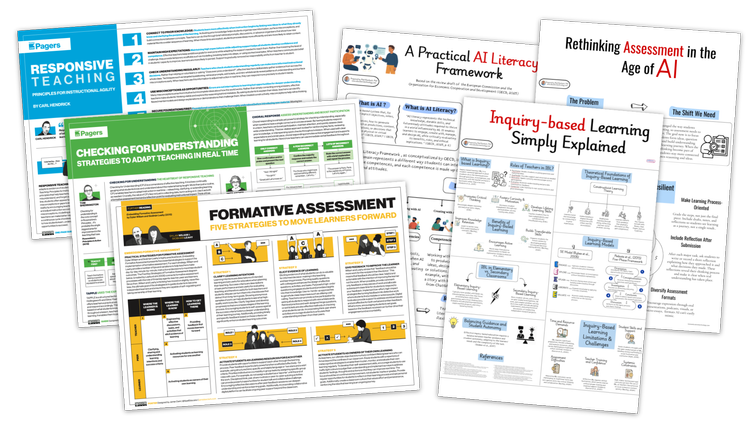
      <p class="" style="color:inherit;font-size:1em;line-height:1.618em;margin:0 0 1.25em 0;font-weight:normal;margin-top:0;font-family:'DejaVu Sans Condensed', 'Liberation Sans', 'Nimbus Sans L', 'Helvetica Neue', Helvetica, Arial, sans-serif;letter-spacing:-.01em;">I love a well-designed, thoughtful <strong>one-pager.</strong> The way text is arranged and styled can play just as important a role as the words themselves.</p><p class="" style="color:inherit;font-size:1em;line-height:1.618em;margin:0 0 1.25em 0;font-weight:normal;font-family:'DejaVu Sans Condensed', 'Liberation Sans', 'Nimbus Sans L', 'Helvetica Neue', Helvetica, Arial, sans-serif;letter-spacing:-.01em;">Jamie Clark creates wonderfully useful <a href="https://www.jamieleeclark.com/graphics" rel="nofollow" style="color:#009cdb !important;">visual guides</a> about teaching and learning. His free resources cover responsive teaching, whole-class feedback, instructional design, study strategies, and much more.</p><p class="" style="color:inherit;font-size:1em;line-height:1.618em;margin:0 0 1.25em 0;font-weight:normal;font-family:'DejaVu Sans Condensed', 'Liberation Sans', 'Nimbus Sans L', 'Helvetica Neue', Helvetica, Arial, sans-serif;letter-spacing:-.01em;">I also highly recommend <a href="https://newsletter.jamieleeclark.com" rel="nofollow" style="color:#009cdb !important;">subscribing</a> to Jamie's newsletter, DistillEd. His <a href="https://newsletter.jamieleeclark.com/archive" rel="nofollow" style="color:#009cdb !important;">archive</a> is worth exploring, with plenty of ideas and insights to discover.</p><p class="" style="color:inherit;font-size:1em;line-height:1.618em;margin:0 0 1.25em 0;font-weight:normal;margin-bottom:0;font-family:'DejaVu Sans Condensed', 'Liberation Sans', 'Nimbus Sans L', 'Helvetica Neue', Helvetica, Arial, sans-serif;letter-spacing:-.01em;">Med Kharbach has another impressive <a href="https://medkharbach.com/visuals/" rel="nofollow" style="color:#009cdb !important;">collection of visual guides</a> for educators. His resources explore topics including AI ethics, assessment, pedagogy, literacies, and research methodologies.</p>
    </td>
  </tr>
</tbody></table>

</div>
<div id="image-image-section-below-17">
<table role="presentation" width="100%" cellpadding="0" cellspacing="0" border="0" bgcolor="#FDEEE9" class="image-section below-layout section-content">


    <tbody><tr>
      <td>
        <table role="presentation" width="100%" cellpadding="0" cellspacing="0" border="0">
          <tbody><tr>
              
    <td class="show-desktop-only section-spacing-left" width="44"></td>
  

            <td align="left" valign="middle" class="section-image-cell section-content-cell section-hoverable-image" data-aspect="ORIGINAL" style="padding:0;">
              
  <img class="section-scaleable-image" src="https://images.squarespace-cdn.com/content/50eca855e4b0939ae8bb12d9/011fc6b0-f52b-47d9-ab11-a023295f58bb/One-pagers.png?content-type=image%2Fpng&amp;format=750w" width="594" alt="Assorted thumbnails of one-pagers" style="font-size:.6666666666666666em;display:block;border:0;text-decoration:none;line-height:0;background-color:transparent;font-weight:normal;height:auto;width:100%;max-width:100%;font-family:'DejaVu Sans Condensed', 'Liberation Sans', 'Nimbus Sans L', 'Helvetica Neue', Helvetica, Arial, sans-serif;">


            </td>
              
    <td class="show-desktop-only section-spacing-right" width="44"></td>
  

          </tr>
        </tbody></table>
      </td>
    </tr>


  <tr>
    <td bgcolor="#FDEEE9" class="spacing-below" height="13"></td>
  </tr>


</tbody></table>

</div>
<div id="text-text-section-18">


<table role="presentation" width="100%" cellpadding="0" cellspacing="0" border="0" bgcolor="#22C55F" class="text-section section-content">
  <tbody><tr>
    <td valign="top" class="section-text-area section-content-cell padding-mobile-both" style="padding-top:12px;padding-right:66px;padding-bottom:12px;padding-left:66px;color:#fff;background-color:#22c55f;">
      <h4 style="color:inherit;margin:1.414em 0 .5em;font-weight:400;line-height:1.25em;font-size:1.5em;mso-line-height-alt:1.5em;margin-top:0;margin-bottom:0;font-family:'DejaVu Sans Condensed', 'Liberation Sans', 'Nimbus Sans L', 'Helvetica Neue', Helvetica, Arial, sans-serif;letter-spacing:.02em;">🟥 Tile Talent</h4>
    </td>
  </tr>
</tbody></table>

</div>
<div id="text-text-section-19">


<table role="presentation" width="100%" cellpadding="0" cellspacing="0" border="0" bgcolor="#D5FFE2" class="text-section section-content">
  <tbody><tr>
    <td valign="top" class="section-text-area section-content-cell padding-mobile-both" style="padding-top:12px;padding-right:66px;padding-bottom:19px;padding-left:66px;color:#272727;background-color:#d5ffe2;">
      <p class="" style="color:inherit;font-size:1em;line-height:1.618em;margin:0 0 1.25em 0;font-weight:normal;margin-top:0;font-family:'DejaVu Sans Condensed', 'Liberation Sans', 'Nimbus Sans L', 'Helvetica Neue', Helvetica, Arial, sans-serif;letter-spacing:-.01em;">I watch the TV show <em>Big Brother</em>, and my family is a bit obsessed with it. A recent competition had HouseGuests crossing a bridge by choosing between two tiles. Green let them move forward, while red sent them back to the beginning.</p><p class="" style="color:inherit;font-size:1em;line-height:1.618em;margin:0 0 1.25em 0;font-weight:normal;font-family:'DejaVu Sans Condensed', 'Liberation Sans', 'Nimbus Sans L', 'Helvetica Neue', Helvetica, Arial, sans-serif;letter-spacing:-.01em;">I knew I had to vibe code a digital version. I call mine <a href="https://teacherhive.app/info/tile-and-error" rel="nofollow" style="color:#009cdb !important;"><strong>Tile and Error</strong></a>. Pick a tile in each column and light your path from start to finish. Choose green to keep going. Hit red, and you're back at the beginning.</p><p class="" style="color:inherit;font-size:1em;line-height:1.618em;margin:0 0 1.25em 0;font-weight:normal;margin-bottom:0;font-family:'DejaVu Sans Condensed', 'Liberation Sans', 'Nimbus Sans L', 'Helvetica Neue', Helvetica, Arial, sans-serif;letter-spacing:-.01em;">Gemini coded the game for me, and it's published on <a href="https://teacherhive.app" rel="nofollow" style="color:#009cdb !important;">Teacher Hive</a>, which means I could add a global leaderboard. See if your guesses and memory are good enough to make the <strong>Best Runs</strong>!</p>
    </td>
  </tr>
</tbody></table>

</div>
<div id="image-image-section-below-20">
<table role="presentation" width="100%" cellpadding="0" cellspacing="0" border="0" bgcolor="#D5FFE2" class="image-section below-layout section-content">


    <tbody><tr>
      <td>
        <table role="presentation" width="100%" cellpadding="0" cellspacing="0" border="0">
          <tbody><tr>
              
    <td class="show-desktop-only section-spacing-left" width="44"></td>
  

            <td align="left" valign="middle" class="section-image-cell section-content-cell section-hoverable-image" data-aspect="ORIGINAL" style="padding:0;">
              
  <a href="https://apphive.us/tile-and-error" style="color:#009cdb !important;"><img class="section-scaleable-image" src="https://images.squarespace-cdn.com/content/50eca855e4b0939ae8bb12d9/95582f9d-434d-4993-8a50-43f9d501bf59/tile_and_error_demo+%282%29.gif?content-type=image%2Fgif&amp;format=750w" width="594" alt="Tile and Error game play animation" style="font-size:.6666666666666666em;display:block;border:0;text-decoration:none;line-height:0;background-color:transparent;font-weight:normal;height:auto;width:100%;max-width:100%;font-family:'DejaVu Sans Condensed', 'Liberation Sans', 'Nimbus Sans L', 'Helvetica Neue', Helvetica, Arial, sans-serif;"></a>


            </td>
              
    <td class="show-desktop-only section-spacing-right" width="44"></td>
  

          </tr>
        </tbody></table>
      </td>
    </tr>


  <tr>
    <td bgcolor="#D5FFE2" class="spacing-below" height="24"></td>
  </tr>


</tbody></table>

</div>
<div id="text-text-section-21">


<table role="presentation" width="100%" cellpadding="0" cellspacing="0" border="0" bgcolor="#CC3030" class="text-section section-content">
  <tbody><tr>
    <td valign="top" class="section-text-area section-content-cell padding-mobile-both" style="padding-top:12px;padding-right:66px;padding-bottom:12px;padding-left:66px;color:#fff;background-color:#cc3030;">
      <h4 style="color:inherit;margin:1.414em 0 .5em;font-weight:400;line-height:1.25em;font-size:1.5em;mso-line-height-alt:1.5em;margin-top:0;margin-bottom:0;font-family:'DejaVu Sans Condensed', 'Liberation Sans', 'Nimbus Sans L', 'Helvetica Neue', Helvetica, Arial, sans-serif;letter-spacing:.02em;">🚀 FETC Freshness</h4>
    </td>
  </tr>
</tbody></table>

</div>
<div id="text-text-section-22">


<table role="presentation" width="100%" cellpadding="0" cellspacing="0" border="0" bgcolor="#FFEFEF" class="text-section section-content">
  <tbody><tr>
    <td valign="top" class="section-text-area section-content-cell padding-mobile-both" style="padding-top:12px;padding-right:66px;padding-bottom:12px;padding-left:66px;color:#272727;background-color:#ffefef;">
      <p class="" style="color:inherit;font-size:1em;line-height:1.618em;margin:0 0 1.25em 0;font-weight:normal;margin-top:0;font-family:'DejaVu Sans Condensed', 'Liberation Sans', 'Nimbus Sans L', 'Helvetica Neue', Helvetica, Arial, sans-serif;letter-spacing:-.01em;">FETC's <em><a href="https://event.on24.com/wcc/r/5434011/F884847E7CC62D02E02E0E48ABECB1A4" rel="nofollow" style="color:#009cdb !important;">Back-to-School EdTech: Smarter Tools, More Learning</a></em> webinar took place August 13, and I caught the recording. Scott Bricker, Lindy Hockenbary, John Meehan, and Christina Núñez packed 75 minutes with ideas worth trying as we head into a new school year.</p><p class="" style="color:inherit;font-size:1em;line-height:1.618em;margin:0 0 1.25em 0;font-weight:normal;font-family:'DejaVu Sans Condensed', 'Liberation Sans', 'Nimbus Sans L', 'Helvetica Neue', Helvetica, Arial, sans-serif;letter-spacing:-.01em;"><strong>Scott Bricker</strong> shared <a href="https://copilot.microsoft.com" rel="nofollow" style="color:#009cdb !important;">Microsoft Copilot's Study and Learn mode</a>, which guides students through problems instead of simply giving them answers. It asks questions, offers hints, and encourages students to work through the process. Scott even demonstrated it making an incorrect graph, providing a nice reminder to <strong>trust, but verify</strong>. Copilot's Study and Learn is very similar to <a href="https://gemini.google.com/guided-learning" rel="nofollow" style="color:#009cdb !important;">Gemini's Guided Learning mode.</a></p><p class="" style="color:inherit;font-size:1em;line-height:1.618em;margin:0 0 1.25em 0;font-weight:normal;font-family:'DejaVu Sans Condensed', 'Liberation Sans', 'Nimbus Sans L', 'Helvetica Neue', Helvetica, Arial, sans-serif;letter-spacing:-.01em;"><strong>Lindy Hockenbary</strong> showed how <a href="https://quickdraw.withgoogle.com" rel="nofollow" style="color:#009cdb !important;">Google Quick, Draw!</a> can give students a peek behind the AI curtain. They can <a href="https://quickdraw.withgoogle.com/data" rel="nofollow" style="color:#009cdb !important;">explore the doodles used to train the model</a> and see how AI makes predictions by finding patterns. She also demonstrated <a href="https://teachablemachine.withgoogle.com" rel="nofollow" style="color:#009cdb !important;">Teachable Machine</a>, where students create their own simple AI models and discover what happens when their training data isn't quite right.</p><p class="" style="color:inherit;font-size:1em;line-height:1.618em;margin:0 0 1.25em 0;font-weight:normal;font-family:'DejaVu Sans Condensed', 'Liberation Sans', 'Nimbus Sans L', 'Helvetica Neue', Helvetica, Arial, sans-serif;letter-spacing:-.01em;"><strong>John Meehan</strong> suggested using random icons from <a href="https://thenounproject.com" rel="nofollow" style="color:#009cdb !important;">The Noun Project</a> as thinking prompts. Students might use an icon to recap a reading, predict what's coming, or make a connection. Because an image doesn't have a reading level, it's an easy way to get everyone talking.</p><p class="" style="color:inherit;font-size:1em;line-height:1.618em;margin:0 0 1.25em 0;font-weight:normal;font-family:'DejaVu Sans Condensed', 'Liberation Sans', 'Nimbus Sans L', 'Helvetica Neue', Helvetica, Arial, sans-serif;letter-spacing:-.01em;"><strong>Christina Núñez</strong> demonstrated <a href="https://gemini.google/overview/canvas/" rel="nofollow" style="color:#009cdb !important;">Gemini Canvas</a>, using it to turn classroom expectations into an interactive game. A student even created their own version after deciding the teacher's game was "lame." She also showed how <a href="https://notebook.google.com" rel="nofollow" style="color:#009cdb !important;">Gemini Notebook</a> can transform documents such as a student handbook into resources like podcasts and conversations. Her district created translated handbook podcasts for families.</p><p class="" style="color:inherit;font-size:1em;line-height:1.618em;margin:0 0 1.25em 0;font-weight:normal;font-family:'DejaVu Sans Condensed', 'Liberation Sans', 'Nimbus Sans L', 'Helvetica Neue', Helvetica, Arial, sans-serif;letter-spacing:-.01em;">A few ideas that stand out:</p><ul data-rte-list="default" style="padding-left:25px;"><li style="font-weight:normal;margin-top:0px;margin-bottom:0px;margin-left:15px;font-family:'DejaVu Sans Condensed', 'Liberation Sans', 'Nimbus Sans L', 'Helvetica Neue', Helvetica, Arial, sans-serif;"><p class="" style="color:inherit;font-size:1em;line-height:1.618em;margin:0 0 1.25em 0;font-weight:normal;margin-top:0;margin-bottom:0;font-family:'DejaVu Sans Condensed', 'Liberation Sans', 'Nimbus Sans L', 'Helvetica Neue', Helvetica, Arial, sans-serif;letter-spacing:-.01em;"><strong>Start with the problem, not the tool.</strong> Christina warned about falling down the "AI rabbit hole." It's easy to get excited about what a tool can do and forget to ask whether we actually need it.</p></li><li style="font-weight:normal;margin-top:0px;margin-bottom:0px;margin-left:15px;font-family:'DejaVu Sans Condensed', 'Liberation Sans', 'Nimbus Sans L', 'Helvetica Neue', Helvetica, Arial, sans-serif;"><p class="" style="color:inherit;font-size:1em;line-height:1.618em;margin:0 0 1.25em 0;font-weight:normal;margin-top:0;margin-bottom:0;font-family:'DejaVu Sans Condensed', 'Liberation Sans', 'Nimbus Sans L', 'Helvetica Neue', Helvetica, Arial, sans-serif;letter-spacing:-.01em;"><strong>Make room for thinking.</strong> Scott made a case for protecting time to think, reflect, and even be bored. When AI can instantly generate the next thing, unstructured thinking time may be more important than ever.</p></li><li style="font-weight:normal;margin-top:0px;margin-bottom:0px;margin-left:15px;font-family:'DejaVu Sans Condensed', 'Liberation Sans', 'Nimbus Sans L', 'Helvetica Neue', Helvetica, Arial, sans-serif;"><p class="" style="color:inherit;font-size:1em;line-height:1.618em;margin:0 0 1.25em 0;font-weight:normal;margin-top:0;margin-bottom:0;font-family:'DejaVu Sans Condensed', 'Liberation Sans', 'Nimbus Sans L', 'Helvetica Neue', Helvetica, Arial, sans-serif;letter-spacing:-.01em;"><strong>Treat play as a learning strategy.</strong> John emphasized that playful learning isn't just about adding games. It's a mindset that can make learning more engaging without necessarily creating more work for the teacher.</p></li></ul><p class="" style="color:inherit;font-size:1em;line-height:1.618em;margin:0 0 1.25em 0;font-weight:normal;margin-bottom:0;font-family:'DejaVu Sans Condensed', 'Liberation Sans', 'Nimbus Sans L', 'Helvetica Neue', Helvetica, Arial, sans-serif;letter-spacing:-.01em;">If you get a chance, <a href="https://event.on24.com/wcc/r/5434011/F884847E7CC62D02E02E0E48ABECB1A4" rel="nofollow" style="color:#009cdb !important;">watch the entire recording</a>. Low on time? Speed it up! You can get through a 75-minute webinar surprisingly quickly that way.</p>
    </td>
  </tr>
</tbody></table>

</div>
<div id="image-image-section-below-23">
<table role="presentation" width="100%" cellpadding="0" cellspacing="0" border="0" bgcolor="#FFEFEF" class="image-section below-layout section-content">


    <tbody><tr>
      <td>
        <table role="presentation" width="100%" cellpadding="0" cellspacing="0" border="0">
          <tbody><tr>
              
    <td class="show-desktop-only section-spacing-left" width="44"></td>
  

            <td align="left" valign="middle" class="section-image-cell section-content-cell section-hoverable-image" data-aspect="ORIGINAL" style="padding:0;">
              
  <a href="https://event.on24.com/wcc/r/5434011/F884847E7CC62D02E02E0E48ABECB1A4" style="color:#009cdb !important;"><img class="section-scaleable-image" src="https://images.squarespace-cdn.com/content/50eca855e4b0939ae8bb12d9/ab803b70-9571-4173-8d8e-d37ea4b16d8c/HPZebteXEAAkQwx.jpg?content-type=image%2Fjpeg&amp;format=750w" width="594" alt="Back to School EdTech Webinar Advertisement Graphic" style="font-size:.6666666666666666em;display:block;border:0;text-decoration:none;line-height:0;background-color:transparent;font-weight:normal;height:auto;width:100%;max-width:100%;font-family:'DejaVu Sans Condensed', 'Liberation Sans', 'Nimbus Sans L', 'Helvetica Neue', Helvetica, Arial, sans-serif;"></a>


            </td>
              
    <td class="show-desktop-only section-spacing-right" width="44"></td>
  

          </tr>
        </tbody></table>
      </td>
    </tr>


  <tr>
    <td bgcolor="#FFEFEF" class="spacing-below" height="31"></td>
  </tr>


</tbody></table>

</div>
<div id="text-text-section-24">


<table role="presentation" width="100%" cellpadding="0" cellspacing="0" border="0" bgcolor="#0A3972" class="text-section section-content">
  <tbody><tr>
    <td valign="top" class="section-text-area section-content-cell padding-mobile-both" style="padding-top:12px;padding-right:66px;padding-bottom:12px;padding-left:66px;color:#fff;background-color:#0a3972;">
      <h4 style="color:inherit;margin:1.414em 0 .5em;font-weight:400;line-height:1.25em;font-size:1.5em;mso-line-height-alt:1.5em;margin-top:0;margin-bottom:0;font-family:'DejaVu Sans Condensed', 'Liberation Sans', 'Nimbus Sans L', 'Helvetica Neue', Helvetica, Arial, sans-serif;letter-spacing:.02em;">🎛️ Classroom Command Center</h4>
    </td>
  </tr>
</tbody></table>

</div>
<div id="text-text-section-25">


<table role="presentation" width="100%" cellpadding="0" cellspacing="0" border="0" bgcolor="#E7F0FF" class="text-section section-content">
  <tbody><tr>
    <td valign="top" class="section-text-area section-content-cell padding-mobile-both" style="padding-top:12px;padding-right:66px;padding-bottom:12px;padding-left:66px;color:#272727;background-color:#e7f0ff;">
      <p class="" style="color:inherit;font-size:1em;line-height:1.618em;margin:0 0 1.25em 0;font-weight:normal;margin-top:0;font-family:'DejaVu Sans Condensed', 'Liberation Sans', 'Nimbus Sans L', 'Helvetica Neue', Helvetica, Arial, sans-serif;letter-spacing:-.01em;">One back-to-school tool I want tell you about is <a href="https://ourhomeroom.app" rel="nofollow" style="color:#009cdb !important;"><strong>HomeRoom</strong></a>.</p><p class="" style="color:inherit;font-size:1em;line-height:1.618em;margin:0 0 1.25em 0;font-weight:normal;font-family:'DejaVu Sans Condensed', 'Liberation Sans', 'Nimbus Sans L', 'Helvetica Neue', Helvetica, Arial, sans-serif;letter-spacing:-.01em;">Fifth grade teacher Jeff Hennigar started building <strong>HomeRoom</strong> after discovering vibe coding. What began as a simple tool for randomly assigning groups evolved into a classroom dashboard and day planner filled with the tools he wanted to use every day.</p><p class="" style="color:inherit;font-size:1em;line-height:1.618em;margin:0 0 1.25em 0;font-weight:normal;font-family:'DejaVu Sans Condensed', 'Liberation Sans', 'Nimbus Sans L', 'Helvetica Neue', Helvetica, Arial, sans-serif;letter-spacing:-.01em;">HomeRoom puts timers, spinners, group makers, games, discussion boards, polls, exit tickets, and other classroom tools on one screen. But the feature that really caught my attention is the&nbsp;<strong>remote control</strong>. Open <a href="https://ourhomeroom.app" rel="nofollow" style="color:#009cdb !important;">HomeRoom</a> on your classroom display, then use your phone or tablet as a remote. You can change what's on the screen while you're sitting with your students, switch from a morning meeting prompt to a math activity, or dim the display when you want everyone's attention.</p><p class="" style="color:inherit;font-size:1em;line-height:1.618em;margin:0 0 1.25em 0;font-weight:normal;font-family:'DejaVu Sans Condensed', 'Liberation Sans', 'Nimbus Sans L', 'Helvetica Neue', Helvetica, Arial, sans-serif;letter-spacing:-.01em;">The dashboard isn't just for displaying things, either. Students can visit&nbsp;<strong>join.ourhomeroom.app</strong>&nbsp;and enter a class code to submit exit tickets, answer polls, or participate in discussion boards. Think of it as some of the functionality you might use in tools like Padlet built right into your classroom dashboard.</p><p class="" style="color:inherit;font-size:1em;line-height:1.618em;margin:0 0 1.25em 0;font-weight:normal;font-family:'DejaVu Sans Condensed', 'Liberation Sans', 'Nimbus Sans L', 'Helvetica Neue', Helvetica, Arial, sans-serif;letter-spacing:-.01em;">The built-in planner connects to the dashboard, too. Plan your lessons in HomeRoom, and learning targets can automatically appear on the classroom display at the appropriate time. You can even rearrange lessons when the schedule inevitably changes.</p><p class="" style="color:inherit;font-size:1em;line-height:1.618em;margin:0 0 1.25em 0;font-weight:normal;margin-bottom:0;font-family:'DejaVu Sans Condensed', 'Liberation Sans', 'Nimbus Sans L', 'Helvetica Neue', Helvetica, Arial, sans-serif;letter-spacing:-.01em;">There's a free version you can use to explore <a href="https://ourhomeroom.app" rel="nofollow" style="color:#009cdb !important;">HomeRoom</a>, while the Pro version unlocks the full collection of tools and planning features. New users get two months to try Pro, and the annual subscription is $20.</p>
    </td>
  </tr>
</tbody></table>

</div>
<div id="image-image-section-below-26">
<table role="presentation" width="100%" cellpadding="0" cellspacing="0" border="0" bgcolor="#E7F0FF" class="image-section below-layout section-content">


    <tbody><tr>
      <td>
        <table role="presentation" width="100%" cellpadding="0" cellspacing="0" border="0">
          <tbody><tr>
              

            <td align="left" valign="middle" class="section-image-cell section-content-cell section-hoverable-image" data-aspect="ORIGINAL" style="padding:0;">
              
  <a href="https://ourhomeroom.app" style="color:#009cdb !important;"><img class="section-scaleable-image" src="https://images.squarespace-cdn.com/content/50eca855e4b0939ae8bb12d9/15b21461-5a56-4246-9ef4-c51607bafc2d/Our+Home+Room.png?content-type=image%2Fpng&amp;format=750w" width="594" alt="Screenshot of the Homeroom dashboard
" style="font-size:.6666666666666666em;display:block;border:0;text-decoration:none;line-height:0;background-color:transparent;font-weight:normal;height:auto;width:100%;max-width:100%;font-family:'DejaVu Sans Condensed', 'Liberation Sans', 'Nimbus Sans L', 'Helvetica Neue', Helvetica, Arial, sans-serif;"></a>


            </td>
              

          </tr>
        </tbody></table>
      </td>
    </tr>


</tbody></table>

</div>
<div id="text-text-section-27">


<table role="presentation" width="100%" cellpadding="0" cellspacing="0" border="0" bgcolor="transparent" class="text-section section-content">
  <tbody><tr>
    <td valign="top" class="section-text-area section-content-cell padding-mobile-both" style="padding-top:37px;padding-right:66px;padding-bottom:10px;padding-left:66px;color:#272727;background-color:transparent;">
      <p class="" style="color:inherit;font-size:1em;line-height:1.618em;margin:0 0 1.25em 0;font-weight:normal;margin-top:0;margin-bottom:0;font-family:'DejaVu Sans Condensed', 'Liberation Sans', 'Nimbus Sans L', 'Helvetica Neue', Helvetica, Arial, sans-serif;letter-spacing:-.01em;">AI can help us do all sorts of things, from designing stickers to building apps. But, AI has its drawbacks, too. In one of my presentations, I show that concerns about AI's pitfalls aren't new.</p>
    </td>
  </tr>
</tbody></table>

</div>
<div id="image-image-section-below-28">
<table role="presentation" width="100%" cellpadding="0" cellspacing="0" border="0" bgcolor="transparent" class="image-section below-layout section-content">


    <tbody><tr>
      <td>
        <table role="presentation" width="100%" cellpadding="0" cellspacing="0" border="0">
          <tbody><tr>
              
    <td class="show-desktop-only section-spacing-left" width="44"></td>
  

            <td align="left" valign="middle" class="section-image-cell section-content-cell section-hoverable-image" data-aspect="ORIGINAL" style="padding:0;">
              
  <a href="https://www.youtube.com/watch?v=BLF1k_UXEGc" style="color:#009cdb !important;"><img class="section-scaleable-image" src="https://images.squarespace-cdn.com/content/50eca855e4b0939ae8bb12d9/3065dc43-7067-42ac-9f19-3113bb197c7b/Superfriends+GEEC+Tour.png?content-type=image%2Fpng&amp;format=750w" width="594" alt="" style="font-size:.6666666666666666em;display:block;border:0;text-decoration:none;line-height:0;background-color:transparent;font-weight:normal;height:auto;width:100%;max-width:100%;font-family:'DejaVu Sans Condensed', 'Liberation Sans', 'Nimbus Sans L', 'Helvetica Neue', Helvetica, Arial, sans-serif;"></a>


            </td>
              
    <td class="show-desktop-only section-spacing-right" width="44"></td>
  

          </tr>
        </tbody></table>
      </td>
    </tr>


</tbody></table>

</div>
<div id="text-text-section-29">


<table role="presentation" width="100%" cellpadding="0" cellspacing="0" border="0" bgcolor="transparent" class="text-section section-content">
  <tbody><tr>
    <td valign="top" class="section-text-area section-content-cell padding-mobile-both" style="padding-top:18px;padding-right:66px;padding-bottom:0px;padding-left:66px;color:#272727;background-color:transparent;">
      <p class="" style="color:inherit;font-size:1em;line-height:1.618em;margin:0 0 1.25em 0;font-weight:normal;margin-top:0;font-family:'DejaVu Sans Condensed', 'Liberation Sans', 'Nimbus Sans L', 'Helvetica Neue', Helvetica, Arial, sans-serif;letter-spacing:-.01em;">A <strong>1973 episode of the </strong><em><strong>Super Friends</strong></em> has the heroes tour an enormous data center run by the eccentric Professor Goodfellow. His <strong>Goodfellow's Effort Eliminating Computer</strong> (GEEC) is designed to take over all the mental and physical tasks of humans. You can <a href="https://www.youtube.com/watch?v=BLF1k_UXEGc" rel="nofollow" style="color:#009cdb !important;">watch about five minutes of the 40-minute episode on YouTube</a>.</p><p style="color:inherit;font-size:1em;line-height:1.618em;margin:0 0 1.25em 0;font-weight:normal;margin-bottom:0;font-family:'DejaVu Sans Condensed', 'Liberation Sans', 'Nimbus Sans L', 'Helvetica Neue', Helvetica, Arial, sans-serif;letter-spacing:-.01em;text-align:center;" class="">Smiles from Iowa,</p>
    </td>
  </tr>
</tbody></table>

</div>
<div id="image-image-section-below-30">
<table role="presentation" width="100%" cellpadding="0" cellspacing="0" border="0" bgcolor="transparent" class="image-section below-layout section-content">


    <tbody><tr>
      <td>
        <table role="presentation" width="100%" cellpadding="0" cellspacing="0" border="0">
          <tbody><tr>
              
    <td class="show-desktop-only section-spacing-left" width="88"></td>
  

            <td align="left" valign="middle" class="section-image-cell section-content-cell section-hoverable-image" data-aspect="ORIGINAL" style="padding:0;">
              
  <img class="section-scaleable-image" src="https://images.squarespace-cdn.com/content/50eca855e4b0939ae8bb12d9/00445278-d88c-451c-89ad-108eb0a7cfca/Tony+Signature.png?content-type=image%2Fpng&amp;format=750w" width="594" alt="" style="font-size:.6666666666666666em;display:block;border:0;text-decoration:none;line-height:0;background-color:transparent;font-weight:normal;height:auto;width:100%;max-width:100%;font-family:'DejaVu Sans Condensed', 'Liberation Sans', 'Nimbus Sans L', 'Helvetica Neue', Helvetica, Arial, sans-serif;">


            </td>
              
    <td class="show-desktop-only section-spacing-right" width="88"></td>
  

          </tr>
        </tbody></table>
      </td>
    </tr>


  <tr>
    <td bgcolor="transparent" class="spacing-below" height="29"></td>
  </tr>


</tbody></table>

</div>
<div id="button-button-section-31">


<table role="presentation" width="100%" cellpadding="0" cellspacing="0" border="0" bgcolor="#EDEDED" class="button-section section-content" style="width:100%;background-color:#ededed;">
  <tbody><tr>
    <td align="center" valign="middle" class="section-content-cell section-text-area" style="padding-top:22px;padding-right:22px;padding-bottom:8px;padding-left:22px;">
      
      <a href="https://learninginhand.com/newsletter" class="button-section-box button-style-solid" style="color:#009cdb !important;display:inline-block;line-height:11px;margin:0;mso-padding-alt:0;text-align:center;text-decoration:none;transition:.15s;width:auto;background-color:#009cdb;border:0;padding:17px 0;"><i class="button-section-mso" style="letter-spacing:29.92px;mso-font-width:-100%;mso-text-raise:26.950000000000003px;">&nbsp;</i><span class="button-section-label" style="line-height:inherit;margin:0;font-family:'DejaVu Sans Condensed', 'Liberation Sans', 'Nimbus Sans L', 'Helvetica Neue', Helvetica, Arial, sans-serif;font-weight:700;color:#fff;display:inline-block;font-size:11px;min-width:1px;mso-text-raise:15.95px;"><span data-letter-spacing="3" style="font-size:inherit;font-weight:inherit;line-height:inherit;margin:0;letter-spacing:0.2em;">Previous Issues</span></span><i class="button-section-mso" style="letter-spacing:29.92px;mso-font-width:-100%;mso-text-raise:26.950000000000003px;">&nbsp;</i></a>
    </td>
  </tr>
</tbody></table>

</div>
<div id="text-text-section-32">


<table role="presentation" width="100%" cellpadding="0" cellspacing="0" border="0" bgcolor="#EDEDED" class="text-section section-content">
  <tbody><tr>
    <td valign="top" class="section-text-area section-content-cell padding-mobile-both" style="padding-top:8px;padding-right:66px;padding-bottom:8px;padding-left:66px;color:#313131;background-color:#ededed;">
      <p style="color:inherit;font-size:1em;line-height:1.618em;margin:0 0 1.25em 0;font-weight:normal;margin-top:0;font-family:'DejaVu Sans Condensed', 'Liberation Sans', 'Nimbus Sans L', 'Helvetica Neue', Helvetica, Arial, sans-serif;letter-spacing:-.01em;text-align:center;" class="">Subscribe at&nbsp;<a href="https://learninginhand.com/newsletter" rel="nofollow" style="color:#009cdb !important;">learninginhand.com</a></p><p class="" style="color:inherit;font-size:1em;line-height:1.618em;margin:0 0 1.25em 0;font-weight:normal;font-family:'DejaVu Sans Condensed', 'Liberation Sans', 'Nimbus Sans L', 'Helvetica Neue', Helvetica, Arial, sans-serif;letter-spacing:-.01em;"><em>AI gave me a hand with brainstorming, drafting, and polishing this issue. Of course, I reviewed and adjusted everything before sharing it with you.</em></p><p class="" style="color:inherit;font-size:1em;line-height:1.618em;margin:0 0 1.25em 0;font-weight:normal;margin-bottom:0;font-family:'DejaVu Sans Condensed', 'Liberation Sans', 'Nimbus Sans L', 'Helvetica Neue', Helvetica, Arial, sans-serif;letter-spacing:-.01em;"><strong>Let's learn together. Bring me to your school, district, or conference. Reply to this email and let’s talk.</strong></p>
    </td>
  </tr>
</tbody></table>

</div>
                </td>
              </tr>
            </tbody></table>
            
              <table role="presentation" width="100%" cellpadding="0" cellspacing="0" border="0" id="newsletter-section-footer">
                <tbody><tr>
                  <td align="center" valign="top" id="newsletter-section-footer-cell">
                    
<div id="footer-footer-section-stacked-bottom-0">


<table role="presentation" width="100%" cellpadding="0" cellspacing="0" border="0" bgcolor="#EDEDED" class="footer-section footer-section-stacked section-content" style="background-color:#ededed;">
  <tbody><tr>
    <td align="center" valign="top" class="section-text-area section-content-cell" style="padding-top:20px;padding-right:22px;padding-bottom:22px;padding-left:22px;">
      
  <table role="presentation" class="social-links" cellpadding="0" cellspacing="0" border="0">
    <tbody><tr>
    
    
      <td valign="top" width="30" height="52">
        <a href="http://www.facebook.com/learninginhand" style="color:#009cdb !important;text-decoration:none;">
          <img class="social-link-icon" src="https://assets.squarespace.com/composer/assets/images/email/social-icons/facebook+dark.png" width="22" height="22" max-width="22" alt="facebook" style="font-size:.6666666666666666em;text-decoration:none;line-height:0;font-weight:normal;font-family:'DejaVu Sans Condensed', 'Liberation Sans', 'Nimbus Sans L', 'Helvetica Neue', Helvetica, Arial, sans-serif;display:block;margin:0 auto;border:0;">
        </a>
      </td>


<td class="" width="20"></td>

    
      <td valign="top" width="30" height="52">
        <a href="https://x.com/tonyvincent" style="color:#009cdb !important;text-decoration:none;">
          <img class="social-link-icon" src="https://assets.squarespace.com/composer/assets/images/email/social-icons/x-formerly-twitter+dark.png" width="22" height="22" max-width="22" alt="x-formerly-twitter" style="font-size:.6666666666666666em;text-decoration:none;line-height:0;font-weight:normal;font-family:'DejaVu Sans Condensed', 'Liberation Sans', 'Nimbus Sans L', 'Helvetica Neue', Helvetica, Arial, sans-serif;display:block;margin:0 auto;border:0;">
        </a>
      </td>


<td class="" width="20"></td>

    
      <td valign="top" width="30" height="52">
        <a href="http://instagram.com/learninginhand" style="color:#009cdb !important;text-decoration:none;">
          <img class="social-link-icon" src="https://assets.squarespace.com/composer/assets/images/email/social-icons/instagram+dark.png" width="22" height="22" max-width="22" alt="instagram" style="font-size:.6666666666666666em;text-decoration:none;line-height:0;font-weight:normal;font-family:'DejaVu Sans Condensed', 'Liberation Sans', 'Nimbus Sans L', 'Helvetica Neue', Helvetica, Arial, sans-serif;display:block;margin:0 auto;border:0;">
        </a>
      </td>


<td class="" width="20"></td>

    
      <td valign="top" width="30" height="52">
        <a href="https://www.threads.net/@learninginhand" style="color:#009cdb !important;text-decoration:none;">
          <img class="social-link-icon" src="https://assets.squarespace.com/composer/assets/images/email/social-icons/threads+dark.png" width="22" height="22" max-width="22" alt="threads" style="font-size:.6666666666666666em;text-decoration:none;line-height:0;font-weight:normal;font-family:'DejaVu Sans Condensed', 'Liberation Sans', 'Nimbus Sans L', 'Helvetica Neue', Helvetica, Arial, sans-serif;display:block;margin:0 auto;border:0;">
        </a>
      </td>


<td class="" width="20"></td>

    
      <td valign="top" width="30" height="52">
        <a href="https://www.tiktok.com/@learninginhand" style="color:#009cdb !important;text-decoration:none;">
          <img class="social-link-icon" src="https://assets.squarespace.com/composer/assets/images/email/social-icons/tiktok+dark.png" width="22" height="22" max-width="22" alt="tiktok" style="font-size:.6666666666666666em;text-decoration:none;line-height:0;font-weight:normal;font-family:'DejaVu Sans Condensed', 'Liberation Sans', 'Nimbus Sans L', 'Helvetica Neue', Helvetica, Arial, sans-serif;display:block;margin:0 auto;border:0;">
        </a>
      </td>
    
    </tr>
  </tbody></table>


    <p class="footer-company-info" style="line-height:1.618em;font-weight:normal;font-family:'DejaVu Sans Condensed', 'Liberation Sans', 'Nimbus Sans L', 'Helvetica Neue', Helvetica, Arial, sans-serif;letter-spacing:-.01em;color:#777;font-size:11px;margin:0 0 13.75px 0;padding:0;">
  <a style="color:#777;text-decoration:none;font-size:inherit;font-family:inherit;font-weight:inherit;line-height:inherit;cursor:default;">Tony Vincent, Inc., 
  1406 Callahan Drive, 
  Council Bluffs, Iowa, 
  USA</a>
</p>


      <a class="brand-logo-link" href="https://learninginhand.com/" style="color:#009cdb !important;"><img class="brand-logo" src="https://images.squarespace-cdn.com/content/v1/50eca855e4b0939ae8bb12d9/410f2385-df7d-42a7-a349-9423d6c7484d/LIH_blue.png" height="63" alt="Learning in Hand with Tony Vincent" style="font-size:.6666666666666666em;border:0;text-decoration:none;line-height:0;font-weight:normal;font-family:'DejaVu Sans Condensed', 'Liberation Sans', 'Nimbus Sans L', 'Helvetica Neue', Helvetica, Arial, sans-serif;margin-bottom:13.75px;color:#777;display:inline;height:auto;max-height:63px;max-width:100%;width:auto;"></a>


<p class="footer-links" style="line-height:1.618em;font-weight:normal;font-family:'DejaVu Sans Condensed', 'Liberation Sans', 'Nimbus Sans L', 'Helvetica Neue', Helvetica, Arial, sans-serif;letter-spacing:-.01em;font-size:11px;color:#313131;margin:0 0 13.75px 0;padding:0;">
  Powered by <a href="https://www.squarespace.com?channel=product_refer&amp;subchannel=customer&amp;source=email_campaigns_button&amp;campaign=50eca855e4b0939ae8bb12d9&amp;utm_medium=product_refer&amp;utm_source=email_campaigns_button" class="sqsp-link" style="color:#313131;text-decoration:underline;display:inline-block;">Squarespace</a>
</p>


      <p class="footer-links" style="line-height:1.618em;font-weight:normal;margin-bottom:0;font-family:'DejaVu Sans Condensed', 'Liberation Sans', 'Nimbus Sans L', 'Helvetica Neue', Helvetica, Arial, sans-serif;letter-spacing:-.01em;font-size:11px;color:#313131;margin:0 0 13.75px 0;padding:0;">
  <a href="#" class="unsubscribe-link" style="color:#313131;text-decoration:underline;">
    <span class="unsubscribe-link-text" style="font-size:inherit;font-weight:inherit;line-height:inherit;margin:0;">Unsubscribe</span>
  </a>
</p>

    </td>
  </tr>
</tbody></table>

</div>
                  </td>
                </tr>
              </tbody></table>
            
          </td>
        </tr>
      </tbody></table>
    </td>
  </tr>
</tbody></table>

  </body>
</html>