<!doctype html>
<html xmlns="http://www.w3.org/1999/xhtml" xmlns:v="urn:schemas-microsoft-com:vml" xmlns:o="urn:schemas-microsoft-com:office:office" lang="en-US" xml:lang="en-US">
  <head>
    <title data-ignore-plain-text>Learning in Hand Issue 44</title>
    <meta http-equiv="content-type" content="text/html; charset=utf-8">
    <meta name="viewport" content="width=device-width, initial-scale=1, maximum-scale=1">
    <meta name="format-detection" content="address=no">
    <!--[if (gte mso 9)|(IE)]>
    <style type="text/css" media="screen">
      li {
        text-indent: -1em;
      }
    </style>
    <![endif]-->
    <style type="text/css" media="all">
      body,
.section-text-area,
.section-text-area-wrapper,
.section-text-cell {
    overflow-wrap: break-word;
    word-wrap: break-word;
    -ms-word-break: break-all;
    word-break: break-word;
}
body {
    width: 100% !important;
    min-width: 100% !important;
    -ms-text-size-adjust: none;
    -webkit-text-size-adjust: none;
    mso-line-height-rule: exactly;
}
p {
    margin-block: 0;
}
@media only screen and (max-width:  593px ) {
    table#newsletter-table {
        border: 0 !important;
    }
    table#newsletter-email {
        width: 100% !important;
    }
    img.section-scaleable-image,
    img.section-empty-img {
        max-width: 100% !important;
        height: auto !important;
    }
    .bg-none {
        background: none !important;
    }
    .hauto {
        height: auto !important;
    }
    .show-desktop-only {
        display: none !important;
    }
    .show-mobile-only {
        display: block !important;
        float: none !important;
        line-height: auto !important;
        max-height: inherit !important;
        max-width: inherit !important;
        margin-top: 0px !important;
        overflow: visible !important;
        visibility: inherit !important;
        width: auto !important;
    }
    .stack-cell-wrap {
        display: block !important;
    }
    .stack-cell-up {
        display: table-header-group !important;
    }
    .stack-cell-down {
        display: table-footer-group !important;
    }
    .mw100p {
        max-width: 100% !important;
    }
    .section-horizontal-padding,
    .padding-mobile-both {
        padding-left: 22px !important;
        padding-right: 22px !important;
    }
    .padding-mobile-left {
        padding-left: 22px !important;
    }
    .padding-mobile-right {
        padding-right: 22px !important;
    }
    .text-left {
        text-align: left !important;
    }
    .text-right {
        text-align: right !important;
    }
    .w100p {
        width: 100% !important;
    }
}
.button-style-solid:hover,
.button-style-rounded:hover {
    opacity: .8 !important;
}
a:hover {
    text-decoration: none !important;
}
span.mail-merge-preview {
    border-bottom: 2px dotted currentColor;
    display: inline-block;
    line-height: 1em !important;
    margin-bottom: .125em !important;
}
table#newsletter-section-body .linked-site-title-link {
    color: #009cdb !important;
}
#header-header-section-stacked-top-0 .brand-name .linked-site-title-link {
    color: #777;
    text-decoration: none;
}
#footer-footer-section-stacked-bottom-0 .brand-name .linked-site-title-link {
    color: #777;
    text-decoration: none;
}
#footer-footer-section-stacked-bottom-0 .footer-text .linked-site-title-link {
    color: #009cdb;
}
#button-button-section-20 .button-style-outline:hover {
    background-color: #092b6d !important;
    border: 1px solid #092b6d !important;
}
#button-button-section-20 .button-style-outline:hover .button-section-label {
    color: #fff !important;
}
#button-button-section-27 .button-style-outline:hover {
    background-color: #009cdb !important;
    border: 1px solid #009cdb !important;
}
#button-button-section-27 .button-style-outline:hover .button-section-label {
    color: #000 !important;
}

    </style>
    
    
    <!--[if mso]>
    <noscript>
      <xml>
        <o:OfficeDocumentSettings>
          <o:AllowPNG/>
          <o:PixelsPerInch>96</o:PixelsPerInch>
        </o:OfficeDocumentSettings>
      </xml>
    </noscript>
    <![endif]-->
    
    <!--[if (mso)|(mso 16)]>
      <style type="text/css">
        a {text-decoration: none;}
      </style>
    <![endif]-->
  </head>
  <body style="padding:0;margin:0;text-align:center;background-color:#ededed;">
    <table role="article" aria-label="Learning in Hand Issue 44" lang="en-US" cellpadding="0" cellspacing="0" border="0" align="center" id="newsletter-table" style="font-size:16px;font-weight:normal;width:100%;padding:0px;background-color:#ededed;border-top:44px solid #ededed;border-bottom:44px solid #ededed;margin:0 auto;text-align:center;table-layout:fixed;">
  <tbody><tr>
    <td align="center" valign="top" bgcolor="#EDEDED" id="newsletter-cell" style="font-size:1em;">
      <div data-ignore-plain-text class="newsletter-preview-text" style="color:transparent;display:none !important;height:0;max-height:0;max-width:0;opacity:0;overflow:hidden;mso-hide:all;visibility:hidden;width:0;">
        
            
            Six or Seven, Element Exploration, Page Partitioning, Transparent Trick, Slide Smarts, Subscription Shortcut   ͏   ͏   ͏   ͏   ͏   ͏   ͏   ͏   ͏   ͏   ͏   ͏   ͏   ͏   ͏   ͏   ͏   ͏   ͏   ͏   ͏   ͏   ͏   ͏   ͏   ͏   ͏   ͏   ͏   ͏   ͏   ͏   ͏   ͏   ͏   ͏   ͏   ͏   ͏   ͏   ͏   ͏   ͏   ͏   ͏   ͏   ͏   ͏   ͏   ͏   ͏   ͏   ͏   ͏   ͏   ͏   ͏   ͏   ͏   ͏   ͏   ͏   ͏   ͏   ͏   ͏   ͏   ͏   ͏   ͏   ͏   ͏   ͏   ͏   ͏   ͏   ͏   ͏   ͏   ͏   ͏   ͏   ͏   ͏   ͏   ͏   ͏   ͏   ͏   ͏   ͏   ͏   ͏   ͏   ͏   ͏   ͏   ͏   ͏   ͏   ͏   ͏   ͏   ͏   ͏   ͏   ͏   ͏   ͏   ͏   ͏   ͏   ͏   ͏   ͏   ͏   ͏   ͏   ͏   ͏   ͏   ͏   ͏   ͏   ͏   ͏   ͏   ͏   ͏   ͏   ͏   ͏   ͏   ͏   ͏   ͏   ͏   ͏   ͏   ͏   ͏   ͏   ͏   ͏   ͏   ͏   ͏   ͏   ͏   ͏   ͏   ͏   ͏   ͏   ͏   ͏   ͏   ͏   ͏   ͏   ͏   ͏   ͏   ͏   ͏   ͏   ͏   ͏   ͏   ͏   ͏   ͏   ͏   ͏   ͏   ͏   ͏   ͏   ͏   ͏   ͏   ͏   ͏   ͏   ͏   ͏   ͏   ͏   ͏   ͏   ͏   ͏   ͏   ͏   ͏   ͏   ͏   ͏   ͏   ͏   ͏   ͏   ͏   ͏   ͏   ͏   ͏   ͏   ͏   ͏   ͏   ͏   ͏   ͏   ͏   ͏   ͏   ͏   ͏   ͏   ͏   ͏   ͏   ͏   ͏   ͏   ͏   ͏   ͏   ͏   ͏   ͏   ͏   ͏   ͏   ͏   ͏   ͏   ͏   ͏   ͏   ͏   ͏   ͏   ͏   ͏   ͏   ͏   ͏   ͏   ͏   ͏   ͏   ͏   ͏
        
      </div>
      <table border="0" cellpadding="0" cellspacing="0" width="594" bgcolor="#FFFFFF" id="newsletter-email">
        <tbody><tr>
          <td align="center" valign="top" id="newsletter-email-wrapper" class="modern-sans">
            <table role="presentation" width="100%" cellpadding="0" cellspacing="0" border="0" id="newsletter-section-header">
              <tbody><tr>
                <td align="center" valign="middle" id="newsletter-section-header-cell">
                  
<div id="header-header-section-stacked-top-0">


<table role="presentation" width="100%" cellpadding="0" cellspacing="0" border="0" class="view-in-browser-table" style="background-color:#ededed;">
  <tbody><tr>
    <td align="right" valign="middle" class="section-text-area section-header-view-in-browser section-content-cell">
      <p class="view-in-browser" style="color:inherit;line-height:1.618em;margin:0 0 1.25em 0;font-weight:normal;margin-top:0;font-family:'DejaVu Sans Condensed', 'Liberation Sans', 'Nimbus Sans L', 'Helvetica Neue', Helvetica, Arial, sans-serif;letter-spacing:-.01em;font-size:11px;margin-bottom:11px;"><a href="#" class="view-in-browser-link" style="color:#009cdb !important;text-decoration-line:underline;text-decoration-color:#5E5E5E;"><span class="view-in-browser-link-text" style="font-size:inherit;font-weight:inherit;line-height:inherit;margin:0;color:#5E5E5E;">View in Browser</span></a></p>
    </td>
  </tr>
</tbody></table>


<table role="presentation" width="100%" cellpadding="0" cellspacing="0" border="0" bgcolor="#009CDB" class="section-content header-section header-section-stacked" style="background-color:#009cdb;">
  <tbody><tr>
    <td align="center" valign="middle" class="section-text-area section-content-cell" style="padding-top:22px;padding-right:22px;padding-bottom:22px;padding-left:22px;">


      <a class="brand-logo-link" href="https://learninginhand.com/" style="color:#009cdb !important;"><img class="brand-logo" src="https://images.squarespace-cdn.com/content/v1/50eca855e4b0939ae8bb12d9/410f2385-df7d-42a7-a349-9423d6c7484d/LIH_blue.png" height="110" alt="Learning in Hand with Tony Vincent" style="font-size:.6666666666666666em;display:block;border:0;text-decoration:none;line-height:0;font-weight:normal;font-family:'DejaVu Sans Condensed', 'Liberation Sans', 'Nimbus Sans L', 'Helvetica Neue', Helvetica, Arial, sans-serif;color:#777;height:auto;max-height:110px;max-width:100%;width:auto;"></a>


    </td>
  </tr>
</tbody></table>

</div>
                </td>
              </tr>
            </tbody></table>
            <table role="presentation" width="100%" cellpadding="0" cellspacing="0" border="0" id="newsletter-section-body">
              <tbody><tr>
                <td align="center" valign="top" width="100%" id="newsletter-section-body-cell">
                  
<div id="text-text-section-0">


<table role="presentation" width="100%" cellpadding="0" cellspacing="0" border="0" bgcolor="#C1D72E" class="text-section section-content">
  <tbody><tr>
    <td valign="top" class="section-text-area section-content-cell" style="padding-top:12px;padding-right:22px;padding-bottom:12px;padding-left:22px;color:#fff;background-color:#c1d72e;">
      <h3 style="color:inherit;margin:1.414em 0 .5em;font-weight:400;line-height:1.25em;font-size:2.25em;mso-line-height-alt:2.25em;margin-top:0;margin-bottom:0;font-family:'DejaVu Sans Condensed', 'Liberation Sans', 'Nimbus Sans L', 'Helvetica Neue', Helvetica, Arial, sans-serif;letter-spacing:0em;text-align:center;"><strong>Newsletter</strong></h3>
    </td>
  </tr>
</tbody></table>

</div>
<div id="text-text-section-1">


<table role="presentation" width="100%" cellpadding="0" cellspacing="0" border="0" bgcolor="transparent" class="text-section section-content">
  <tbody><tr>
    <td valign="top" class="section-text-area section-content-cell padding-mobile-both" style="padding-top:8px;padding-right:66px;padding-bottom:8px;padding-left:66px;color:#009cdb;background-color:transparent;">
      <p style="color:inherit;font-size:1em;line-height:1.618em;margin:0 0 1.25em 0;font-weight:normal;margin-top:0;margin-bottom:0;font-family:'DejaVu Sans Condensed', 'Liberation Sans', 'Nimbus Sans L', 'Helvetica Neue', Helvetica, Arial, sans-serif;letter-spacing:-.01em;text-align:center;" class="">Issue 44 • October 1, 2025</p>
    </td>
  </tr>
</tbody></table>

</div>
<div id="text-text-section-2">


<table role="presentation" width="100%" cellpadding="0" cellspacing="0" border="0" bgcolor="transparent" class="text-section section-content">
  <tbody><tr>
    <td valign="top" class="section-text-area section-content-cell padding-mobile-both" style="padding-top:22px;padding-right:66px;padding-bottom:22px;padding-left:66px;color:#272727;background-color:transparent;">
      <p class="" style="color:inherit;font-size:1em;line-height:1.618em;margin:0 0 1.25em 0;font-weight:normal;margin-top:0;margin-bottom:0;font-family:'DejaVu Sans Condensed', 'Liberation Sans', 'Nimbus Sans L', 'Helvetica Neue', Helvetica, Arial, sans-serif;letter-spacing:-.01em;">Next month I present 7 sessions at the <a href="https://conference.gaetc.org" rel="nofollow" style="color:#009cdb !important;">Georgia Education Technology Conference</a> in Atlanta. This is the conference where I debut new topics each year. My new presentations for 2025 incorporate prompting custom AI chatbots, 3D printing, and vibe coding. I’ll be working on these presentation over the next few weeks. I always want to come prepared with lots of examples and real-life uses.</p>
    </td>
  </tr>
</tbody></table>

</div>
<div id="text-text-section-3">


<table role="presentation" width="100%" cellpadding="0" cellspacing="0" border="0" bgcolor="#270E71" class="text-section section-content">
  <tbody><tr>
    <td valign="top" class="section-text-area section-content-cell padding-mobile-both" style="padding-top:12px;padding-right:66px;padding-bottom:12px;padding-left:66px;color:#fff;background-color:#270e71;">
      <h4 style="color:inherit;margin:1.414em 0 .5em;font-weight:400;line-height:1.25em;font-size:1.5em;mso-line-height-alt:1.5em;margin-top:0;margin-bottom:0;font-family:'DejaVu Sans Condensed', 'Liberation Sans', 'Nimbus Sans L', 'Helvetica Neue', Helvetica, Arial, sans-serif;letter-spacing:.02em;">Six or Seven 🫴</h4>
    </td>
  </tr>
</tbody></table>

</div>
<div id="text-text-section-4">


<table role="presentation" width="100%" cellpadding="0" cellspacing="0" border="0" bgcolor="#F1ECFF" class="text-section section-content">
  <tbody><tr>
    <td valign="top" class="section-text-area section-content-cell padding-mobile-both" style="padding-top:12px;padding-right:66px;padding-bottom:12px;padding-left:66px;color:#272727;background-color:#f1ecff;">
      <p class="" style="color:inherit;font-size:1em;line-height:1.618em;margin:0 0 1.25em 0;font-weight:normal;margin-top:0;font-family:'DejaVu Sans Condensed', 'Liberation Sans', 'Nimbus Sans L', 'Helvetica Neue', Helvetica, Arial, sans-serif;letter-spacing:-.01em;"><strong>Vibe coding</strong> is when you describe what you want a program to do and let AI write the code. You don’t need to be a coding expert. The key skill is clearly describing your idea to the chatbot.</p><p class="" style="color:inherit;font-size:1em;line-height:1.618em;margin:0 0 1.25em 0;font-weight:normal;font-family:'DejaVu Sans Condensed', 'Liberation Sans', 'Nimbus Sans L', 'Helvetica Neue', Helvetica, Arial, sans-serif;letter-spacing:-.01em;">Since “6-7” is such a phenomenon in schools, I set out to code an online math game where every answer is 6 or 7. I explained the idea to ChatGPT, answered its questions, and after several iterations, we landed on a final version.</p><p class="" style="color:inherit;font-size:1em;line-height:1.618em;margin:0 0 1.25em 0;font-weight:normal;font-family:'DejaVu Sans Condensed', 'Liberation Sans', 'Nimbus Sans L', 'Helvetica Neue', Helvetica, Arial, sans-serif;letter-spacing:-.01em;"><a href="https://tonyv.me/sixorseven/" rel="nofollow" style="color:#009cdb !important;"><strong>Try Six or Seven!</strong> </a>It works on laptops, tablets, and phones. Players decide if each falling expression equals 6 or 7, with four modes suited for Grades 3–8.</p><p class="" style="color:inherit;font-size:1em;line-height:1.618em;margin:0 0 1.25em 0;font-weight:normal;font-family:'DejaVu Sans Condensed', 'Liberation Sans', 'Nimbus Sans L', 'Helvetica Neue', Helvetica, Arial, sans-serif;letter-spacing:-.01em;">The game works well as a choice board activity, warm-up, station rotation, or early finisher option. It even tracks high scores. If you have a 3D printer, you could print a <a href="https://makerworld.com/en/models/1411565-6-7-pencil-topper?from=search#profileId-1465380" rel="nofollow" style="color:#009cdb !important;">6-7 pencil topper</a> as a prize.</p><p class="" style="color:inherit;font-size:1em;line-height:1.618em;margin:0 0 1.25em 0;font-weight:normal;margin-bottom:0;font-family:'DejaVu Sans Condensed', 'Liberation Sans', 'Nimbus Sans L', 'Helvetica Neue', Helvetica, Arial, sans-serif;letter-spacing:-.01em;">And maybe, just maybe, bringing “6-7” into a lesson will make blurting it out at the wrong time less appealing. 😉</p>
    </td>
  </tr>
</tbody></table>

</div>
<div id="image-image-section-below-5">
<table role="presentation" width="100%" cellpadding="0" cellspacing="0" border="0" bgcolor="#F1ECFF" class="image-section below-layout section-content">


    <tbody><tr>
      <td>
        <table role="presentation" width="100%" cellpadding="0" cellspacing="0" border="0">
          <tbody><tr>
              

            <td align="left" valign="middle" class="section-image-cell section-content-cell section-hoverable-image" data-aspect="ORIGINAL" style="padding:0;">
              
  <a href="https://tonyv.me/sixorseven/" style="color:#009cdb !important;"><img class="section-scaleable-image" src="https://images.squarespace-cdn.com/content/50eca855e4b0939ae8bb12d9/dd7f5e5c-dfde-4f62-914e-bbca35d0c9be/6+or+7+Screenshot.png?content-type=image%2Fpng&amp;format=750w" width="594" alt="Screenshot of the 6 or 7 game" style="font-size:.6666666666666666em;display:block;border:0;text-decoration:none;line-height:0;background-color:transparent;font-weight:normal;height:auto;width:100%;max-width:100%;font-family:'DejaVu Sans Condensed', 'Liberation Sans', 'Nimbus Sans L', 'Helvetica Neue', Helvetica, Arial, sans-serif;"></a>


            </td>
              

          </tr>
        </tbody></table>
      </td>
    </tr>


</tbody></table>

</div>
<div id="text-text-section-6">


<table role="presentation" width="100%" cellpadding="0" cellspacing="0" border="0" bgcolor="#6D3DE6" class="text-section section-content">
  <tbody><tr>
    <td valign="top" class="section-text-area section-content-cell padding-mobile-both" style="padding-top:12px;padding-right:66px;padding-bottom:12px;padding-left:66px;color:#fff;background-color:#6d3de6;">
      <h4 style="color:inherit;margin:1.414em 0 .5em;font-weight:400;line-height:1.25em;font-size:1.5em;mso-line-height-alt:1.5em;margin-top:0;margin-bottom:0;font-family:'DejaVu Sans Condensed', 'Liberation Sans', 'Nimbus Sans L', 'Helvetica Neue', Helvetica, Arial, sans-serif;letter-spacing:.02em;">Element Exploration 🕵</h4>
    </td>
  </tr>
</tbody></table>

</div>
<div id="text-text-section-7">


<table role="presentation" width="100%" cellpadding="0" cellspacing="0" border="0" bgcolor="#EEE6FF" class="text-section section-content">
  <tbody><tr>
    <td valign="top" class="section-text-area section-content-cell padding-mobile-both" style="padding-top:12px;padding-right:66px;padding-bottom:12px;padding-left:66px;color:#272727;background-color:#eee6ff;">
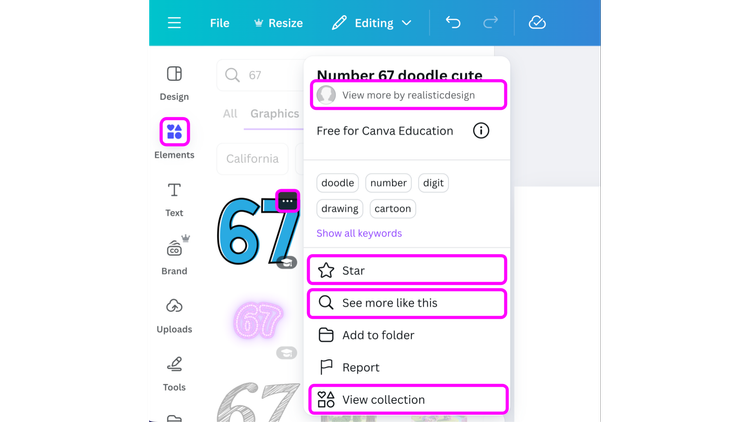
      <p class="" style="color:inherit;font-size:1em;line-height:1.618em;margin:0 0 1.25em 0;font-weight:normal;margin-top:0;font-family:'DejaVu Sans Condensed', 'Liberation Sans', 'Nimbus Sans L', 'Helvetica Neue', Helvetica, Arial, sans-serif;letter-spacing:-.01em;">Consistent graphics make designs look more professional. I try to stick with elements that share the same colors, stroke weight, and overall style.</p><p class="" style="color:inherit;font-size:1em;line-height:1.618em;margin:0 0 1.25em 0;font-weight:normal;font-family:'DejaVu Sans Condensed', 'Liberation Sans', 'Nimbus Sans L', 'Helvetica Neue', Helvetica, Arial, sans-serif;letter-spacing:-.01em;">In Canva, open the <strong>Elements</strong> panel on the left. When you hover over a thumbnail, three dots appear in the top-right corner. Click those dots and choose <strong>View more by [creator]</strong> to see matching graphics from the same artist. This helps keep line weight and style consistent.</p><p class="" style="color:inherit;font-size:1em;line-height:1.618em;margin:0 0 1.25em 0;font-weight:normal;font-family:'DejaVu Sans Condensed', 'Liberation Sans', 'Nimbus Sans L', 'Helvetica Neue', Helvetica, Arial, sans-serif;letter-spacing:-.01em;">From that same menu, you can also click <strong>See more like this</strong> or <strong>View collection</strong> to pull up similar elements in the same style. It is a quick way to build a cohesive set.</p><p class="" style="color:inherit;font-size:1em;line-height:1.618em;margin:0 0 1.25em 0;font-weight:normal;font-family:'DejaVu Sans Condensed', 'Liberation Sans', 'Nimbus Sans L', 'Helvetica Neue', Helvetica, Arial, sans-serif;letter-spacing:-.01em;">When you click an element on the canvas, Canva often shows a <strong>Magic Recommendations</strong> strip in the Elements panel with similar options you can swap in. Browsing that strip is another fast path to a consistent look.</p><p class="" style="color:inherit;font-size:1em;line-height:1.618em;margin:0 0 1.25em 0;font-weight:normal;margin-bottom:0;font-family:'DejaVu Sans Condensed', 'Liberation Sans', 'Nimbus Sans L', 'Helvetica Neue', Helvetica, Arial, sans-serif;letter-spacing:-.01em;">When you find keepers, click the <strong>Star</strong>. Starred items are easy to reuse across projects, so your slides and printables keep the same visual style.</p>
    </td>
  </tr>
</tbody></table>

</div>
<div id="image-image-section-below-8">
<table role="presentation" width="100%" cellpadding="0" cellspacing="0" border="0" bgcolor="#EEE6FF" class="image-section below-layout section-content">


    <tbody><tr>
      <td>
        <table role="presentation" width="100%" cellpadding="0" cellspacing="0" border="0">
          <tbody><tr>
              
    <td class="show-desktop-only section-spacing-left" width="44"></td>
  

            <td align="left" valign="middle" class="section-image-cell section-content-cell section-hoverable-image" data-aspect="ORIGINAL" style="padding:0;">
              
  <a href="https://learninginhand.com/s/Slide-and-Seek-by-Tony-Vincent.pdf" style="color:#009cdb !important;"><img class="section-scaleable-image" src="https://images.squarespace-cdn.com/content/50eca855e4b0939ae8bb12d9/436c7842-030f-4c8e-8fca-b6cab6f1e51d/Elements.png?content-type=image%2Fpng&amp;format=750w" width="594" alt="Slide &amp; Seek: Bring Motion to Your Pages graphic with 8 steps." style="font-size:.6666666666666666em;display:block;border:0;text-decoration:none;line-height:0;background-color:transparent;font-weight:normal;height:auto;width:100%;max-width:100%;font-family:'DejaVu Sans Condensed', 'Liberation Sans', 'Nimbus Sans L', 'Helvetica Neue', Helvetica, Arial, sans-serif;"></a>


            </td>
              
    <td class="show-desktop-only section-spacing-right" width="44"></td>
  

          </tr>
        </tbody></table>
      </td>
    </tr>


  <tr>
    <td bgcolor="#EEE6FF" class="spacing-below" height="22"></td>
  </tr>


</tbody></table>

</div>
<div id="text-text-section-9">


<table role="presentation" width="100%" cellpadding="0" cellspacing="0" border="0" bgcolor="#FF9502" class="text-section section-content">
  <tbody><tr>
    <td valign="top" class="section-text-area section-content-cell padding-mobile-both" style="padding-top:12px;padding-right:66px;padding-bottom:12px;padding-left:66px;color:#fff;background-color:#ff9502;">
      <h4 style="color:inherit;margin:1.414em 0 .5em;font-weight:400;line-height:1.25em;font-size:1.5em;mso-line-height-alt:1.5em;margin-top:0;margin-bottom:0;font-family:'DejaVu Sans Condensed', 'Liberation Sans', 'Nimbus Sans L', 'Helvetica Neue', Helvetica, Arial, sans-serif;letter-spacing:.02em;">Page Partitioning 🔲</h4>
    </td>
  </tr>
</tbody></table>

</div>
<div id="text-text-section-10">


<table role="presentation" width="100%" cellpadding="0" cellspacing="0" border="0" bgcolor="#FDF7E3" class="text-section section-content">
  <tbody><tr>
    <td valign="top" class="section-text-area section-content-cell padding-mobile-both" style="padding-top:12px;padding-right:66px;padding-bottom:12px;padding-left:66px;color:#272727;background-color:#fdf7e3;">
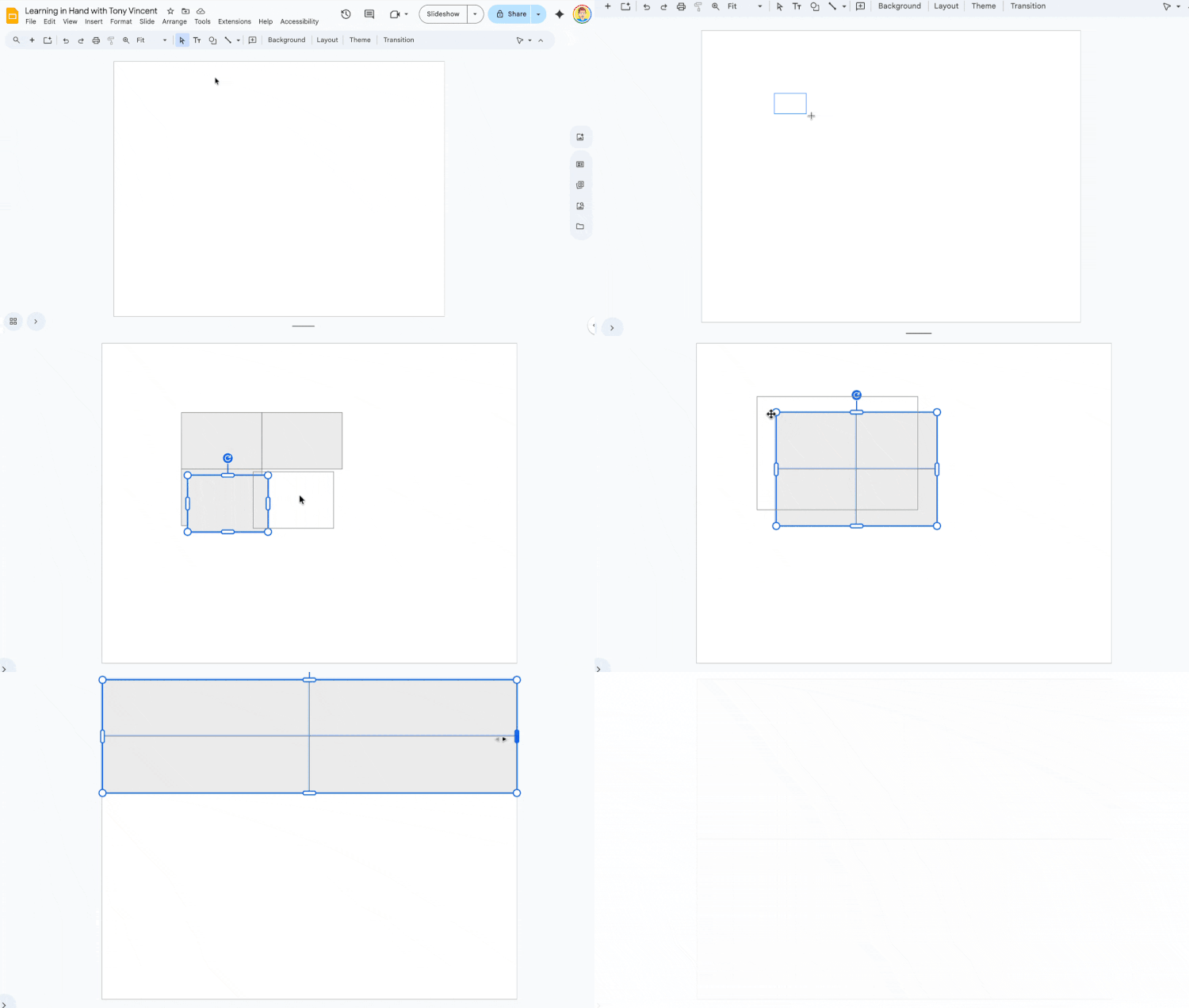
      <p class="" style="color:inherit;font-size:1em;line-height:1.618em;margin:0 0 1.25em 0;font-weight:normal;margin-top:0;font-family:'DejaVu Sans Condensed', 'Liberation Sans', 'Nimbus Sans L', 'Helvetica Neue', Helvetica, Arial, sans-serif;letter-spacing:-.01em;">Despite my love for Canva, I usually reach for Google Slides when making printables and graphics. I think it’s because I like to start from scratch and build my own layouts. Plus, Google Slides gives me better control over adding and adjusting shapes. After all, I’m the <a href="https://shapegrams.com" rel="nofollow" style="color:#009cdb !important;">Shapegrams</a> guy.</p><p class="" style="color:inherit;font-size:1em;line-height:1.618em;margin:0 0 1.25em 0;font-weight:normal;font-family:'DejaVu Sans Condensed', 'Liberation Sans', 'Nimbus Sans L', 'Helvetica Neue', Helvetica, Arial, sans-serif;letter-spacing:-.01em;">One format I design often is the quarter-page handout, where four copies fit on a single sheet that I print and cut apart. I did this recently for an exit ticket. Here’s the workflow I used:</p><ol data-rte-list="default" style="padding-left:25px;"><li style="font-weight:normal;margin-top:0px;margin-bottom:0px;margin-left:15px;font-family:'DejaVu Sans Condensed', 'Liberation Sans', 'Nimbus Sans L', 'Helvetica Neue', Helvetica, Arial, sans-serif;"><p class="" style="color:inherit;font-size:1em;line-height:1.618em;margin:0 0 1.25em 0;font-weight:normal;margin-top:0;margin-bottom:0;font-family:'DejaVu Sans Condensed', 'Liberation Sans', 'Nimbus Sans L', 'Helvetica Neue', Helvetica, Arial, sans-serif;letter-spacing:-.01em;">Create a new Google Slides file, then go to File → Page Setup and set a custom size of 11 x 8.5 inches.</p></li><li style="font-weight:normal;margin-top:0px;margin-bottom:0px;margin-left:15px;font-family:'DejaVu Sans Condensed', 'Liberation Sans', 'Nimbus Sans L', 'Helvetica Neue', Helvetica, Arial, sans-serif;"><p class="" style="color:inherit;font-size:1em;line-height:1.618em;margin:0 0 1.25em 0;font-weight:normal;margin-top:0;margin-bottom:0;font-family:'DejaVu Sans Condensed', 'Liberation Sans', 'Nimbus Sans L', 'Helvetica Neue', Helvetica, Arial, sans-serif;letter-spacing:-.01em;">Delete any placeholder text from the slide.</p></li><li style="font-weight:normal;margin-top:0px;margin-bottom:0px;margin-left:15px;font-family:'DejaVu Sans Condensed', 'Liberation Sans', 'Nimbus Sans L', 'Helvetica Neue', Helvetica, Arial, sans-serif;"><p class="" style="color:inherit;font-size:1em;line-height:1.618em;margin:0 0 1.25em 0;font-weight:normal;margin-top:0;margin-bottom:0;font-family:'DejaVu Sans Condensed', 'Liberation Sans', 'Nimbus Sans L', 'Helvetica Neue', Helvetica, Arial, sans-serif;letter-spacing:-.01em;">Draw a small rectangle (the exact size doesn’t matter).</p></li><li style="font-weight:normal;margin-top:0px;margin-bottom:0px;margin-left:15px;font-family:'DejaVu Sans Condensed', 'Liberation Sans', 'Nimbus Sans L', 'Helvetica Neue', Helvetica, Arial, sans-serif;"><p class="" style="color:inherit;font-size:1em;line-height:1.618em;margin:0 0 1.25em 0;font-weight:normal;margin-top:0;margin-bottom:0;font-family:'DejaVu Sans Condensed', 'Liberation Sans', 'Nimbus Sans L', 'Helvetica Neue', Helvetica, Arial, sans-serif;letter-spacing:-.01em;">Duplicate the rectangle three times, then arrange the four rectangles into a 2 × 2 grid with the edges touching.</p></li><li style="font-weight:normal;margin-top:0px;margin-bottom:0px;margin-left:15px;font-family:'DejaVu Sans Condensed', 'Liberation Sans', 'Nimbus Sans L', 'Helvetica Neue', Helvetica, Arial, sans-serif;"><p class="" style="color:inherit;font-size:1em;line-height:1.618em;margin:0 0 1.25em 0;font-weight:normal;margin-top:0;margin-bottom:0;font-family:'DejaVu Sans Condensed', 'Liberation Sans', 'Nimbus Sans L', 'Helvetica Neue', Helvetica, Arial, sans-serif;letter-spacing:-.01em;">Select all four rectangles as a group and move them to the top-left corner of the slide.</p></li><li style="font-weight:normal;margin-top:0px;margin-bottom:0px;margin-left:15px;font-family:'DejaVu Sans Condensed', 'Liberation Sans', 'Nimbus Sans L', 'Helvetica Neue', Helvetica, Arial, sans-serif;"><p class="" style="color:inherit;font-size:1em;line-height:1.618em;margin:0 0 1.25em 0;font-weight:normal;margin-top:0;margin-bottom:0;font-family:'DejaVu Sans Condensed', 'Liberation Sans', 'Nimbus Sans L', 'Helvetica Neue', Helvetica, Arial, sans-serif;letter-spacing:-.01em;">Drag the side handle of the group to the right edge of the slide.</p></li><li style="font-weight:normal;margin-top:0px;margin-bottom:0px;margin-left:15px;font-family:'DejaVu Sans Condensed', 'Liberation Sans', 'Nimbus Sans L', 'Helvetica Neue', Helvetica, Arial, sans-serif;"><p class="" style="color:inherit;font-size:1em;line-height:1.618em;margin:0 0 1.25em 0;font-weight:normal;margin-top:0;margin-bottom:0;font-family:'DejaVu Sans Condensed', 'Liberation Sans', 'Nimbus Sans L', 'Helvetica Neue', Helvetica, Arial, sans-serif;letter-spacing:-.01em;">Drag the bottom handle of the group to the bottom of the slide.</p></li></ol><p class="" style="color:inherit;font-size:1em;line-height:1.618em;margin:0 0 1.25em 0;font-weight:normal;margin-bottom:0;font-family:'DejaVu Sans Condensed', 'Liberation Sans', 'Nimbus Sans L', 'Helvetica Neue', Helvetica, Arial, sans-serif;letter-spacing:-.01em;">Now the page is evenly divided into four sections.</p>
    </td>
  </tr>
</tbody></table>

</div>
<div id="image-image-section-below-11">
<table role="presentation" width="100%" cellpadding="0" cellspacing="0" border="0" bgcolor="#FDF7E3" class="image-section below-layout section-content">


    <tbody><tr>
      <td>
        <table role="presentation" width="100%" cellpadding="0" cellspacing="0" border="0">
          <tbody><tr>
              
    <td class="show-desktop-only section-spacing-left" width="10"></td>
  

            <td align="left" valign="middle" class="section-image-cell section-content-cell section-hoverable-image" data-aspect="ORIGINAL" style="padding:0;">
              
  <img class="section-scaleable-image" src="https://images.squarespace-cdn.com/content/50eca855e4b0939ae8bb12d9/ef3a4102-40c9-4091-ab32-997d7d300cc2/Making4Sectionsv2-ezgif.com-optimize.gif?content-type=image%2Fgif&amp;format=750w" width="594" alt="Demo dividing slides into four sections" style="font-size:.6666666666666666em;display:block;border:0;text-decoration:none;line-height:0;background-color:transparent;font-weight:normal;height:auto;width:100%;max-width:100%;font-family:'DejaVu Sans Condensed', 'Liberation Sans', 'Nimbus Sans L', 'Helvetica Neue', Helvetica, Arial, sans-serif;">


            </td>
              
    <td class="show-desktop-only section-spacing-right" width="10"></td>
  

          </tr>
        </tbody></table>
      </td>
    </tr>


</tbody></table>

</div>
<div id="text-text-section-12">


<table role="presentation" width="100%" cellpadding="0" cellspacing="0" border="0" bgcolor="#FDF7E3" class="text-section section-content">
  <tbody><tr>
    <td valign="top" class="section-text-area section-content-cell padding-mobile-both" style="padding-top:12px;padding-right:66px;padding-bottom:12px;padding-left:66px;color:#272727;background-color:#fdf7e3;">
      <p class="" style="color:inherit;font-size:1em;line-height:1.618em;margin:0 0 1.25em 0;font-weight:normal;margin-top:0;margin-bottom:0;font-family:'DejaVu Sans Condensed', 'Liberation Sans', 'Nimbus Sans L', 'Helvetica Neue', Helvetica, Arial, sans-serif;letter-spacing:-.01em;">I also use this method to divide a page vertically or horizontally when making table tents.</p>
    </td>
  </tr>
</tbody></table>

</div>
<div id="image-image-section-below-13">
<table role="presentation" width="100%" cellpadding="0" cellspacing="0" border="0" bgcolor="#FDF7E3" class="image-section below-layout section-content">


    <tbody><tr>
      <td>
        <table role="presentation" width="100%" cellpadding="0" cellspacing="0" border="0">
          <tbody><tr>
              
    <td class="show-desktop-only section-spacing-left" width="10"></td>
  

            <td align="left" valign="middle" class="section-image-cell section-content-cell section-hoverable-image" data-aspect="ORIGINAL" style="padding:0;">
              
  <img class="section-scaleable-image" src="https://images.squarespace-cdn.com/content/50eca855e4b0939ae8bb12d9/30b3f3f4-ed53-4137-805e-59e5078398e2/MakingNameTent-ezgif.com-optimize.gif?content-type=image%2Fgif&amp;format=750w" width="594" alt="Demo making a name tent in Google Slides
" style="font-size:.6666666666666666em;display:block;border:0;text-decoration:none;line-height:0;background-color:transparent;font-weight:normal;height:auto;width:100%;max-width:100%;font-family:'DejaVu Sans Condensed', 'Liberation Sans', 'Nimbus Sans L', 'Helvetica Neue', Helvetica, Arial, sans-serif;">


            </td>
              
    <td class="show-desktop-only section-spacing-right" width="10"></td>
  

          </tr>
        </tbody></table>
      </td>
    </tr>


</tbody></table>

</div>
<div id="text-text-section-14">


<table role="presentation" width="100%" cellpadding="0" cellspacing="0" border="0" bgcolor="#FDF7E3" class="text-section section-content">
  <tbody><tr>
    <td valign="top" class="section-text-area section-content-cell padding-mobile-both" style="padding-top:12px;padding-right:66px;padding-bottom:22px;padding-left:66px;color:#272727;background-color:#fdf7e3;">
      <p class="" style="color:inherit;font-size:1em;line-height:1.618em;margin:0 0 1.25em 0;font-weight:normal;margin-top:0;margin-bottom:0;font-family:'DejaVu Sans Condensed', 'Liberation Sans', 'Nimbus Sans L', 'Helvetica Neue', Helvetica, Arial, sans-serif;letter-spacing:-.01em;">This technique isn’t limited to Google Slides. I use it in Canva and PowerPoint too. In PowerPoint, the key is to group the rectangles before resizing. No matter which tool you choose, it is a quick way to make shapes that are the same size and together fill the page or slide exactly as needed, whether for print or digital projects.</p>
    </td>
  </tr>
</tbody></table>

</div>
<div id="text-text-section-15">


<table role="presentation" width="100%" cellpadding="0" cellspacing="0" border="0" bgcolor="#7CB342" class="text-section section-content">
  <tbody><tr>
    <td valign="top" class="section-text-area section-content-cell padding-mobile-both" style="padding-top:12px;padding-right:66px;padding-bottom:12px;padding-left:66px;color:#fff;background-color:#7cb342;">
      <h4 style="color:inherit;margin:1.414em 0 .5em;font-weight:400;line-height:1.25em;font-size:1.5em;mso-line-height-alt:1.5em;margin-top:0;margin-bottom:0;font-family:'DejaVu Sans Condensed', 'Liberation Sans', 'Nimbus Sans L', 'Helvetica Neue', Helvetica, Arial, sans-serif;letter-spacing:.02em;">Transparent Trick 📲</h4>
    </td>
  </tr>
</tbody></table>

</div>
<div id="text-text-section-16">


<table role="presentation" width="100%" cellpadding="0" cellspacing="0" border="0" bgcolor="#EDFFDA" class="text-section section-content">
  <tbody><tr>
    <td valign="top" class="section-text-area section-content-cell padding-mobile-both" style="padding-top:13px;padding-right:66px;padding-bottom:12px;padding-left:66px;color:#272727;background-color:#edffda;">
      <p class="" style="color:inherit;font-size:1em;line-height:1.618em;margin:0 0 1.25em 0;font-weight:normal;margin-top:0;font-family:'DejaVu Sans Condensed', 'Liberation Sans', 'Nimbus Sans L', 'Helvetica Neue', Helvetica, Arial, sans-serif;letter-spacing:-.01em;">On iPhone and iPad, you can quickly save an image without its background. Press and hold on the subject of the image, choose <em>Share</em>, then <em>Save Image</em>. The picture is saved to your Photos app as <strong>a PNG with a transparent background</strong>.</p><p class="" style="color:inherit;font-size:1em;line-height:1.618em;margin:0 0 1.25em 0;font-weight:normal;margin-bottom:0;font-family:'DejaVu Sans Condensed', 'Liberation Sans', 'Nimbus Sans L', 'Helvetica Neue', Helvetica, Arial, sans-serif;letter-spacing:-.01em;">This feature works on most recent devices running iOS 16 or later.</p>
    </td>
  </tr>
</tbody></table>

</div>
<div id="text-text-section-17">


<table role="presentation" width="100%" cellpadding="0" cellspacing="0" border="0" bgcolor="#092B6D" class="text-section section-content">
  <tbody><tr>
    <td valign="top" class="section-text-area section-content-cell padding-mobile-both" style="padding-top:12px;padding-right:66px;padding-bottom:12px;padding-left:66px;color:#fff;background-color:#092b6d;">
      <h4 style="color:inherit;margin:1.414em 0 .5em;font-weight:400;line-height:1.25em;font-size:1.5em;mso-line-height-alt:1.5em;margin-top:0;margin-bottom:0;font-family:'DejaVu Sans Condensed', 'Liberation Sans', 'Nimbus Sans L', 'Helvetica Neue', Helvetica, Arial, sans-serif;letter-spacing:.02em;">Slide Smarts 🧠</h4>
    </td>
  </tr>
</tbody></table>

</div>
<div id="text-text-section-18">


<table role="presentation" width="100%" cellpadding="0" cellspacing="0" border="0" bgcolor="#1044AA" class="text-section section-content">
  <tbody><tr>
    <td valign="top" class="section-text-area section-content-cell padding-mobile-both" style="padding-top:12px;padding-right:66px;padding-bottom:12px;padding-left:66px;color:#fff;background-color:#1044aa;">
      <p class="" style="color:inherit;font-size:1em;line-height:1.618em;margin:0 0 1.25em 0;font-weight:normal;margin-top:0;margin-bottom:0;font-family:'DejaVu Sans Condensed', 'Liberation Sans', 'Nimbus Sans L', 'Helvetica Neue', Helvetica, Arial, sans-serif;letter-spacing:-.01em;"><em>Gamma affiliate link helps support this newsletter</em></p>
    </td>
  </tr>
</tbody></table>

</div>
<div id="text-text-section-19">


<table role="presentation" width="100%" cellpadding="0" cellspacing="0" border="0" bgcolor="#E4EEFF" class="text-section section-content">
  <tbody><tr>
    <td valign="top" class="section-text-area section-content-cell padding-mobile-both" style="padding-top:12px;padding-right:66px;padding-bottom:12px;padding-left:66px;color:#272727;background-color:#e4eeff;">
      <p class="" style="color:inherit;font-size:1em;line-height:1.618em;margin:0 0 1.25em 0;font-weight:normal;margin-top:0;font-family:'DejaVu Sans Condensed', 'Liberation Sans', 'Nimbus Sans L', 'Helvetica Neue', Helvetica, Arial, sans-serif;letter-spacing:-.01em;">Teachers often ask me about AI tools that can make presentations. If you have ever searched for an AI slideshow generator for teachers, you know there are lots of options. The one I want to focus on is <a href="https://try.gamma.app/learninginhand" rel="nofollow" style="color:#009cdb !important;">Gamma</a>, but first let’s look at a few others educators often use.</p><ul data-rte-list="default" style="padding-left:25px;"><li style="font-weight:normal;margin-top:0px;margin-bottom:0px;margin-left:15px;font-family:'DejaVu Sans Condensed', 'Liberation Sans', 'Nimbus Sans L', 'Helvetica Neue', Helvetica, Arial, sans-serif;"><p class="" style="color:inherit;font-size:1em;line-height:1.618em;margin:0 0 1.25em 0;font-weight:normal;margin-top:0;margin-bottom:0;font-family:'DejaVu Sans Condensed', 'Liberation Sans', 'Nimbus Sans L', 'Helvetica Neue', Helvetica, Arial, sans-serif;letter-spacing:-.01em;"><strong>Canva</strong>: The Canva AI presentation maker is especially popular with teachers because it is built right into the Canva dashboard. Canva AI will generate a slideshow with layouts, text, and images you can edit right away. Since many schools already use Canva, this option makes it easy to create a stylish deck without starting from scratch.</p></li><li style="font-weight:normal;margin-top:0px;margin-bottom:0px;margin-left:15px;font-family:'DejaVu Sans Condensed', 'Liberation Sans', 'Nimbus Sans L', 'Helvetica Neue', Helvetica, Arial, sans-serif;"><p class="" style="color:inherit;font-size:1em;line-height:1.618em;margin:0 0 1.25em 0;font-weight:normal;margin-top:0;margin-bottom:0;font-family:'DejaVu Sans Condensed', 'Liberation Sans', 'Nimbus Sans L', 'Helvetica Neue', Helvetica, Arial, sans-serif;letter-spacing:-.01em;"><strong>Brisk Teaching</strong>: A Chrome extension that instantly builds a Google Slides presentation from the page you are viewing.</p></li><li style="font-weight:normal;margin-top:0px;margin-bottom:0px;margin-left:15px;font-family:'DejaVu Sans Condensed', 'Liberation Sans', 'Nimbus Sans L', 'Helvetica Neue', Helvetica, Arial, sans-serif;"><p class="" style="color:inherit;font-size:1em;line-height:1.618em;margin:0 0 1.25em 0;font-weight:normal;margin-top:0;margin-bottom:0;font-family:'DejaVu Sans Condensed', 'Liberation Sans', 'Nimbus Sans L', 'Helvetica Neue', Helvetica, Arial, sans-serif;letter-spacing:-.01em;"><strong>Prezi</strong>: Instead of linear slides, Prezi AI generates a zoomable presentation on an open canvas.</p></li><li style="font-weight:normal;margin-top:0px;margin-bottom:0px;margin-left:15px;font-family:'DejaVu Sans Condensed', 'Liberation Sans', 'Nimbus Sans L', 'Helvetica Neue', Helvetica, Arial, sans-serif;"><p class="" style="color:inherit;font-size:1em;line-height:1.618em;margin:0 0 1.25em 0;font-weight:normal;margin-top:0;margin-bottom:0;font-family:'DejaVu Sans Condensed', 'Liberation Sans', 'Nimbus Sans L', 'Helvetica Neue', Helvetica, Arial, sans-serif;letter-spacing:-.01em;"><strong>PowerPoint</strong>: Microsoft Copilot designs presentations from your prompt and can pull content from your files.</p></li><li style="font-weight:normal;margin-top:0px;margin-bottom:0px;margin-left:15px;font-family:'DejaVu Sans Condensed', 'Liberation Sans', 'Nimbus Sans L', 'Helvetica Neue', Helvetica, Arial, sans-serif;"><p class="" style="color:inherit;font-size:1em;line-height:1.618em;margin:0 0 1.25em 0;font-weight:normal;margin-top:0;margin-bottom:0;font-family:'DejaVu Sans Condensed', 'Liberation Sans', 'Nimbus Sans L', 'Helvetica Neue', Helvetica, Arial, sans-serif;letter-spacing:-.01em;"><strong>NotebookLM</strong>: Add sources and NotebookLM produces a narrated video overview, which is more of a video slideshow than a slide deck.</p></li></ul><p class="" style="color:inherit;font-size:1em;line-height:1.618em;margin:0 0 1.25em 0;font-weight:normal;font-family:'DejaVu Sans Condensed', 'Liberation Sans', 'Nimbus Sans L', 'Helvetica Neue', Helvetica, Arial, sans-serif;letter-spacing:-.01em;">Out of all of these, <a href="https://try.gamma.app/learninginhand" rel="nofollow" style="color:#009cdb !important;"><strong>Gamma</strong></a> often produces the most polished results.</p><p class="" style="color:inherit;font-size:1em;line-height:1.618em;margin:0 0 1.25em 0;font-weight:normal;font-family:'DejaVu Sans Condensed', 'Liberation Sans', 'Nimbus Sans L', 'Helvetica Neue', Helvetica, Arial, sans-serif;letter-spacing:-.01em;"><strong>Why Teachers Like Gamma</strong></p><p class="" style="color:inherit;font-size:1em;line-height:1.618em;margin:0 0 1.25em 0;font-weight:normal;font-family:'DejaVu Sans Condensed', 'Liberation Sans', 'Nimbus Sans L', 'Helvetica Neue', Helvetica, Arial, sans-serif;letter-spacing:-.01em;"><a href="https://try.gamma.app/learninginhand" rel="nofollow" style="color:#009cdb !important;">Gamma</a> makes creating a presentation quick and easy. You can:</p><ul data-rte-list="default" style="padding-left:25px;"><li style="font-weight:normal;margin-top:0px;margin-bottom:0px;margin-left:15px;font-family:'DejaVu Sans Condensed', 'Liberation Sans', 'Nimbus Sans L', 'Helvetica Neue', Helvetica, Arial, sans-serif;"><p class="" style="color:inherit;font-size:1em;line-height:1.618em;margin:0 0 1.25em 0;font-weight:normal;margin-top:0;margin-bottom:0;font-family:'DejaVu Sans Condensed', 'Liberation Sans', 'Nimbus Sans L', 'Helvetica Neue', Helvetica, Arial, sans-serif;letter-spacing:-.01em;">Upload a PDF and let Gamma turn it into slides.</p></li><li style="font-weight:normal;margin-top:0px;margin-bottom:0px;margin-left:15px;font-family:'DejaVu Sans Condensed', 'Liberation Sans', 'Nimbus Sans L', 'Helvetica Neue', Helvetica, Arial, sans-serif;"><p class="" style="color:inherit;font-size:1em;line-height:1.618em;margin:0 0 1.25em 0;font-weight:normal;margin-top:0;margin-bottom:0;font-family:'DejaVu Sans Condensed', 'Liberation Sans', 'Nimbus Sans L', 'Helvetica Neue', Helvetica, Arial, sans-serif;letter-spacing:-.01em;">Describe your presentation topic, and Gamma will generate an outline you can edit before it creates the full slideshow.</p></li></ul><p class="" style="color:inherit;font-size:1em;line-height:1.618em;margin:0 0 1.25em 0;font-weight:normal;font-family:'DejaVu Sans Condensed', 'Liberation Sans', 'Nimbus Sans L', 'Helvetica Neue', Helvetica, Arial, sans-serif;letter-spacing:-.01em;">It is fun to watch the AI generator type out slides. Once the deck is ready, the Gamma editor lets you tweak text, adjust layouts, and replace visuals. Since AI images can miss the mark, I appreciate how simple it is to swap in icons, illustrations, and photos.</p><p class="" style="color:inherit;font-size:1em;line-height:1.618em;margin:0 0 1.25em 0;font-weight:normal;font-family:'DejaVu Sans Condensed', 'Liberation Sans', 'Nimbus Sans L', 'Helvetica Neue', Helvetica, Arial, sans-serif;letter-spacing:-.01em;"><a href="https://try.gamma.app/learninginhand" rel="nofollow" style="color:#009cdb !important;">Gamma</a> also gives you flexible ways to share and use your work:</p><ul data-rte-list="default" style="padding-left:25px;"><li style="font-weight:normal;margin-top:0px;margin-bottom:0px;margin-left:15px;font-family:'DejaVu Sans Condensed', 'Liberation Sans', 'Nimbus Sans L', 'Helvetica Neue', Helvetica, Arial, sans-serif;"><p class="" style="color:inherit;font-size:1em;line-height:1.618em;margin:0 0 1.25em 0;font-weight:normal;margin-top:0;margin-bottom:0;font-family:'DejaVu Sans Condensed', 'Liberation Sans', 'Nimbus Sans L', 'Helvetica Neue', Helvetica, Arial, sans-serif;letter-spacing:-.01em;"><strong>Invite</strong> collaborators</p></li><li style="font-weight:normal;margin-top:0px;margin-bottom:0px;margin-left:15px;font-family:'DejaVu Sans Condensed', 'Liberation Sans', 'Nimbus Sans L', 'Helvetica Neue', Helvetica, Arial, sans-serif;"><p class="" style="color:inherit;font-size:1em;line-height:1.618em;margin:0 0 1.25em 0;font-weight:normal;margin-top:0;margin-bottom:0;font-family:'DejaVu Sans Condensed', 'Liberation Sans', 'Nimbus Sans L', 'Helvetica Neue', Helvetica, Arial, sans-serif;letter-spacing:-.01em;"><strong>Share</strong> with a web link or embed code</p></li><li style="font-weight:normal;margin-top:0px;margin-bottom:0px;margin-left:15px;font-family:'DejaVu Sans Condensed', 'Liberation Sans', 'Nimbus Sans L', 'Helvetica Neue', Helvetica, Arial, sans-serif;"><p class="" style="color:inherit;font-size:1em;line-height:1.618em;margin:0 0 1.25em 0;font-weight:normal;margin-top:0;margin-bottom:0;font-family:'DejaVu Sans Condensed', 'Liberation Sans', 'Nimbus Sans L', 'Helvetica Neue', Helvetica, Arial, sans-serif;letter-spacing:-.01em;"><strong>Export</strong> as PDF, PowerPoint, Google Slides, or PNG images</p></li></ul><p class="" style="color:inherit;font-size:1em;line-height:1.618em;margin:0 0 1.25em 0;font-weight:normal;font-family:'DejaVu Sans Condensed', 'Liberation Sans', 'Nimbus Sans L', 'Helvetica Neue', Helvetica, Arial, sans-serif;letter-spacing:-.01em;"><strong>More Than Slides</strong></p><p class="" style="color:inherit;font-size:1em;line-height:1.618em;margin:0 0 1.25em 0;font-weight:normal;font-family:'DejaVu Sans Condensed', 'Liberation Sans', 'Nimbus Sans L', 'Helvetica Neue', Helvetica, Arial, sans-serif;letter-spacing:-.01em;"><a href="https://try.gamma.app/learninginhand" rel="nofollow" style="color:#009cdb !important;">Gamma</a> can also create webpages, documents, and social media posts.</p><p class="" style="color:inherit;font-size:1em;line-height:1.618em;margin:0 0 1.25em 0;font-weight:normal;font-family:'DejaVu Sans Condensed', 'Liberation Sans', 'Nimbus Sans L', 'Helvetica Neue', Helvetica, Arial, sans-serif;letter-spacing:-.01em;"><strong>Pricing and Credits</strong></p><ul data-rte-list="default" style="padding-left:25px;"><li style="font-weight:normal;margin-top:0px;margin-bottom:0px;margin-left:15px;font-family:'DejaVu Sans Condensed', 'Liberation Sans', 'Nimbus Sans L', 'Helvetica Neue', Helvetica, Arial, sans-serif;"><p class="" style="color:inherit;font-size:1em;line-height:1.618em;margin:0 0 1.25em 0;font-weight:normal;margin-top:0;margin-bottom:0;font-family:'DejaVu Sans Condensed', 'Liberation Sans', 'Nimbus Sans L', 'Helvetica Neue', Helvetica, Arial, sans-serif;letter-spacing:-.01em;">Signing up for Gamma gives you 400 free credits. A typical AI presentation uses about 40 credits.</p></li><li style="font-weight:normal;margin-top:0px;margin-bottom:0px;margin-left:15px;font-family:'DejaVu Sans Condensed', 'Liberation Sans', 'Nimbus Sans L', 'Helvetica Neue', Helvetica, Arial, sans-serif;"><p class="" style="color:inherit;font-size:1em;line-height:1.618em;margin:0 0 1.25em 0;font-weight:normal;margin-top:0;margin-bottom:0;font-family:'DejaVu Sans Condensed', 'Liberation Sans', 'Nimbus Sans L', 'Helvetica Neue', Helvetica, Arial, sans-serif;letter-spacing:-.01em;">With Gamma Plus ($8/month or $96/year) you get unlimited AI presentations and up to 20 slides per deck.</p></li></ul><p class="" style="color:inherit;font-size:1em;line-height:1.618em;margin:0 0 1.25em 0;font-weight:normal;font-family:'DejaVu Sans Condensed', 'Liberation Sans', 'Nimbus Sans L', 'Helvetica Neue', Helvetica, Arial, sans-serif;letter-spacing:-.01em;"><strong>Final Thoughts</strong></p><p class="" style="color:inherit;font-size:1em;line-height:1.618em;margin:0 0 1.25em 0;font-weight:normal;font-family:'DejaVu Sans Condensed', 'Liberation Sans', 'Nimbus Sans L', 'Helvetica Neue', Helvetica, Arial, sans-serif;letter-spacing:-.01em;">I do not rely on AI to design my own presentations and keynotes. My style is big text, simple visuals, and slides that act as visual aids rather than complete handouts. Making my own slides helps me think through a topic and refine my ideas. My presentations would not be as strong if I let AI generate them.</p><p class="" style="color:inherit;font-size:1em;line-height:1.618em;margin:0 0 1.25em 0;font-weight:normal;margin-bottom:0;font-family:'DejaVu Sans Condensed', 'Liberation Sans', 'Nimbus Sans L', 'Helvetica Neue', Helvetica, Arial, sans-serif;letter-spacing:-.01em;">That said, <a href="https://try.gamma.app/learninginhand" rel="nofollow" style="color:#009cdb !important;">Gamma</a> is one of the best slideshow generators for teachers who need a quick deck, a starting point, or a spark of inspiration. For fresh ideas, Gamma is worth a try. And if you like it, upgrading to Gamma Plus is reasonably priced.</p>
    </td>
  </tr>
</tbody></table>

</div>
<div id="button-button-section-20">


<table role="presentation" width="100%" cellpadding="0" cellspacing="0" border="0" bgcolor="#E4EEFF" class="button-section section-content" style="width:100%;background-color:#e4eeff;">
  <tbody><tr>
    <td align="center" valign="middle" class="section-content-cell section-text-area" style="padding-top:22px;padding-right:22px;padding-bottom:22px;padding-left:22px;">
      
      <a href="https://try.gamma.app/learninginhand" class="button-section-box button-style-solid" style="color:#009cdb !important;display:inline-block;line-height:11px;margin:0;mso-padding-alt:0;text-align:center;text-decoration:none;transition:.15s;width:auto;background-color:#092b6d;border:0;padding:17px 0;"><i class="button-section-mso" style="letter-spacing:29.92px;mso-font-width:-100%;mso-text-raise:26.950000000000003px;">&nbsp;</i><span class="button-section-label" style="line-height:inherit;margin:0;font-family:'DejaVu Sans Condensed', 'Liberation Sans', 'Nimbus Sans L', 'Helvetica Neue', Helvetica, Arial, sans-serif;font-weight:700;color:#efefef;display:inline-block;font-size:11px;min-width:1px;mso-text-raise:15.95px;"><span data-letter-spacing="3" style="font-size:inherit;font-weight:inherit;line-height:inherit;margin:0;letter-spacing:0.2em;">Sign up for Gamma and start with 400 free credits</span></span><i class="button-section-mso" style="letter-spacing:29.92px;mso-font-width:-100%;mso-text-raise:26.950000000000003px;">&nbsp;</i></a>
    </td>
  </tr>
</tbody></table>

</div>
<div id="text-text-section-21">


<table role="presentation" width="100%" cellpadding="0" cellspacing="0" border="0" bgcolor="#E4EEFF" class="text-section section-content">
  <tbody><tr>
    <td valign="top" class="section-text-area section-content-cell padding-mobile-both" style="padding-top:8px;padding-right:66px;padding-bottom:8px;padding-left:66px;color:#313131;background-color:#e4eeff;">
      <p class="" style="color:inherit;font-size:1em;line-height:1.618em;margin:0 0 1.25em 0;font-weight:normal;margin-top:0;margin-bottom:0;font-family:'DejaVu Sans Condensed', 'Liberation Sans', 'Nimbus Sans L', 'Helvetica Neue', Helvetica, Arial, sans-serif;letter-spacing:-.01em;">Want to see Gamma in action? I imported the article above into Gamma, and <a href="https://gamma.app/docs/Gammaapp-AI-Slideshow-Generator-for-Teachers-jyj1y6824bohhzn" rel="nofollow" style="color:#009cdb !important;">it generated this document</a> that you can view as a presentation. While you are in <a href="https://gamma.app/docs/Gammaapp-AI-Slideshow-Generator-for-Teachers-jyj1y6824bohhzn?mode=present#card-lc4cwjm2i0zjtxl" rel="nofollow" style="color:#009cdb !important;">presentation mode,</a> try the <strong>Spotlight</strong> feature. It is a simple way to focus students’ attention on key content.</p>
    </td>
  </tr>
</tbody></table>

</div>
<div id="image-image-section-below-22">
<table role="presentation" width="100%" cellpadding="0" cellspacing="0" border="0" bgcolor="#E4EEFF" class="image-section below-layout section-content">


    <tbody><tr>
      <td>
        <table role="presentation" width="100%" cellpadding="0" cellspacing="0" border="0">
          <tbody><tr>
              
    <td class="show-desktop-only section-spacing-left" width="44"></td>
  

            <td align="left" valign="middle" class="section-image-cell section-content-cell section-hoverable-image" data-aspect="ORIGINAL" style="padding:0;">
              
  <a href="https://gamma.app/docs/Gammaapp-AI-Slideshow-Generator-for-Teachers-jyj1y6824bohhzn" style="color:#009cdb !important;"><img class="section-scaleable-image" src="https://images.squarespace-cdn.com/content/50eca855e4b0939ae8bb12d9/eb73d5f8-b018-4674-bec9-89ce75c831c5/Gamme.png?content-type=image%2Fpng&amp;format=750w" width="594" alt="" style="font-size:.6666666666666666em;display:block;border:0;text-decoration:none;line-height:0;background-color:transparent;font-weight:normal;height:auto;width:100%;max-width:100%;font-family:'DejaVu Sans Condensed', 'Liberation Sans', 'Nimbus Sans L', 'Helvetica Neue', Helvetica, Arial, sans-serif;"></a>


            </td>
              
    <td class="show-desktop-only section-spacing-right" width="44"></td>
  

          </tr>
        </tbody></table>
      </td>
    </tr>


  <tr>
    <td bgcolor="#E4EEFF" class="spacing-below" height="22"></td>
  </tr>


</tbody></table>

</div>
<div id="text-text-section-23">


<table role="presentation" width="100%" cellpadding="0" cellspacing="0" border="0" bgcolor="#F44336" class="text-section section-content">
  <tbody><tr>
    <td valign="top" class="section-text-area section-content-cell padding-mobile-both" style="padding-top:12px;padding-right:66px;padding-bottom:12px;padding-left:66px;color:#fff;background-color:#f44336;">
      <h4 style="color:inherit;margin:1.414em 0 .5em;font-weight:400;line-height:1.25em;font-size:1.5em;mso-line-height-alt:1.5em;margin-top:0;margin-bottom:0;font-family:'DejaVu Sans Condensed', 'Liberation Sans', 'Nimbus Sans L', 'Helvetica Neue', Helvetica, Arial, sans-serif;letter-spacing:.02em;">Subscription Shortcut 📤</h4>
    </td>
  </tr>
</tbody></table>

</div>
<div id="text-text-section-24">


<table role="presentation" width="100%" cellpadding="0" cellspacing="0" border="0" bgcolor="#FFE7E6" class="text-section section-content">
  <tbody><tr>
    <td valign="top" class="section-text-area section-content-cell padding-mobile-both" style="padding-top:12px;padding-right:66px;padding-bottom:12px;padding-left:66px;color:#272727;background-color:#ffe7e6;">
      <p class="" style="color:inherit;font-size:1em;line-height:1.618em;margin:0 0 1.25em 0;font-weight:normal;margin-top:0;margin-bottom:0;font-family:'DejaVu Sans Condensed', 'Liberation Sans', 'Nimbus Sans L', 'Helvetica Neue', Helvetica, Arial, sans-serif;letter-spacing:-.01em;">Want to see all the emails you are subscribed to in Gmail? Open <a href="https://mail.google.com/mail/u/0/#sub" rel="nofollow" style="color:#009cdb !important;">this link</a> and you’ll get a list of your active subscriptions. From there, you can quickly <strong>unsubscribe</strong> from anything you no longer want cluttering your inbox. </p>
    </td>
  </tr>
</tbody></table>

</div>
<div id="text-text-section-25">


<table role="presentation" width="100%" cellpadding="0" cellspacing="0" border="0" bgcolor="transparent" class="text-section section-content">
  <tbody><tr>
    <td valign="top" class="section-text-area section-content-cell padding-mobile-both" style="padding-top:28px;padding-right:66px;padding-bottom:0px;padding-left:66px;color:#272727;background-color:transparent;">
      <p class="" style="color:inherit;font-size:1em;line-height:1.618em;margin:0 0 1.25em 0;font-weight:normal;margin-top:0;font-family:'DejaVu Sans Condensed', 'Liberation Sans', 'Nimbus Sans L', 'Helvetica Neue', Helvetica, Arial, sans-serif;letter-spacing:-.01em;">I hope you don’t unsubscribe from the Learning in Hand Newsletter! In fact, I hope you’ll do the opposite and encourage your colleagues to <a href="https://learninginhand.com/newsletter" rel="nofollow" style="color:#009cdb !important;">subscribe</a>. 😎</p><p class="" style="color:inherit;font-size:1em;line-height:1.618em;margin:0 0 1.25em 0;font-weight:normal;font-family:'DejaVu Sans Condensed', 'Liberation Sans', 'Nimbus Sans L', 'Helvetica Neue', Helvetica, Arial, sans-serif;letter-spacing:-.01em;">I’ll be back in two weeks with more tools, tips, and resources to share.</p><p style="color:inherit;font-size:1em;line-height:1.618em;margin:0 0 1.25em 0;font-weight:normal;margin-bottom:0;font-family:'DejaVu Sans Condensed', 'Liberation Sans', 'Nimbus Sans L', 'Helvetica Neue', Helvetica, Arial, sans-serif;letter-spacing:-.01em;text-align:center;" class="">Smiles from Iowa,</p>
    </td>
  </tr>
</tbody></table>

</div>
<div id="image-image-section-below-26">
<table role="presentation" width="100%" cellpadding="0" cellspacing="0" border="0" bgcolor="transparent" class="image-section below-layout section-content">


    <tbody><tr>
      <td>
        <table role="presentation" width="100%" cellpadding="0" cellspacing="0" border="0">
          <tbody><tr>
              
    <td class="show-desktop-only section-spacing-left" width="88"></td>
  

            <td align="left" valign="middle" class="section-image-cell section-content-cell section-hoverable-image" data-aspect="ORIGINAL" style="padding:0;">
              
  <img class="section-scaleable-image" src="https://images.squarespace-cdn.com/content/50eca855e4b0939ae8bb12d9/00445278-d88c-451c-89ad-108eb0a7cfca/Tony+Signature.png?content-type=image%2Fpng&amp;format=750w" width="594" alt="" style="font-size:.6666666666666666em;display:block;border:0;text-decoration:none;line-height:0;background-color:transparent;font-weight:normal;height:auto;width:100%;max-width:100%;font-family:'DejaVu Sans Condensed', 'Liberation Sans', 'Nimbus Sans L', 'Helvetica Neue', Helvetica, Arial, sans-serif;">


            </td>
              
    <td class="show-desktop-only section-spacing-right" width="88"></td>
  

          </tr>
        </tbody></table>
      </td>
    </tr>


  <tr>
    <td bgcolor="transparent" class="spacing-below" height="29"></td>
  </tr>


</tbody></table>

</div>
<div id="button-button-section-27">


<table role="presentation" width="100%" cellpadding="0" cellspacing="0" border="0" bgcolor="#EDEDED" class="button-section section-content" style="width:100%;background-color:#ededed;">
  <tbody><tr>
    <td align="center" valign="middle" class="section-content-cell section-text-area" style="padding-top:22px;padding-right:22px;padding-bottom:8px;padding-left:22px;">
      
      <a href="https://learninginhand.com/newsletter" class="button-section-box button-style-solid" style="color:#009cdb !important;display:inline-block;line-height:11px;margin:0;mso-padding-alt:0;text-align:center;text-decoration:none;transition:.15s;width:auto;background-color:#009cdb;border:0;padding:17px 0;"><i class="button-section-mso" style="letter-spacing:29.92px;mso-font-width:-100%;mso-text-raise:26.950000000000003px;">&nbsp;</i><span class="button-section-label" style="line-height:inherit;margin:0;font-family:'DejaVu Sans Condensed', 'Liberation Sans', 'Nimbus Sans L', 'Helvetica Neue', Helvetica, Arial, sans-serif;font-weight:700;color:#fff;display:inline-block;font-size:11px;min-width:1px;mso-text-raise:15.95px;"><span data-letter-spacing="3" style="font-size:inherit;font-weight:inherit;line-height:inherit;margin:0;letter-spacing:0.2em;">Previous Issues</span></span><i class="button-section-mso" style="letter-spacing:29.92px;mso-font-width:-100%;mso-text-raise:26.950000000000003px;">&nbsp;</i></a>
    </td>
  </tr>
</tbody></table>

</div>
<div id="text-text-section-28">


<table role="presentation" width="100%" cellpadding="0" cellspacing="0" border="0" bgcolor="#EDEDED" class="text-section section-content">
  <tbody><tr>
    <td valign="top" class="section-text-area section-content-cell padding-mobile-both" style="padding-top:8px;padding-right:66px;padding-bottom:8px;padding-left:66px;color:#313131;background-color:#ededed;">
      <p style="color:inherit;font-size:1em;line-height:1.618em;margin:0 0 1.25em 0;font-weight:normal;margin-top:0;font-family:'DejaVu Sans Condensed', 'Liberation Sans', 'Nimbus Sans L', 'Helvetica Neue', Helvetica, Arial, sans-serif;letter-spacing:-.01em;text-align:center;" class="">Subscribe at&nbsp;<a href="https://learninginhand.com/newsletter" rel="nofollow" style="color:#009cdb !important;">learninginhand.com</a></p><p class="" style="color:inherit;font-size:1em;line-height:1.618em;margin:0 0 1.25em 0;font-weight:normal;margin-bottom:0;font-family:'DejaVu Sans Condensed', 'Liberation Sans', 'Nimbus Sans L', 'Helvetica Neue', Helvetica, Arial, sans-serif;letter-spacing:-.01em;"><em>AI gave me a hand with brainstorming, drafting, and polishing this issue. Of course, I reviewed and adjusted everything before sharing it with you.</em></p>
    </td>
  </tr>
</tbody></table>

</div>
                </td>
              </tr>
            </tbody></table>
            
              <table role="presentation" width="100%" cellpadding="0" cellspacing="0" border="0" id="newsletter-section-footer">
                <tbody><tr>
                  <td align="center" valign="top" id="newsletter-section-footer-cell">
                    
<div id="footer-footer-section-stacked-bottom-0">


<table role="presentation" width="100%" cellpadding="0" cellspacing="0" border="0" bgcolor="#EDEDED" class="footer-section footer-section-stacked section-content" style="background-color:#ededed;">
  <tbody><tr>
    <td align="center" valign="top" class="section-text-area section-content-cell" style="padding-top:20px;padding-right:22px;padding-bottom:22px;padding-left:22px;">
      
  <table role="presentation" class="social-links" cellpadding="0" cellspacing="0" border="0">
    <tbody><tr>
    
    
      <td valign="top" width="30" height="52">
        <a href="http://www.facebook.com/learninginhand" style="color:#009cdb !important;text-decoration:none;">
          <img class="social-link-icon" src="https://assets.squarespace.com/composer/assets/images/email/social-icons/facebook+dark.png" width="22" height="22" max-width="22" alt="facebook" style="font-size:.6666666666666666em;text-decoration:none;line-height:0;font-weight:normal;font-family:'DejaVu Sans Condensed', 'Liberation Sans', 'Nimbus Sans L', 'Helvetica Neue', Helvetica, Arial, sans-serif;display:block;margin:0 auto;border:0;">
        </a>
      </td>


<td class="" width="20"></td>

    
      <td valign="top" width="30" height="52">
        <a href="https://x.com/tonyvincent" style="color:#009cdb !important;text-decoration:none;">
          <img class="social-link-icon" src="https://assets.squarespace.com/composer/assets/images/email/social-icons/x-formerly-twitter+dark.png" width="22" height="22" max-width="22" alt="x-formerly-twitter" style="font-size:.6666666666666666em;text-decoration:none;line-height:0;font-weight:normal;font-family:'DejaVu Sans Condensed', 'Liberation Sans', 'Nimbus Sans L', 'Helvetica Neue', Helvetica, Arial, sans-serif;display:block;margin:0 auto;border:0;">
        </a>
      </td>


<td class="" width="20"></td>

    
      <td valign="top" width="30" height="52">
        <a href="http://instagram.com/learninginhand" style="color:#009cdb !important;text-decoration:none;">
          <img class="social-link-icon" src="https://assets.squarespace.com/composer/assets/images/email/social-icons/instagram+dark.png" width="22" height="22" max-width="22" alt="instagram" style="font-size:.6666666666666666em;text-decoration:none;line-height:0;font-weight:normal;font-family:'DejaVu Sans Condensed', 'Liberation Sans', 'Nimbus Sans L', 'Helvetica Neue', Helvetica, Arial, sans-serif;display:block;margin:0 auto;border:0;">
        </a>
      </td>


<td class="" width="20"></td>

    
      <td valign="top" width="30" height="52">
        <a href="https://www.threads.net/@learninginhand" style="color:#009cdb !important;text-decoration:none;">
          <img class="social-link-icon" src="https://assets.squarespace.com/composer/assets/images/email/social-icons/threads+dark.png" width="22" height="22" max-width="22" alt="threads" style="font-size:.6666666666666666em;text-decoration:none;line-height:0;font-weight:normal;font-family:'DejaVu Sans Condensed', 'Liberation Sans', 'Nimbus Sans L', 'Helvetica Neue', Helvetica, Arial, sans-serif;display:block;margin:0 auto;border:0;">
        </a>
      </td>


<td class="" width="20"></td>

    
      <td valign="top" width="30" height="52">
        <a href="https://www.tiktok.com/@learninginhand" style="color:#009cdb !important;text-decoration:none;">
          <img class="social-link-icon" src="https://assets.squarespace.com/composer/assets/images/email/social-icons/tiktok+dark.png" width="22" height="22" max-width="22" alt="tiktok" style="font-size:.6666666666666666em;text-decoration:none;line-height:0;font-weight:normal;font-family:'DejaVu Sans Condensed', 'Liberation Sans', 'Nimbus Sans L', 'Helvetica Neue', Helvetica, Arial, sans-serif;display:block;margin:0 auto;border:0;">
        </a>
      </td>
    
    </tr>
  </tbody></table>


    <p class="footer-company-info" style="line-height:1.618em;font-weight:normal;font-family:'DejaVu Sans Condensed', 'Liberation Sans', 'Nimbus Sans L', 'Helvetica Neue', Helvetica, Arial, sans-serif;letter-spacing:-.01em;color:#777;font-size:11px;margin:0 0 13.75px 0;padding:0;">
  <a style="color:#777;text-decoration:none;font-size:inherit;font-family:inherit;font-weight:inherit;line-height:inherit;cursor:default;">Tony Vincent, Inc., 
  1406 Callahan Drive, 
  Council Bluffs, Iowa, 
  USA</a>
</p>


      <a class="brand-logo-link" href="https://learninginhand.com/" style="color:#009cdb !important;"><img class="brand-logo" src="https://images.squarespace-cdn.com/content/v1/50eca855e4b0939ae8bb12d9/410f2385-df7d-42a7-a349-9423d6c7484d/LIH_blue.png" height="63" alt="Learning in Hand with Tony Vincent" style="font-size:.6666666666666666em;border:0;text-decoration:none;line-height:0;font-weight:normal;font-family:'DejaVu Sans Condensed', 'Liberation Sans', 'Nimbus Sans L', 'Helvetica Neue', Helvetica, Arial, sans-serif;margin-bottom:13.75px;color:#777;display:inline;height:auto;max-height:63px;max-width:100%;width:auto;"></a>


<p class="footer-links" style="line-height:1.618em;font-weight:normal;font-family:'DejaVu Sans Condensed', 'Liberation Sans', 'Nimbus Sans L', 'Helvetica Neue', Helvetica, Arial, sans-serif;letter-spacing:-.01em;font-size:11px;color:#313131;margin:0 0 13.75px 0;padding:0;">
  Powered by <a href="https://www.squarespace.com?channel=product_refer&amp;subchannel=customer&amp;source=email_campaigns_button&amp;campaign=50eca855e4b0939ae8bb12d9&amp;utm_medium=product_refer&amp;utm_source=email_campaigns_button" class="sqsp-link" style="color:#313131;text-decoration:underline;display:inline-block;">Squarespace</a>
</p>


      <p class="footer-links" style="line-height:1.618em;font-weight:normal;margin-bottom:0;font-family:'DejaVu Sans Condensed', 'Liberation Sans', 'Nimbus Sans L', 'Helvetica Neue', Helvetica, Arial, sans-serif;letter-spacing:-.01em;font-size:11px;color:#313131;margin:0 0 13.75px 0;padding:0;">
  <a href="#" class="unsubscribe-link" style="color:#313131;text-decoration:underline;">
    <span class="unsubscribe-link-text" style="font-size:inherit;font-weight:inherit;line-height:inherit;margin:0;">Unsubscribe</span>
  </a>
</p>

    </td>
  </tr>
</tbody></table>

</div>
                  </td>
                </tr>
              </tbody></table>
            
          </td>
        </tr>
      </tbody></table>
    </td>
  </tr>
</tbody></table>

  
</body></html>