<!doctype html>
<html xmlns="http://www.w3.org/1999/xhtml" xmlns:v="urn:schemas-microsoft-com:vml" xmlns:o="urn:schemas-microsoft-com:office:office" lang="en-US" xml:lang="en-US">
  <head>
    <title data-ignore-plain-text>Learning in Hand Issue 28</title>
    <meta http-equiv="content-type" content="text/html; charset=utf-8">
    <meta name="viewport" content="width=device-width, initial-scale=1, maximum-scale=1">
    <meta name="format-detection" content="address=no">
    <!--[if (gte mso 9)|(IE)]>
    <style type="text/css" media="screen">
      li {
        text-indent: -1em;
      }
    </style>
    <![endif]-->
    <style type="text/css" media="all">
      body,
.section-text-area,
.section-text-area-wrapper,
.section-text-cell {
    overflow-wrap: break-word;
    word-wrap: break-word;
    -ms-word-break: break-all;
    word-break: break-word;
}
body {
    width: 100% !important;
    min-width: 100% !important;
    -ms-text-size-adjust: none;
    -webkit-text-size-adjust: none;
    mso-line-height-rule: exactly;
}
p {
    margin-block: 0;
}
@media only screen and (max-width:  593px ) {
    table#newsletter-table {
        border: 0 !important;
    }
    table#newsletter-email {
        width: 100% !important;
    }
    img.section-scaleable-image,
    img.section-empty-img {
        max-width: 100% !important;
        height: auto !important;
    }
    .bg-none {
        background: none !important;
    }
    .hauto {
        height: auto !important;
    }
    .show-desktop-only {
        display: none !important;
    }
    .show-mobile-only {
        display: block !important;
        float: none !important;
        line-height: auto !important;
        max-height: inherit !important;
        max-width: inherit !important;
        margin-top: 0px !important;
        overflow: visible !important;
        visibility: inherit !important;
        width: auto !important;
    }
    .stack-cell-wrap {
        display: block !important;
    }
    .stack-cell-up {
        display: table-header-group !important;
    }
    .stack-cell-down {
        display: table-footer-group !important;
    }
    .mw100p {
        max-width: 100% !important;
    }
    .section-horizontal-padding,
    .padding-mobile-both {
        padding-left: 22px !important;
        padding-right: 22px !important;
    }
    .padding-mobile-left {
        padding-left: 22px !important;
    }
    .padding-mobile-right {
        padding-right: 22px !important;
    }
    .text-left {
        text-align: left !important;
    }
    .text-right {
        text-align: right !important;
    }
    .w100p {
        width: 100% !important;
    }
}
.button-style-solid:hover,
.button-style-rounded:hover {
    opacity: .8 !important;
}
a:hover {
    text-decoration: none !important;
}
span.mail-merge-preview {
    border-bottom: 2px dotted currentColor;
    display: inline-block;
    line-height: 1em !important;
    margin-bottom: .125em !important;
}
table#newsletter-section-body .linked-site-title-link {
    color: #009cdb !important;
}
#header-header-section-stacked-top-0 .brand-name .linked-site-title-link {
    color: #777;
    text-decoration: none;
}
#footer-footer-section-stacked-bottom-0 .brand-name .linked-site-title-link {
    color: #777;
    text-decoration: none;
}
#footer-footer-section-stacked-bottom-0 .footer-text .linked-site-title-link {
    color: #009cdb;
}
#button-button-section-34 .button-style-outline:hover {
    background-color: #009cdb !important;
    border: 1px solid #009cdb !important;
}
#button-button-section-34 .button-style-outline:hover .button-section-label {
    color: #000 !important;
}

    </style>
    
    
    <!--[if mso]>
    <noscript>
      <xml>
        <o:OfficeDocumentSettings>
          <o:AllowPNG/>
          <o:PixelsPerInch>96</o:PixelsPerInch>
        </o:OfficeDocumentSettings>
      </xml>
    </noscript>
    <![endif]-->
    
    <!--[if (mso)|(mso 16)]>
      <style type="text/css">
        a {text-decoration: none;}
      </style>
    <![endif]-->
  </head>
  <body style="padding:0;margin:0;text-align:center;background-color:#ededed;">
    <table role="article" aria-label="Learning in Hand Issue 28" lang="en-US" cellpadding="0" cellspacing="0" border="0" align="center" id="newsletter-table" style="font-size:16px;font-weight:normal;width:100%;padding:0px;background-color:#ededed;border-top:44px solid #ededed;border-bottom:44px solid #ededed;margin:0 auto;text-align:center;table-layout:fixed;">
  <tbody><tr>
    <td align="center" valign="top" bgcolor="#EDEDED" id="newsletter-cell" style="font-size:1em;">
      <div data-ignore-plain-text class="newsletter-preview-text" style="color:transparent;display:none !important;height:0;max-height:0;max-width:0;opacity:0;overflow:hidden;mso-hide:all;visibility:hidden;width:0;">
        
            
            Buzzer in Google Forms, Canva Match &amp; Move, free Gemini Advanced, circle challenge, February FigJams + Shapegrams, custom Wordles͏‌&nbsp;͏‌&nbsp;͏‌&nbsp;͏‌&nbsp;͏‌&nbsp;͏‌&nbsp;͏‌&nbsp;͏‌&nbsp;͏‌&nbsp;͏‌&nbsp;͏‌&nbsp;͏‌&nbsp;͏‌&nbsp;͏‌&nbsp;͏‌&nbsp;͏‌&nbsp;͏‌&nbsp;͏‌&nbsp;͏‌&nbsp;͏‌&nbsp;͏‌&nbsp;͏‌&nbsp;͏‌&nbsp;͏‌&nbsp;͏‌&nbsp;͏‌&nbsp;͏‌&nbsp;͏‌&nbsp;͏‌&nbsp;͏‌&nbsp;͏‌&nbsp;͏‌&nbsp;͏‌&nbsp;͏‌&nbsp;͏‌&nbsp;͏‌&nbsp;͏‌&nbsp;͏‌&nbsp;͏‌&nbsp;͏‌&nbsp;͏‌&nbsp;͏‌&nbsp;͏‌&nbsp;͏‌&nbsp;͏‌&nbsp;͏‌&nbsp;͏‌&nbsp;͏‌&nbsp;͏‌&nbsp;͏‌&nbsp;͏‌&nbsp;͏‌&nbsp;͏‌&nbsp;͏‌&nbsp;͏‌&nbsp;͏‌&nbsp;͏‌&nbsp;͏‌&nbsp;͏‌&nbsp;͏‌&nbsp;͏‌&nbsp;͏‌&nbsp;͏‌&nbsp;͏‌&nbsp;͏‌&nbsp;͏‌&nbsp;͏‌&nbsp;͏‌&nbsp;͏‌&nbsp;͏‌&nbsp;͏‌&nbsp;͏‌&nbsp;͏‌&nbsp;͏‌&nbsp;͏‌&nbsp;͏‌&nbsp;͏‌&nbsp;͏‌&nbsp;͏‌&nbsp;͏‌&nbsp;͏‌&nbsp;͏‌&nbsp;͏‌&nbsp;͏‌&nbsp;͏‌&nbsp;͏‌&nbsp;͏‌&nbsp;͏‌&nbsp;͏‌&nbsp;͏‌&nbsp;͏‌&nbsp;͏‌&nbsp;͏‌&nbsp;͏‌&nbsp;͏‌&nbsp;͏‌&nbsp;͏‌&nbsp;͏‌&nbsp;͏‌&nbsp;͏‌&nbsp;͏‌&nbsp;͏‌&nbsp;͏‌&nbsp;͏‌&nbsp;͏‌&nbsp;͏‌&nbsp;͏‌&nbsp;͏‌&nbsp;͏‌&nbsp;͏‌&nbsp;͏‌&nbsp;͏‌&nbsp;͏‌&nbsp;͏‌&nbsp;͏‌&nbsp;͏‌&nbsp;͏‌&nbsp;͏‌&nbsp;͏‌&nbsp;͏‌&nbsp;͏‌&nbsp;͏‌&nbsp;͏‌&nbsp;͏‌&nbsp;͏‌&nbsp;͏‌&nbsp;͏‌&nbsp;͏‌&nbsp;͏‌&nbsp;͏‌&nbsp;͏‌&nbsp;͏‌&nbsp;͏‌&nbsp;͏‌&nbsp;͏‌&nbsp;͏‌&nbsp;͏‌&nbsp;͏‌&nbsp;͏‌&nbsp;͏‌&nbsp;͏‌&nbsp;͏‌&nbsp;͏‌&nbsp;͏‌&nbsp;͏‌&nbsp;͏‌&nbsp;͏‌&nbsp;͏‌&nbsp;͏‌&nbsp;͏‌&nbsp;͏‌&nbsp;͏‌&nbsp;͏‌&nbsp;͏‌&nbsp;͏‌&nbsp;͏‌&nbsp;͏‌&nbsp;͏‌&nbsp;͏‌&nbsp;͏‌&nbsp;͏‌&nbsp;͏‌&nbsp;͏‌&nbsp;͏‌&nbsp;͏‌&nbsp;͏‌&nbsp;͏‌&nbsp;͏‌&nbsp;͏‌&nbsp;͏‌&nbsp;͏‌&nbsp;͏‌&nbsp;͏‌&nbsp;͏‌&nbsp;͏‌&nbsp;͏‌&nbsp;͏‌&nbsp;͏‌&nbsp;͏‌&nbsp;͏‌&nbsp;͏‌&nbsp;͏‌&nbsp;͏‌&nbsp;͏‌&nbsp;͏‌&nbsp;͏‌&nbsp;͏‌&nbsp;͏‌&nbsp;͏‌&nbsp;͏‌&nbsp;͏‌&nbsp;͏‌&nbsp;͏‌&nbsp;͏‌&nbsp;͏‌&nbsp;͏‌&nbsp;͏‌&nbsp;͏‌&nbsp;͏‌&nbsp;͏‌&nbsp;͏‌&nbsp;͏‌&nbsp;͏‌&nbsp;͏‌&nbsp;͏‌&nbsp;͏‌&nbsp;͏‌&nbsp;͏‌&nbsp;͏‌&nbsp;͏‌&nbsp;͏‌&nbsp;͏‌&nbsp;͏‌&nbsp;͏‌&nbsp;͏‌&nbsp;͏‌&nbsp;͏‌&nbsp;͏‌&nbsp;͏‌&nbsp;͏‌&nbsp;͏‌&nbsp;͏‌&nbsp;͏‌&nbsp;͏‌&nbsp;͏‌&nbsp;͏‌&nbsp;͏‌&nbsp;͏‌&nbsp;͏‌&nbsp;͏‌&nbsp;͏‌&nbsp;͏‌&nbsp;͏‌&nbsp;͏‌&nbsp;͏‌&nbsp;͏‌&nbsp;͏‌&nbsp;͏‌&nbsp;͏‌&nbsp;͏‌&nbsp;͏‌&nbsp;͏‌&nbsp;͏‌&nbsp;͏‌&nbsp;͏‌&nbsp;͏‌&nbsp;͏‌&nbsp;͏‌&nbsp;͏‌&nbsp;͏‌&nbsp;͏‌&nbsp;͏‌&nbsp;͏‌&nbsp;͏‌&nbsp;͏‌&nbsp;
        
      </div>
      <table border="0" cellpadding="0" cellspacing="0" width="594" bgcolor="#FFFFFF" id="newsletter-email">
        <tbody><tr>
          <td align="center" valign="top" id="newsletter-email-wrapper" class="modern-sans">
            <table role="presentation" width="100%" cellpadding="0" cellspacing="0" border="0" id="newsletter-section-header">
              <tbody><tr>
                <td align="center" valign="middle" id="newsletter-section-header-cell">
                  
<div id="header-header-section-stacked-top-0">


<table role="presentation" width="100%" cellpadding="0" cellspacing="0" border="0" class="view-in-browser-table" style="background-color:#ededed;">
  <tbody><tr>
    <td align="right" valign="middle" class="section-text-area section-header-view-in-browser section-content-cell">
      <p class="view-in-browser" style="color:inherit;line-height:1.618em;margin:0 0 1.25em 0;font-weight:normal;margin-top:0;font-family:'DejaVu Sans Condensed', 'Liberation Sans', 'Nimbus Sans L', 'Helvetica Neue', Helvetica, Arial, sans-serif;letter-spacing:-.01em;font-size:11px;margin-bottom:11px;"><a href="#" class="view-in-browser-link" style="color:#009cdb !important;text-decoration-line:underline;text-decoration-color:#5E5E5E;"><span class="view-in-browser-link-text" style="font-size:inherit;font-weight:inherit;line-height:inherit;margin:0;color:#5E5E5E;">View in Browser</span></a></p>
    </td>
  </tr>
</tbody></table>


<table role="presentation" width="100%" cellpadding="0" cellspacing="0" border="0" bgcolor="#009CDB" class="section-content header-section header-section-stacked" style="background-color:#009cdb;">
  <tbody><tr>
    <td align="center" valign="middle" class="section-text-area section-content-cell" style="padding-top:22px;padding-right:22px;padding-bottom:22px;padding-left:22px;">


      <a class="brand-logo-link" href="https://learninginhand.com/" style="color:#009cdb !important;"><img class="brand-logo" src="https://images.squarespace-cdn.com/content/v1/50eca855e4b0939ae8bb12d9/410f2385-df7d-42a7-a349-9423d6c7484d/LIH_blue.png" height="110" alt="Learning in Hand with Tony Vincent" style="font-size:.6666666666666666em;display:block;border:0;text-decoration:none;line-height:0;font-weight:normal;font-family:'DejaVu Sans Condensed', 'Liberation Sans', 'Nimbus Sans L', 'Helvetica Neue', Helvetica, Arial, sans-serif;color:#777;height:auto;max-height:110px;max-width:100%;width:auto;"></a>


    </td>
  </tr>
</tbody></table>

</div>
                </td>
              </tr>
            </tbody></table>
            <table role="presentation" width="100%" cellpadding="0" cellspacing="0" border="0" id="newsletter-section-body">
              <tbody><tr>
                <td align="center" valign="top" width="100%" id="newsletter-section-body-cell">
                  
<div id="text-text-section-0">


<table role="presentation" width="100%" cellpadding="0" cellspacing="0" border="0" bgcolor="#C1D72E" class="text-section section-content">
  <tbody><tr>
    <td valign="top" class="section-text-area section-content-cell" style="padding-top:12px;padding-right:22px;padding-bottom:12px;padding-left:22px;color:#fff;background-color:#c1d72e;">
      <h3 style="color:inherit;margin:1.414em 0 .5em;font-weight:400;line-height:1.25em;font-size:2.25em;mso-line-height-alt:2.25em;margin-top:0;margin-bottom:0;font-family:'DejaVu Sans Condensed', 'Liberation Sans', 'Nimbus Sans L', 'Helvetica Neue', Helvetica, Arial, sans-serif;letter-spacing:0em;text-align:center;"><strong>Newsletter</strong></h3>
    </td>
  </tr>
</tbody></table>

</div>
<div id="text-text-section-1">


<table role="presentation" width="100%" cellpadding="0" cellspacing="0" border="0" bgcolor="transparent" class="text-section section-content">
  <tbody><tr>
    <td valign="top" class="section-text-area section-content-cell padding-mobile-both" style="padding-top:8px;padding-right:66px;padding-bottom:8px;padding-left:66px;color:#009cdb;background-color:transparent;">
      <p style="color:inherit;font-size:1em;line-height:1.618em;margin:0 0 1.25em 0;font-weight:normal;margin-top:0;margin-bottom:0;font-family:'DejaVu Sans Condensed', 'Liberation Sans', 'Nimbus Sans L', 'Helvetica Neue', Helvetica, Arial, sans-serif;letter-spacing:-.01em;text-align:center;" class="">Issue 28 • Date January 29, 2025</p>
    </td>
  </tr>
</tbody></table>

</div>
<div id="text-text-section-2">


<table role="presentation" width="100%" cellpadding="0" cellspacing="0" border="0" bgcolor="transparent" class="text-section section-content">
  <tbody><tr>
    <td valign="top" class="section-text-area section-content-cell padding-mobile-both" style="padding-top:22px;padding-right:66px;padding-bottom:22px;padding-left:66px;color:#272727;background-color:transparent;">
      <p class="" style="color:inherit;font-size:1em;line-height:1.618em;margin:0 0 1.25em 0;font-weight:normal;margin-top:0;margin-bottom:0;font-family:'DejaVu Sans Condensed', 'Liberation Sans', 'Nimbus Sans L', 'Helvetica Neue', Helvetica, Arial, sans-serif;letter-spacing:-.01em;">I spoke at the Michigan Association for Computer Users in Learning (<a href="https://macul.org" rel="nofollow" style="color:#009cdb !important;">MACUL</a>) conference in 2004 and 2005. Back then I presented about using Palm Pilot and other handheld devices in the classroom. I even did a book signing for the book I co-wrote about that topic. And yes, I had frosted tips back then. 😳</p>
    </td>
  </tr>
</tbody></table>

</div>
<div id="image-image-section-below-3">
<table role="presentation" width="100%" cellpadding="0" cellspacing="0" border="0" bgcolor="transparent" class="image-section below-layout section-content">


    <tbody><tr>
      <td>
        <table role="presentation" width="100%" cellpadding="0" cellspacing="0" border="0">
          <tbody><tr>
              
    <td class="show-desktop-only section-spacing-left" width="88"></td>
  

            <td align="left" valign="middle" class="section-image-cell section-content-cell section-hoverable-image" data-aspect="ORIGINAL" style="padding:0;">
              
  <a href="https://maculconference.org" style="color:#009cdb !important;"><img class="section-scaleable-image" src="https://images.squarespace-cdn.com/content/50eca855e4b0939ae8bb12d9/24c004d4-da07-4792-9c81-1256937b0dd8/Tony+signing+5.jpg?content-type=image%2Fjpeg&amp;format=750w" width="594" alt="MACUL 2025 Banner" style="font-size:.6666666666666666em;display:block;border:0;text-decoration:none;line-height:0;background-color:transparent;font-weight:normal;height:auto;width:100%;max-width:100%;font-family:'DejaVu Sans Condensed', 'Liberation Sans', 'Nimbus Sans L', 'Helvetica Neue', Helvetica, Arial, sans-serif;"></a>


            </td>
              
    <td class="show-desktop-only section-spacing-right" width="88"></td>
  

          </tr>
        </tbody></table>
      </td>
    </tr>


</tbody></table>

</div>
<div id="text-text-section-4">


<table role="presentation" width="100%" cellpadding="0" cellspacing="0" border="0" bgcolor="transparent" class="text-section section-content">
  <tbody><tr>
    <td valign="top" class="section-text-area section-content-cell padding-mobile-both" style="padding-top:22px;padding-right:66px;padding-bottom:22px;padding-left:66px;color:#272727;background-color:transparent;">
      <p class="" style="color:inherit;font-size:1em;line-height:1.618em;margin:0 0 1.25em 0;font-weight:normal;margin-top:0;margin-bottom:0;font-family:'DejaVu Sans Condensed', 'Liberation Sans', 'Nimbus Sans L', 'Helvetica Neue', Helvetica, Arial, sans-serif;letter-spacing:-.01em;">I’m happy to say that after 20 years, <strong>I am finally returning to  MACUL as a featured speaker!</strong> This year’s conference is March 19-21 in Detroit, and there will be no frost in my hair this time.</p>
    </td>
  </tr>
</tbody></table>

</div>
<div id="image-image-section-below-5">
<table role="presentation" width="100%" cellpadding="0" cellspacing="0" border="0" bgcolor="transparent" class="image-section below-layout section-content">


    <tbody><tr>
      <td>
        <table role="presentation" width="100%" cellpadding="0" cellspacing="0" border="0">
          <tbody><tr>
              
    <td class="show-desktop-only section-spacing-left" width="14"></td>
  

            <td align="left" valign="middle" class="section-image-cell section-content-cell section-hoverable-image" data-aspect="ORIGINAL" style="padding:0;">
              
  <a href="https://maculconference.org" style="color:#009cdb !important;"><img class="section-scaleable-image" src="https://images.squarespace-cdn.com/content/50eca855e4b0939ae8bb12d9/07033c56-88c3-4e3c-ace7-f33bf946d238/1500x500.jpg?content-type=image%2Fjpeg&amp;format=750w" width="594" alt="MACUL 2025 Banner" style="font-size:.6666666666666666em;display:block;border:0;text-decoration:none;line-height:0;background-color:transparent;font-weight:normal;height:auto;width:100%;max-width:100%;font-family:'DejaVu Sans Condensed', 'Liberation Sans', 'Nimbus Sans L', 'Helvetica Neue', Helvetica, Arial, sans-serif;"></a>


            </td>
              
    <td class="show-desktop-only section-spacing-right" width="14"></td>
  

          </tr>
        </tbody></table>
      </td>
    </tr>


</tbody></table>

</div>
<div id="text-text-section-6">


<table role="presentation" width="100%" cellpadding="0" cellspacing="0" border="0" bgcolor="transparent" class="text-section section-content">
  <tbody><tr>
    <td valign="top" class="section-text-area section-content-cell padding-mobile-both" style="padding-top:22px;padding-right:66px;padding-bottom:10px;padding-left:66px;color:#272727;background-color:transparent;">
      <p class="" style="color:inherit;font-size:1em;line-height:1.618em;margin:0 0 1.25em 0;font-weight:normal;margin-top:0;font-family:'DejaVu Sans Condensed', 'Liberation Sans', 'Nimbus Sans L', 'Helvetica Neue', Helvetica, Arial, sans-serif;letter-spacing:-.01em;">I’m presenting a <a href="https://maculconference.org/conference-workshops/" rel="nofollow" style="color:#009cdb !important;">Wednesday workshop</a> at MACUL, “Cooking Up Classroom Conversations,” which requires pre-registration. My regular session are:</p><ul data-rte-list="default" style="padding-left:25px;"><li style="font-weight:normal;margin-top:0px;margin-bottom:0px;margin-left:15px;font-family:'DejaVu Sans Condensed', 'Liberation Sans', 'Nimbus Sans L', 'Helvetica Neue', Helvetica, Arial, sans-serif;"><p class="" style="color:inherit;font-size:1em;line-height:1.618em;margin:0 0 1.25em 0;font-weight:normal;margin-top:0;margin-bottom:0;font-family:'DejaVu Sans Condensed', 'Liberation Sans', 'Nimbus Sans L', 'Helvetica Neue', Helvetica, Arial, sans-serif;letter-spacing:-.01em;">From Prompt to Pictures: Creative Illustrations with A.I.</p></li><li style="font-weight:normal;margin-top:0px;margin-bottom:0px;margin-left:15px;font-family:'DejaVu Sans Condensed', 'Liberation Sans', 'Nimbus Sans L', 'Helvetica Neue', Helvetica, Arial, sans-serif;"><p class="" style="color:inherit;font-size:1em;line-height:1.618em;margin:0 0 1.25em 0;font-weight:normal;margin-top:0;margin-bottom:0;font-family:'DejaVu Sans Condensed', 'Liberation Sans', 'Nimbus Sans L', 'Helvetica Neue', Helvetica, Arial, sans-serif;letter-spacing:-.01em;">Artificial Sweeteners: A.I. for Teachers</p></li><li style="font-weight:normal;margin-top:0px;margin-bottom:0px;margin-left:15px;font-family:'DejaVu Sans Condensed', 'Liberation Sans', 'Nimbus Sans L', 'Helvetica Neue', Helvetica, Arial, sans-serif;"><p class="" style="color:inherit;font-size:1em;line-height:1.618em;margin:0 0 1.25em 0;font-weight:normal;margin-top:0;margin-bottom:0;font-family:'DejaVu Sans Condensed', 'Liberation Sans', 'Nimbus Sans L', 'Helvetica Neue', Helvetica, Arial, sans-serif;letter-spacing:-.01em;">Digital Snacks: Breaks for Students’ Brains</p></li><li style="font-weight:normal;margin-top:0px;margin-bottom:0px;margin-left:15px;font-family:'DejaVu Sans Condensed', 'Liberation Sans', 'Nimbus Sans L', 'Helvetica Neue', Helvetica, Arial, sans-serif;"><p class="" style="color:inherit;font-size:1em;line-height:1.618em;margin:0 0 1.25em 0;font-weight:normal;margin-top:0;margin-bottom:0;font-family:'DejaVu Sans Condensed', 'Liberation Sans', 'Nimbus Sans L', 'Helvetica Neue', Helvetica, Arial, sans-serif;letter-spacing:-.01em;">Tempting Lesson Hooks</p></li><li style="font-weight:normal;margin-top:0px;margin-bottom:0px;margin-left:15px;font-family:'DejaVu Sans Condensed', 'Liberation Sans', 'Nimbus Sans L', 'Helvetica Neue', Helvetica, Arial, sans-serif;"><p class="" style="color:inherit;font-size:1em;line-height:1.618em;margin:0 0 1.25em 0;font-weight:normal;margin-top:0;margin-bottom:0;font-family:'DejaVu Sans Condensed', 'Liberation Sans', 'Nimbus Sans L', 'Helvetica Neue', Helvetica, Arial, sans-serif;letter-spacing:-.01em;">Sweet Lesson Closures</p></li><li style="font-weight:normal;margin-top:0px;margin-bottom:0px;margin-left:15px;font-family:'DejaVu Sans Condensed', 'Liberation Sans', 'Nimbus Sans L', 'Helvetica Neue', Helvetica, Arial, sans-serif;"><p class="" style="color:inherit;font-size:1em;line-height:1.618em;margin:0 0 1.25em 0;font-weight:normal;margin-top:0;margin-bottom:0;font-family:'DejaVu Sans Condensed', 'Liberation Sans', 'Nimbus Sans L', 'Helvetica Neue', Helvetica, Arial, sans-serif;letter-spacing:-.01em;">Funky Forms: Offbeat Ideas for Google Forms</p></li></ul>
    </td>
  </tr>
</tbody></table>

</div>
<div id="text-text-section-7">


<table role="presentation" width="100%" cellpadding="0" cellspacing="0" border="0" bgcolor="#FFB500" class="text-section section-content">
  <tbody><tr>
    <td valign="top" class="section-text-area section-content-cell padding-mobile-both" style="padding-top:12px;padding-right:66px;padding-bottom:12px;padding-left:66px;color:#fff;background-color:#ffb500;">
      <h4 style="color:inherit;margin:1.414em 0 .5em;font-weight:400;line-height:1.25em;font-size:1.5em;mso-line-height-alt:1.5em;margin-top:0;margin-bottom:0;font-family:'DejaVu Sans Condensed', 'Liberation Sans', 'Nimbus Sans L', 'Helvetica Neue', Helvetica, Arial, sans-serif;letter-spacing:.02em;">Best Buzzer 🐝</h4>
    </td>
  </tr>
</tbody></table>

</div>
<div id="text-text-section-8">


<table role="presentation" width="100%" cellpadding="0" cellspacing="0" border="0" bgcolor="#FFF7C5" class="text-section section-content">
  <tbody><tr>
    <td valign="top" class="section-text-area section-content-cell padding-mobile-both" style="padding-top:12px;padding-right:66px;padding-bottom:12px;padding-left:66px;color:#272727;background-color:#fff7c5;">
      <p class="" style="color:inherit;font-size:1em;line-height:1.618em;margin:0 0 1.25em 0;font-weight:normal;margin-top:0;font-family:'DejaVu Sans Condensed', 'Liberation Sans', 'Nimbus Sans L', 'Helvetica Neue', Helvetica, Arial, sans-serif;letter-spacing:-.01em;">One of the offbeat ideas I highlight in my <em>Funky Forms</em> presentation is using a Google Form as a buzzer.</p><p class="" style="color:inherit;font-size:1em;line-height:1.618em;margin:0 0 1.25em 0;font-weight:normal;font-family:'DejaVu Sans Condensed', 'Liberation Sans', 'Nimbus Sans L', 'Helvetica Neue', Helvetica, Arial, sans-serif;letter-spacing:-.01em;">Over the years, I’ve tried various physical and digital buzzer systems for classroom games, but my favorite is <strong>Google Forms</strong>. It’s free, reliable, and accessible on school networks. Plus, students don’t need to log in—getting started is as simple as sharing a link.</p><p class="" style="color:inherit;font-size:1em;line-height:1.618em;margin:0 0 1.25em 0;font-weight:normal;font-family:'DejaVu Sans Condensed', 'Liberation Sans', 'Nimbus Sans L', 'Helvetica Neue', Helvetica, Arial, sans-serif;letter-spacing:-.01em;"><strong>Here’s how it works:</strong> </p><ol data-rte-list="default" style="padding-left:25px;"><li style="font-weight:normal;margin-top:0px;margin-bottom:0px;margin-left:15px;font-family:'DejaVu Sans Condensed', 'Liberation Sans', 'Nimbus Sans L', 'Helvetica Neue', Helvetica, Arial, sans-serif;"><p class="" style="color:inherit;font-size:1em;line-height:1.618em;margin:0 0 1.25em 0;font-weight:normal;margin-top:0;margin-bottom:0;font-family:'DejaVu Sans Condensed', 'Liberation Sans', 'Nimbus Sans L', 'Helvetica Neue', Helvetica, Arial, sans-serif;letter-spacing:-.01em;"><strong>Get the Template:</strong><br>Make a copy of my Google Forms buzzer template at <a href="https://tonyv.me/buzzertemplate" rel="nofollow" style="color:#009cdb !important;">tonyv.me/buzzertemplate</a>.</p></li><li style="font-weight:normal;margin-top:0px;margin-bottom:0px;margin-left:15px;font-family:'DejaVu Sans Condensed', 'Liberation Sans', 'Nimbus Sans L', 'Helvetica Neue', Helvetica, Arial, sans-serif;"><p class="" style="color:inherit;font-size:1em;line-height:1.618em;margin:0 0 1.25em 0;font-weight:normal;margin-top:0;margin-bottom:0;font-family:'DejaVu Sans Condensed', 'Liberation Sans', 'Nimbus Sans L', 'Helvetica Neue', Helvetica, Arial, sans-serif;letter-spacing:-.01em;"><strong>Link to a Spreadsheet:</strong><br>In your copy of the form, click <strong>Responses</strong>, then select <strong>Link to Sheets</strong> to open a connected spreadsheet.</p></li><li style="font-weight:normal;margin-top:0px;margin-bottom:0px;margin-left:15px;font-family:'DejaVu Sans Condensed', 'Liberation Sans', 'Nimbus Sans L', 'Helvetica Neue', Helvetica, Arial, sans-serif;"><p class="" style="color:inherit;font-size:1em;line-height:1.618em;margin:0 0 1.25em 0;font-weight:normal;margin-top:0;margin-bottom:0;font-family:'DejaVu Sans Condensed', 'Liberation Sans', 'Nimbus Sans L', 'Helvetica Neue', Helvetica, Arial, sans-serif;letter-spacing:-.01em;"><strong>Share the Form with Students:</strong><br>Send the form’s link to your students.</p></li><li style="font-weight:normal;margin-top:0px;margin-bottom:0px;margin-left:15px;font-family:'DejaVu Sans Condensed', 'Liberation Sans', 'Nimbus Sans L', 'Helvetica Neue', Helvetica, Arial, sans-serif;"><p class="" style="color:inherit;font-size:1em;line-height:1.618em;margin:0 0 1.25em 0;font-weight:normal;margin-top:0;margin-bottom:0;font-family:'DejaVu Sans Condensed', 'Liberation Sans', 'Nimbus Sans L', 'Helvetica Neue', Helvetica, Arial, sans-serif;letter-spacing:-.01em;"><strong>Students Buzz In:</strong><br>Students enter their names and submit the form when they’re ready to answer a question.</p></li><li style="font-weight:normal;margin-top:0px;margin-bottom:0px;margin-left:15px;font-family:'DejaVu Sans Condensed', 'Liberation Sans', 'Nimbus Sans L', 'Helvetica Neue', Helvetica, Arial, sans-serif;"><p class="" style="color:inherit;font-size:1em;line-height:1.618em;margin:0 0 1.25em 0;font-weight:normal;margin-top:0;margin-bottom:0;font-family:'DejaVu Sans Condensed', 'Liberation Sans', 'Nimbus Sans L', 'Helvetica Neue', Helvetica, Arial, sans-serif;letter-spacing:-.01em;"><strong>Ask Questions:</strong><br>Verbally ask a question or display it on a big screen. Students submit their answers using the form.</p></li><li style="font-weight:normal;margin-top:0px;margin-bottom:0px;margin-left:15px;font-family:'DejaVu Sans Condensed', 'Liberation Sans', 'Nimbus Sans L', 'Helvetica Neue', Helvetica, Arial, sans-serif;"><p class="" style="color:inherit;font-size:1em;line-height:1.618em;margin:0 0 1.25em 0;font-weight:normal;margin-top:0;margin-bottom:0;font-family:'DejaVu Sans Condensed', 'Liberation Sans', 'Nimbus Sans L', 'Helvetica Neue', Helvetica, Arial, sans-serif;letter-spacing:-.01em;"><strong>Track Responses:</strong><br>Check the spreadsheet to see who buzzed in first. The responses are timestamped and listed in the order they’re received.</p></li><li style="font-weight:normal;margin-top:0px;margin-bottom:0px;margin-left:15px;font-family:'DejaVu Sans Condensed', 'Liberation Sans', 'Nimbus Sans L', 'Helvetica Neue', Helvetica, Arial, sans-serif;"><p class="" style="color:inherit;font-size:1em;line-height:1.618em;margin:0 0 1.25em 0;font-weight:normal;margin-top:0;margin-bottom:0;font-family:'DejaVu Sans Condensed', 'Liberation Sans', 'Nimbus Sans L', 'Helvetica Neue', Helvetica, Arial, sans-serif;letter-spacing:-.01em;"><strong>Repeat:</strong><br>Students prepare the form again to answer the next question.</p></li></ol><p class="" style="color:inherit;font-size:1em;line-height:1.618em;margin:0 0 1.25em 0;font-weight:normal;margin-bottom:0;font-family:'DejaVu Sans Condensed', 'Liberation Sans', 'Nimbus Sans L', 'Helvetica Neue', Helvetica, Arial, sans-serif;letter-spacing:-.01em;">To make the game even more engaging, I like to have students work in teams. Before playing, each team reviews the content together. For this setup, I add a <strong>Team Name</strong> question to the buzzer form. Points go to the team whenever a teammate is the first to buzz in with the correct answer. This incentivizes students to have a great pre-game study session.</p>
    </td>
  </tr>
</tbody></table>

</div>
<div id="image-image-section-below-9">
<table role="presentation" width="100%" cellpadding="0" cellspacing="0" border="0" bgcolor="#FFF7C5" class="image-section below-layout section-content">


    <tbody><tr>
      <td>
        <table role="presentation" width="100%" cellpadding="0" cellspacing="0" border="0">
          <tbody><tr>
              
    <td class="show-desktop-only section-spacing-left" width="44"></td>
  

            <td align="left" valign="middle" class="section-image-cell section-content-cell section-hoverable-image" data-aspect="ORIGINAL" style="padding:0;">
              
  <img class="section-scaleable-image" src="https://images.squarespace-cdn.com/content/50eca855e4b0939ae8bb12d9/9e60bdb6-f9fe-4019-ae1b-17f31b48283d/Buzzer+Form.png?content-type=image%2Fpng&amp;format=750w" width="594" alt="" style="font-size:.6666666666666666em;display:block;border:0;text-decoration:none;line-height:0;background-color:transparent;font-weight:normal;height:auto;width:100%;max-width:100%;font-family:'DejaVu Sans Condensed', 'Liberation Sans', 'Nimbus Sans L', 'Helvetica Neue', Helvetica, Arial, sans-serif;">


            </td>
              
    <td class="show-desktop-only section-spacing-right" width="44"></td>
  

          </tr>
        </tbody></table>
      </td>
    </tr>


  <tr>
    <td bgcolor="#FFF7C5" class="spacing-below" height="20"></td>
  </tr>


</tbody></table>

</div>
<div id="text-text-section-10">


<table role="presentation" width="100%" cellpadding="0" cellspacing="0" border="0" bgcolor="#43247F" class="text-section section-content">
  <tbody><tr>
    <td valign="top" class="section-text-area section-content-cell padding-mobile-both" style="padding-top:12px;padding-right:66px;padding-bottom:12px;padding-left:66px;color:#fff;background-color:#43247f;">
      <h4 style="color:inherit;margin:1.414em 0 .5em;font-weight:400;line-height:1.25em;font-size:1.5em;mso-line-height-alt:1.5em;margin-top:0;margin-bottom:0;font-family:'DejaVu Sans Condensed', 'Liberation Sans', 'Nimbus Sans L', 'Helvetica Neue', Helvetica, Arial, sans-serif;letter-spacing:.02em;">Match &amp; Move ✨</h4>
    </td>
  </tr>
</tbody></table>

</div>
<div id="text-text-section-11">


<table role="presentation" width="100%" cellpadding="0" cellspacing="0" border="0" bgcolor="#E9DEFF" class="text-section section-content">
  <tbody><tr>
    <td valign="top" class="section-text-area section-content-cell padding-mobile-both" style="padding-top:12px;padding-right:66px;padding-bottom:12px;padding-left:66px;color:#272727;background-color:#e9deff;">
      <p class="" style="color:inherit;font-size:1em;line-height:1.618em;margin:0 0 1.25em 0;font-weight:normal;margin-top:0;font-family:'DejaVu Sans Condensed', 'Liberation Sans', 'Nimbus Sans L', 'Helvetica Neue', Helvetica, Arial, sans-serif;letter-spacing:-.01em;">The <strong>Match &amp; Move transition</strong> <strong>in Canva</strong> smoothly animates elements between slides, making objects appear to move, resize, or change position seamlessly. Match &amp; Move is similar to the <em>Morph</em> transition in PowerPoint and <em>Magic Move</em> in Keynote. </p><p class="" style="color:inherit;font-size:1em;line-height:1.618em;margin:0 0 1.25em 0;font-weight:normal;margin-bottom:0;font-family:'DejaVu Sans Condensed', 'Liberation Sans', 'Nimbus Sans L', 'Helvetica Neue', Helvetica, Arial, sans-serif;letter-spacing:-.01em;">Canva has a <a href="https://www.canva.com/designschool/tutorials/video/match-and-move/" rel="nofollow" style="color:#009cdb !important;">short video tutorial</a>, and I include the slide below in my presentations and workshops as a handy quick reference.</p>
    </td>
  </tr>
</tbody></table>

</div>
<div id="image-image-section-below-12">
<table role="presentation" width="100%" cellpadding="0" cellspacing="0" border="0" bgcolor="transparent" class="image-section below-layout section-content">


    <tbody><tr>
      <td>
        <table role="presentation" width="100%" cellpadding="0" cellspacing="0" border="0">
          <tbody><tr>
              

            <td align="left" valign="middle" class="section-image-cell section-content-cell section-hoverable-image" data-aspect="ORIGINAL" style="padding:0;">
              
  <img class="section-scaleable-image" src="https://images.squarespace-cdn.com/content/50eca855e4b0939ae8bb12d9/b893a50c-99eb-4815-bbb2-1fab5f8128ee/Bravo%2BSlides.005.png?content-type=image%2Fpng&amp;format=750w" width="594" alt="" style="font-size:.6666666666666666em;display:block;border:0;text-decoration:none;line-height:0;background-color:transparent;font-weight:normal;height:auto;width:100%;max-width:100%;font-family:'DejaVu Sans Condensed', 'Liberation Sans', 'Nimbus Sans L', 'Helvetica Neue', Helvetica, Arial, sans-serif;">


            </td>
              

          </tr>
        </tbody></table>
      </td>
    </tr>


</tbody></table>

</div>
<div id="text-text-section-13">


<table role="presentation" width="100%" cellpadding="0" cellspacing="0" border="0" bgcolor="#E9DEFF" class="text-section section-content">
  <tbody><tr>
    <td valign="top" class="section-text-area section-content-cell padding-mobile-both" style="padding-top:12px;padding-right:66px;padding-bottom:12px;padding-left:66px;color:#272727;background-color:#e9deff;">
      <p class="" style="color:inherit;font-size:1em;line-height:1.618em;margin:0 0 1.25em 0;font-weight:normal;margin-top:0;margin-bottom:0;font-family:'DejaVu Sans Condensed', 'Liberation Sans', 'Nimbus Sans L', 'Helvetica Neue', Helvetica, Arial, sans-serif;letter-spacing:-.01em;">Use Match &amp; Move between pages in a <strong>presentation</strong> or <strong>video</strong> project. It’s a great way to enlarge words, emphasize content, and to effortlessly animate elements.</p>
    </td>
  </tr>
</tbody></table>

</div>
<div id="image-image-section-below-14">
<table role="presentation" width="100%" cellpadding="0" cellspacing="0" border="0" bgcolor="#E9DEFF" class="image-section below-layout section-content">


    <tbody><tr>
      <td>
        <table role="presentation" width="100%" cellpadding="0" cellspacing="0" border="0">
          <tbody><tr>
              
    <td class="show-desktop-only section-spacing-left" width="44"></td>
  

            <td align="left" valign="middle" class="section-image-cell section-content-cell section-hoverable-image" data-aspect="ORIGINAL" style="padding:0;">
              
  <img class="section-scaleable-image" src="https://images.squarespace-cdn.com/content/50eca855e4b0939ae8bb12d9/20822b0d-399c-4891-b3de-f732653ca7f5/Move+only+1+match+to+fix+the+equation.gif?content-type=image%2Fgif&amp;format=750w" width="594" alt="" style="font-size:.6666666666666666em;display:block;border:0;text-decoration:none;line-height:0;background-color:transparent;font-weight:normal;height:auto;width:100%;max-width:100%;font-family:'DejaVu Sans Condensed', 'Liberation Sans', 'Nimbus Sans L', 'Helvetica Neue', Helvetica, Arial, sans-serif;">


            </td>
              
    <td class="show-desktop-only section-spacing-right" width="44"></td>
  

          </tr>
        </tbody></table>
      </td>
    </tr>


</tbody></table>

</div>
<div id="text-text-section-15">


<table role="presentation" width="100%" cellpadding="0" cellspacing="0" border="0" bgcolor="#E9DEFF" class="text-section section-content">
  <tbody><tr>
    <td valign="top" class="section-text-area section-content-cell padding-mobile-both" style="padding-top:12px;padding-right:66px;padding-bottom:12px;padding-left:66px;color:#272727;background-color:#e9deff;">
      <p class="" style="color:inherit;font-size:1em;line-height:1.618em;margin:0 0 1.25em 0;font-weight:normal;margin-top:0;margin-bottom:0;font-family:'DejaVu Sans Condensed', 'Liberation Sans', 'Nimbus Sans L', 'Helvetica Neue', Helvetica, Arial, sans-serif;letter-spacing:-.01em;">The animation above was created using four pages in Canva. I started by designing Page 2, which displays the initial problem. Then, I duplicated Page 2 to create Page 1 and rearranged the matchsticks into rows. Next, I duplicated Page 2 again to make Page 3, where I simply repositioned one matchstick. I added the Match &amp; Move transition between Pages 1 and 2, as well as between Pages 2 and 3 (indicated by the red arrows below). The animation concludes with a Dissolve transition to a blank white page.</p>
    </td>
  </tr>
</tbody></table>

</div>
<div id="image-image-section-below-16">
<table role="presentation" width="100%" cellpadding="0" cellspacing="0" border="0" bgcolor="#E9DEFF" class="image-section below-layout section-content">


    <tbody><tr>
      <td>
        <table role="presentation" width="100%" cellpadding="0" cellspacing="0" border="0">
          <tbody><tr>
              
    <td class="show-desktop-only section-spacing-left" width="44"></td>
  

            <td align="left" valign="middle" class="section-image-cell section-content-cell section-hoverable-image" data-aspect="ORIGINAL" style="padding:0;">
              
  <img class="section-scaleable-image" src="https://images.squarespace-cdn.com/content/50eca855e4b0939ae8bb12d9/1e5d4b60-fd85-4e9e-9720-c1a679a7f35b/Timeline.png?content-type=image%2Fpng&amp;format=750w" width="594" alt="" style="font-size:.6666666666666666em;display:block;border:0;text-decoration:none;line-height:0;background-color:transparent;font-weight:normal;height:auto;width:100%;max-width:100%;font-family:'DejaVu Sans Condensed', 'Liberation Sans', 'Nimbus Sans L', 'Helvetica Neue', Helvetica, Arial, sans-serif;">


            </td>
              
    <td class="show-desktop-only section-spacing-right" width="44"></td>
  

          </tr>
        </tbody></table>
      </td>
    </tr>


</tbody></table>

</div>
<div id="text-text-section-17">


<table role="presentation" width="100%" cellpadding="0" cellspacing="0" border="0" bgcolor="#E9DEFF" class="text-section section-content">
  <tbody><tr>
    <td valign="top" class="section-text-area section-content-cell padding-mobile-both" style="padding-top:12px;padding-right:66px;padding-bottom:12px;padding-left:66px;color:#272727;background-color:#e9deff;">
      <p class="" style="color:inherit;font-size:1em;line-height:1.618em;margin:0 0 1.25em 0;font-weight:normal;margin-top:0;margin-bottom:0;font-family:'DejaVu Sans Condensed', 'Liberation Sans', 'Nimbus Sans L', 'Helvetica Neue', Helvetica, Arial, sans-serif;letter-spacing:-.01em;">You can adjust Match &amp; Move’s duration, but the longest is only 2 seconds. There are times I wish I could make the transition last longer. Nonetheless, it’s a handy way to move elements without needing to manually create complex animations.</p>
    </td>
  </tr>
</tbody></table>

</div>
<div id="text-text-section-18">


<table role="presentation" width="100%" cellpadding="0" cellspacing="0" border="0" bgcolor="#E65625" class="text-section section-content">
  <tbody><tr>
    <td valign="top" class="section-text-area section-content-cell padding-mobile-both" style="padding-top:12px;padding-right:66px;padding-bottom:12px;padding-left:66px;color:#fff;background-color:#e65625;">
      <h4 style="color:inherit;margin:1.414em 0 .5em;font-weight:400;line-height:1.25em;font-size:1.5em;mso-line-height-alt:1.5em;margin-top:0;margin-bottom:0;font-family:'DejaVu Sans Condensed', 'Liberation Sans', 'Nimbus Sans L', 'Helvetica Neue', Helvetica, Arial, sans-serif;letter-spacing:.02em;">Free Features 🤖</h4>
    </td>
  </tr>
</tbody></table>

</div>
<div id="text-text-section-19">


<table role="presentation" width="100%" cellpadding="0" cellspacing="0" border="0" bgcolor="#FDEEE9" class="text-section section-content">
  <tbody><tr>
    <td valign="top" class="section-text-area section-content-cell padding-mobile-both" style="padding-top:12px;padding-right:66px;padding-bottom:22px;padding-left:66px;color:#272727;background-color:#fdeee9;">
      <p class="" style="color:inherit;font-size:1em;line-height:1.618em;margin:0 0 1.25em 0;font-weight:normal;margin-top:0;font-family:'DejaVu Sans Condensed', 'Liberation Sans', 'Nimbus Sans L', 'Helvetica Neue', Helvetica, Arial, sans-serif;letter-spacing:-.01em;">Gemini Advanced is Google’s most powerful AI model (1.5 Pro), and it is available for $20 a month. This subscription allows you to create Gems (custom chatbots), access Gemini within Google apps, and upload a wider range of file types beyond just images.</p><p class="" style="color:inherit;font-size:1em;line-height:1.618em;margin:0 0 1.25em 0;font-weight:normal;font-family:'DejaVu Sans Condensed', 'Liberation Sans', 'Nimbus Sans L', 'Helvetica Neue', Helvetica, Arial, sans-serif;letter-spacing:-.01em;">However, you can <strong>use Gemini’s Pro model for free through </strong><a href="https://aistudio.google.com" rel="nofollow" style="color:#009cdb !important;"><strong>Google AI Studio</strong></a>. Simply follow the link and click the <em>Try Gemini</em> button.</p><p class="" style="color:inherit;font-size:1em;line-height:1.618em;margin:0 0 1.25em 0;font-weight:normal;font-family:'DejaVu Sans Condensed', 'Liberation Sans', 'Nimbus Sans L', 'Helvetica Neue', Helvetica, Arial, sans-serif;letter-spacing:-.01em;">While Google AI Studio is designed for developers, you don’t need to be one to use it. You might see advanced options, but they can be ignored—just focus on the chat box at the bottom, where you can upload files (not limited to images) to interact with the AI.</p><p class="" style="color:inherit;font-size:1em;line-height:1.618em;margin:0 0 1.25em 0;font-weight:normal;font-family:'DejaVu Sans Condensed', 'Liberation Sans', 'Nimbus Sans L', 'Helvetica Neue', Helvetica, Arial, sans-serif;letter-spacing:-.01em;">Gemini Advanced excels at complex tasks like coding, reasoning, and multi-step problem-solving. Because of its advanced capabilities, generating responses may take longer than other chatbots.</p><p class="" style="color:inherit;font-size:1em;line-height:1.618em;margin:0 0 1.25em 0;font-weight:normal;font-family:'DejaVu Sans Condensed', 'Liberation Sans', 'Nimbus Sans L', 'Helvetica Neue', Helvetica, Arial, sans-serif;letter-spacing:-.01em;">My favorite feature of Google AI Studio is its ability to process a variety of file types. I often upload PDFs and use the AI to create quizzes, summaries, study guides, and other teaching resources.</p><p class="" style="color:inherit;font-size:1em;line-height:1.618em;margin:0 0 1.25em 0;font-weight:normal;margin-bottom:0;font-family:'DejaVu Sans Condensed', 'Liberation Sans', 'Nimbus Sans L', 'Helvetica Neue', Helvetica, Arial, sans-serif;letter-spacing:-.01em;">I should note that you can upload PDFs to <a href="https://chatgpt.com" rel="nofollow" style="color:#009cdb !important;">ChatGPT</a> and <a href="https://claude.ai" rel="nofollow" style="color:#009cdb !important;">Claude</a> for free. However, those chatbots limit file size to 30MB while Google AI Studio supports much larger files.</p>
    </td>
  </tr>
</tbody></table>

</div>
<div id="text-text-section-20">


<table role="presentation" width="100%" cellpadding="0" cellspacing="0" border="0" bgcolor="#0CDE0D" class="text-section section-content">
  <tbody><tr>
    <td valign="top" class="section-text-area section-content-cell padding-mobile-both" style="padding-top:12px;padding-right:66px;padding-bottom:12px;padding-left:66px;color:#fff;background-color:#0cde0d;">
      <h4 style="color:inherit;margin:1.414em 0 .5em;font-weight:400;line-height:1.25em;font-size:1.5em;mso-line-height-alt:1.5em;margin-top:0;margin-bottom:0;font-family:'DejaVu Sans Condensed', 'Liberation Sans', 'Nimbus Sans L', 'Helvetica Neue', Helvetica, Arial, sans-serif;letter-spacing:.02em;">Pursuing Perfection ⭕️</h4>
    </td>
  </tr>
</tbody></table>

</div>
<div id="text-text-section-21">


<table role="presentation" width="100%" cellpadding="0" cellspacing="0" border="0" bgcolor="#D9FFDA" class="text-section section-content">
  <tbody><tr>
    <td valign="top" class="section-text-area section-content-cell padding-mobile-both" style="padding-top:12px;padding-right:66px;padding-bottom:12px;padding-left:66px;color:#272727;background-color:#d9ffda;">
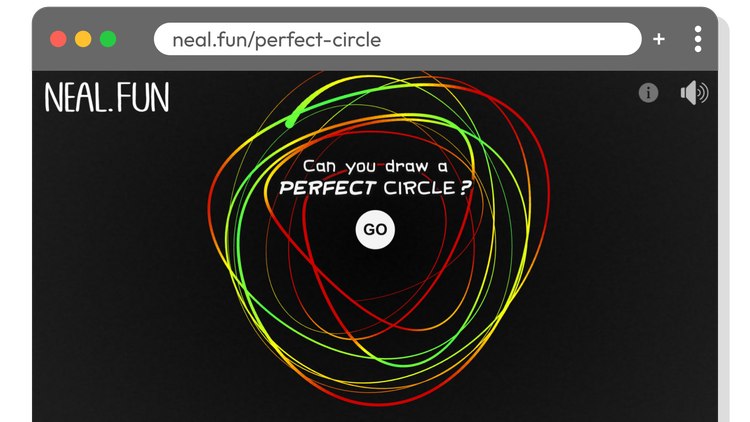
      <p class="" style="color:inherit;font-size:1em;line-height:1.618em;margin:0 0 1.25em 0;font-weight:normal;margin-top:0;margin-bottom:0;font-family:'DejaVu Sans Condensed', 'Liberation Sans', 'Nimbus Sans L', 'Helvetica Neue', Helvetica, Arial, sans-serif;letter-spacing:-.01em;"><strong>Draw a perfect circle with a mouse?</strong> That's a challenge! Try Neal.fun’s <a href="https://neal.fun/perfect-circle/" rel="nofollow" style="color:#009cdb !important;">Draw a Perfect Circle</a> and see how close you can get. After you draw, you'll receive a score—but keep your circle from being too small or too wobbly. It's a quick and fun brain break!</p>
    </td>
  </tr>
</tbody></table>

</div>
<div id="image-image-section-below-22">
<table role="presentation" width="100%" cellpadding="0" cellspacing="0" border="0" bgcolor="#D9FFDA" class="image-section below-layout section-content">


    <tbody><tr>
      <td>
        <table role="presentation" width="100%" cellpadding="0" cellspacing="0" border="0">
          <tbody><tr>
              

            <td align="left" valign="middle" class="section-image-cell section-content-cell section-hoverable-image" data-aspect="ORIGINAL" style="padding:0;">
              
  <a href="https://neal.fun/perfect-circle/" style="color:#009cdb !important;"><img class="section-scaleable-image" src="https://images.squarespace-cdn.com/content/50eca855e4b0939ae8bb12d9/90ff5cf5-664c-4490-a46f-f4b2c0f63de8/Neal+Fun+Circle+Screenshot.png?content-type=image%2Fpng&amp;format=750w" width="594" alt="Screenshot of Neal.fun's Draw a Perfect Circle splash page" style="font-size:.6666666666666666em;display:block;border:0;text-decoration:none;line-height:0;background-color:transparent;font-weight:normal;height:auto;width:100%;max-width:100%;font-family:'DejaVu Sans Condensed', 'Liberation Sans', 'Nimbus Sans L', 'Helvetica Neue', Helvetica, Arial, sans-serif;"></a>


            </td>
              

          </tr>
        </tbody></table>
      </td>
    </tr>


</tbody></table>

</div>
<div id="text-text-section-23">


<table role="presentation" width="100%" cellpadding="0" cellspacing="0" border="0" bgcolor="#8A38F5" class="text-section section-content">
  <tbody><tr>
    <td valign="top" class="section-text-area section-content-cell padding-mobile-both" style="padding-top:12px;padding-right:66px;padding-bottom:12px;padding-left:66px;color:#fff;background-color:#8a38f5;">
      <h4 style="color:inherit;margin:1.414em 0 .5em;font-weight:400;line-height:1.25em;font-size:1.5em;mso-line-height-alt:1.5em;margin-top:0;margin-bottom:0;font-family:'DejaVu Sans Condensed', 'Liberation Sans', 'Nimbus Sans L', 'Helvetica Neue', Helvetica, Arial, sans-serif;letter-spacing:.02em;">February FigJam Fun 💜</h4>
    </td>
  </tr>
</tbody></table>

</div>
<div id="text-text-section-24">


<table role="presentation" width="100%" cellpadding="0" cellspacing="0" border="0" bgcolor="#EEDFFF" class="text-section section-content">
  <tbody><tr>
    <td valign="top" class="section-text-area section-content-cell padding-mobile-both" style="padding-top:13px;padding-right:66px;padding-bottom:12px;padding-left:66px;color:#272727;background-color:#eedfff;">
      <p class="" style="color:inherit;font-size:1em;line-height:1.618em;margin:0 0 1.25em 0;font-weight:normal;margin-top:0;font-family:'DejaVu Sans Condensed', 'Liberation Sans', 'Nimbus Sans L', 'Helvetica Neue', Helvetica, Arial, sans-serif;letter-spacing:-.01em;">I’ve created two Valentiney templates in <a href="https://www.figma.com/education/" rel="nofollow" style="color:#009cdb !important;">FigJam</a>! FigJam is a free collaborative whiteboard that works perfectly as a replacement for Google’s discontinued Jamboard.</p><p class="" style="color:inherit;font-size:1em;line-height:1.618em;margin:0 0 1.25em 0;font-weight:normal;font-family:'DejaVu Sans Condensed', 'Liberation Sans', 'Nimbus Sans L', 'Helvetica Neue', Helvetica, Arial, sans-serif;letter-spacing:-.01em;"><strong><span data-letter-spacing="2" style="font-size:inherit;font-weight:inherit;line-height:inherit;margin:0;letter-spacing:0.1em;">Hearty Color Schemes</span></strong></p><p class="" style="color:inherit;font-size:1em;line-height:1.618em;margin:0 0 1.25em 0;font-weight:normal;font-family:'DejaVu Sans Condensed', 'Liberation Sans', 'Nimbus Sans L', 'Helvetica Neue', Helvetica, Arial, sans-serif;letter-spacing:-.01em;">In this template, students explore color schemes and apply one to create vibrant, artfully designed hearts. Each student gets their own heart to work on within a shared file. Once the hearts are finished, the class can vote for their favorites by stamping the designs they love most. <a href="https://www.figma.com/community/file/1464021753917322973" rel="nofollow" style="color:#009cdb !important;">Open in FigJam.</a></p><p class="" style="color:inherit;font-size:1em;line-height:1.618em;margin:0 0 1.25em 0;font-weight:normal;font-family:'DejaVu Sans Condensed', 'Liberation Sans', 'Nimbus Sans L', 'Helvetica Neue', Helvetica, Arial, sans-serif;letter-spacing:-.01em;"><strong><span data-letter-spacing="2" style="font-size:inherit;font-weight:inherit;line-height:inherit;margin:0;letter-spacing:0.1em;">Learny Libs: Valentine’s Day</span></strong></p><p class="" style="color:inherit;font-size:1em;line-height:1.618em;margin:0 0 1.25em 0;font-weight:normal;margin-bottom:0;font-family:'DejaVu Sans Condensed', 'Liberation Sans', 'Nimbus Sans L', 'Helvetica Neue', Helvetica, Arial, sans-serif;letter-spacing:-.01em;">In this template, the class brainstorms parts of speech and votes on the most vivid words. Using the winning words as a guide, they replace parts of a nonfiction text about Valentine’s Day. After reading the silly new version and sharing some laughs, students guess the original words. Finally, the original Valentine’s Day text is revealed for comparison and discussion. <a href="https://www.figma.com/community/file/1464021720173335260" rel="nofollow" style="color:#009cdb !important;">Open in FigJam.</a></p>
    </td>
  </tr>
</tbody></table>

</div>
<div id="image-image-section-thumbnail-25">


<table role="presentation" width="100%" cellpadding="0" cellspacing="0" border="0" align="center" bgcolor="#EEDFFF" class="image-section thumbnail-layout section-content">


    <tbody><tr>
        
    <td class=" section-spacing-left" width="44"></td>
  

      <td>
        <table role="presentation" width="100%" cellpadding="0" cellspacing="0" border="0">
          <tbody><tr>


<td align="center" valign="middle" class="section-image-cell section-content-cell section-hoverable-image" data-aspect="ORIGINAL" style="padding:0;">

  <a href="https://www.figma.com/community/file/1464021753917322973" style="color:#009cdb !important;"><img class="section-thumbnail-image" src="https://images.squarespace-cdn.com/content/50eca855e4b0939ae8bb12d9/6edf6ff3-3833-4fff-938e-6cb2b2a7cd41/976ebd5be11d336b437fc5d4c4163eba7daf3618.png?content-type=image%2Fpng&amp;format=750w" width="250" style="font-size:.6666666666666666em;display:block;border:0;text-decoration:none;line-height:0;font-weight:normal;font-family:'DejaVu Sans Condensed', 'Liberation Sans', 'Nimbus Sans L', 'Helvetica Neue', Helvetica, Arial, sans-serif;height:auto;max-width:100%;max-height:250px;width:250px;" alt="Heart color schemes thumbnail"></a>

</td>

                
                <td width="19" height="19"></td>


<td align="center" valign="middle" class="section-image-cell section-content-cell section-hoverable-image" data-aspect="ORIGINAL" style="padding:0;">

  <a href="https://www.figma.com/community/file/1464021720173335260" style="color:#009cdb !important;"><img class="section-thumbnail-image" src="https://images.squarespace-cdn.com/content/50eca855e4b0939ae8bb12d9/175c005c-90b3-4522-a5d5-3fb20e14f7c9/c4aeb43ca1bcc7f4d3e24dac0c8b6695af7875d6.png?content-type=image%2Fpng&amp;format=750w" width="250" style="font-size:.6666666666666666em;display:block;border:0;text-decoration:none;line-height:0;font-weight:normal;font-family:'DejaVu Sans Condensed', 'Liberation Sans', 'Nimbus Sans L', 'Helvetica Neue', Helvetica, Arial, sans-serif;height:auto;max-width:100%;max-height:250px;width:250px;" alt="Learny Libs: Valentine's Day thumbnail
"></a>

</td>


          </tr>
        </tbody></table>
      </td>
        
    <td class=" section-spacing-right" width="44"></td>
  

    </tr>
    
  <tr>
    <td bgcolor="#EEDFFF" class="spacing-below" height="22"></td>
  </tr>


</tbody></table>

</div>
<div id="text-text-section-26">


<table role="presentation" width="100%" cellpadding="0" cellspacing="0" border="0" bgcolor="#222672" class="text-section section-content">
  <tbody><tr>
    <td valign="top" class="section-text-area section-content-cell padding-mobile-both" style="padding-top:12px;padding-right:66px;padding-bottom:12px;padding-left:66px;color:#fff;background-color:#222672;">
      <h4 style="color:inherit;margin:1.414em 0 .5em;font-weight:400;line-height:1.25em;font-size:1.5em;mso-line-height-alt:1.5em;margin-top:0;margin-bottom:0;font-family:'DejaVu Sans Condensed', 'Liberation Sans', 'Nimbus Sans L', 'Helvetica Neue', Helvetica, Arial, sans-serif;letter-spacing:.02em;">Sensational Shapegrams 😍</h4>
    </td>
  </tr>
</tbody></table>

</div>
<div id="text-text-section-27">


<table role="presentation" width="100%" cellpadding="0" cellspacing="0" border="0" bgcolor="#DEE0FF" class="text-section section-content">
  <tbody><tr>
    <td valign="top" class="section-text-area section-content-cell padding-mobile-both" style="padding-top:13px;padding-right:66px;padding-bottom:12px;padding-left:66px;color:#272727;background-color:#dee0ff;">
      <p class="" style="color:inherit;font-size:1em;line-height:1.618em;margin:0 0 1.25em 0;font-weight:normal;margin-top:0;font-family:'DejaVu Sans Condensed', 'Liberation Sans', 'Nimbus Sans L', 'Helvetica Neue', Helvetica, Arial, sans-serif;letter-spacing:-.01em;"><strong>Turn your students into digital </strong><em><strong>heARTISTS</strong></em><strong> with Valentine’s Shapegrams!</strong></p><p class="" style="color:inherit;font-size:1em;line-height:1.618em;margin:0 0 1.25em 0;font-weight:normal;font-family:'DejaVu Sans Condensed', 'Liberation Sans', 'Nimbus Sans L', 'Helvetica Neue', Helvetica, Arial, sans-serif;letter-spacing:-.01em;"><a href="https://docs.google.com/presentation/d/1SkGBmdOKYQu9x-RYqtrEynq5XA_gW73C479OBHv12GA/present" rel="nofollow" style="color:#009cdb !important;">Most of these no-prep lessons</a> are at the Beginning Blue level, so students with no previous experience in grades 3–12 can get started on them right away .</p><p class="" style="color:inherit;font-size:1em;line-height:1.618em;margin:0 0 1.25em 0;font-weight:normal;margin-bottom:0;font-family:'DejaVu Sans Condensed', 'Liberation Sans', 'Nimbus Sans L', 'Helvetica Neue', Helvetica, Arial, sans-serif;letter-spacing:-.01em;"><a href="https://shapegrams.com/pricing/" rel="nofollow" style="color:#009cdb !important;">Membership</a> is only $35 per year per teacher. If you’re unfamiliar with the power of Shapegrams, <a href="https://shapegrams.com/free/" rel="nofollow" style="color:#009cdb !important;">try some free ones</a> with your class and see how they encourage creativity, build tech skills, and foster a growth mindset.</p>
    </td>
  </tr>
</tbody></table>

</div>
<div id="image-image-section-below-28">
<table role="presentation" width="100%" cellpadding="0" cellspacing="0" border="0" bgcolor="#DEE0FF" class="image-section below-layout section-content">


    <tbody><tr>
      <td>
        <table role="presentation" width="100%" cellpadding="0" cellspacing="0" border="0">
          <tbody><tr>
              
    <td class="show-desktop-only section-spacing-left" width="44"></td>
  

            <td align="left" valign="middle" class="section-image-cell section-content-cell section-hoverable-image" data-aspect="ORIGINAL" style="padding:0;">
              
  <a href="https://docs.google.com/presentation/d/1SkGBmdOKYQu9x-RYqtrEynq5XA_gW73C479OBHv12GA/present" style="color:#009cdb !important;"><img class="section-scaleable-image" src="https://images.squarespace-cdn.com/content/50eca855e4b0939ae8bb12d9/e8b0a6d4-6aec-4085-b1f3-a021bdb5e827/Valentine+Shapegrams.png?content-type=image%2Fpng&amp;format=750w" width="594" alt="Graphic showing 6 different heart and Valentine's Day themed images" style="font-size:.6666666666666666em;display:block;border:0;text-decoration:none;line-height:0;background-color:transparent;font-weight:normal;height:auto;width:100%;max-width:100%;font-family:'DejaVu Sans Condensed', 'Liberation Sans', 'Nimbus Sans L', 'Helvetica Neue', Helvetica, Arial, sans-serif;"></a>


            </td>
              
    <td class="show-desktop-only section-spacing-right" width="44"></td>
  

          </tr>
        </tbody></table>
      </td>
    </tr>


  <tr>
    <td bgcolor="#DEE0FF" class="spacing-below" height="22"></td>
  </tr>


</tbody></table>

</div>
<div id="text-text-section-29">


<table role="presentation" width="100%" cellpadding="0" cellspacing="0" border="0" bgcolor="#1BA34A" class="text-section section-content">
  <tbody><tr>
    <td valign="top" class="section-text-area section-content-cell padding-mobile-both" style="padding-top:12px;padding-right:66px;padding-bottom:12px;padding-left:66px;color:#fff;background-color:#1ba34a;">
      <h4 style="color:inherit;margin:1.414em 0 .5em;font-weight:400;line-height:1.25em;font-size:1.5em;mso-line-height-alt:1.5em;margin-top:0;margin-bottom:0;font-family:'DejaVu Sans Condensed', 'Liberation Sans', 'Nimbus Sans L', 'Helvetica Neue', Helvetica, Arial, sans-serif;letter-spacing:.02em;">Wordle Wrangler 🐎</h4>
    </td>
  </tr>
</tbody></table>

</div>
<div id="text-text-section-30">


<table role="presentation" width="100%" cellpadding="0" cellspacing="0" border="0" bgcolor="#E3F8EA" class="text-section section-content">
  <tbody><tr>
    <td valign="top" class="section-text-area section-content-cell padding-mobile-both" style="padding-top:12px;padding-right:66px;padding-bottom:12px;padding-left:66px;color:#272727;background-color:#e3f8ea;">
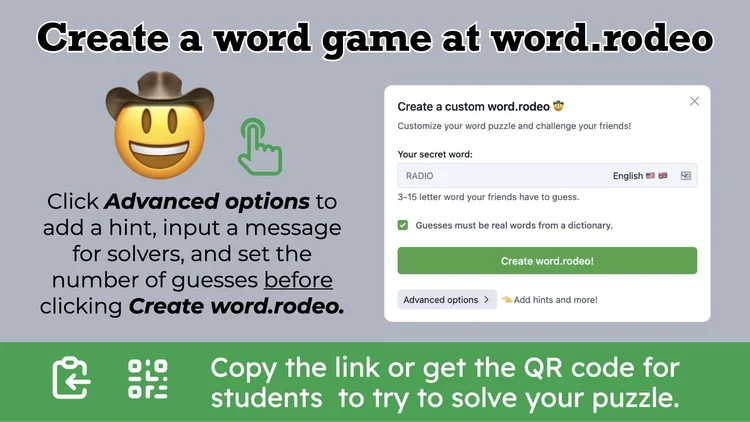
      <p class="" style="color:inherit;font-size:1em;line-height:1.618em;margin:0 0 1.25em 0;font-weight:normal;margin-top:0;margin-bottom:0;font-family:'DejaVu Sans Condensed', 'Liberation Sans', 'Nimbus Sans L', 'Helvetica Neue', Helvetica, Arial, sans-serif;letter-spacing:-.01em;"><a href="https://word.rodeo" rel="nofollow" style="color:#009cdb !important;">Word.Rodeo</a> is like <strong>Wordle</strong>, except you can create your own puzzles to share. Puzzles can be be as short as 3 letters and as long as 10 letters. Advanced options include adding a hint and allowing up to 12 guesses.</p>
    </td>
  </tr>
</tbody></table>

</div>
<div id="image-image-section-below-31">
<table role="presentation" width="100%" cellpadding="0" cellspacing="0" border="0" bgcolor="#E3F8EA" class="image-section below-layout section-content">


    <tbody><tr>
      <td>
        <table role="presentation" width="100%" cellpadding="0" cellspacing="0" border="0">
          <tbody><tr>
              
    <td class="show-desktop-only section-spacing-left" width="44"></td>
  

            <td align="left" valign="middle" class="section-image-cell section-content-cell section-hoverable-image" data-aspect="ORIGINAL" style="padding:0;">
              
  <a href="https://word.rodeo" style="color:#009cdb !important;"><img class="section-scaleable-image" src="https://images.squarespace-cdn.com/content/50eca855e4b0939ae8bb12d9/f233a77a-2174-4013-8a02-bc37a9551594/Temping%2BLesson%2BHooks.028.jpeg?content-type=image%2Fjpeg&amp;format=750w" width="594" alt="A screenshot of the word.rodeo website, featuring a smiling cowboy hat emoji. The main text reads &quot;Create a word game at word.rodeo.&quot; Below, there's a form to create a custom word puzzle. Users can input their secret word, choose the word length, and" style="font-size:.6666666666666666em;display:block;border:0;text-decoration:none;line-height:0;background-color:transparent;font-weight:normal;height:auto;width:100%;max-width:100%;font-family:'DejaVu Sans Condensed', 'Liberation Sans', 'Nimbus Sans L', 'Helvetica Neue', Helvetica, Arial, sans-serif;"></a>


            </td>
              
    <td class="show-desktop-only section-spacing-right" width="44"></td>
  

          </tr>
        </tbody></table>
      </td>
    </tr>


  <tr>
    <td bgcolor="#E3F8EA" class="spacing-below" height="22"></td>
  </tr>


</tbody></table>

</div>
<div id="text-text-section-32">


<table role="presentation" width="100%" cellpadding="0" cellspacing="0" border="0" bgcolor="transparent" class="text-section section-content">
  <tbody><tr>
    <td valign="top" class="section-text-area section-content-cell padding-mobile-both" style="padding-top:28px;padding-right:66px;padding-bottom:0px;padding-left:66px;color:#272727;background-color:transparent;">
      <p class="" style="color:inherit;font-size:1em;line-height:1.618em;margin:0 0 1.25em 0;font-weight:normal;margin-top:0;font-family:'DejaVu Sans Condensed', 'Liberation Sans', 'Nimbus Sans L', 'Helvetica Neue', Helvetica, Arial, sans-serif;letter-spacing:-.01em;">Did you know that “<strong>biweekly</strong>” can mean both twice a week and once every two weeks?</p><p class="" style="color:inherit;font-size:1em;line-height:1.618em;margin:0 0 1.25em 0;font-weight:normal;font-family:'DejaVu Sans Condensed', 'Liberation Sans', 'Nimbus Sans L', 'Helvetica Neue', Helvetica, Arial, sans-serif;letter-spacing:-.01em;">Up until now, <em>Learning in Hand</em> has been a weekly newsletter, with occasional breaks for holidays. However, I’ve realized that creating this newsletter takes more time than I often have to spare. While I have plenty of ideas and resources to share, I’m a slow writer, and composing each issue is a significant time investment.</p><p class="" style="color:inherit;font-size:1em;line-height:1.618em;margin:0 0 1.25em 0;font-weight:normal;font-family:'DejaVu Sans Condensed', 'Liberation Sans', 'Nimbus Sans L', 'Helvetica Neue', Helvetica, Arial, sans-serif;letter-spacing:-.01em;">So, I’m adjusting the schedule to <strong>biweekly</strong>—the “once every two weeks” kind of biweekly. If you don’t see <em>Learning in Hand</em> in your inbox next week, don’t worry—I haven’t removed you from the mailing list!</p><p class="" style="color:inherit;font-size:1em;line-height:1.618em;margin:0 0 1.25em 0;font-weight:normal;font-family:'DejaVu Sans Condensed', 'Liberation Sans', 'Nimbus Sans L', 'Helvetica Neue', Helvetica, Arial, sans-serif;letter-spacing:-.01em;">Thank you for your understanding and continued support. I look forward to sharing more handy education and technology insights with you every other week.</p><p style="color:inherit;font-size:1em;line-height:1.618em;margin:0 0 1.25em 0;font-weight:normal;margin-bottom:0;font-family:'DejaVu Sans Condensed', 'Liberation Sans', 'Nimbus Sans L', 'Helvetica Neue', Helvetica, Arial, sans-serif;letter-spacing:-.01em;text-align:center;" class="">Smiles from Iowa,</p>
    </td>
  </tr>
</tbody></table>

</div>
<div id="image-image-section-below-33">
<table role="presentation" width="100%" cellpadding="0" cellspacing="0" border="0" bgcolor="transparent" class="image-section below-layout section-content">


    <tbody><tr>
      <td>
        <table role="presentation" width="100%" cellpadding="0" cellspacing="0" border="0">
          <tbody><tr>
              
    <td class="show-desktop-only section-spacing-left" width="88"></td>
  

            <td align="left" valign="middle" class="section-image-cell section-content-cell section-hoverable-image" data-aspect="ORIGINAL" style="padding:0;">
              
  <img class="section-scaleable-image" src="https://images.squarespace-cdn.com/content/50eca855e4b0939ae8bb12d9/00445278-d88c-451c-89ad-108eb0a7cfca/Tony+Signature.png?content-type=image%2Fpng&amp;format=750w" width="594" alt="" style="font-size:.6666666666666666em;display:block;border:0;text-decoration:none;line-height:0;background-color:transparent;font-weight:normal;height:auto;width:100%;max-width:100%;font-family:'DejaVu Sans Condensed', 'Liberation Sans', 'Nimbus Sans L', 'Helvetica Neue', Helvetica, Arial, sans-serif;">


            </td>
              
    <td class="show-desktop-only section-spacing-right" width="88"></td>
  

          </tr>
        </tbody></table>
      </td>
    </tr>


  <tr>
    <td bgcolor="transparent" class="spacing-below" height="29"></td>
  </tr>


</tbody></table>

</div>
<div id="button-button-section-34">


<table role="presentation" width="100%" cellpadding="0" cellspacing="0" border="0" bgcolor="#EDEDED" class="button-section section-content" style="width:100%;background-color:#ededed;">
  <tbody><tr>
    <td align="center" valign="middle" class="section-content-cell section-text-area" style="padding-top:22px;padding-right:22px;padding-bottom:8px;padding-left:22px;">
      
      <a href="https://learninginhand.com/newsletter" class="button-section-box button-style-solid" style="color:#009cdb !important;display:inline-block;line-height:11px;margin:0;mso-padding-alt:0;text-align:center;text-decoration:none;transition:.15s;width:auto;background-color:#009cdb;border:0;padding:17px 0;"><i class="button-section-mso" style="letter-spacing:29.92px;mso-font-width:-100%;mso-text-raise:26.950000000000003px;">&nbsp;</i><span class="button-section-label" style="line-height:inherit;margin:0;font-family:'DejaVu Sans Condensed', 'Liberation Sans', 'Nimbus Sans L', 'Helvetica Neue', Helvetica, Arial, sans-serif;font-weight:700;color:#fff;display:inline-block;font-size:11px;min-width:1px;mso-text-raise:15.95px;"><span data-letter-spacing="3" style="font-size:inherit;font-weight:inherit;line-height:inherit;margin:0;letter-spacing:0.2em;">Previous Issues</span></span><i class="button-section-mso" style="letter-spacing:29.92px;mso-font-width:-100%;mso-text-raise:26.950000000000003px;">&nbsp;</i></a>
    </td>
  </tr>
</tbody></table>

</div>
<div id="text-text-section-35">


<table role="presentation" width="100%" cellpadding="0" cellspacing="0" border="0" bgcolor="#EDEDED" class="text-section section-content">
  <tbody><tr>
    <td valign="top" class="section-text-area section-content-cell padding-mobile-both" style="padding-top:8px;padding-right:66px;padding-bottom:8px;padding-left:66px;color:#313131;background-color:#ededed;">
      <p style="color:inherit;font-size:1em;line-height:1.618em;margin:0 0 1.25em 0;font-weight:normal;margin-top:0;font-family:'DejaVu Sans Condensed', 'Liberation Sans', 'Nimbus Sans L', 'Helvetica Neue', Helvetica, Arial, sans-serif;letter-spacing:-.01em;text-align:center;" class="">Subscribe at&nbsp;<a href="https://learninginhand.com/newsletter" rel="nofollow" style="color:#009cdb !important;">learninginhand.com</a></p><p class="" style="color:inherit;font-size:1em;line-height:1.618em;margin:0 0 1.25em 0;font-weight:normal;margin-bottom:0;font-family:'DejaVu Sans Condensed', 'Liberation Sans', 'Nimbus Sans L', 'Helvetica Neue', Helvetica, Arial, sans-serif;letter-spacing:-.01em;"><em>Al was used to revise and proofread some of the text in this newsletter. It was also used to generate possibilities for section titles.</em></p>
    </td>
  </tr>
</tbody></table>

</div>
                </td>
              </tr>
            </tbody></table>
            
              <table role="presentation" width="100%" cellpadding="0" cellspacing="0" border="0" id="newsletter-section-footer">
                <tbody><tr>
                  <td align="center" valign="top" id="newsletter-section-footer-cell">
                    
<div id="footer-footer-section-stacked-bottom-0">


<table role="presentation" width="100%" cellpadding="0" cellspacing="0" border="0" bgcolor="#EDEDED" class="footer-section footer-section-stacked section-content" style="background-color:#ededed;">
  <tbody><tr>
    <td align="center" valign="top" class="section-text-area section-content-cell" style="padding-top:20px;padding-right:22px;padding-bottom:22px;padding-left:22px;">
      
  <table role="presentation" class="social-links" cellpadding="0" cellspacing="0" border="0">
    <tbody><tr>
    
    
      <td valign="top" width="30" height="52">
        <a href="http://www.facebook.com/learninginhand" style="color:#009cdb !important;text-decoration:none;">
          <img class="social-link-icon" src="https://assets.squarespace.com/composer/assets/images/email/social-icons/facebook+dark.png" width="22" height="22" max-width="22" alt="facebook" style="font-size:.6666666666666666em;text-decoration:none;line-height:0;font-weight:normal;font-family:'DejaVu Sans Condensed', 'Liberation Sans', 'Nimbus Sans L', 'Helvetica Neue', Helvetica, Arial, sans-serif;display:block;margin:0 auto;border:0;">
        </a>
      </td>


<td class="" width="20"></td>

    
      <td valign="top" width="30" height="52">
        <a href="https://x.com/tonyvincent" style="color:#009cdb !important;text-decoration:none;">
          <img class="social-link-icon" src="https://assets.squarespace.com/composer/assets/images/email/social-icons/x-formerly-twitter+dark.png" width="22" height="22" max-width="22" alt="x-formerly-twitter" style="font-size:.6666666666666666em;text-decoration:none;line-height:0;font-weight:normal;font-family:'DejaVu Sans Condensed', 'Liberation Sans', 'Nimbus Sans L', 'Helvetica Neue', Helvetica, Arial, sans-serif;display:block;margin:0 auto;border:0;">
        </a>
      </td>


<td class="" width="20"></td>

    
      <td valign="top" width="30" height="52">
        <a href="http://instagram.com/learninginhand" style="color:#009cdb !important;text-decoration:none;">
          <img class="social-link-icon" src="https://assets.squarespace.com/composer/assets/images/email/social-icons/instagram+dark.png" width="22" height="22" max-width="22" alt="instagram" style="font-size:.6666666666666666em;text-decoration:none;line-height:0;font-weight:normal;font-family:'DejaVu Sans Condensed', 'Liberation Sans', 'Nimbus Sans L', 'Helvetica Neue', Helvetica, Arial, sans-serif;display:block;margin:0 auto;border:0;">
        </a>
      </td>


<td class="" width="20"></td>

    
      <td valign="top" width="30" height="52">
        <a href="https://www.threads.net/@learninginhand" style="color:#009cdb !important;text-decoration:none;">
          <img class="social-link-icon" src="https://assets.squarespace.com/composer/assets/images/email/social-icons/threads+dark.png" width="22" height="22" max-width="22" alt="threads" style="font-size:.6666666666666666em;text-decoration:none;line-height:0;font-weight:normal;font-family:'DejaVu Sans Condensed', 'Liberation Sans', 'Nimbus Sans L', 'Helvetica Neue', Helvetica, Arial, sans-serif;display:block;margin:0 auto;border:0;">
        </a>
      </td>


<td class="" width="20"></td>

    
      <td valign="top" width="30" height="52">
        <a href="https://www.tiktok.com/@learninginhand" style="color:#009cdb !important;text-decoration:none;">
          <img class="social-link-icon" src="https://assets.squarespace.com/composer/assets/images/email/social-icons/tiktok+dark.png" width="22" height="22" max-width="22" alt="tiktok" style="font-size:.6666666666666666em;text-decoration:none;line-height:0;font-weight:normal;font-family:'DejaVu Sans Condensed', 'Liberation Sans', 'Nimbus Sans L', 'Helvetica Neue', Helvetica, Arial, sans-serif;display:block;margin:0 auto;border:0;">
        </a>
      </td>
    
    </tr>
  </tbody></table>


    <p class="footer-company-info" style="line-height:1.618em;font-weight:normal;font-family:'DejaVu Sans Condensed', 'Liberation Sans', 'Nimbus Sans L', 'Helvetica Neue', Helvetica, Arial, sans-serif;letter-spacing:-.01em;color:#777;font-size:11px;margin:0 0 13.75px 0;padding:0;">
  <a style="color:#777;text-decoration:none;font-size:inherit;font-family:inherit;font-weight:inherit;line-height:inherit;cursor:default;">Tony Vincent, Inc., 
  1406 Callahan Drive, 
  Council Bluffs, Iowa, 
  USA</a>
</p>


      <a class="brand-logo-link" href="https://learninginhand.com/" style="color:#009cdb !important;"><img class="brand-logo" src="https://images.squarespace-cdn.com/content/v1/50eca855e4b0939ae8bb12d9/410f2385-df7d-42a7-a349-9423d6c7484d/LIH_blue.png" height="63" alt="Learning in Hand with Tony Vincent" style="font-size:.6666666666666666em;border:0;text-decoration:none;line-height:0;font-weight:normal;font-family:'DejaVu Sans Condensed', 'Liberation Sans', 'Nimbus Sans L', 'Helvetica Neue', Helvetica, Arial, sans-serif;margin-bottom:13.75px;color:#777;display:inline;height:auto;max-height:63px;max-width:100%;width:auto;"></a>


<p class="footer-links" style="line-height:1.618em;font-weight:normal;font-family:'DejaVu Sans Condensed', 'Liberation Sans', 'Nimbus Sans L', 'Helvetica Neue', Helvetica, Arial, sans-serif;letter-spacing:-.01em;font-size:11px;color:#313131;margin:0 0 13.75px 0;padding:0;">
  Powered by <a href="https://www.squarespace.com?channel=product_refer&amp;subchannel=customer&amp;source=email_campaigns_button&amp;campaign=50eca855e4b0939ae8bb12d9&amp;utm_medium=product_refer&amp;utm_source=email_campaigns_button" class="sqsp-link" style="color:#313131;text-decoration:underline;display:inline-block;">Squarespace</a>
</p>


      <p class="footer-links" style="line-height:1.618em;font-weight:normal;margin-bottom:0;font-family:'DejaVu Sans Condensed', 'Liberation Sans', 'Nimbus Sans L', 'Helvetica Neue', Helvetica, Arial, sans-serif;letter-spacing:-.01em;font-size:11px;color:#313131;margin:0 0 13.75px 0;padding:0;">
  <a href="#" class="unsubscribe-link" style="color:#313131;text-decoration:underline;">
    <span class="unsubscribe-link-text" style="font-size:inherit;font-weight:inherit;line-height:inherit;margin:0;">Unsubscribe</span>
  </a>
</p>

    </td>
  </tr>
</tbody></table>

</div>
                  </td>
                </tr>
              </tbody></table>
            
          </td>
        </tr>
      </tbody></table>
    </td>
  </tr>
</tbody></table>

  
</body></html>