<!doctype html>
<html xmlns="http://www.w3.org/1999/xhtml" xmlns:v="urn:schemas-microsoft-com:vml" xmlns:o="urn:schemas-microsoft-com:office:office" lang="en-US" xml:lang="en-US">
  <head>
    <title data-ignore-plain-text>Learning in Hand Issue 27</title>
    <meta http-equiv="content-type" content="text/html; charset=utf-8">
    <meta name="viewport" content="width=device-width, initial-scale=1, maximum-scale=1">
    <meta name="format-detection" content="address=no">
    <!--[if (gte mso 9)|(IE)]>
    <style type="text/css" media="screen">
      li {
        text-indent: -1em;
      }
    </style>
    <![endif]-->
    <style type="text/css" media="all">
      body,
.section-text-area,
.section-text-area-wrapper,
.section-text-cell {
    overflow-wrap: break-word;
    word-wrap: break-word;
    -ms-word-break: break-all;
    word-break: break-word;
}
body {
    width: 100% !important;
    min-width: 100% !important;
    -ms-text-size-adjust: none;
    -webkit-text-size-adjust: none;
    mso-line-height-rule: exactly;
}
p {
    margin-block: 0;
}
@media only screen and (max-width:  593px ) {
    table#newsletter-table {
        border: 0 !important;
    }
    table#newsletter-email {
        width: 100% !important;
    }
    img.section-scaleable-image,
    img.section-empty-img {
        max-width: 100% !important;
        height: auto !important;
    }
    .bg-none {
        background: none !important;
    }
    .hauto {
        height: auto !important;
    }
    .show-desktop-only {
        display: none !important;
    }
    .show-mobile-only {
        display: block !important;
        float: none !important;
        line-height: auto !important;
        max-height: inherit !important;
        max-width: inherit !important;
        margin-top: 0px !important;
        overflow: visible !important;
        visibility: inherit !important;
        width: auto !important;
    }
    .stack-cell-wrap {
        display: block !important;
    }
    .stack-cell-up {
        display: table-header-group !important;
    }
    .stack-cell-down {
        display: table-footer-group !important;
    }
    .mw100p {
        max-width: 100% !important;
    }
    .section-horizontal-padding,
    .padding-mobile-both {
        padding-left: 22px !important;
        padding-right: 22px !important;
    }
    .padding-mobile-left {
        padding-left: 22px !important;
    }
    .padding-mobile-right {
        padding-right: 22px !important;
    }
    .text-left {
        text-align: left !important;
    }
    .text-right {
        text-align: right !important;
    }
    .w100p {
        width: 100% !important;
    }
}
.button-style-solid:hover,
.button-style-rounded:hover {
    opacity: .8 !important;
}
a:hover {
    text-decoration: none !important;
}
span.mail-merge-preview {
    border-bottom: 2px dotted currentColor;
    display: inline-block;
    line-height: 1em !important;
    margin-bottom: .125em !important;
}
table#newsletter-section-body .linked-site-title-link {
    color: #009cdb !important;
}
#header-header-section-stacked-top-0 .brand-name .linked-site-title-link {
    color: #777;
    text-decoration: none;
}
#footer-footer-section-stacked-bottom-0 .brand-name .linked-site-title-link {
    color: #777;
    text-decoration: none;
}
#footer-footer-section-stacked-bottom-0 .footer-text .linked-site-title-link {
    color: #009cdb;
}
#button-button-section-25 .button-style-outline:hover {
    background-color: #0040ff !important;
    border: 1px solid #0040ff !important;
}
#button-button-section-25 .button-style-outline:hover .button-section-label {
    color: #fff !important;
}
#button-button-section-27 .button-style-outline:hover {
    background-color: #0040ff !important;
    border: 1px solid #0040ff !important;
}
#button-button-section-27 .button-style-outline:hover .button-section-label {
    color: #fff !important;
}
#button-button-section-31 .button-style-outline:hover {
    background-color: #009cdb !important;
    border: 1px solid #009cdb !important;
}
#button-button-section-31 .button-style-outline:hover .button-section-label {
    color: #000 !important;
}

    </style>
    
    
    <!--[if mso]>
    <noscript>
      <xml>
        <o:OfficeDocumentSettings>
          <o:AllowPNG/>
          <o:PixelsPerInch>96</o:PixelsPerInch>
        </o:OfficeDocumentSettings>
      </xml>
    </noscript>
    <![endif]-->
    
    <!--[if (mso)|(mso 16)]>
      <style type="text/css">
        a {text-decoration: none;}
      </style>
    <![endif]-->
  </head>
  <body style="padding:0;margin:0;text-align:center;background-color:#ededed;">
    <table role="article" aria-label="Learning in Hand Issue 27" lang="en-US" cellpadding="0" cellspacing="0" border="0" align="center" id="newsletter-table" style="font-size:16px;font-weight:normal;width:100%;padding:0px;background-color:#ededed;border-top:44px solid #ededed;border-bottom:44px solid #ededed;margin:0 auto;text-align:center;table-layout:fixed;">
  <tbody><tr>
    <td align="center" valign="top" bgcolor="#EDEDED" id="newsletter-cell" style="font-size:1em;">
      <div data-ignore-plain-text class="newsletter-preview-text" style="color:transparent;display:none !important;height:0;max-height:0;max-width:0;opacity:0;overflow:hidden;mso-hide:all;visibility:hidden;width:0;">
        
            
            AI transparency, Canva offline presenting, Would You Rather, snowflakes, redacted font, Form of Fortune͏‌&nbsp;͏‌&nbsp;͏‌&nbsp;͏‌&nbsp;͏‌&nbsp;͏‌&nbsp;͏‌&nbsp;͏‌&nbsp;͏‌&nbsp;͏‌&nbsp;͏‌&nbsp;͏‌&nbsp;͏‌&nbsp;͏‌&nbsp;͏‌&nbsp;͏‌&nbsp;͏‌&nbsp;͏‌&nbsp;͏‌&nbsp;͏‌&nbsp;͏‌&nbsp;͏‌&nbsp;͏‌&nbsp;͏‌&nbsp;͏‌&nbsp;͏‌&nbsp;͏‌&nbsp;͏‌&nbsp;͏‌&nbsp;͏‌&nbsp;͏‌&nbsp;͏‌&nbsp;͏‌&nbsp;͏‌&nbsp;͏‌&nbsp;͏‌&nbsp;͏‌&nbsp;͏‌&nbsp;͏‌&nbsp;͏‌&nbsp;͏‌&nbsp;͏‌&nbsp;͏‌&nbsp;͏‌&nbsp;͏‌&nbsp;͏‌&nbsp;͏‌&nbsp;͏‌&nbsp;͏‌&nbsp;͏‌&nbsp;͏‌&nbsp;͏‌&nbsp;͏‌&nbsp;͏‌&nbsp;͏‌&nbsp;͏‌&nbsp;͏‌&nbsp;͏‌&nbsp;͏‌&nbsp;͏‌&nbsp;͏‌&nbsp;͏‌&nbsp;͏‌&nbsp;͏‌&nbsp;͏‌&nbsp;͏‌&nbsp;͏‌&nbsp;͏‌&nbsp;͏‌&nbsp;͏‌&nbsp;͏‌&nbsp;͏‌&nbsp;͏‌&nbsp;͏‌&nbsp;͏‌&nbsp;͏‌&nbsp;͏‌&nbsp;͏‌&nbsp;͏‌&nbsp;͏‌&nbsp;͏‌&nbsp;͏‌&nbsp;͏‌&nbsp;͏‌&nbsp;͏‌&nbsp;͏‌&nbsp;͏‌&nbsp;͏‌&nbsp;͏‌&nbsp;͏‌&nbsp;͏‌&nbsp;͏‌&nbsp;͏‌&nbsp;͏‌&nbsp;͏‌&nbsp;͏‌&nbsp;͏‌&nbsp;͏‌&nbsp;͏‌&nbsp;͏‌&nbsp;͏‌&nbsp;͏‌&nbsp;͏‌&nbsp;͏‌&nbsp;͏‌&nbsp;͏‌&nbsp;͏‌&nbsp;͏‌&nbsp;͏‌&nbsp;͏‌&nbsp;͏‌&nbsp;͏‌&nbsp;͏‌&nbsp;͏‌&nbsp;͏‌&nbsp;͏‌&nbsp;͏‌&nbsp;͏‌&nbsp;͏‌&nbsp;͏‌&nbsp;͏‌&nbsp;͏‌&nbsp;͏‌&nbsp;͏‌&nbsp;͏‌&nbsp;͏‌&nbsp;͏‌&nbsp;͏‌&nbsp;͏‌&nbsp;͏‌&nbsp;͏‌&nbsp;͏‌&nbsp;͏‌&nbsp;͏‌&nbsp;͏‌&nbsp;͏‌&nbsp;͏‌&nbsp;͏‌&nbsp;͏‌&nbsp;͏‌&nbsp;͏‌&nbsp;͏‌&nbsp;͏‌&nbsp;͏‌&nbsp;͏‌&nbsp;͏‌&nbsp;͏‌&nbsp;͏‌&nbsp;͏‌&nbsp;͏‌&nbsp;͏‌&nbsp;͏‌&nbsp;͏‌&nbsp;͏‌&nbsp;͏‌&nbsp;͏‌&nbsp;͏‌&nbsp;͏‌&nbsp;͏‌&nbsp;͏‌&nbsp;͏‌&nbsp;͏‌&nbsp;͏‌&nbsp;͏‌&nbsp;͏‌&nbsp;͏‌&nbsp;͏‌&nbsp;͏‌&nbsp;͏‌&nbsp;͏‌&nbsp;͏‌&nbsp;͏‌&nbsp;͏‌&nbsp;͏‌&nbsp;͏‌&nbsp;͏‌&nbsp;͏‌&nbsp;͏‌&nbsp;͏‌&nbsp;͏‌&nbsp;͏‌&nbsp;͏‌&nbsp;͏‌&nbsp;͏‌&nbsp;͏‌&nbsp;͏‌&nbsp;͏‌&nbsp;͏‌&nbsp;͏‌&nbsp;͏‌&nbsp;͏‌&nbsp;͏‌&nbsp;͏‌&nbsp;͏‌&nbsp;͏‌&nbsp;͏‌&nbsp;͏‌&nbsp;͏‌&nbsp;͏‌&nbsp;͏‌&nbsp;͏‌&nbsp;͏‌&nbsp;͏‌&nbsp;͏‌&nbsp;͏‌&nbsp;͏‌&nbsp;͏‌&nbsp;͏‌&nbsp;͏‌&nbsp;͏‌&nbsp;͏‌&nbsp;͏‌&nbsp;͏‌&nbsp;͏‌&nbsp;͏‌&nbsp;͏‌&nbsp;͏‌&nbsp;͏‌&nbsp;͏‌&nbsp;͏‌&nbsp;͏‌&nbsp;͏‌&nbsp;͏‌&nbsp;͏‌&nbsp;͏‌&nbsp;͏‌&nbsp;͏‌&nbsp;͏‌&nbsp;͏‌&nbsp;͏‌&nbsp;͏‌&nbsp;͏‌&nbsp;͏‌&nbsp;͏‌&nbsp;͏‌&nbsp;͏‌&nbsp;͏‌&nbsp;͏‌&nbsp;͏‌&nbsp;͏‌&nbsp;͏‌&nbsp;͏‌&nbsp;͏‌&nbsp;͏‌&nbsp;͏‌&nbsp;͏‌&nbsp;͏‌&nbsp;͏‌&nbsp;͏‌&nbsp;͏‌&nbsp;͏‌&nbsp;͏‌&nbsp;͏‌&nbsp;͏‌&nbsp;͏‌&nbsp;
        
      </div>
      <table border="0" cellpadding="0" cellspacing="0" width="594" bgcolor="#FFFFFF" id="newsletter-email">
        <tbody><tr>
          <td align="center" valign="top" id="newsletter-email-wrapper" class="modern-sans">
            <table role="presentation" width="100%" cellpadding="0" cellspacing="0" border="0" id="newsletter-section-header">
              <tbody><tr>
                <td align="center" valign="middle" id="newsletter-section-header-cell">
                  
<div id="header-header-section-stacked-top-0">


<table role="presentation" width="100%" cellpadding="0" cellspacing="0" border="0" class="view-in-browser-table" style="background-color:#ededed;">
  <tbody><tr>
    <td align="right" valign="middle" class="section-text-area section-header-view-in-browser section-content-cell">
      <p class="view-in-browser" style="color:inherit;line-height:1.618em;margin:0 0 1.25em 0;font-weight:normal;margin-top:0;font-family:'DejaVu Sans Condensed', 'Liberation Sans', 'Nimbus Sans L', 'Helvetica Neue', Helvetica, Arial, sans-serif;letter-spacing:-.01em;font-size:11px;margin-bottom:11px;"><a href="#" class="view-in-browser-link" style="color:#009cdb !important;text-decoration-line:underline;text-decoration-color:#5E5E5E;"><span class="view-in-browser-link-text" style="font-size:inherit;font-weight:inherit;line-height:inherit;margin:0;color:#5E5E5E;">View in Browser</span></a></p>
    </td>
  </tr>
</tbody></table>


<table role="presentation" width="100%" cellpadding="0" cellspacing="0" border="0" bgcolor="#009CDB" class="section-content header-section header-section-stacked" style="background-color:#009cdb;">
  <tbody><tr>
    <td align="center" valign="middle" class="section-text-area section-content-cell" style="padding-top:22px;padding-right:22px;padding-bottom:22px;padding-left:22px;">


      <a class="brand-logo-link" href="https://learninginhand.com/" style="color:#009cdb !important;"><img class="brand-logo" src="https://images.squarespace-cdn.com/content/v1/50eca855e4b0939ae8bb12d9/410f2385-df7d-42a7-a349-9423d6c7484d/LIH_blue.png" height="110" alt="Learning in Hand with Tony Vincent" style="font-size:.6666666666666666em;display:block;border:0;text-decoration:none;line-height:0;font-weight:normal;font-family:'DejaVu Sans Condensed', 'Liberation Sans', 'Nimbus Sans L', 'Helvetica Neue', Helvetica, Arial, sans-serif;color:#777;height:auto;max-height:110px;max-width:100%;width:auto;"></a>


    </td>
  </tr>
</tbody></table>

</div>
                </td>
              </tr>
            </tbody></table>
            <table role="presentation" width="100%" cellpadding="0" cellspacing="0" border="0" id="newsletter-section-body">
              <tbody><tr>
                <td align="center" valign="top" width="100%" id="newsletter-section-body-cell">
                  
<div id="text-text-section-0">


<table role="presentation" width="100%" cellpadding="0" cellspacing="0" border="0" bgcolor="#C1D72E" class="text-section section-content">
  <tbody><tr>
    <td valign="top" class="section-text-area section-content-cell" style="padding-top:12px;padding-right:22px;padding-bottom:12px;padding-left:22px;color:#fff;background-color:#c1d72e;">
      <h3 style="color:inherit;margin:1.414em 0 .5em;font-weight:400;line-height:1.25em;font-size:2.25em;mso-line-height-alt:2.25em;margin-top:0;margin-bottom:0;font-family:'DejaVu Sans Condensed', 'Liberation Sans', 'Nimbus Sans L', 'Helvetica Neue', Helvetica, Arial, sans-serif;letter-spacing:0em;text-align:center;"><strong>Newsletter</strong></h3>
    </td>
  </tr>
</tbody></table>

</div>
<div id="text-text-section-1">


<table role="presentation" width="100%" cellpadding="0" cellspacing="0" border="0" bgcolor="transparent" class="text-section section-content">
  <tbody><tr>
    <td valign="top" class="section-text-area section-content-cell padding-mobile-both" style="padding-top:8px;padding-right:66px;padding-bottom:8px;padding-left:66px;color:#009cdb;background-color:transparent;">
      <p style="color:inherit;font-size:1em;line-height:1.618em;margin:0 0 1.25em 0;font-weight:normal;margin-top:0;margin-bottom:0;font-family:'DejaVu Sans Condensed', 'Liberation Sans', 'Nimbus Sans L', 'Helvetica Neue', Helvetica, Arial, sans-serif;letter-spacing:-.01em;text-align:center;" class="">Issue 27 • Date January 22, 2025</p>
    </td>
  </tr>
</tbody></table>

</div>
<div id="text-text-section-2">


<table role="presentation" width="100%" cellpadding="0" cellspacing="0" border="0" bgcolor="transparent" class="text-section section-content">
  <tbody><tr>
    <td valign="top" class="section-text-area section-content-cell padding-mobile-both" style="padding-top:22px;padding-right:66px;padding-bottom:12px;padding-left:66px;color:#272727;background-color:transparent;">
      <p class="" style="color:inherit;font-size:1em;line-height:1.618em;margin:0 0 1.25em 0;font-weight:normal;margin-top:0;font-family:'DejaVu Sans Condensed', 'Liberation Sans', 'Nimbus Sans L', 'Helvetica Neue', Helvetica, Arial, sans-serif;letter-spacing:-.01em;">Using artificial intelligence can be incredibly helpful, and being upfront about it matters. Whether it’s brainstorming ideas, polishing writing, or creating something new, I believe in being transparent when AI plays a role. Sharing how we use AI builds credibility and models responsible technology use, showing others the importance of ethical and intentional practices.</p><p class="" style="color:inherit;font-size:1em;line-height:1.618em;margin:0 0 1.25em 0;font-weight:normal;font-family:'DejaVu Sans Condensed', 'Liberation Sans', 'Nimbus Sans L', 'Helvetica Neue', Helvetica, Arial, sans-serif;letter-spacing:-.01em;">When I collaborate with an AI chatbot, it’s like having a digital sidekick that supports me in refining my ideas, suggesting examples, and fixing my grammar.</p><p class="" style="color:inherit;font-size:1em;line-height:1.618em;margin:0 0 1.25em 0;font-weight:normal;margin-bottom:0;font-family:'DejaVu Sans Condensed', 'Liberation Sans', 'Nimbus Sans L', 'Helvetica Neue', Helvetica, Arial, sans-serif;letter-spacing:-.01em;">To be transparent, I want you to know that I use tools like ChatGPT, Gemini, Claude, and Apple Intelligence to help me revise my newsletters. I include a short transparency statement at the bottom of each issue to highlight AI’s role. My goal is to model ethical and responsible practices while I continue learning and refining how I communicate AI’s involvement in my work.</p>
    </td>
  </tr>
</tbody></table>

</div>
<div id="image-image-section-below-3">
<table role="presentation" width="100%" cellpadding="0" cellspacing="0" border="0" bgcolor="transparent" class="image-section below-layout section-content">


    <tbody><tr>
      <td>
        <table role="presentation" width="100%" cellpadding="0" cellspacing="0" border="0">
          <tbody><tr>
              
    <td class="show-desktop-only section-spacing-left" width="44"></td>
  

            <td align="left" valign="middle" class="section-image-cell section-content-cell section-hoverable-image" data-aspect="ORIGINAL" style="padding:0;">
              
  <img class="section-scaleable-image" src="https://images.squarespace-cdn.com/content/50eca855e4b0939ae8bb12d9/bada0249-96ea-40af-a56d-c5f5e5395e6f/Transparency+2.jpg?content-type=image%2Fjpeg&amp;format=750w" width="594" alt="Image generated with Ideogram AI, January 2025" style="font-size:.6666666666666666em;display:block;border:0;text-decoration:none;line-height:0;background-color:transparent;font-weight:normal;height:auto;width:100%;max-width:100%;font-family:'DejaVu Sans Condensed', 'Liberation Sans', 'Nimbus Sans L', 'Helvetica Neue', Helvetica, Arial, sans-serif;">


            </td>
              
    <td class="show-desktop-only section-spacing-right" width="44"></td>
  

          </tr>
        </tbody></table>
      </td>
    </tr>


  <tr>
    <td bgcolor="transparent" class="spacing-below" height="22"></td>
  </tr>


</tbody></table>

</div>
<div id="text-text-section-4">


<table role="presentation" width="100%" cellpadding="0" cellspacing="0" border="0" bgcolor="#02C3CC" class="text-section section-content">
  <tbody><tr>
    <td valign="top" class="section-text-area section-content-cell padding-mobile-both" style="padding-top:12px;padding-right:66px;padding-bottom:12px;padding-left:66px;color:#fff;background-color:#02c3cc;">
      <h4 style="color:inherit;margin:1.414em 0 .5em;font-weight:400;line-height:1.25em;font-size:1.5em;mso-line-height-alt:1.5em;margin-top:0;margin-bottom:0;font-family:'DejaVu Sans Condensed', 'Liberation Sans', 'Nimbus Sans L', 'Helvetica Neue', Helvetica, Arial, sans-serif;letter-spacing:.02em;">Revisions with Restraint ✏️</h4>
    </td>
  </tr>
</tbody></table>

</div>
<div id="text-text-section-5">


<table role="presentation" width="100%" cellpadding="0" cellspacing="0" border="0" bgcolor="#E6F9FA" class="text-section section-content">
  <tbody><tr>
    <td valign="top" class="section-text-area section-content-cell padding-mobile-both" style="padding-top:12px;padding-right:66px;padding-bottom:22px;padding-left:66px;color:#272727;background-color:#e6f9fa;">
      <p class="" style="color:inherit;font-size:1em;line-height:1.618em;margin:0 0 1.25em 0;font-weight:normal;margin-top:0;font-family:'DejaVu Sans Condensed', 'Liberation Sans', 'Nimbus Sans L', 'Helvetica Neue', Helvetica, Arial, sans-serif;letter-spacing:-.01em;">As a writer, I know my voice well. While my writing is generally clear and friendly, I tend to struggle with transitions and repetition. When I use AI to revise my writing, it often makes too many changes, adding flowery, over-the-top language that doesn’t sound like me.</p><p class="" style="color:inherit;font-size:1em;line-height:1.618em;margin:0 0 1.25em 0;font-weight:normal;font-family:'DejaVu Sans Condensed', 'Liberation Sans', 'Nimbus Sans L', 'Helvetica Neue', Helvetica, Arial, sans-serif;letter-spacing:-.01em;">I’ve refined a prompt that works really well to revise my writing. It addresses issues in my writing while preserving my voice. Here’s what I typically input into ChatGPT, Gemini, or Claude before pasting my draft:</p><blockquote style="padding-left:20px;padding-right:20px;"><p class="" style="color:inherit;font-size:1em;line-height:1.618em;margin:0 0 1.25em 0;font-weight:normal;margin-top:0;margin-bottom:0;font-family:'DejaVu Sans Condensed', 'Liberation Sans', 'Nimbus Sans L', 'Helvetica Neue', Helvetica, Arial, sans-serif;letter-spacing:-.01em;"><strong>Revise for clarity, flow, and grammar, and list the changes made.</strong></p></blockquote><p class="" style="color:inherit;font-size:1em;line-height:1.618em;margin:0 0 1.25em 0;font-weight:normal;font-family:'DejaVu Sans Condensed', 'Liberation Sans', 'Nimbus Sans L', 'Helvetica Neue', Helvetica, Arial, sans-serif;letter-spacing:-.01em;">I also like to specify the audience for my writing, as it helps the AI tailor its revisions more effectively.</p><p class="" style="color:inherit;font-size:1em;line-height:1.618em;margin:0 0 1.25em 0;font-weight:normal;margin-bottom:0;font-family:'DejaVu Sans Condensed', 'Liberation Sans', 'Nimbus Sans L', 'Helvetica Neue', Helvetica, Arial, sans-serif;letter-spacing:-.01em;">Instead of simply asking AI to make your writing better, develop a prompt that focuses on your specific needs as a writer. A clear and intentional prompt helps guide the AI to make restrained revisions so that your writing keeps your unique voice and style.</p>
    </td>
  </tr>
</tbody></table>

</div>
<div id="text-text-section-6">


<table role="presentation" width="100%" cellpadding="0" cellspacing="0" border="0" bgcolor="#9902EB" class="text-section section-content">
  <tbody><tr>
    <td valign="top" class="section-text-area section-content-cell padding-mobile-both" style="padding-top:12px;padding-right:66px;padding-bottom:12px;padding-left:66px;color:#fff;background-color:#9902eb;">
      <h4 style="color:inherit;margin:1.414em 0 .5em;font-weight:400;line-height:1.25em;font-size:1.5em;mso-line-height-alt:1.5em;margin-top:0;margin-bottom:0;font-family:'DejaVu Sans Condensed', 'Liberation Sans', 'Nimbus Sans L', 'Helvetica Neue', Helvetica, Arial, sans-serif;letter-spacing:.02em;">Offline Option 💾</h4>
    </td>
  </tr>
</tbody></table>

</div>
<div id="text-text-section-7">


<table role="presentation" width="100%" cellpadding="0" cellspacing="0" border="0" bgcolor="#F5E6FD" class="text-section section-content">
  <tbody><tr>
    <td valign="top" class="section-text-area section-content-cell padding-mobile-both" style="padding-top:12px;padding-right:66px;padding-bottom:12px;padding-left:66px;color:#272727;background-color:#f5e6fd;">
      <p class="" style="color:inherit;font-size:1em;line-height:1.618em;margin:0 0 1.25em 0;font-weight:normal;margin-top:0;font-family:'DejaVu Sans Condensed', 'Liberation Sans', 'Nimbus Sans L', 'Helvetica Neue', Helvetica, Arial, sans-serif;letter-spacing:-.01em;">Did you know you can use Canva presentations without an internet connection? It’s a lifesaver when Wi-Fi isn’t cooperating. Here’s how to enable offline access:</p><ol data-rte-list="default" style="padding-left:25px;"><li style="font-weight:normal;margin-top:0px;margin-bottom:0px;margin-left:15px;font-family:'DejaVu Sans Condensed', 'Liberation Sans', 'Nimbus Sans L', 'Helvetica Neue', Helvetica, Arial, sans-serif;"><p class="" style="color:inherit;font-size:1em;line-height:1.618em;margin:0 0 1.25em 0;font-weight:normal;margin-top:0;margin-bottom:0;font-family:'DejaVu Sans Condensed', 'Liberation Sans', 'Nimbus Sans L', 'Helvetica Neue', Helvetica, Arial, sans-serif;letter-spacing:-.01em;">While you have an internet connection, <strong>go to your Canva homepage</strong> and find your presentation.</p></li><li style="font-weight:normal;margin-top:0px;margin-bottom:0px;margin-left:15px;font-family:'DejaVu Sans Condensed', 'Liberation Sans', 'Nimbus Sans L', 'Helvetica Neue', Helvetica, Arial, sans-serif;"><p class="" style="color:inherit;font-size:1em;line-height:1.618em;margin:0 0 1.25em 0;font-weight:normal;margin-top:0;margin-bottom:0;font-family:'DejaVu Sans Condensed', 'Liberation Sans', 'Nimbus Sans L', 'Helvetica Neue', Helvetica, Arial, sans-serif;letter-spacing:-.01em;"><strong>Click the More (•••) icon</strong> on the presentation’s thumbnail.</p></li><li style="font-weight:normal;margin-top:0px;margin-bottom:0px;margin-left:15px;font-family:'DejaVu Sans Condensed', 'Liberation Sans', 'Nimbus Sans L', 'Helvetica Neue', Helvetica, Arial, sans-serif;"><p class="" style="color:inherit;font-size:1em;line-height:1.618em;margin:0 0 1.25em 0;font-weight:normal;margin-top:0;margin-bottom:0;font-family:'DejaVu Sans Condensed', 'Liberation Sans', 'Nimbus Sans L', 'Helvetica Neue', Helvetica, Arial, sans-serif;letter-spacing:-.01em;"><strong>Select "Enable offline presenting"</strong> and confirm by clicking <em>Continue</em>.</p></li></ol><p class="" style="color:inherit;font-size:1em;line-height:1.618em;margin:0 0 1.25em 0;font-weight:normal;margin-bottom:0;font-family:'DejaVu Sans Condensed', 'Liberation Sans', 'Nimbus Sans L', 'Helvetica Neue', Helvetica, Arial, sans-serif;letter-spacing:-.01em;">Once enabled, your presentation will appear on your homepage, saved to your device and ready to open, even without internet. Note that embedded media, like YouTube videos, will not work without an internet connection.</p>
    </td>
  </tr>
</tbody></table>

</div>
<div id="image-image-section-below-8">
<table role="presentation" width="100%" cellpadding="0" cellspacing="0" border="0" bgcolor="#F5E6FD" class="image-section below-layout section-content">


    <tbody><tr>
      <td>
        <table role="presentation" width="100%" cellpadding="0" cellspacing="0" border="0">
          <tbody><tr>
              

            <td align="left" valign="middle" class="section-image-cell section-content-cell section-hoverable-image" data-aspect="ORIGINAL" style="padding:0;">
              
  <img class="section-scaleable-image" src="https://images.squarespace-cdn.com/content/50eca855e4b0939ae8bb12d9/36b2a007-5146-4bf7-9b8c-9318ef4caf26/EOP.png?content-type=image%2Fpng&amp;format=750w" width="594" alt="Canva logo with a button that says &quot;Enable offline presenting." style="font-size:.6666666666666666em;display:block;border:0;text-decoration:none;line-height:0;background-color:transparent;font-weight:normal;height:auto;width:100%;max-width:100%;font-family:'DejaVu Sans Condensed', 'Liberation Sans', 'Nimbus Sans L', 'Helvetica Neue', Helvetica, Arial, sans-serif;">


            </td>
              

          </tr>
        </tbody></table>
      </td>
    </tr>


  <tr>
    <td bgcolor="#F5E6FD" class="spacing-below" height="16"></td>
  </tr>


</tbody></table>

</div>
<div id="text-text-section-9">


<table role="presentation" width="100%" cellpadding="0" cellspacing="0" border="0" bgcolor="#CF4B4B" class="text-section section-content">
  <tbody><tr>
    <td valign="top" class="section-text-area section-content-cell padding-mobile-both" style="padding-top:12px;padding-right:66px;padding-bottom:12px;padding-left:66px;color:#fff;background-color:#cf4b4b;">
      <h4 style="color:inherit;margin:1.414em 0 .5em;font-weight:400;line-height:1.25em;font-size:1.5em;mso-line-height-alt:1.5em;margin-top:0;margin-bottom:0;font-family:'DejaVu Sans Condensed', 'Liberation Sans', 'Nimbus Sans L', 'Helvetica Neue', Helvetica, Arial, sans-serif;letter-spacing:.02em;">Decibels Decide 👏</h4>
    </td>
  </tr>
</tbody></table>

</div>
<div id="text-text-section-10">


<table role="presentation" width="100%" cellpadding="0" cellspacing="0" border="0" bgcolor="#FFEAEA" class="text-section section-content">
  <tbody><tr>
    <td valign="top" class="section-text-area section-content-cell padding-mobile-both" style="padding-top:12px;padding-right:66px;padding-bottom:12px;padding-left:66px;color:#272727;background-color:#ffeaea;">
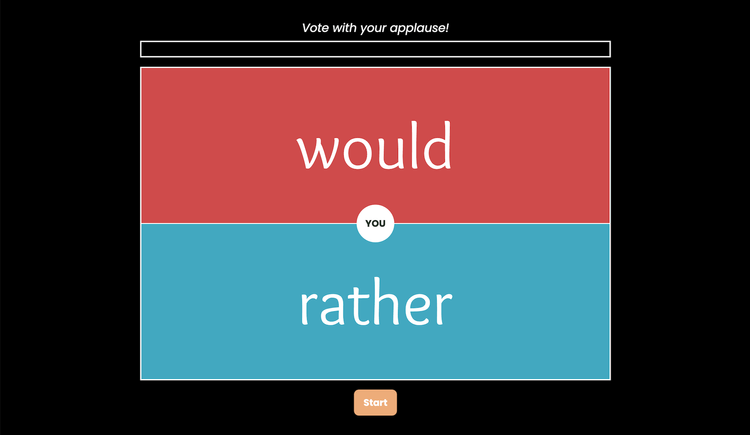
      <p class="" style="color:inherit;font-size:1em;line-height:1.618em;margin:0 0 1.25em 0;font-weight:normal;margin-top:0;font-family:'DejaVu Sans Condensed', 'Liberation Sans', 'Nimbus Sans L', 'Helvetica Neue', Helvetica, Arial, sans-serif;letter-spacing:-.01em;">Playing <strong>Would You Rather</strong> is a classic brain break for classrooms, and <a href="https://classroomzen.com/brain-breaks/would-you-rather" rel="nofollow" style="color:#009cdb !important;">ClassroomZen</a> adds a unique twist: students vote with by applauding. Using the teacher’s microphone to measure decibel levels, ClassroomZen shows how much applause each choice receives.</p><p class="" style="color:inherit;font-size:1em;line-height:1.618em;margin:0 0 1.25em 0;font-weight:normal;margin-bottom:0;font-family:'DejaVu Sans Condensed', 'Liberation Sans', 'Nimbus Sans L', 'Helvetica Neue', Helvetica, Arial, sans-serif;letter-spacing:-.01em;">While you can’t input your own choices, the tool offers a variety of engaging questions. The choices are displayed for 10 seconds before voting begins, and students have a quick 5-second window to cast their votes. It’s easy to set up and provides a fun, interactive way to reboot and refocus your class.</p>
    </td>
  </tr>
</tbody></table>

</div>
<div id="image-image-section-below-11">
<table role="presentation" width="100%" cellpadding="0" cellspacing="0" border="0" bgcolor="#FFEAEA" class="image-section below-layout section-content">


    <tbody><tr>
      <td>
        <table role="presentation" width="100%" cellpadding="0" cellspacing="0" border="0">
          <tbody><tr>
              
    <td class="show-desktop-only section-spacing-left" width="44"></td>
  

            <td align="left" valign="middle" class="section-image-cell section-content-cell section-hoverable-image" data-aspect="ORIGINAL" style="padding:0;">
              
  <a href="https://classroomzen.com/brain-breaks/would-you-rather" style="color:#009cdb !important;"><img class="section-scaleable-image" src="https://images.squarespace-cdn.com/content/50eca855e4b0939ae8bb12d9/0b424bf4-c6ef-447d-b0b5-d3a2854a9f67/Screenshot+2025-01-18+at+12.02.29%E2%80%AFPM.png?content-type=image%2Fpng&amp;format=750w" width="594" alt="Screenshot that says &quot;Vote with your applause&quot; and presents two choice." style="font-size:.6666666666666666em;display:block;border:0;text-decoration:none;line-height:0;background-color:transparent;font-weight:normal;height:auto;width:100%;max-width:100%;font-family:'DejaVu Sans Condensed', 'Liberation Sans', 'Nimbus Sans L', 'Helvetica Neue', Helvetica, Arial, sans-serif;"></a>


            </td>
              
    <td class="show-desktop-only section-spacing-right" width="44"></td>
  

          </tr>
        </tbody></table>
      </td>
    </tr>


  <tr>
    <td bgcolor="#FFEAEA" class="spacing-below" height="22"></td>
  </tr>


</tbody></table>

</div>
<div id="text-text-section-12">


<table role="presentation" width="100%" cellpadding="0" cellspacing="0" border="0" bgcolor="#374F64" class="text-section section-content">
  <tbody><tr>
    <td valign="top" class="section-text-area section-content-cell padding-mobile-both" style="padding-top:12px;padding-right:66px;padding-bottom:12px;padding-left:66px;color:#fff;background-color:#374f64;">
      <h4 style="color:inherit;margin:1.414em 0 .5em;font-weight:400;line-height:1.25em;font-size:1.5em;mso-line-height-alt:1.5em;margin-top:0;margin-bottom:0;font-family:'DejaVu Sans Condensed', 'Liberation Sans', 'Nimbus Sans L', 'Helvetica Neue', Helvetica, Arial, sans-serif;letter-spacing:.02em;">Snowflake Science ❄️</h4>
    </td>
  </tr>
</tbody></table>

</div>
<div id="text-text-section-13">


<table role="presentation" width="100%" cellpadding="0" cellspacing="0" border="0" bgcolor="#EAF5FF" class="text-section section-content">
  <tbody><tr>
    <td valign="top" class="section-text-area section-content-cell padding-mobile-both" style="padding-top:13px;padding-right:66px;padding-bottom:12px;padding-left:66px;color:#272727;background-color:#eaf5ff;">
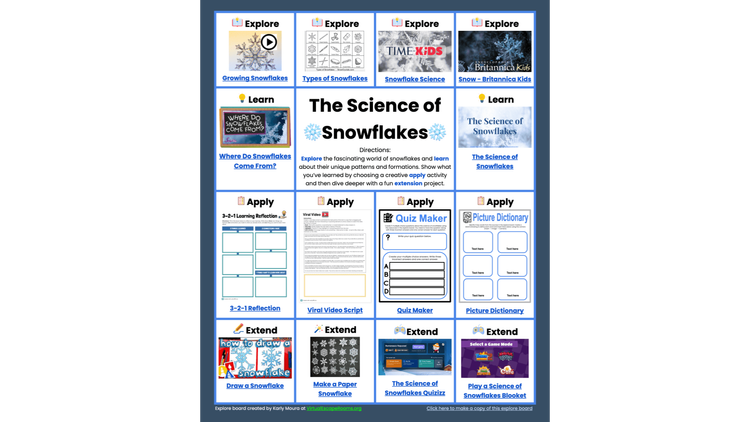
      <p class="" style="color:inherit;font-size:1em;line-height:1.618em;margin:0 0 1.25em 0;font-weight:normal;margin-top:0;font-family:'DejaVu Sans Condensed', 'Liberation Sans', 'Nimbus Sans L', 'Helvetica Neue', Helvetica, Arial, sans-serif;letter-spacing:-.01em;">The <a href="https://docs.google.com/document/d/1HV2Zbg5GialeEuMhT9bTmq5TUUjc5-18Q4ObmBrm7pA/preview?_bhlid=4607ab23c00c080aa0ab7f518bd211defb99c02c&amp;tab=t.0" rel="nofollow" style="color:#009cdb !important;"><strong>Science of Snowflakes</strong></a> is a interactive document created by Karly Moura. It provides a variety of learning links for students in grades 3-8. There are videos, articles, and charts all about snowflakes. The document also has creative ways for students to apply and extend their learning.</p><p class="" style="color:inherit;font-size:1em;line-height:1.618em;margin:0 0 1.25em 0;font-weight:normal;font-family:'DejaVu Sans Condensed', 'Liberation Sans', 'Nimbus Sans L', 'Helvetica Neue', Helvetica, Arial, sans-serif;letter-spacing:-.01em;">Teachers can <a href="https://docs.google.com/document/d/1HV2Zbg5GialeEuMhT9bTmq5TUUjc5-18Q4ObmBrm7pA/copy" rel="nofollow" style="color:#009cdb !important;">make a copy of the document</a> and make changes before sharing with their students. If you do make a your own copy, you can nicely present your copy the way Karly presents hers:</p><ol data-rte-list="default" style="padding-left:25px;"><li style="font-weight:normal;margin-top:0px;margin-bottom:0px;margin-left:15px;font-family:'DejaVu Sans Condensed', 'Liberation Sans', 'Nimbus Sans L', 'Helvetica Neue', Helvetica, Arial, sans-serif;"><p class="" style="color:inherit;font-size:1em;line-height:1.618em;margin:0 0 1.25em 0;font-weight:normal;margin-top:0;margin-bottom:0;font-family:'DejaVu Sans Condensed', 'Liberation Sans', 'Nimbus Sans L', 'Helvetica Neue', Helvetica, Arial, sans-serif;letter-spacing:-.01em;">In your copy of the Google Doc, click <em>Share</em>.</p></li><li style="font-weight:normal;margin-top:0px;margin-bottom:0px;margin-left:15px;font-family:'DejaVu Sans Condensed', 'Liberation Sans', 'Nimbus Sans L', 'Helvetica Neue', Helvetica, Arial, sans-serif;"><p class="" style="color:inherit;font-size:1em;line-height:1.618em;margin:0 0 1.25em 0;font-weight:normal;margin-top:0;margin-bottom:0;font-family:'DejaVu Sans Condensed', 'Liberation Sans', 'Nimbus Sans L', 'Helvetica Neue', Helvetica, Arial, sans-serif;letter-spacing:-.01em;">Under <em>General access</em>, change <em>Restricted</em> to <em>Anyone with the link.</em></p></li><li style="font-weight:normal;margin-top:0px;margin-bottom:0px;margin-left:15px;font-family:'DejaVu Sans Condensed', 'Liberation Sans', 'Nimbus Sans L', 'Helvetica Neue', Helvetica, Arial, sans-serif;"><p class="" style="color:inherit;font-size:1em;line-height:1.618em;margin:0 0 1.25em 0;font-weight:normal;margin-top:0;margin-bottom:0;font-family:'DejaVu Sans Condensed', 'Liberation Sans', 'Nimbus Sans L', 'Helvetica Neue', Helvetica, Arial, sans-serif;letter-spacing:-.01em;">Click <em>Copy link</em>, then click <em>Done</em>.</p></li><li style="font-weight:normal;margin-top:0px;margin-bottom:0px;margin-left:15px;font-family:'DejaVu Sans Condensed', 'Liberation Sans', 'Nimbus Sans L', 'Helvetica Neue', Helvetica, Arial, sans-serif;"><p class="" style="color:inherit;font-size:1em;line-height:1.618em;margin:0 0 1.25em 0;font-weight:normal;margin-top:0;margin-bottom:0;font-family:'DejaVu Sans Condensed', 'Liberation Sans', 'Nimbus Sans L', 'Helvetica Neue', Helvetica, Arial, sans-serif;letter-spacing:-.01em;">When you paste the link, you’ll see the URL ends with “/edit?usp=sharing”. Replace with “/preview”.</p></li></ol><p class="" style="color:inherit;font-size:1em;line-height:1.618em;margin:0 0 1.25em 0;font-weight:normal;margin-bottom:0;font-family:'DejaVu Sans Condensed', 'Liberation Sans', 'Nimbus Sans L', 'Helvetica Neue', Helvetica, Arial, sans-serif;letter-spacing:-.01em;">Now, when the link is followed, the document will open in a distraction-free view that hides menus and editing tools—students only see the content, making it look more like a streamlined web page than a typical Google Doc.</p>
    </td>
  </tr>
</tbody></table>

</div>
<div id="image-image-section-below-14">
<table role="presentation" width="100%" cellpadding="0" cellspacing="0" border="0" bgcolor="#EAF5FF" class="image-section below-layout section-content">


    <tbody><tr>
      <td>
        <table role="presentation" width="100%" cellpadding="0" cellspacing="0" border="0">
          <tbody><tr>
              

            <td align="left" valign="middle" class="section-image-cell section-content-cell section-hoverable-image" data-aspect="ORIGINAL" style="padding:0;">
              
  <a href="Screenshot of Science of Snowflakes document" style="color:#009cdb !important;"><img class="section-scaleable-image" src="https://images.squarespace-cdn.com/content/50eca855e4b0939ae8bb12d9/1771f918-6498-41f7-b642-c2fe27fb65f5/Snowflakes+Explore+Board.png?content-type=image%2Fpng&amp;format=750w" width="594" alt="https://docs.google.com/document/d/1HV2Zbg5GialeEuMhT9bTmq5TUUjc5-18Q4ObmBrm7pA/preview?_bhlid=4607ab23c00c080aa0ab7f518bd211defb99c02c&amp;tab=t.0" style="font-size:.6666666666666666em;display:block;border:0;text-decoration:none;line-height:0;background-color:transparent;font-weight:normal;height:auto;width:100%;max-width:100%;font-family:'DejaVu Sans Condensed', 'Liberation Sans', 'Nimbus Sans L', 'Helvetica Neue', Helvetica, Arial, sans-serif;"></a>


            </td>
              

          </tr>
        </tbody></table>
      </td>
    </tr>


  <tr>
    <td bgcolor="#EAF5FF" class="spacing-below" height="22"></td>
  </tr>


</tbody></table>

</div>
<div id="text-text-section-15">


<table role="presentation" width="100%" cellpadding="0" cellspacing="0" border="0" bgcolor="#93B151" class="text-section section-content">
  <tbody><tr>
    <td valign="top" class="section-text-area section-content-cell padding-mobile-both" style="padding-top:12px;padding-right:66px;padding-bottom:12px;padding-left:66px;color:#fff;background-color:#93b151;">
      <h4 style="color:inherit;margin:1.414em 0 .5em;font-weight:400;line-height:1.25em;font-size:1.5em;mso-line-height-alt:1.5em;margin-top:0;margin-bottom:0;font-family:'DejaVu Sans Condensed', 'Liberation Sans', 'Nimbus Sans L', 'Helvetica Neue', Helvetica, Arial, sans-serif;letter-spacing:.02em;">Masked Messages 🎭</h4>
    </td>
  </tr>
</tbody></table>

</div>
<div id="text-text-section-16">


<table role="presentation" width="100%" cellpadding="0" cellspacing="0" border="0" bgcolor="#E9EFDC" class="text-section section-content">
  <tbody><tr>
    <td valign="top" class="section-text-area section-content-cell padding-mobile-both" style="padding-top:12px;padding-right:66px;padding-bottom:6px;padding-left:66px;color:#272727;background-color:#e9efdc;">
      <p class="" style="color:inherit;font-size:1em;line-height:1.618em;margin:0 0 1.25em 0;font-weight:normal;margin-top:0;font-family:'DejaVu Sans Condensed', 'Liberation Sans', 'Nimbus Sans L', 'Helvetica Neue', Helvetica, Arial, sans-serif;letter-spacing:-.01em;"><a href="https://fonts.google.com" rel="nofollow" style="color:#009cdb !important;">Google Fonts</a> has nearly 2,000 fonts, and a couple of the strangest ones are <strong>Redacted</strong> and <strong>Redacted Script</strong>—these fonts are actually designed to be <em>unreadable</em>.</p><p class="" style="color:inherit;font-size:1em;line-height:1.618em;margin:0 0 1.25em 0;font-weight:normal;margin-bottom:0;font-family:'DejaVu Sans Condensed', 'Liberation Sans', 'Nimbus Sans L', 'Helvetica Neue', Helvetica, Arial, sans-serif;letter-spacing:-.01em;">When text is changed to <a href="https://fonts.google.com/specimen/Redacted" rel="nofollow" style="color:#009cdb !important;">Redacted</a>, each letter becomes a solid black rectangle.</p>
    </td>
  </tr>
</tbody></table>

</div>
<div id="image-image-section-below-17">
<table role="presentation" width="100%" cellpadding="0" cellspacing="0" border="0" bgcolor="#E9EFDC" class="image-section below-layout section-content">


    <tbody><tr>
      <td>
        <table role="presentation" width="100%" cellpadding="0" cellspacing="0" border="0">
          <tbody><tr>
              
    <td class="show-desktop-only section-spacing-left" width="44"></td>
  

            <td align="left" valign="middle" class="section-image-cell section-content-cell section-hoverable-image" data-aspect="ORIGINAL" style="padding:0;">
              
  <img class="section-scaleable-image" src="https://images.squarespace-cdn.com/content/50eca855e4b0939ae8bb12d9/e209c33a-9373-4581-8eb3-884b57bdf1b2/Redacted.png?content-type=image%2Fpng&amp;format=750w" width="594" alt="" style="font-size:.6666666666666666em;display:block;border:0;text-decoration:none;line-height:0;background-color:transparent;font-weight:normal;height:auto;width:100%;max-width:100%;font-family:'DejaVu Sans Condensed', 'Liberation Sans', 'Nimbus Sans L', 'Helvetica Neue', Helvetica, Arial, sans-serif;">


            </td>
              
    <td class="show-desktop-only section-spacing-right" width="44"></td>
  

          </tr>
        </tbody></table>
      </td>
    </tr>


  <tr>
    <td bgcolor="#E9EFDC" class="spacing-below" height="13"></td>
  </tr>


</tbody></table>

</div>
<div id="text-text-section-18">


<table role="presentation" width="100%" cellpadding="0" cellspacing="0" border="0" bgcolor="#E9EFDC" class="text-section section-content">
  <tbody><tr>
    <td valign="top" class="section-text-area section-content-cell padding-mobile-both" style="padding-top:12px;padding-right:66px;padding-bottom:6px;padding-left:66px;color:#272727;background-color:#e9efdc;">
      <p class="" style="color:inherit;font-size:1em;line-height:1.618em;margin:0 0 1.25em 0;font-weight:normal;margin-top:0;margin-bottom:0;font-family:'DejaVu Sans Condensed', 'Liberation Sans', 'Nimbus Sans L', 'Helvetica Neue', Helvetica, Arial, sans-serif;letter-spacing:-.01em;">With <a href="https://fonts.google.com/specimen/Redacted+Script" rel="nofollow" style="color:#009cdb !important;">Redacted Script</a>, letters are replaced with scribbles.</p>
    </td>
  </tr>
</tbody></table>

</div>
<div id="image-image-section-below-19">
<table role="presentation" width="100%" cellpadding="0" cellspacing="0" border="0" bgcolor="#E9EFDC" class="image-section below-layout section-content">


    <tbody><tr>
      <td>
        <table role="presentation" width="100%" cellpadding="0" cellspacing="0" border="0">
          <tbody><tr>
              
    <td class="show-desktop-only section-spacing-left" width="44"></td>
  

            <td align="left" valign="middle" class="section-image-cell section-content-cell section-hoverable-image" data-aspect="ORIGINAL" style="padding:0;">
              
  <img class="section-scaleable-image" src="https://images.squarespace-cdn.com/content/50eca855e4b0939ae8bb12d9/ec8c65e7-0568-4b8e-90ef-cf3db98be0ca/Redacted+Script.png?content-type=image%2Fpng&amp;format=750w" width="594" alt="" style="font-size:.6666666666666666em;display:block;border:0;text-decoration:none;line-height:0;background-color:transparent;font-weight:normal;height:auto;width:100%;max-width:100%;font-family:'DejaVu Sans Condensed', 'Liberation Sans', 'Nimbus Sans L', 'Helvetica Neue', Helvetica, Arial, sans-serif;">


            </td>
              
    <td class="show-desktop-only section-spacing-right" width="44"></td>
  

          </tr>
        </tbody></table>
      </td>
    </tr>


</tbody></table>

</div>
<div id="text-text-section-20">


<table role="presentation" width="100%" cellpadding="0" cellspacing="0" border="0" bgcolor="#E9EFDC" class="text-section section-content">
  <tbody><tr>
    <td valign="top" class="section-text-area section-content-cell padding-mobile-both" style="padding-top:12px;padding-right:66px;padding-bottom:22px;padding-left:66px;color:#272727;background-color:#e9efdc;">
      <p class="" style="color:inherit;font-size:1em;line-height:1.618em;margin:0 0 1.25em 0;font-weight:normal;margin-top:0;margin-bottom:0;font-family:'DejaVu Sans Condensed', 'Liberation Sans', 'Nimbus Sans L', 'Helvetica Neue', Helvetica, Arial, sans-serif;letter-spacing:-.01em;">Since these fonts replace letters with meaningless markings, they can be used to black out text in a document. This is handy for hiding answer keys or creating mystery word reveals. To unveil the hidden text, simply switch the font back to something readable, like Helvetica, Lexend, or any standard font.</p>
    </td>
  </tr>
</tbody></table>

</div>
<div id="text-text-section-21">


<table role="presentation" width="100%" cellpadding="0" cellspacing="0" border="0" bgcolor="#0040FF" class="text-section section-content">
  <tbody><tr>
    <td valign="top" class="section-text-area section-content-cell padding-mobile-both" style="padding-top:12px;padding-right:66px;padding-bottom:12px;padding-left:66px;color:#fff;background-color:#0040ff;">
      <h4 style="color:inherit;margin:1.414em 0 .5em;font-weight:400;line-height:1.25em;font-size:1.5em;mso-line-height-alt:1.5em;margin-top:0;margin-bottom:0;font-family:'DejaVu Sans Condensed', 'Liberation Sans', 'Nimbus Sans L', 'Helvetica Neue', Helvetica, Arial, sans-serif;letter-spacing:.02em;">Form of Fortune</h4>
    </td>
  </tr>
</tbody></table>

</div>
<div id="text-text-section-22">


<table role="presentation" width="100%" cellpadding="0" cellspacing="0" border="0" bgcolor="#E3EAFF" class="text-section section-content">
  <tbody><tr>
    <td valign="top" class="section-text-area section-content-cell padding-mobile-both" style="padding-top:12px;padding-right:66px;padding-bottom:12px;padding-left:66px;color:#272727;background-color:#e3eaff;">
      <p class="" style="color:inherit;font-size:1em;line-height:1.618em;margin:0 0 1.25em 0;font-weight:normal;margin-top:0;margin-bottom:0;font-family:'DejaVu Sans Condensed', 'Liberation Sans', 'Nimbus Sans L', 'Helvetica Neue', Helvetica, Arial, sans-serif;letter-spacing:-.01em;">Introducing a funky new Google Forms template…</p>
    </td>
  </tr>
</tbody></table>

</div>
<div id="image-image-section-below-23">
<table role="presentation" width="100%" cellpadding="0" cellspacing="0" border="0" bgcolor="#E3EAFF" class="image-section below-layout section-content">


    <tbody><tr>
      <td>
        <table role="presentation" width="100%" cellpadding="0" cellspacing="0" border="0">
          <tbody><tr>
              
    <td class="show-desktop-only section-spacing-left" width="88"></td>
  

            <td align="left" valign="middle" class="section-image-cell section-content-cell section-hoverable-image" data-aspect="ORIGINAL" style="padding:0;">
              
  <img class="section-scaleable-image" src="https://images.squarespace-cdn.com/content/50eca855e4b0939ae8bb12d9/113e933a-4789-4fc6-9515-fddf7459f39c/Form+of+Fotune+Header.gif?content-type=image%2Fgif&amp;format=750w" width="594" alt="" style="font-size:.6666666666666666em;display:block;border:0;text-decoration:none;line-height:0;background-color:transparent;font-weight:normal;height:auto;width:100%;max-width:100%;font-family:'DejaVu Sans Condensed', 'Liberation Sans', 'Nimbus Sans L', 'Helvetica Neue', Helvetica, Arial, sans-serif;">


            </td>
              
    <td class="show-desktop-only section-spacing-right" width="88"></td>
  

          </tr>
        </tbody></table>
      </td>
    </tr>


</tbody></table>

</div>
<div id="text-text-section-24">


<table role="presentation" width="100%" cellpadding="0" cellspacing="0" border="0" bgcolor="#E3EAFF" class="text-section section-content">
  <tbody><tr>
    <td valign="top" class="section-text-area section-content-cell padding-mobile-both" style="padding-top:12px;padding-right:66px;padding-bottom:12px;padding-left:66px;color:#272727;background-color:#e3eaff;">
      <p class="" style="color:inherit;font-size:1em;line-height:1.618em;margin:0 0 1.25em 0;font-weight:normal;margin-top:0;font-family:'DejaVu Sans Condensed', 'Liberation Sans', 'Nimbus Sans L', 'Helvetica Neue', Helvetica, Arial, sans-serif;letter-spacing:-.01em;">My <strong>Form of Fortune</strong> template brings a touch of serendipity to  Google Forms! Respondents get a randomly selected question, making it particularly useful for exit tickets. The teacher can use the same form again and again, and students won’t have to answer the same question each time.</p><p class="" style="color:inherit;font-size:1em;line-height:1.618em;margin:0 0 1.25em 0;font-weight:normal;font-family:'DejaVu Sans Condensed', 'Liberation Sans', 'Nimbus Sans L', 'Helvetica Neue', Helvetica, Arial, sans-serif;letter-spacing:-.01em;">How does it work? The form's theme uses the <a href="https://fonts.google.com/specimen/Redacted" rel="nofollow" style="color:#009cdb !important;">Redacted font</a> for text, which blacks out all the multiple-choice options. These choices are randomized and linked to individual sections, each containing a unique question.</p><p class="" style="color:inherit;font-size:1em;line-height:1.618em;margin:0 0 1.25em 0;font-weight:normal;font-family:'DejaVu Sans Condensed', 'Liberation Sans', 'Nimbus Sans L', 'Helvetica Neue', Helvetica, Arial, sans-serif;letter-spacing:-.01em;">The Redacted fonts prevents respondents from knowing which option they are actually choosing because they all look the same. I think it’s a pretty clever way to randomize the question a student receives.</p><p class="" style="color:inherit;font-size:1em;line-height:1.618em;margin:0 0 1.25em 0;font-weight:normal;font-family:'DejaVu Sans Condensed', 'Liberation Sans', 'Nimbus Sans L', 'Helvetica Neue', Helvetica, Arial, sans-serif;letter-spacing:-.01em;">It’s easier to experience than explain, so why not try it yourself? <a href="https://forms.gle/fMg6xjVeuXivNABh6" rel="nofollow" style="color:#009cdb !important;">This Form of Fortune has questions designed to spark thoughtful reflection at the end of a lesson. </a>You’re welcome to submit the form multiple times as you discover how it works.</p><p class="" style="color:inherit;font-size:1em;line-height:1.618em;margin:0 0 1.25em 0;font-weight:normal;margin-bottom:0;font-family:'DejaVu Sans Condensed', 'Liberation Sans', 'Nimbus Sans L', 'Helvetica Neue', Helvetica, Arial, sans-serif;letter-spacing:-.01em;"><strong>Click the button below to get your own copy of the Form of Fortune with built-in reflection questions!</strong></p>
    </td>
  </tr>
</tbody></table>

</div>
<div id="button-button-section-25">


<table role="presentation" width="100%" cellpadding="0" cellspacing="0" border="0" bgcolor="#E3EAFF" class="button-section section-content" style="width:100%;background-color:#e3eaff;">
  <tbody><tr>
    <td align="center" valign="middle" class="section-content-cell section-text-area" style="padding-top:10px;padding-right:22px;padding-bottom:10px;padding-left:22px;">
      
      <a href="https://docs.google.com/forms/d/1fw71LL54Fq74fd_MLzZ3iFH35vn8uBoxanA-7KCQdQA/template/preview" class="button-section-box button-style-solid" style="color:#009cdb !important;display:inline-block;line-height:11px;margin:0;mso-padding-alt:0;text-align:center;text-decoration:none;transition:.15s;width:auto;background-color:#0040ff;border:0;padding:17px 0;"><i class="button-section-mso" style="letter-spacing:29.92px;mso-font-width:-100%;mso-text-raise:26.950000000000003px;">&nbsp;</i><span class="button-section-label" style="line-height:inherit;margin:0;font-family:'DejaVu Sans Condensed', 'Liberation Sans', 'Nimbus Sans L', 'Helvetica Neue', Helvetica, Arial, sans-serif;font-weight:700;color:#efefef;display:inline-block;font-size:11px;min-width:1px;mso-text-raise:15.95px;"><span data-letter-spacing="3" style="font-size:inherit;font-weight:inherit;line-height:inherit;margin:0;letter-spacing:0.2em;">Form for Fortune Template: Reflection questions</span></span><i class="button-section-mso" style="letter-spacing:29.92px;mso-font-width:-100%;mso-text-raise:26.950000000000003px;">&nbsp;</i></a>
    </td>
  </tr>
</tbody></table>

</div>
<div id="text-text-section-26">


<table role="presentation" width="100%" cellpadding="0" cellspacing="0" border="0" bgcolor="#E3EAFF" class="text-section section-content">
  <tbody><tr>
    <td valign="top" class="section-text-area section-content-cell padding-mobile-both" style="padding-top:12px;padding-right:66px;padding-bottom:12px;padding-left:66px;color:#272727;background-color:#e3eaff;">
      <p class="" style="color:inherit;font-size:1em;line-height:1.618em;margin:0 0 1.25em 0;font-weight:normal;margin-top:0;font-family:'DejaVu Sans Condensed', 'Liberation Sans', 'Nimbus Sans L', 'Helvetica Neue', Helvetica, Arial, sans-serif;letter-spacing:-.01em;">Reflection isn’t the only time that you might want to use the Form of Fortune. You could use it for thing like…</p><ul data-rte-list="default" style="padding-left:25px;"><li style="font-weight:normal;margin-top:0px;margin-bottom:0px;margin-left:15px;font-family:'DejaVu Sans Condensed', 'Liberation Sans', 'Nimbus Sans L', 'Helvetica Neue', Helvetica, Arial, sans-serif;"><p class="" style="color:inherit;font-size:1em;line-height:1.618em;margin:0 0 1.25em 0;font-weight:normal;margin-top:0;margin-bottom:0;font-family:'DejaVu Sans Condensed', 'Liberation Sans', 'Nimbus Sans L', 'Helvetica Neue', Helvetica, Arial, sans-serif;letter-spacing:-.01em;">spot-checking for understanding</p></li><li style="font-weight:normal;margin-top:0px;margin-bottom:0px;margin-left:15px;font-family:'DejaVu Sans Condensed', 'Liberation Sans', 'Nimbus Sans L', 'Helvetica Neue', Helvetica, Arial, sans-serif;"><p class="" style="color:inherit;font-size:1em;line-height:1.618em;margin:0 0 1.25em 0;font-weight:normal;margin-top:0;margin-bottom:0;font-family:'DejaVu Sans Condensed', 'Liberation Sans', 'Nimbus Sans L', 'Helvetica Neue', Helvetica, Arial, sans-serif;letter-spacing:-.01em;">assigning vocab words to use in a sentence</p></li><li style="font-weight:normal;margin-top:0px;margin-bottom:0px;margin-left:15px;font-family:'DejaVu Sans Condensed', 'Liberation Sans', 'Nimbus Sans L', 'Helvetica Neue', Helvetica, Arial, sans-serif;"><p class="" style="color:inherit;font-size:1em;line-height:1.618em;margin:0 0 1.25em 0;font-weight:normal;margin-top:0;margin-bottom:0;font-family:'DejaVu Sans Condensed', 'Liberation Sans', 'Nimbus Sans L', 'Helvetica Neue', Helvetica, Arial, sans-serif;letter-spacing:-.01em;">surprising students with randomized writing prompts</p></li><li style="font-weight:normal;margin-top:0px;margin-bottom:0px;margin-left:15px;font-family:'DejaVu Sans Condensed', 'Liberation Sans', 'Nimbus Sans L', 'Helvetica Neue', Helvetica, Arial, sans-serif;"><p class="" style="color:inherit;font-size:1em;line-height:1.618em;margin:0 0 1.25em 0;font-weight:normal;margin-top:0;margin-bottom:0;font-family:'DejaVu Sans Condensed', 'Liberation Sans', 'Nimbus Sans L', 'Helvetica Neue', Helvetica, Arial, sans-serif;letter-spacing:-.01em;">giving out mystery research topics</p></li></ul><p class="" style="color:inherit;font-size:1em;line-height:1.618em;margin:0 0 1.25em 0;font-weight:normal;margin-bottom:0;font-family:'DejaVu Sans Condensed', 'Liberation Sans', 'Nimbus Sans L', 'Helvetica Neue', Helvetica, Arial, sans-serif;letter-spacing:-.01em;"><strong>Click the button below to get your own copy of a blank Form of Fortune. It contains instructions for entering your own questions.</strong> </p>
    </td>
  </tr>
</tbody></table>

</div>
<div id="button-button-section-27">


<table role="presentation" width="100%" cellpadding="0" cellspacing="0" border="0" bgcolor="#E3EAFF" class="button-section section-content" style="width:100%;background-color:#e3eaff;">
  <tbody><tr>
    <td align="center" valign="middle" class="section-content-cell section-text-area" style="padding-top:10px;padding-right:22px;padding-bottom:10px;padding-left:22px;">
      
      <a href="https://docs.google.com/forms/d/1QAT3PZyM7TaSCBEBN4SZWdzJaR6e4Lw0BY2iAaiKNnk/template/preview" class="button-section-box button-style-solid" style="color:#009cdb !important;display:inline-block;line-height:11px;margin:0;mso-padding-alt:0;text-align:center;text-decoration:none;transition:.15s;width:auto;background-color:#0040ff;border:0;padding:17px 0;"><i class="button-section-mso" style="letter-spacing:29.92px;mso-font-width:-100%;mso-text-raise:26.950000000000003px;">&nbsp;</i><span class="button-section-label" style="line-height:inherit;margin:0;font-family:'DejaVu Sans Condensed', 'Liberation Sans', 'Nimbus Sans L', 'Helvetica Neue', Helvetica, Arial, sans-serif;font-weight:700;color:#efefef;display:inline-block;font-size:11px;min-width:1px;mso-text-raise:15.95px;"><span data-letter-spacing="3" style="font-size:inherit;font-weight:inherit;line-height:inherit;margin:0;letter-spacing:0.2em;">Form of Fortune Template: Enter your own questions</span></span><i class="button-section-mso" style="letter-spacing:29.92px;mso-font-width:-100%;mso-text-raise:26.950000000000003px;">&nbsp;</i></a>
    </td>
  </tr>
</tbody></table>

</div>
<div id="text-text-section-28">


<table role="presentation" width="100%" cellpadding="0" cellspacing="0" border="0" bgcolor="#E3EAFF" class="text-section section-content">
  <tbody><tr>
    <td valign="top" class="section-text-area section-content-cell padding-mobile-both" style="padding-top:12px;padding-right:66px;padding-bottom:28px;padding-left:66px;color:#272727;background-color:#e3eaff;">
      <p class="" style="color:inherit;font-size:1em;line-height:1.618em;margin:0 0 1.25em 0;font-weight:normal;margin-top:0;margin-bottom:0;font-family:'DejaVu Sans Condensed', 'Liberation Sans', 'Nimbus Sans L', 'Helvetica Neue', Helvetica, Arial, sans-serif;letter-spacing:-.01em;">Whether you use the template with built-in reflection questions or the template where you enter your own questions, I’d love to hear from you. I’m especially curious about the creative ways you’re using <strong>Form of Fortune</strong> in your classroom.</p>
    </td>
  </tr>
</tbody></table>

</div>
<div id="text-text-section-29">


<table role="presentation" width="100%" cellpadding="0" cellspacing="0" border="0" bgcolor="transparent" class="text-section section-content">
  <tbody><tr>
    <td valign="top" class="section-text-area section-content-cell padding-mobile-both" style="padding-top:28px;padding-right:66px;padding-bottom:0px;padding-left:66px;color:#272727;background-color:transparent;">
      <p class="" style="color:inherit;font-size:1em;line-height:1.618em;margin:0 0 1.25em 0;font-weight:normal;margin-top:0;font-family:'DejaVu Sans Condensed', 'Liberation Sans', 'Nimbus Sans L', 'Helvetica Neue', Helvetica, Arial, sans-serif;letter-spacing:-.01em;">I revised the text above with the assistance of ChatGPT, Gemini, and Claude.</p><p class="" style="color:inherit;font-size:1em;line-height:1.618em;margin:0 0 1.25em 0;font-weight:normal;font-family:'DejaVu Sans Condensed', 'Liberation Sans', 'Nimbus Sans L', 'Helvetica Neue', Helvetica, Arial, sans-serif;letter-spacing:-.01em;">You’re probably wondering why I use multiple AI chatbots. I have a few reasons. While ChatGPT currently does the best job for me, I often reach the free account limit. When that happens, I switch to another chatbot so I can keep working. Another reason I use multiple tools is to stay informed about how they compare. Over time, I’ve developed a solid understanding of how each one can enhance my writing.</p><p style="color:inherit;font-size:1em;line-height:1.618em;margin:0 0 1.25em 0;font-weight:normal;margin-bottom:0;font-family:'DejaVu Sans Condensed', 'Liberation Sans', 'Nimbus Sans L', 'Helvetica Neue', Helvetica, Arial, sans-serif;letter-spacing:-.01em;text-align:center;" class="">Smiles from Iowa,</p>
    </td>
  </tr>
</tbody></table>

</div>
<div id="image-image-section-below-30">
<table role="presentation" width="100%" cellpadding="0" cellspacing="0" border="0" bgcolor="transparent" class="image-section below-layout section-content">


    <tbody><tr>
      <td>
        <table role="presentation" width="100%" cellpadding="0" cellspacing="0" border="0">
          <tbody><tr>
              
    <td class="show-desktop-only section-spacing-left" width="88"></td>
  

            <td align="left" valign="middle" class="section-image-cell section-content-cell section-hoverable-image" data-aspect="ORIGINAL" style="padding:0;">
              
  <img class="section-scaleable-image" src="https://images.squarespace-cdn.com/content/50eca855e4b0939ae8bb12d9/00445278-d88c-451c-89ad-108eb0a7cfca/Tony+Signature.png?content-type=image%2Fpng&amp;format=750w" width="594" alt="" style="font-size:.6666666666666666em;display:block;border:0;text-decoration:none;line-height:0;background-color:transparent;font-weight:normal;height:auto;width:100%;max-width:100%;font-family:'DejaVu Sans Condensed', 'Liberation Sans', 'Nimbus Sans L', 'Helvetica Neue', Helvetica, Arial, sans-serif;">


            </td>
              
    <td class="show-desktop-only section-spacing-right" width="88"></td>
  

          </tr>
        </tbody></table>
      </td>
    </tr>


  <tr>
    <td bgcolor="transparent" class="spacing-below" height="29"></td>
  </tr>


</tbody></table>

</div>
<div id="button-button-section-31">


<table role="presentation" width="100%" cellpadding="0" cellspacing="0" border="0" bgcolor="#EDEDED" class="button-section section-content" style="width:100%;background-color:#ededed;">
  <tbody><tr>
    <td align="center" valign="middle" class="section-content-cell section-text-area" style="padding-top:22px;padding-right:22px;padding-bottom:8px;padding-left:22px;">
      
      <a href="https://learninginhand.com/newsletter" class="button-section-box button-style-solid" style="color:#009cdb !important;display:inline-block;line-height:11px;margin:0;mso-padding-alt:0;text-align:center;text-decoration:none;transition:.15s;width:auto;background-color:#009cdb;border:0;padding:17px 0;"><i class="button-section-mso" style="letter-spacing:29.92px;mso-font-width:-100%;mso-text-raise:26.950000000000003px;">&nbsp;</i><span class="button-section-label" style="line-height:inherit;margin:0;font-family:'DejaVu Sans Condensed', 'Liberation Sans', 'Nimbus Sans L', 'Helvetica Neue', Helvetica, Arial, sans-serif;font-weight:700;color:#fff;display:inline-block;font-size:11px;min-width:1px;mso-text-raise:15.95px;"><span data-letter-spacing="3" style="font-size:inherit;font-weight:inherit;line-height:inherit;margin:0;letter-spacing:0.2em;">Previous Issues</span></span><i class="button-section-mso" style="letter-spacing:29.92px;mso-font-width:-100%;mso-text-raise:26.950000000000003px;">&nbsp;</i></a>
    </td>
  </tr>
</tbody></table>

</div>
<div id="text-text-section-32">


<table role="presentation" width="100%" cellpadding="0" cellspacing="0" border="0" bgcolor="#EDEDED" class="text-section section-content">
  <tbody><tr>
    <td valign="top" class="section-text-area section-content-cell padding-mobile-both" style="padding-top:8px;padding-right:66px;padding-bottom:8px;padding-left:66px;color:#313131;background-color:#ededed;">
      <p style="color:inherit;font-size:1em;line-height:1.618em;margin:0 0 1.25em 0;font-weight:normal;margin-top:0;font-family:'DejaVu Sans Condensed', 'Liberation Sans', 'Nimbus Sans L', 'Helvetica Neue', Helvetica, Arial, sans-serif;letter-spacing:-.01em;text-align:center;" class="">Subscribe at&nbsp;<a href="https://learninginhand.com/newsletter" rel="nofollow" style="color:#009cdb !important;">learninginhand.com</a></p><p class="" style="color:inherit;font-size:1em;line-height:1.618em;margin:0 0 1.25em 0;font-weight:normal;margin-bottom:0;font-family:'DejaVu Sans Condensed', 'Liberation Sans', 'Nimbus Sans L', 'Helvetica Neue', Helvetica, Arial, sans-serif;letter-spacing:-.01em;"><em>Al was used to help revise and edit this newsletter. AI was used to generate alliterative section titles.</em></p>
    </td>
  </tr>
</tbody></table>

</div>
                </td>
              </tr>
            </tbody></table>
            
              <table role="presentation" width="100%" cellpadding="0" cellspacing="0" border="0" id="newsletter-section-footer">
                <tbody><tr>
                  <td align="center" valign="top" id="newsletter-section-footer-cell">
                    
<div id="footer-footer-section-stacked-bottom-0">


<table role="presentation" width="100%" cellpadding="0" cellspacing="0" border="0" bgcolor="#EDEDED" class="footer-section footer-section-stacked section-content" style="background-color:#ededed;">
  <tbody><tr>
    <td align="center" valign="top" class="section-text-area section-content-cell" style="padding-top:20px;padding-right:22px;padding-bottom:22px;padding-left:22px;">
      
  <table role="presentation" class="social-links" cellpadding="0" cellspacing="0" border="0">
    <tbody><tr>
    
    
      <td valign="top" width="30" height="52">
        <a href="http://www.facebook.com/learninginhand" style="color:#009cdb !important;text-decoration:none;">
          <img class="social-link-icon" src="https://assets.squarespace.com/composer/assets/images/email/social-icons/facebook+dark.png" width="22" height="22" max-width="22" alt="facebook" style="font-size:.6666666666666666em;text-decoration:none;line-height:0;font-weight:normal;font-family:'DejaVu Sans Condensed', 'Liberation Sans', 'Nimbus Sans L', 'Helvetica Neue', Helvetica, Arial, sans-serif;display:block;margin:0 auto;border:0;">
        </a>
      </td>


<td class="" width="20"></td>

    
      <td valign="top" width="30" height="52">
        <a href="https://x.com/tonyvincent" style="color:#009cdb !important;text-decoration:none;">
          <img class="social-link-icon" src="https://assets.squarespace.com/composer/assets/images/email/social-icons/x-formerly-twitter+dark.png" width="22" height="22" max-width="22" alt="x-formerly-twitter" style="font-size:.6666666666666666em;text-decoration:none;line-height:0;font-weight:normal;font-family:'DejaVu Sans Condensed', 'Liberation Sans', 'Nimbus Sans L', 'Helvetica Neue', Helvetica, Arial, sans-serif;display:block;margin:0 auto;border:0;">
        </a>
      </td>


<td class="" width="20"></td>

    
      <td valign="top" width="30" height="52">
        <a href="http://instagram.com/learninginhand" style="color:#009cdb !important;text-decoration:none;">
          <img class="social-link-icon" src="https://assets.squarespace.com/composer/assets/images/email/social-icons/instagram+dark.png" width="22" height="22" max-width="22" alt="instagram" style="font-size:.6666666666666666em;text-decoration:none;line-height:0;font-weight:normal;font-family:'DejaVu Sans Condensed', 'Liberation Sans', 'Nimbus Sans L', 'Helvetica Neue', Helvetica, Arial, sans-serif;display:block;margin:0 auto;border:0;">
        </a>
      </td>


<td class="" width="20"></td>

    
      <td valign="top" width="30" height="52">
        <a href="https://www.threads.net/@learninginhand" style="color:#009cdb !important;text-decoration:none;">
          <img class="social-link-icon" src="https://assets.squarespace.com/composer/assets/images/email/social-icons/threads+dark.png" width="22" height="22" max-width="22" alt="threads" style="font-size:.6666666666666666em;text-decoration:none;line-height:0;font-weight:normal;font-family:'DejaVu Sans Condensed', 'Liberation Sans', 'Nimbus Sans L', 'Helvetica Neue', Helvetica, Arial, sans-serif;display:block;margin:0 auto;border:0;">
        </a>
      </td>


<td class="" width="20"></td>

    
      <td valign="top" width="30" height="52">
        <a href="https://www.tiktok.com/@learninginhand" style="color:#009cdb !important;text-decoration:none;">
          <img class="social-link-icon" src="https://assets.squarespace.com/composer/assets/images/email/social-icons/tiktok+dark.png" width="22" height="22" max-width="22" alt="tiktok" style="font-size:.6666666666666666em;text-decoration:none;line-height:0;font-weight:normal;font-family:'DejaVu Sans Condensed', 'Liberation Sans', 'Nimbus Sans L', 'Helvetica Neue', Helvetica, Arial, sans-serif;display:block;margin:0 auto;border:0;">
        </a>
      </td>
    
    </tr>
  </tbody></table>


    <p class="footer-company-info" style="line-height:1.618em;font-weight:normal;font-family:'DejaVu Sans Condensed', 'Liberation Sans', 'Nimbus Sans L', 'Helvetica Neue', Helvetica, Arial, sans-serif;letter-spacing:-.01em;color:#777;font-size:11px;margin:0 0 13.75px 0;padding:0;">
  <a style="color:#777;text-decoration:none;font-size:inherit;font-family:inherit;font-weight:inherit;line-height:inherit;cursor:default;">Tony Vincent, Inc., 
  1406 Callahan Drive, 
  Council Bluffs, Iowa, 
  USA</a>
</p>


      <a class="brand-logo-link" href="https://learninginhand.com/" style="color:#009cdb !important;"><img class="brand-logo" src="https://images.squarespace-cdn.com/content/v1/50eca855e4b0939ae8bb12d9/410f2385-df7d-42a7-a349-9423d6c7484d/LIH_blue.png" height="63" alt="Learning in Hand with Tony Vincent" style="font-size:.6666666666666666em;border:0;text-decoration:none;line-height:0;font-weight:normal;font-family:'DejaVu Sans Condensed', 'Liberation Sans', 'Nimbus Sans L', 'Helvetica Neue', Helvetica, Arial, sans-serif;margin-bottom:13.75px;color:#777;display:inline;height:auto;max-height:63px;max-width:100%;width:auto;"></a>


<p class="footer-links" style="line-height:1.618em;font-weight:normal;font-family:'DejaVu Sans Condensed', 'Liberation Sans', 'Nimbus Sans L', 'Helvetica Neue', Helvetica, Arial, sans-serif;letter-spacing:-.01em;font-size:11px;color:#313131;margin:0 0 13.75px 0;padding:0;">
  Powered by <a href="https://www.squarespace.com?channel=product_refer&amp;subchannel=customer&amp;source=email_campaigns_button&amp;campaign=50eca855e4b0939ae8bb12d9&amp;utm_medium=product_refer&amp;utm_source=email_campaigns_button" class="sqsp-link" style="color:#313131;text-decoration:underline;display:inline-block;">Squarespace</a>
</p>


      <p class="footer-links" style="line-height:1.618em;font-weight:normal;margin-bottom:0;font-family:'DejaVu Sans Condensed', 'Liberation Sans', 'Nimbus Sans L', 'Helvetica Neue', Helvetica, Arial, sans-serif;letter-spacing:-.01em;font-size:11px;color:#313131;margin:0 0 13.75px 0;padding:0;">
  <a href="#" class="unsubscribe-link" style="color:#313131;text-decoration:underline;">
    <span class="unsubscribe-link-text" style="font-size:inherit;font-weight:inherit;line-height:inherit;margin:0;">Unsubscribe</span>
  </a>
</p>

    </td>
  </tr>
</tbody></table>

</div>
                  </td>
                </tr>
              </tbody></table>
            
          </td>
        </tr>
      </tbody></table>
    </td>
  </tr>
</tbody></table>

  
</body></html>