<!doctype html>
<html xmlns="http://www.w3.org/1999/xhtml" xmlns:v="urn:schemas-microsoft-com:vml" xmlns:o="urn:schemas-microsoft-com:office:office" lang="en-US" xml:lang="en-US">
  <head>
    <title data-ignore-plain-text>Learning in Hand Newsletter Issue 18</title>
    <meta http-equiv="content-type" content="text/html; charset=utf-8">
    <meta name="viewport" content="width=device-width, initial-scale=1, maximum-scale=1">
    <meta name="format-detection" content="address=no">
    <!--[if (gte mso 9)|(IE)]>
    <style type="text/css" media="screen">
      li {
        text-indent: -1em;
      }
    </style>
    <![endif]-->
    <style type="text/css" media="all">
      body,
.section-text-area,
.section-text-area-wrapper,
.section-text-cell {
    overflow-wrap: break-word;
    word-wrap: break-word;
    -ms-word-break: break-all;
    word-break: break-word;
}
body {
    width: 100% !important;
    min-width: 100% !important;
    -ms-text-size-adjust: none;
    -webkit-text-size-adjust: none;
    mso-line-height-rule: exactly;
}
p {
    margin-block: 0;
}
@media only screen and (max-width:  593px ) {
    table#newsletter-table {
        border: 0 !important;
    }
    table#newsletter-email {
        width: 100% !important;
    }
    img.section-scaleable-image,
    img.section-empty-img {
        max-width: 100% !important;
        height: auto !important;
    }
    .bg-none {
        background: none !important;
    }
    .hauto {
        height: auto !important;
    }
    .show-desktop-only {
        display: none !important;
    }
    .show-mobile-only {
        display: block !important;
        float: none !important;
        line-height: auto !important;
        max-height: inherit !important;
        max-width: inherit !important;
        margin-top: 0px !important;
        overflow: visible !important;
        visibility: inherit !important;
        width: auto !important;
    }
    .stack-cell-wrap {
        display: block !important;
    }
    .stack-cell-up {
        display: table-header-group !important;
    }
    .stack-cell-down {
        display: table-footer-group !important;
    }
    .mw100p {
        max-width: 100% !important;
    }
    .section-horizontal-padding,
    .padding-mobile-both {
        padding-left: 22px !important;
        padding-right: 22px !important;
    }
    .padding-mobile-left {
        padding-left: 22px !important;
    }
    .padding-mobile-right {
        padding-right: 22px !important;
    }
    .text-left {
        text-align: left !important;
    }
    .text-right {
        text-align: right !important;
    }
    .w100p {
        width: 100% !important;
    }
}
.button-style-solid:hover,
.button-style-rounded:hover {
    opacity: .8 !important;
}
a:hover {
    text-decoration: none !important;
}
span.mail-merge-preview {
    border-bottom: 2px dotted currentColor;
    display: inline-block;
    line-height: 1em !important;
    margin-bottom: .125em !important;
}
table#newsletter-section-body .linked-site-title-link {
    color: #009cdb !important;
}
#header-header-section-stacked-top-0 .brand-name .linked-site-title-link {
    color: #777;
    text-decoration: none;
}
#footer-footer-section-stacked-bottom-0 .brand-name .linked-site-title-link {
    color: #777;
    text-decoration: none;
}
#footer-footer-section-stacked-bottom-0 .footer-text .linked-site-title-link {
    color: #009cdb;
}
#button-button-section-34 .button-style-outline:hover {
    background-color: #009cdb !important;
    border: 1px solid #009cdb !important;
}
#button-button-section-34 .button-style-outline:hover .button-section-label {
    color: #000 !important;
}

    </style>
    
    
    <!--[if mso]>
    <noscript>
      <xml>
        <o:OfficeDocumentSettings>
          <o:AllowPNG/>
          <o:PixelsPerInch>96</o:PixelsPerInch>
        </o:OfficeDocumentSettings>
      </xml>
    </noscript>
    <![endif]-->
    
    <!--[if (mso)|(mso 16)]>
      <style type="text/css">
        a {text-decoration: none;}
      </style>
    <![endif]-->
  </head>
  <body style="padding:0;margin:0;text-align:center;background-color:#ededed;">
    <table role="article" aria-label="Learning in Hand Newsletter Issue 18" lang="en-US" cellpadding="0" cellspacing="0" border="0" align="center" id="newsletter-table" style="font-size:16px;font-weight:normal;width:100%;padding:0px;background-color:#ededed;border-top:44px solid #ededed;border-bottom:44px solid #ededed;margin:0 auto;text-align:center;table-layout:fixed;">
  <tbody><tr>
    <td align="center" valign="top" bgcolor="#EDEDED" id="newsletter-cell" style="font-size:1em;">
      <div data-ignore-plain-text class="newsletter-preview-text" style="color:transparent;display:none !important;height:0;max-height:0;max-width:0;opacity:0;overflow:hidden;mso-hide:all;visibility:hidden;width:0;">
        
            
            Single point rubrics, brain dump drawings, picture-in-picture, AI coloring pages, keyboarding diagram, ratings in Google Forms͏‌&nbsp;͏‌&nbsp;͏‌&nbsp;͏‌&nbsp;͏‌&nbsp;͏‌&nbsp;͏‌&nbsp;͏‌&nbsp;͏‌&nbsp;͏‌&nbsp;͏‌&nbsp;͏‌&nbsp;͏‌&nbsp;͏‌&nbsp;͏‌&nbsp;͏‌&nbsp;͏‌&nbsp;͏‌&nbsp;͏‌&nbsp;͏‌&nbsp;͏‌&nbsp;͏‌&nbsp;͏‌&nbsp;͏‌&nbsp;͏‌&nbsp;͏‌&nbsp;͏‌&nbsp;͏‌&nbsp;͏‌&nbsp;͏‌&nbsp;͏‌&nbsp;͏‌&nbsp;͏‌&nbsp;͏‌&nbsp;͏‌&nbsp;͏‌&nbsp;͏‌&nbsp;͏‌&nbsp;͏‌&nbsp;͏‌&nbsp;͏‌&nbsp;͏‌&nbsp;͏‌&nbsp;͏‌&nbsp;͏‌&nbsp;͏‌&nbsp;͏‌&nbsp;͏‌&nbsp;͏‌&nbsp;͏‌&nbsp;͏‌&nbsp;͏‌&nbsp;͏‌&nbsp;͏‌&nbsp;͏‌&nbsp;͏‌&nbsp;͏‌&nbsp;͏‌&nbsp;͏‌&nbsp;͏‌&nbsp;͏‌&nbsp;͏‌&nbsp;͏‌&nbsp;͏‌&nbsp;͏‌&nbsp;͏‌&nbsp;͏‌&nbsp;͏‌&nbsp;͏‌&nbsp;͏‌&nbsp;͏‌&nbsp;͏‌&nbsp;͏‌&nbsp;͏‌&nbsp;͏‌&nbsp;͏‌&nbsp;͏‌&nbsp;͏‌&nbsp;͏‌&nbsp;͏‌&nbsp;͏‌&nbsp;͏‌&nbsp;͏‌&nbsp;͏‌&nbsp;͏‌&nbsp;͏‌&nbsp;͏‌&nbsp;͏‌&nbsp;͏‌&nbsp;͏‌&nbsp;͏‌&nbsp;͏‌&nbsp;͏‌&nbsp;͏‌&nbsp;͏‌&nbsp;͏‌&nbsp;͏‌&nbsp;͏‌&nbsp;͏‌&nbsp;͏‌&nbsp;͏‌&nbsp;͏‌&nbsp;͏‌&nbsp;͏‌&nbsp;͏‌&nbsp;͏‌&nbsp;͏‌&nbsp;͏‌&nbsp;͏‌&nbsp;͏‌&nbsp;͏‌&nbsp;͏‌&nbsp;͏‌&nbsp;͏‌&nbsp;͏‌&nbsp;͏‌&nbsp;͏‌&nbsp;͏‌&nbsp;͏‌&nbsp;͏‌&nbsp;͏‌&nbsp;͏‌&nbsp;͏‌&nbsp;͏‌&nbsp;͏‌&nbsp;͏‌&nbsp;͏‌&nbsp;͏‌&nbsp;͏‌&nbsp;͏‌&nbsp;͏‌&nbsp;͏‌&nbsp;͏‌&nbsp;͏‌&nbsp;͏‌&nbsp;͏‌&nbsp;͏‌&nbsp;͏‌&nbsp;͏‌&nbsp;͏‌&nbsp;͏‌&nbsp;͏‌&nbsp;͏‌&nbsp;͏‌&nbsp;͏‌&nbsp;͏‌&nbsp;͏‌&nbsp;͏‌&nbsp;͏‌&nbsp;͏‌&nbsp;͏‌&nbsp;͏‌&nbsp;͏‌&nbsp;͏‌&nbsp;͏‌&nbsp;͏‌&nbsp;͏‌&nbsp;͏‌&nbsp;͏‌&nbsp;͏‌&nbsp;͏‌&nbsp;͏‌&nbsp;͏‌&nbsp;͏‌&nbsp;͏‌&nbsp;͏‌&nbsp;͏‌&nbsp;͏‌&nbsp;͏‌&nbsp;͏‌&nbsp;͏‌&nbsp;͏‌&nbsp;͏‌&nbsp;͏‌&nbsp;͏‌&nbsp;͏‌&nbsp;͏‌&nbsp;͏‌&nbsp;͏‌&nbsp;͏‌&nbsp;͏‌&nbsp;͏‌&nbsp;͏‌&nbsp;͏‌&nbsp;͏‌&nbsp;͏‌&nbsp;͏‌&nbsp;͏‌&nbsp;͏‌&nbsp;͏‌&nbsp;͏‌&nbsp;͏‌&nbsp;͏‌&nbsp;͏‌&nbsp;͏‌&nbsp;͏‌&nbsp;͏‌&nbsp;͏‌&nbsp;͏‌&nbsp;͏‌&nbsp;͏‌&nbsp;͏‌&nbsp;͏‌&nbsp;͏‌&nbsp;͏‌&nbsp;͏‌&nbsp;͏‌&nbsp;͏‌&nbsp;͏‌&nbsp;͏‌&nbsp;͏‌&nbsp;͏‌&nbsp;͏‌&nbsp;͏‌&nbsp;͏‌&nbsp;͏‌&nbsp;͏‌&nbsp;͏‌&nbsp;͏‌&nbsp;͏‌&nbsp;͏‌&nbsp;͏‌&nbsp;͏‌&nbsp;͏‌&nbsp;͏‌&nbsp;͏‌&nbsp;͏‌&nbsp;͏‌&nbsp;͏‌&nbsp;͏‌&nbsp;͏‌&nbsp;͏‌&nbsp;͏‌&nbsp;͏‌&nbsp;͏‌&nbsp;͏‌&nbsp;͏‌&nbsp;͏‌&nbsp;͏‌&nbsp;͏‌&nbsp;͏‌&nbsp;͏‌&nbsp;͏‌&nbsp;͏‌&nbsp;͏‌&nbsp;͏‌&nbsp;͏‌&nbsp;͏‌&nbsp;͏‌&nbsp;͏‌&nbsp;͏‌&nbsp;͏‌&nbsp;͏‌&nbsp;͏‌&nbsp;͏‌&nbsp;
        
      </div>
      <table border="0" cellpadding="0" cellspacing="0" width="594" bgcolor="#FFFFFF" id="newsletter-email">
        <tbody><tr>
          <td align="center" valign="top" id="newsletter-email-wrapper" class="modern-sans">
            <table role="presentation" width="100%" cellpadding="0" cellspacing="0" border="0" id="newsletter-section-header">
              <tbody><tr>
                <td align="center" valign="middle" id="newsletter-section-header-cell">
                  
<div id="header-header-section-stacked-top-0">


<table role="presentation" width="100%" cellpadding="0" cellspacing="0" border="0" class="view-in-browser-table" style="background-color:#ededed;">
  <tbody><tr>
    <td align="right" valign="middle" class="section-text-area section-header-view-in-browser section-content-cell">
      <p class="view-in-browser" style="color:inherit;line-height:1.618em;margin:0 0 1.25em 0;font-weight:normal;margin-top:0;font-family:'DejaVu Sans Condensed', 'Liberation Sans', 'Nimbus Sans L', 'Helvetica Neue', Helvetica, Arial, sans-serif;letter-spacing:-.01em;font-size:11px;margin-bottom:11px;"><a href="#" class="view-in-browser-link" style="color:#009cdb !important;text-decoration-line:underline;text-decoration-color:#5E5E5E;"><span class="view-in-browser-link-text" style="font-size:inherit;font-weight:inherit;line-height:inherit;margin:0;color:#5E5E5E;">View in Browser</span></a></p>
    </td>
  </tr>
</tbody></table>


<table role="presentation" width="100%" cellpadding="0" cellspacing="0" border="0" bgcolor="#009CDB" class="section-content header-section header-section-stacked" style="background-color:#009cdb;">
  <tbody><tr>
    <td align="center" valign="middle" class="section-text-area section-content-cell" style="padding-top:22px;padding-right:22px;padding-bottom:22px;padding-left:22px;">


      <a class="brand-logo-link" href="https://learninginhand.com/" style="color:#009cdb !important;"><img class="brand-logo" src="https://images.squarespace-cdn.com/content/v1/50eca855e4b0939ae8bb12d9/410f2385-df7d-42a7-a349-9423d6c7484d/LIH_blue.png" height="110" alt="Learning in Hand with Tony Vincent" style="font-size:.6666666666666666em;display:block;border:0;text-decoration:none;line-height:0;font-weight:normal;font-family:'DejaVu Sans Condensed', 'Liberation Sans', 'Nimbus Sans L', 'Helvetica Neue', Helvetica, Arial, sans-serif;color:#777;height:auto;max-height:110px;max-width:100%;width:auto;"></a>


    </td>
  </tr>
</tbody></table>

</div>
                </td>
              </tr>
            </tbody></table>
            <table role="presentation" width="100%" cellpadding="0" cellspacing="0" border="0" id="newsletter-section-body">
              <tbody><tr>
                <td align="center" valign="top" width="100%" id="newsletter-section-body-cell">
                  
<div id="text-text-section-0">


<table role="presentation" width="100%" cellpadding="0" cellspacing="0" border="0" bgcolor="#C1D72E" class="text-section section-content">
  <tbody><tr>
    <td valign="top" class="section-text-area section-content-cell" style="padding-top:12px;padding-right:22px;padding-bottom:12px;padding-left:22px;color:#fff;background-color:#c1d72e;">
      <h3 style="color:inherit;margin:1.414em 0 .5em;font-weight:400;line-height:1.25em;font-size:2.25em;mso-line-height-alt:2.25em;margin-top:0;margin-bottom:0;font-family:'DejaVu Sans Condensed', 'Liberation Sans', 'Nimbus Sans L', 'Helvetica Neue', Helvetica, Arial, sans-serif;letter-spacing:0em;text-align:center;"><strong>Newsletter</strong></h3>
    </td>
  </tr>
</tbody></table>

</div>
<div id="text-text-section-1">


<table role="presentation" width="100%" cellpadding="0" cellspacing="0" border="0" bgcolor="transparent" class="text-section section-content">
  <tbody><tr>
    <td valign="top" class="section-text-area section-content-cell padding-mobile-both" style="padding-top:8px;padding-right:66px;padding-bottom:8px;padding-left:66px;color:#009cdb;background-color:transparent;">
      <p style="color:inherit;font-size:1em;line-height:1.618em;margin:0 0 1.25em 0;font-weight:normal;margin-top:0;margin-bottom:0;font-family:'DejaVu Sans Condensed', 'Liberation Sans', 'Nimbus Sans L', 'Helvetica Neue', Helvetica, Arial, sans-serif;letter-spacing:-.01em;text-align:center;" class="">Issue 18 • Date October 23, 2024</p>
    </td>
  </tr>
</tbody></table>

</div>
<div id="text-text-section-2">


<table role="presentation" width="100%" cellpadding="0" cellspacing="0" border="0" bgcolor="transparent" class="text-section section-content">
  <tbody><tr>
    <td valign="top" class="section-text-area section-content-cell padding-mobile-both" style="padding-top:22px;padding-right:66px;padding-bottom:22px;padding-left:66px;color:#272727;background-color:transparent;">
      <p class="" style="color:inherit;font-size:1em;line-height:1.618em;margin:0 0 1.25em 0;font-weight:normal;margin-top:0;margin-bottom:0;font-family:'DejaVu Sans Condensed', 'Liberation Sans', 'Nimbus Sans L', 'Helvetica Neue', Helvetica, Arial, sans-serif;letter-spacing:-.01em;">Last week, I had the incredible opportunity to meet one of my education heroes, Jennifer Gonzalez. We were both speakers at the Tempe Elementary School District’s annual GAP Conference. Jennifer, who runs the website, blog, and podcast <em><a href="https://www.cultofpedagogy.com" rel="nofollow" style="color:#009cdb !important;">Cult of Pedagogy</a></em>, is passionate about the art and science of teaching. I’ve learned so much from her over the years, and it was a true pleasure to finally chat with her. And yes, I couldn’t resist asking for a selfie! 😊</p>
    </td>
  </tr>
</tbody></table>

</div>
<div id="image-image-section-below-3">
<table role="presentation" width="100%" cellpadding="0" cellspacing="0" border="0" bgcolor="transparent" class="image-section below-layout section-content">


    <tbody><tr>
      <td>
        <table role="presentation" width="100%" cellpadding="0" cellspacing="0" border="0">
          <tbody><tr>
              
    <td class="show-desktop-only section-spacing-left" width="44"></td>
  

            <td align="left" valign="middle" class="section-image-cell section-content-cell section-hoverable-image" data-aspect="ORIGINAL" style="padding:0;">
              
  <img class="section-scaleable-image" src="https://images.squarespace-cdn.com/content/50eca855e4b0939ae8bb12d9/83f52e4e-c00e-4557-94b9-468ec30d59b2/Jenn+and+Tony.jpeg?content-type=image%2Fjpeg&amp;format=750w" width="594" alt="" style="font-size:.6666666666666666em;display:block;border:0;text-decoration:none;line-height:0;background-color:transparent;font-weight:normal;height:auto;width:100%;max-width:100%;font-family:'DejaVu Sans Condensed', 'Liberation Sans', 'Nimbus Sans L', 'Helvetica Neue', Helvetica, Arial, sans-serif;">


            </td>
              
    <td class="show-desktop-only section-spacing-right" width="44"></td>
  

          </tr>
        </tbody></table>
      </td>
    </tr>


  <tr>
    <td bgcolor="transparent" class="spacing-below" height="22"></td>
  </tr>


</tbody></table>

</div>
<div id="text-text-section-4">


<table role="presentation" width="100%" cellpadding="0" cellspacing="0" border="0" bgcolor="#C52627" class="text-section section-content">
  <tbody><tr>
    <td valign="top" class="section-text-area section-content-cell padding-mobile-both" style="padding-top:12px;padding-right:66px;padding-bottom:12px;padding-left:66px;color:#fff;background-color:#c52627;">
      <h4 style="color:inherit;margin:1.414em 0 .5em;font-weight:400;line-height:1.25em;font-size:1.5em;mso-line-height-alt:1.5em;margin-top:0;margin-bottom:0;font-family:'DejaVu Sans Condensed', 'Liberation Sans', 'Nimbus Sans L', 'Helvetica Neue', Helvetica, Arial, sans-serif;letter-spacing:.02em;">Rubric Revelation 📝</h4>
    </td>
  </tr>
</tbody></table>

</div>
<div id="text-text-section-5">


<table role="presentation" width="100%" cellpadding="0" cellspacing="0" border="0" bgcolor="#FFDDDD" class="text-section section-content">
  <tbody><tr>
    <td valign="top" class="section-text-area section-content-cell padding-mobile-both" style="padding-top:12px;padding-right:66px;padding-bottom:4px;padding-left:66px;color:#272727;background-color:#fdd;">
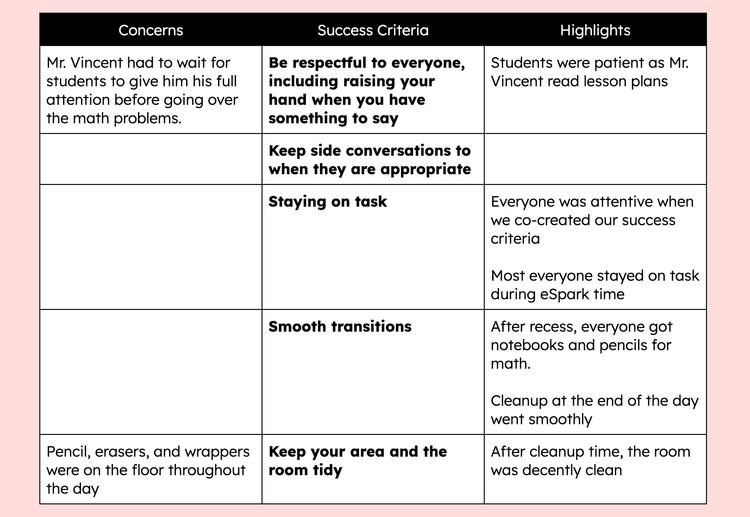
      <p class="" style="color:inherit;font-size:1em;line-height:1.618em;margin:0 0 1.25em 0;font-weight:normal;margin-top:0;font-family:'DejaVu Sans Condensed', 'Liberation Sans', 'Nimbus Sans L', 'Helvetica Neue', Helvetica, Arial, sans-serif;letter-spacing:-.01em;">Years ago Jennifer Gonzalez wrote on her <a href="https://www.cultofpedagogy.com/holistic-analytic-single-point-rubrics/" rel="nofollow" style="color:#009cdb !important;">Cult of Pedagogy blog about different kinds of assessment rubrics</a>. Reading about <strong>single-point rubrics</strong> was a big ah-ha moment for me.</p><p class="" style="color:inherit;font-size:1em;line-height:1.618em;margin:0 0 1.25em 0;font-weight:normal;font-family:'DejaVu Sans Condensed', 'Liberation Sans', 'Nimbus Sans L', 'Helvetica Neue', Helvetica, Arial, sans-serif;letter-spacing:-.01em;">A single-point rubric breaks down an assignment into specific success criteria. Unlike analytic rubrics, which list levels for each criterion, a single-point rubric only outlines what success looks like. It leaves space for the assessor to add comments, noting areas for improvement and places where the student exceeded expectations.</p><p class="" style="color:inherit;font-size:1em;line-height:1.618em;margin:0 0 1.25em 0;font-weight:normal;font-family:'DejaVu Sans Condensed', 'Liberation Sans', 'Nimbus Sans L', 'Helvetica Neue', Helvetica, Arial, sans-serif;letter-spacing:-.01em;">Creating single-point rubrics is much quicker than building analytic ones. While they don’t let you simply circle pre-set levels, their open-ended structure allows for more creativity and personalized feedback.</p><p class="" style="color:inherit;font-size:1em;line-height:1.618em;margin:0 0 1.25em 0;font-weight:normal;margin-bottom:0;font-family:'DejaVu Sans Condensed', 'Liberation Sans', 'Nimbus Sans L', 'Helvetica Neue', Helvetica, Arial, sans-serif;letter-spacing:-.01em;">As a fifth-grade teacher, I used single-point rubrics often. When it made sense, I’d have the class help define the criteria for a project. I usually included two versions of the rubric table in an assignment document—one for student self-assessment and one for me to fill out.</p>
    </td>
  </tr>
</tbody></table>

</div>
<div id="image-image-section-below-6">
<table role="presentation" width="100%" cellpadding="0" cellspacing="0" border="0" bgcolor="#FFDDDD" class="image-section below-layout section-content">


    <tbody><tr>
      <td>
        <table role="presentation" width="100%" cellpadding="0" cellspacing="0" border="0">
          <tbody><tr>
              

            <td align="left" valign="middle" class="section-image-cell section-content-cell section-hoverable-image" data-aspect="ORIGINAL" style="padding:0;">
              
  <img class="section-scaleable-image" src="https://images.squarespace-cdn.com/content/50eca855e4b0939ae8bb12d9/af689bfb-af8a-4eb4-ac18-320e1f7aa529/Screenshot+2024-10-19+at+1.44.51%E2%80%AFPM.png?content-type=image%2Fpng&amp;format=750w" width="594" alt="" style="font-size:.6666666666666666em;display:block;border:0;text-decoration:none;line-height:0;background-color:transparent;font-weight:normal;height:auto;width:100%;max-width:100%;font-family:'DejaVu Sans Condensed', 'Liberation Sans', 'Nimbus Sans L', 'Helvetica Neue', Helvetica, Arial, sans-serif;">


            </td>
              

          </tr>
        </tbody></table>
      </td>
    </tr>


</tbody></table>

</div>
<div id="text-text-section-7">


<table role="presentation" width="100%" cellpadding="0" cellspacing="0" border="0" bgcolor="#FFDDDD" class="text-section section-content">
  <tbody><tr>
    <td valign="top" class="section-text-area section-content-cell padding-mobile-both" style="padding-top:8px;padding-right:66px;padding-bottom:6px;padding-left:66px;color:#272727;background-color:#fdd;">
      <p class="" style="color:inherit;font-size:1em;line-height:1.618em;margin:0 0 1.25em 0;font-weight:normal;margin-top:0;margin-bottom:0;font-family:'DejaVu Sans Condensed', 'Liberation Sans', 'Nimbus Sans L', 'Helvetica Neue', Helvetica, Arial, sans-serif;letter-spacing:-.01em;">As a substitute teacher, I use a single-point rubric with the class in the morning to outline behavior expectations. Throughout the day, we reflect together, adding to the concerns and highlights. At the end of the day, I share the rubric with the regular teacher to give a detailed report on the class's overall behavior.</p>
    </td>
  </tr>
</tbody></table>

</div>
<div id="image-image-section-below-8">
<table role="presentation" width="100%" cellpadding="0" cellspacing="0" border="0" bgcolor="#FFDDDD" class="image-section below-layout section-content">


    <tbody><tr>
      <td>
        <table role="presentation" width="100%" cellpadding="0" cellspacing="0" border="0">
          <tbody><tr>
              

            <td align="left" valign="middle" class="section-image-cell section-content-cell section-hoverable-image" data-aspect="ORIGINAL" style="padding:0;">
              
  <img class="section-scaleable-image" src="https://images.squarespace-cdn.com/content/50eca855e4b0939ae8bb12d9/de1cb522-d6d4-4415-a5c5-a7e4374673c3/Screenshot+2024-10-19+at+1.57.02%E2%80%AFPM.png?content-type=image%2Fpng&amp;format=750w" width="594" alt="" style="font-size:.6666666666666666em;display:block;border:0;text-decoration:none;line-height:0;background-color:transparent;font-weight:normal;height:auto;width:100%;max-width:100%;font-family:'DejaVu Sans Condensed', 'Liberation Sans', 'Nimbus Sans L', 'Helvetica Neue', Helvetica, Arial, sans-serif;">


            </td>
              

          </tr>
        </tbody></table>
      </td>
    </tr>


  <tr>
    <td bgcolor="#FFDDDD" class="spacing-below" height="12"></td>
  </tr>


</tbody></table>

</div>
<div id="text-text-section-9">


<table role="presentation" width="100%" cellpadding="0" cellspacing="0" border="0" bgcolor="#9A4292" class="text-section section-content">
  <tbody><tr>
    <td valign="top" class="section-text-area section-content-cell padding-mobile-both" style="padding-top:12px;padding-right:66px;padding-bottom:12px;padding-left:66px;color:#fff;background-color:#9a4292;">
      <h4 style="color:inherit;margin:1.414em 0 .5em;font-weight:400;line-height:1.25em;font-size:1.5em;mso-line-height-alt:1.5em;margin-top:0;margin-bottom:0;font-family:'DejaVu Sans Condensed', 'Liberation Sans', 'Nimbus Sans L', 'Helvetica Neue', Helvetica, Arial, sans-serif;letter-spacing:.02em;">Drawing-Driven Dumps ✏️</h4>
    </td>
  </tr>
</tbody></table>

</div>
<div id="text-text-section-10">


<table role="presentation" width="100%" cellpadding="0" cellspacing="0" border="0" bgcolor="#FFDAF1" class="text-section section-content">
  <tbody><tr>
    <td valign="top" class="section-text-area section-content-cell padding-mobile-both" style="padding-top:12px;padding-right:66px;padding-bottom:12px;padding-left:66px;color:#272727;background-color:#ffdaf1;">
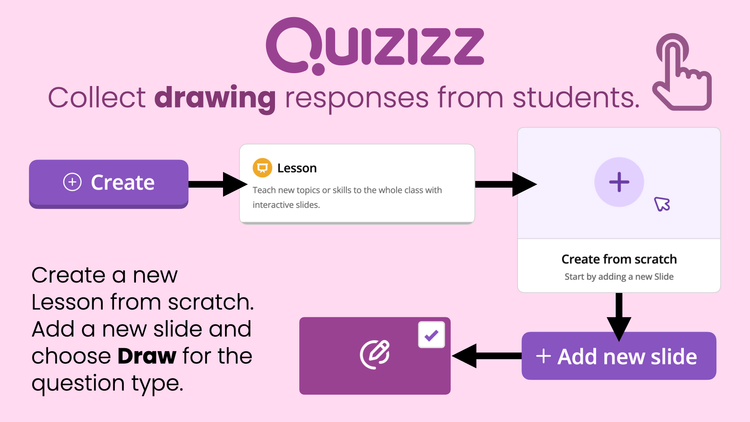
      <p class="" style="color:inherit;font-size:1em;line-height:1.618em;margin:0 0 1.25em 0;font-weight:normal;margin-top:0;font-family:'DejaVu Sans Condensed', 'Liberation Sans', 'Nimbus Sans L', 'Helvetica Neue', Helvetica, Arial, sans-serif;letter-spacing:-.01em;">Cult of Pedagogy’s post, “<a href="https://www.cultofpedagogy.com/retrieval-practice/" rel="nofollow" style="color:#009cdb !important;">Retrieval Practice: The Most Powerful Learning Strategy You’re Not Using</a>,” highlights the effectiveness of retrieval practice—repeatedly recalling information from memory. This active recall helps students strengthen their understanding and improve long-term retention.</p><p class="" style="color:inherit;font-size:1em;line-height:1.618em;margin:0 0 1.25em 0;font-weight:normal;font-family:'DejaVu Sans Condensed', 'Liberation Sans', 'Nimbus Sans L', 'Helvetica Neue', Helvetica, Arial, sans-serif;letter-spacing:-.01em;">One popular retrieval practice is the <strong>Brain Dump</strong>, where students write down everything they remember about a topic without looking at notes. To mix things up, I sometimes have students draw instead of write, using pictures to retrieve and communicate their knowledge. After drawing, students pair up to explain their drawings to each other.</p><p class="" style="color:inherit;font-size:1em;line-height:1.618em;margin:0 0 1.25em 0;font-weight:normal;margin-bottom:0;font-family:'DejaVu Sans Condensed', 'Liberation Sans', 'Nimbus Sans L', 'Helvetica Neue', Helvetica, Arial, sans-serif;letter-spacing:-.01em;">Quizizz can be used to collect these visual brain dumps. The steps below show how to set up a Quizizz lesson where students can join and use a digital whiteboard to draw. As the teacher, I can view everyone’s drawings and highlight certain ones for the whole class. And yes, when students use a laptop trackpad, the drawings can be... charmingly rough—but deciphering those scribbles adds to the fun!</p>
    </td>
  </tr>
</tbody></table>

</div>
<div id="image-image-section-below-11">
<table role="presentation" width="100%" cellpadding="0" cellspacing="0" border="0" bgcolor="#FFDAF1" class="image-section below-layout section-content">


    <tbody><tr>
      <td>
        <table role="presentation" width="100%" cellpadding="0" cellspacing="0" border="0">
          <tbody><tr>
              

            <td align="left" valign="middle" class="section-image-cell section-content-cell section-hoverable-image" data-aspect="ORIGINAL" style="padding:0;">
              
  <img class="section-scaleable-image" src="https://images.squarespace-cdn.com/content/50eca855e4b0939ae8bb12d9/be62e189-44cf-4f0f-bedf-e8227fba2fd8/Quizizz+for+Drawing.png?content-type=image%2Fpng&amp;format=750w" width="594" alt="" style="font-size:.6666666666666666em;display:block;border:0;text-decoration:none;line-height:0;background-color:transparent;font-weight:normal;height:auto;width:100%;max-width:100%;font-family:'DejaVu Sans Condensed', 'Liberation Sans', 'Nimbus Sans L', 'Helvetica Neue', Helvetica, Arial, sans-serif;">


            </td>
              

          </tr>
        </tbody></table>
      </td>
    </tr>


  <tr>
    <td bgcolor="#FFDAF1" class="spacing-below" height="8"></td>
  </tr>


</tbody></table>

</div>
<div id="text-text-section-12">


<table role="presentation" width="100%" cellpadding="0" cellspacing="0" border="0" bgcolor="#02B0B8" class="text-section section-content">
  <tbody><tr>
    <td valign="top" class="section-text-area section-content-cell padding-mobile-both" style="padding-top:12px;padding-right:66px;padding-bottom:12px;padding-left:66px;color:#fff;background-color:#02b0b8;">
      <h4 style="color:inherit;margin:1.414em 0 .5em;font-weight:400;line-height:1.25em;font-size:1.5em;mso-line-height-alt:1.5em;margin-top:0;margin-bottom:0;font-family:'DejaVu Sans Condensed', 'Liberation Sans', 'Nimbus Sans L', 'Helvetica Neue', Helvetica, Arial, sans-serif;letter-spacing:.02em;">Picture in Picture 🎬</h4>
    </td>
  </tr>
</tbody></table>

</div>
<div id="text-text-section-13">


<table role="presentation" width="100%" cellpadding="0" cellspacing="0" border="0" bgcolor="#DEF9F9" class="text-section section-content">
  <tbody><tr>
    <td valign="top" class="section-text-area section-content-cell padding-mobile-both" style="padding-top:12px;padding-right:66px;padding-bottom:12px;padding-left:66px;color:#272727;background-color:#def9f9;">
      <p class="" style="color:inherit;font-size:1em;line-height:1.618em;margin:0 0 1.25em 0;font-weight:normal;margin-top:0;font-family:'DejaVu Sans Condensed', 'Liberation Sans', 'Nimbus Sans L', 'Helvetica Neue', Helvetica, Arial, sans-serif;letter-spacing:-.01em;">Canva’s video editor is useful, but it has its quirks. For example, you can have up to 50 audio tracks, but only <em><span style="font-size:inherit;font-weight:inherit;line-height:inherit;margin:0;text-decoration:underline;">one</span></em> video track. I’m used to layering video tracks in other apps to show things like B-roll or videos over my shoulder, so this is a bit limiting.</p><p class="" style="color:inherit;font-size:1em;line-height:1.618em;margin:0 0 1.25em 0;font-weight:normal;font-family:'DejaVu Sans Condensed', 'Liberation Sans', 'Nimbus Sans L', 'Helvetica Neue', Helvetica, Arial, sans-serif;letter-spacing:-.01em;">You can still layer videos in Canva, but instead of each video having its own track, you add the additional videos directly onto the same track as the base video. You can resize and move the added videos, but here’s the catch: Canva loops those extra videos to match the length of the base video.</p><p class="" style="color:inherit;font-size:1em;line-height:1.618em;margin:0 0 1.25em 0;font-weight:normal;margin-bottom:0;font-family:'DejaVu Sans Condensed', 'Liberation Sans', 'Nimbus Sans L', 'Helvetica Neue', Helvetica, Arial, sans-serif;letter-spacing:-.01em;">To control when picture-in-picture videos appear or disappear, you can tweak the timing. Right-click the added video and select <em>Show timing</em>. This temporarily puts the video on its own track, allowing you to drag the handles to adjust when the added video appears and disappears over the base video.</p>
    </td>
  </tr>
</tbody></table>

</div>
<div id="image-image-section-below-14">
<table role="presentation" width="100%" cellpadding="0" cellspacing="0" border="0" bgcolor="#DEF9F9" class="image-section below-layout section-content">


    <tbody><tr>
      <td>
        <table role="presentation" width="100%" cellpadding="0" cellspacing="0" border="0">
          <tbody><tr>
              

            <td align="left" valign="middle" class="section-image-cell section-content-cell section-hoverable-image" data-aspect="ORIGINAL" style="padding:0;">
              
  <img class="section-scaleable-image" src="https://images.squarespace-cdn.com/content/50eca855e4b0939ae8bb12d9/ebd13c86-23c6-4e2a-823a-4e6fa1c50ae3/Canva+Picture+in+Picture.001.png?content-type=image%2Fpng&amp;format=750w" width="594" alt="" style="font-size:.6666666666666666em;display:block;border:0;text-decoration:none;line-height:0;background-color:transparent;font-weight:normal;height:auto;width:100%;max-width:100%;font-family:'DejaVu Sans Condensed', 'Liberation Sans', 'Nimbus Sans L', 'Helvetica Neue', Helvetica, Arial, sans-serif;">


            </td>
              

          </tr>
        </tbody></table>
      </td>
    </tr>


  <tr>
    <td bgcolor="#DEF9F9" class="spacing-below" height="12"></td>
  </tr>


</tbody></table>

</div>
<div id="text-text-section-15">


<table role="presentation" width="100%" cellpadding="0" cellspacing="0" border="0" bgcolor="#ED1F24" class="text-section section-content">
  <tbody><tr>
    <td valign="top" class="section-text-area section-content-cell padding-mobile-both" style="padding-top:12px;padding-right:66px;padding-bottom:12px;padding-left:66px;color:#fff;background-color:#ed1f24;">
      <h4 style="color:inherit;margin:1.414em 0 .5em;font-weight:400;line-height:1.25em;font-size:1.5em;mso-line-height-alt:1.5em;margin-top:0;margin-bottom:0;font-family:'DejaVu Sans Condensed', 'Liberation Sans', 'Nimbus Sans L', 'Helvetica Neue', Helvetica, Arial, sans-serif;letter-spacing:.02em;">Custom Coloring Creations 🖍️</h4>
    </td>
  </tr>
</tbody></table>

</div>
<div id="text-text-section-16">


<table role="presentation" width="100%" cellpadding="0" cellspacing="0" border="0" bgcolor="#FEDDDE" class="text-section section-content">
  <tbody><tr>
    <td valign="top" class="section-text-area section-content-cell padding-mobile-both" style="padding-top:12px;padding-right:66px;padding-bottom:12px;padding-left:66px;color:#272727;background-color:#feddde;">
      <p class="" style="color:inherit;font-size:1em;line-height:1.618em;margin:0 0 1.25em 0;font-weight:normal;margin-top:0;font-family:'DejaVu Sans Condensed', 'Liberation Sans', 'Nimbus Sans L', 'Helvetica Neue', Helvetica, Arial, sans-serif;letter-spacing:-.01em;">AI image generators can create stunning artwork in a variety of styles, from photorealistic to watercolor, cartoon, and even 3D.</p><p class="" style="color:inherit;font-size:1em;line-height:1.618em;margin:0 0 1.25em 0;font-weight:normal;font-family:'DejaVu Sans Condensed', 'Liberation Sans', 'Nimbus Sans L', 'Helvetica Neue', Helvetica, Arial, sans-serif;letter-spacing:-.01em;">For primary teachers, here’s something especially fun: you can prompt an AI generator to make a custom coloring page! Start your prompt with something like, “Create a black-and-white coloring sheet with simple, clear outlines that kids can color in.” Then, specify what you want the picture to be.</p><p class="" style="color:inherit;font-size:1em;line-height:1.618em;margin:0 0 1.25em 0;font-weight:normal;margin-bottom:0;font-family:'DejaVu Sans Condensed', 'Liberation Sans', 'Nimbus Sans L', 'Helvetica Neue', Helvetica, Arial, sans-serif;letter-spacing:-.01em;">There are many AI image generators to choose from, including <a href="https://ideogram.ai/t/explore" rel="nofollow" style="color:#009cdb !important;">Ideogram</a>, <a href="https://www.canva.com" rel="nofollow" style="color:#009cdb !important;">Canva</a>, and <a href="https://www.adobe.com/express" rel="nofollow" style="color:#009cdb !important;">Adobe Express</a>. This <a href="https://learninginhand.com/s/Coloring-Pages-with-AI-Handout-from-Tony-Vincent-zsyj.pdf" rel="nofollow" style="color:#009cdb !important;">handout</a> includes steps for generating images for each of these websites.</p>
    </td>
  </tr>
</tbody></table>

</div>
<div id="image-image-section-below-17">
<table role="presentation" width="100%" cellpadding="0" cellspacing="0" border="0" bgcolor="#FEDDDE" class="image-section below-layout section-content">


    <tbody><tr>
      <td>
        <table role="presentation" width="100%" cellpadding="0" cellspacing="0" border="0">
          <tbody><tr>
              
    <td class="show-desktop-only section-spacing-left" width="44"></td>
  

            <td align="left" valign="middle" class="section-image-cell section-content-cell section-hoverable-image" data-aspect="ORIGINAL" style="padding:0;">
              
  <a href="https://learninginhand.com/s/Coloring-Pages-with-AI-Handout-from-Tony-Vincent-zsyj.pdf" style="color:#009cdb !important;"><img class="section-scaleable-image" src="https://images.squarespace-cdn.com/content/50eca855e4b0939ae8bb12d9/60e136f9-8f63-42e0-a10a-d18328035e5a/Coloring+Pages+with+AI+Handout+from+Tony+Vincent.png?content-type=image%2Fpng&amp;format=750w" width="594" alt="Coloring Pages instructions for Ideogram, Canva, and Adobe Express" style="font-size:.6666666666666666em;display:block;border:0;text-decoration:none;line-height:0;background-color:transparent;font-weight:normal;height:auto;width:100%;max-width:100%;font-family:'DejaVu Sans Condensed', 'Liberation Sans', 'Nimbus Sans L', 'Helvetica Neue', Helvetica, Arial, sans-serif;"></a>


            </td>
              
    <td class="show-desktop-only section-spacing-right" width="44"></td>
  

          </tr>
        </tbody></table>
      </td>
    </tr>


  <tr>
    <td bgcolor="#FEDDDE" class="spacing-below" height="11"></td>
  </tr>


</tbody></table>

</div>
<div id="text-text-section-18">


<table role="presentation" width="100%" cellpadding="0" cellspacing="0" border="0" bgcolor="#FEDDDE" class="text-section section-content">
  <tbody><tr>
    <td valign="top" class="section-text-area section-content-cell padding-mobile-both" style="padding-top:12px;padding-right:66px;padding-bottom:0px;padding-left:66px;color:#272727;background-color:#feddde;">
      <p style="color:inherit;font-size:1em;line-height:1.618em;margin:0 0 1.25em 0;font-weight:normal;margin-top:0;margin-bottom:0;font-family:'DejaVu Sans Condensed', 'Liberation Sans', 'Nimbus Sans L', 'Helvetica Neue', Helvetica, Arial, sans-serif;letter-spacing:-.01em;text-align:center;" class=""><strong>Custom coloring possibilities…</strong></p>
    </td>
  </tr>
</tbody></table>

</div>
<div id="image-image-section-below-19">
<table role="presentation" width="100%" cellpadding="0" cellspacing="0" border="0" bgcolor="#FEDDDE" class="image-section below-layout section-content">


    <tbody><tr>
      <td>
        <table role="presentation" width="100%" cellpadding="0" cellspacing="0" border="0">
          <tbody><tr>
              
    <td class="show-desktop-only section-spacing-left" width="22"></td>
  

            <td align="left" valign="middle" class="section-image-cell section-content-cell section-hoverable-image" data-aspect="ORIGINAL" style="padding:0;">
              
  <img class="section-scaleable-image" src="https://images.squarespace-cdn.com/content/50eca855e4b0939ae8bb12d9/72b3e87b-bf04-4407-9413-70187c3d7cc0/Coloring+possibilities.png?content-type=image%2Fpng&amp;format=750w" width="594" alt="Number practice, classroom expectations, vocabulary building, living &amp; nonliving, phonic focus, students interests" style="font-size:.6666666666666666em;display:block;border:0;text-decoration:none;line-height:0;background-color:transparent;font-weight:normal;height:auto;width:100%;max-width:100%;font-family:'DejaVu Sans Condensed', 'Liberation Sans', 'Nimbus Sans L', 'Helvetica Neue', Helvetica, Arial, sans-serif;">


            </td>
              
    <td class="show-desktop-only section-spacing-right" width="22"></td>
  

          </tr>
        </tbody></table>
      </td>
    </tr>


  <tr>
    <td bgcolor="#FEDDDE" class="spacing-below" height="18"></td>
  </tr>


</tbody></table>

</div>
<div id="text-text-section-20">


<table role="presentation" width="100%" cellpadding="0" cellspacing="0" border="0" bgcolor="#67A037" class="text-section section-content">
  <tbody><tr>
    <td valign="top" class="section-text-area section-content-cell padding-mobile-both" style="padding-top:12px;padding-right:66px;padding-bottom:12px;padding-left:66px;color:#fff;background-color:#67a037;">
      <h4 style="color:inherit;margin:1.414em 0 .5em;font-weight:400;line-height:1.25em;font-size:1.5em;mso-line-height-alt:1.5em;margin-top:0;margin-bottom:0;font-family:'DejaVu Sans Condensed', 'Liberation Sans', 'Nimbus Sans L', 'Helvetica Neue', Helvetica, Arial, sans-serif;letter-spacing:.02em;">Color-Coded Keys 🌈</h4>
    </td>
  </tr>
</tbody></table>

</div>
<div id="text-text-section-21">


<table role="presentation" width="100%" cellpadding="0" cellspacing="0" border="0" bgcolor="#EDF9E3" class="text-section section-content">
  <tbody><tr>
    <td valign="top" class="section-text-area section-content-cell padding-mobile-both" style="padding-top:12px;padding-right:66px;padding-bottom:12px;padding-left:66px;color:#272727;background-color:#edf9e3;">
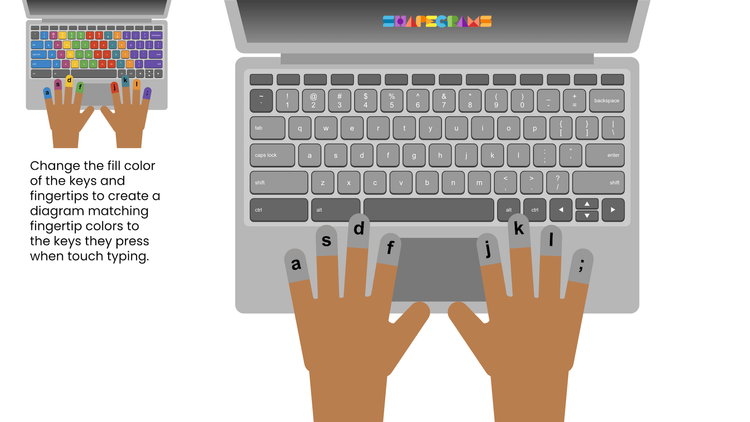
      <p class="" style="color:inherit;font-size:1em;line-height:1.618em;margin:0 0 1.25em 0;font-weight:normal;margin-top:0;font-family:'DejaVu Sans Condensed', 'Liberation Sans', 'Nimbus Sans L', 'Helvetica Neue', Helvetica, Arial, sans-serif;letter-spacing:-.01em;">A key concept in touch typing is that each key is assigned to a specific finger. To help students grasp this, it can be useful to have them <a href="https://docs.google.com/presentation/d/1VXmwSM1DF6GE5wLk9kQIzhu_qS2AxyN3GzgFku9zyCY/template/preview" rel="nofollow" style="color:#009cdb !important;">color in a keyboarding diagram</a>, matching the keys to the fingers that press them.</p><p class="" style="color:inherit;font-size:1em;line-height:1.618em;margin:0 0 1.25em 0;font-weight:normal;margin-bottom:0;font-family:'DejaVu Sans Condensed', 'Liberation Sans', 'Nimbus Sans L', 'Helvetica Neue', Helvetica, Arial, sans-serif;letter-spacing:-.01em;">I’ve <a href="https://docs.google.com/presentation/d/1VXmwSM1DF6GE5wLk9kQIzhu_qS2AxyN3GzgFku9zyCY/template/preview" rel="nofollow" style="color:#009cdb !important;">created a diagram</a> just for this purpose, and you’re welcome to share it with students learning to touch type. It’s in Google Slides, allowing students to customize the fill colors so the keys match the corresponding finger tips.</p>
    </td>
  </tr>
</tbody></table>

</div>
<div id="image-image-section-below-22">
<table role="presentation" width="100%" cellpadding="0" cellspacing="0" border="0" bgcolor="#EDF9E3" class="image-section below-layout section-content">


    <tbody><tr>
      <td>
        <table role="presentation" width="100%" cellpadding="0" cellspacing="0" border="0">
          <tbody><tr>
              
    <td class="show-desktop-only section-spacing-left" width="44"></td>
  

            <td align="left" valign="middle" class="section-image-cell section-content-cell section-hoverable-image" data-aspect="ORIGINAL" style="padding:0;">
              
  <a href="https://docs.google.com/presentation/d/1VXmwSM1DF6GE5wLk9kQIzhu_qS2AxyN3GzgFku9zyCY/template/preview" style="color:#009cdb !important;"><img class="section-scaleable-image" src="https://images.squarespace-cdn.com/content/50eca855e4b0939ae8bb12d9/73f42ea2-9b19-4f62-975e-ece579e4a8a5/Screenshot+2024-10-20+at+4.34.18%E2%80%AFPM.png?content-type=image%2Fpng&amp;format=750w" width="594" alt="Keyboarding diagram to color" style="font-size:.6666666666666666em;display:block;border:0;text-decoration:none;line-height:0;background-color:transparent;font-weight:normal;height:auto;width:100%;max-width:100%;font-family:'DejaVu Sans Condensed', 'Liberation Sans', 'Nimbus Sans L', 'Helvetica Neue', Helvetica, Arial, sans-serif;"></a>


            </td>
              
    <td class="show-desktop-only section-spacing-right" width="44"></td>
  

          </tr>
        </tbody></table>
      </td>
    </tr>


</tbody></table>

</div>
<div id="text-text-section-23">


<table role="presentation" width="100%" cellpadding="0" cellspacing="0" border="0" bgcolor="#EDF9E3" class="text-section section-content">
  <tbody><tr>
    <td valign="top" class="section-text-area section-content-cell padding-mobile-both" style="padding-top:12px;padding-right:66px;padding-bottom:22px;padding-left:66px;color:#272727;background-color:#edf9e3;">
      <p class="" style="color:inherit;font-size:1em;line-height:1.618em;margin:0 0 1.25em 0;font-weight:normal;margin-top:0;font-family:'DejaVu Sans Condensed', 'Liberation Sans', 'Nimbus Sans L', 'Helvetica Neue', Helvetica, Arial, sans-serif;letter-spacing:-.01em;">The diagram is part of the <a href="https://shapegrams.com/keyboard/" rel="nofollow" style="color:#009cdb !important;">Keyboarding Diagram Shapegrams Lesson</a> where I show students how to draw the entire diagram from scratch in Google Slides. This lesson is the most challenging skill level: <a href="https://shapegrams.com/get/#outstanding" rel="nofollow" style="color:#009cdb !important;">Outstanding Orange</a>. </p><p class="" style="color:inherit;font-size:1em;line-height:1.618em;margin:0 0 1.25em 0;font-weight:normal;margin-bottom:0;font-family:'DejaVu Sans Condensed', 'Liberation Sans', 'Nimbus Sans L', 'Helvetica Neue', Helvetica, Arial, sans-serif;letter-spacing:-.01em;">But, don’t worry, you and your students can use <a href="https://docs.google.com/presentation/d/1VXmwSM1DF6GE5wLk9kQIzhu_qS2AxyN3GzgFku9zyCY/template/preview" rel="nofollow" style="color:#009cdb !important;">the template</a> to simply change fill colors—there’s no need to draw it from scratch or to be a Shapegrams member. Though, a <a href="https://shapegrams.com/sign-up/" rel="nofollow" style="color:#009cdb !important;">$35/year membership</a> gets you an all-access pass to every single Shapegram.</p>
    </td>
  </tr>
</tbody></table>

</div>
<div id="text-text-section-24">


<table role="presentation" width="100%" cellpadding="0" cellspacing="0" border="0" bgcolor="#6639B7" class="text-section section-content">
  <tbody><tr>
    <td valign="top" class="section-text-area section-content-cell padding-mobile-both" style="padding-top:12px;padding-right:66px;padding-bottom:12px;padding-left:66px;color:#fff;background-color:#6639b7;">
      <h4 style="color:inherit;margin:1.414em 0 .5em;font-weight:400;line-height:1.25em;font-size:1.5em;mso-line-height-alt:1.5em;margin-top:0;margin-bottom:0;font-family:'DejaVu Sans Condensed', 'Liberation Sans', 'Nimbus Sans L', 'Helvetica Neue', Helvetica, Arial, sans-serif;letter-spacing:.02em;">Rad Ratings 👍</h4>
    </td>
  </tr>
</tbody></table>

</div>
<div id="text-text-section-25">


<table role="presentation" width="100%" cellpadding="0" cellspacing="0" border="0" bgcolor="#EEE5FE" class="text-section section-content">
  <tbody><tr>
    <td valign="top" class="section-text-area section-content-cell padding-mobile-both" style="padding-top:12px;padding-right:66px;padding-bottom:12px;padding-left:66px;color:#272727;background-color:#eee5fe;">
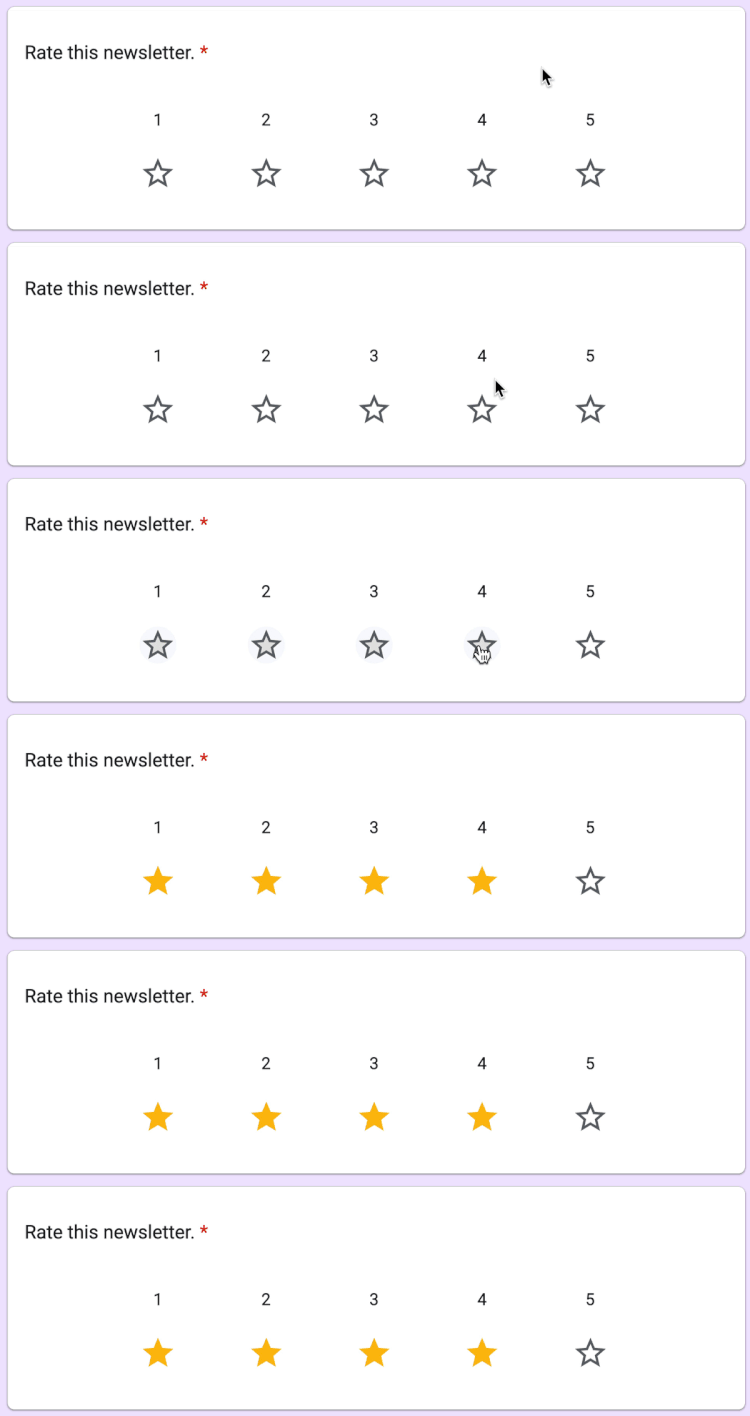
      <p class="" style="color:inherit;font-size:1em;line-height:1.618em;margin:0 0 1.25em 0;font-weight:normal;margin-top:0;margin-bottom:0;font-family:'DejaVu Sans Condensed', 'Liberation Sans', 'Nimbus Sans L', 'Helvetica Neue', Helvetica, Arial, sans-serif;letter-spacing:-.01em;">Google Forms has a brand-new question type—ratings! You can now ask respondents to rate things using a customizable scale, ranging from 3 to 10. You can also choose an icon for the rating, such as stars, hearts, or thumbs up.</p>
    </td>
  </tr>
</tbody></table>

</div>
<div id="image-image-section-below-26">
<table role="presentation" width="100%" cellpadding="0" cellspacing="0" border="0" bgcolor="#EEE5FE" class="image-section below-layout section-content">


    <tbody><tr>
      <td>
        <table role="presentation" width="100%" cellpadding="0" cellspacing="0" border="0">
          <tbody><tr>
              
    <td class="show-desktop-only section-spacing-left" width="44"></td>
  

            <td align="left" valign="middle" class="section-image-cell section-content-cell section-hoverable-image" data-aspect="ORIGINAL" style="padding:0;">
              
  <img class="section-scaleable-image" src="https://images.squarespace-cdn.com/content/50eca855e4b0939ae8bb12d9/b7f2e33f-7e79-4fd9-b2bb-00a120663804/Rating+Question+Type.png?content-type=image%2Fpng&amp;format=750w" width="594" alt="" style="font-size:.6666666666666666em;display:block;border:0;text-decoration:none;line-height:0;background-color:transparent;font-weight:normal;height:auto;width:100%;max-width:100%;font-family:'DejaVu Sans Condensed', 'Liberation Sans', 'Nimbus Sans L', 'Helvetica Neue', Helvetica, Arial, sans-serif;">


            </td>
              
    <td class="show-desktop-only section-spacing-right" width="44"></td>
  

          </tr>
        </tbody></table>
      </td>
    </tr>


</tbody></table>

</div>
<div id="text-text-section-27">


<table role="presentation" width="100%" cellpadding="0" cellspacing="0" border="0" bgcolor="#EEE5FE" class="text-section section-content">
  <tbody><tr>
    <td valign="top" class="section-text-area section-content-cell padding-mobile-both" style="padding-top:12px;padding-right:66px;padding-bottom:12px;padding-left:66px;color:#272727;background-color:#eee5fe;">
      <p class="" style="color:inherit;font-size:1em;line-height:1.618em;margin:0 0 1.25em 0;font-weight:normal;margin-top:0;margin-bottom:0;font-family:'DejaVu Sans Condensed', 'Liberation Sans', 'Nimbus Sans L', 'Helvetica Neue', Helvetica, Arial, sans-serif;letter-spacing:-.01em;">When respondents submit their ratings, the icons fill with color, making it more visually engaging than other question types.</p>
    </td>
  </tr>
</tbody></table>

</div>
<div id="image-image-section-below-28">
<table role="presentation" width="100%" cellpadding="0" cellspacing="0" border="0" bgcolor="#EEE5FE" class="image-section below-layout section-content">


    <tbody><tr>
      <td>
        <table role="presentation" width="100%" cellpadding="0" cellspacing="0" border="0">
          <tbody><tr>
              
    <td class="show-desktop-only section-spacing-left" width="44"></td>
  

            <td align="left" valign="middle" class="section-image-cell section-content-cell section-hoverable-image" data-aspect="ORIGINAL" style="padding:0;">
              
  <img class="section-scaleable-image" src="https://images.squarespace-cdn.com/content/50eca855e4b0939ae8bb12d9/105dba45-727c-4ddf-a4d3-f399282a8202/Rating.gif?content-type=image%2Fgif&amp;format=750w" width="594" alt="" style="font-size:.6666666666666666em;display:block;border:0;text-decoration:none;line-height:0;background-color:transparent;font-weight:normal;height:auto;width:100%;max-width:100%;font-family:'DejaVu Sans Condensed', 'Liberation Sans', 'Nimbus Sans L', 'Helvetica Neue', Helvetica, Arial, sans-serif;">


            </td>
              
    <td class="show-desktop-only section-spacing-right" width="44"></td>
  

          </tr>
        </tbody></table>
      </td>
    </tr>


</tbody></table>

</div>
<div id="text-text-section-29">


<table role="presentation" width="100%" cellpadding="0" cellspacing="0" border="0" bgcolor="#EEE5FE" class="text-section section-content">
  <tbody><tr>
    <td valign="top" class="section-text-area section-content-cell padding-mobile-both" style="padding-top:12px;padding-right:66px;padding-bottom:12px;padding-left:66px;color:#272727;background-color:#eee5fe;">
      <p class="" style="color:inherit;font-size:1em;line-height:1.618em;margin:0 0 1.25em 0;font-weight:normal;margin-top:0;margin-bottom:0;font-family:'DejaVu Sans Condensed', 'Liberation Sans', 'Nimbus Sans L', 'Helvetica Neue', Helvetica, Arial, sans-serif;letter-spacing:-.01em;">As you analyze responses, you'll see the average rating and a bar graph that shows the distribution of responses, giving you a clear picture of how people rated.</p>
    </td>
  </tr>
</tbody></table>

</div>
<div id="image-image-section-below-30">
<table role="presentation" width="100%" cellpadding="0" cellspacing="0" border="0" bgcolor="#EEE5FE" class="image-section below-layout section-content">


    <tbody><tr>
      <td>
        <table role="presentation" width="100%" cellpadding="0" cellspacing="0" border="0">
          <tbody><tr>
              
    <td class="show-desktop-only section-spacing-left" width="44"></td>
  

            <td align="left" valign="middle" class="section-image-cell section-content-cell section-hoverable-image" data-aspect="ORIGINAL" style="padding:0;">
              
  <img class="section-scaleable-image" src="https://images.squarespace-cdn.com/content/50eca855e4b0939ae8bb12d9/bfb02ece-49ce-4129-99a3-575c31c4b40a/Analyze+Results.png?content-type=image%2Fpng&amp;format=750w" width="594" alt="" style="font-size:.6666666666666666em;display:block;border:0;text-decoration:none;line-height:0;background-color:transparent;font-weight:normal;height:auto;width:100%;max-width:100%;font-family:'DejaVu Sans Condensed', 'Liberation Sans', 'Nimbus Sans L', 'Helvetica Neue', Helvetica, Arial, sans-serif;">


            </td>
              
    <td class="show-desktop-only section-spacing-right" width="44"></td>
  

          </tr>
        </tbody></table>
      </td>
    </tr>


</tbody></table>

</div>
<div id="text-text-section-31">


<table role="presentation" width="100%" cellpadding="0" cellspacing="0" border="0" bgcolor="#EEE5FE" class="text-section section-content">
  <tbody><tr>
    <td valign="top" class="section-text-area section-content-cell padding-mobile-both" style="padding-top:12px;padding-right:66px;padding-bottom:22px;padding-left:66px;color:#272727;background-color:#eee5fe;">
      <p class="" style="color:inherit;font-size:1em;line-height:1.618em;margin:0 0 1.25em 0;font-weight:normal;margin-top:0;font-family:'DejaVu Sans Condensed', 'Liberation Sans', 'Nimbus Sans L', 'Helvetica Neue', Helvetica, Arial, sans-serif;letter-spacing:-.01em;">Here are a few ways you might use this new rating feature:</p><ul data-rte-list="default" style="padding-left:25px;"><li style="font-weight:normal;margin-top:0px;margin-bottom:0px;margin-left:15px;font-family:'DejaVu Sans Condensed', 'Liberation Sans', 'Nimbus Sans L', 'Helvetica Neue', Helvetica, Arial, sans-serif;"><p class="" style="color:inherit;font-size:1em;line-height:1.618em;margin:0 0 1.25em 0;font-weight:normal;margin-top:0;margin-bottom:0;font-family:'DejaVu Sans Condensed', 'Liberation Sans', 'Nimbus Sans L', 'Helvetica Neue', Helvetica, Arial, sans-serif;letter-spacing:-.01em;">Ask students to rate how confident they feel about their answers.</p></li><li style="font-weight:normal;margin-top:0px;margin-bottom:0px;margin-left:15px;font-family:'DejaVu Sans Condensed', 'Liberation Sans', 'Nimbus Sans L', 'Helvetica Neue', Helvetica, Arial, sans-serif;"><p class="" style="color:inherit;font-size:1em;line-height:1.618em;margin:0 0 1.25em 0;font-weight:normal;margin-top:0;margin-bottom:0;font-family:'DejaVu Sans Condensed', 'Liberation Sans', 'Nimbus Sans L', 'Helvetica Neue', Helvetica, Arial, sans-serif;letter-spacing:-.01em;">Have students rate their understanding of a lesson.</p></li><li style="font-weight:normal;margin-top:0px;margin-bottom:0px;margin-left:15px;font-family:'DejaVu Sans Condensed', 'Liberation Sans', 'Nimbus Sans L', 'Helvetica Neue', Helvetica, Arial, sans-serif;"><p class="" style="color:inherit;font-size:1em;line-height:1.618em;margin:0 0 1.25em 0;font-weight:normal;margin-top:0;margin-bottom:0;font-family:'DejaVu Sans Condensed', 'Liberation Sans', 'Nimbus Sans L', 'Helvetica Neue', Helvetica, Arial, sans-serif;letter-spacing:-.01em;">Let students self-assess their class participation.</p></li><li style="font-weight:normal;margin-top:0px;margin-bottom:0px;margin-left:15px;font-family:'DejaVu Sans Condensed', 'Liberation Sans', 'Nimbus Sans L', 'Helvetica Neue', Helvetica, Arial, sans-serif;"><p class="" style="color:inherit;font-size:1em;line-height:1.618em;margin:0 0 1.25em 0;font-weight:normal;margin-top:0;margin-bottom:0;font-family:'DejaVu Sans Condensed', 'Liberation Sans', 'Nimbus Sans L', 'Helvetica Neue', Helvetica, Arial, sans-serif;letter-spacing:-.01em;">Track book popularity by asking students to rate books based on specific criteria.</p></li><li style="font-weight:normal;margin-top:0px;margin-bottom:0px;margin-left:15px;font-family:'DejaVu Sans Condensed', 'Liberation Sans', 'Nimbus Sans L', 'Helvetica Neue', Helvetica, Arial, sans-serif;"><p class="" style="color:inherit;font-size:1em;line-height:1.618em;margin:0 0 1.25em 0;font-weight:normal;margin-top:0;margin-bottom:0;font-family:'DejaVu Sans Condensed', 'Liberation Sans', 'Nimbus Sans L', 'Helvetica Neue', Helvetica, Arial, sans-serif;letter-spacing:-.01em;">Ask students to rate characters from a book or historical figures on qualities like likability, leadership, resilience, and vision.</p></li><li style="font-weight:normal;margin-top:0px;margin-bottom:0px;margin-left:15px;font-family:'DejaVu Sans Condensed', 'Liberation Sans', 'Nimbus Sans L', 'Helvetica Neue', Helvetica, Arial, sans-serif;"><p class="" style="color:inherit;font-size:1em;line-height:1.618em;margin:0 0 1.25em 0;font-weight:normal;margin-top:0;margin-bottom:0;font-family:'DejaVu Sans Condensed', 'Liberation Sans', 'Nimbus Sans L', 'Helvetica Neue', Helvetica, Arial, sans-serif;letter-spacing:-.01em;">Gather student and parent feedback on the difficulty of homework assignments.</p></li><li style="font-weight:normal;margin-top:0px;margin-bottom:0px;margin-left:15px;font-family:'DejaVu Sans Condensed', 'Liberation Sans', 'Nimbus Sans L', 'Helvetica Neue', Helvetica, Arial, sans-serif;"><p class="" style="color:inherit;font-size:1em;line-height:1.618em;margin:0 0 1.25em 0;font-weight:normal;margin-top:0;margin-bottom:0;font-family:'DejaVu Sans Condensed', 'Liberation Sans', 'Nimbus Sans L', 'Helvetica Neue', Helvetica, Arial, sans-serif;letter-spacing:-.01em;">Check the pulse of your class by having students rate how they’re feeling about class that day.</p></li></ul><p class="" style="color:inherit;font-size:1em;line-height:1.618em;margin:0 0 1.25em 0;font-weight:normal;margin-bottom:0;font-family:'DejaVu Sans Condensed', 'Liberation Sans', 'Nimbus Sans L', 'Helvetica Neue', Helvetica, Arial, sans-serif;letter-spacing:-.01em;">The rating question type is rolling out gradually, so if you don’t see it yet, you should within a week or two.</p>
    </td>
  </tr>
</tbody></table>

</div>
<div id="text-text-section-32">


<table role="presentation" width="100%" cellpadding="0" cellspacing="0" border="0" bgcolor="transparent" class="text-section section-content">
  <tbody><tr>
    <td valign="top" class="section-text-area section-content-cell padding-mobile-both" style="padding-top:28px;padding-right:66px;padding-bottom:0px;padding-left:66px;color:#272727;background-color:transparent;">
      <p class="" style="color:inherit;font-size:1em;line-height:1.618em;margin:0 0 1.25em 0;font-weight:normal;margin-top:0;font-family:'DejaVu Sans Condensed', 'Liberation Sans', 'Nimbus Sans L', 'Helvetica Neue', Helvetica, Arial, sans-serif;letter-spacing:-.01em;">It’s spooky season, and if you missed last week’s newsletter, <a href="https://learninginhand.com/issue17" rel="nofollow" style="color:#009cdb !important;">click here to read it online</a>. It’s full of Halloween ideas and resources. 🎃</p><p style="color:inherit;font-size:1em;line-height:1.618em;margin:0 0 1.25em 0;font-weight:normal;margin-bottom:0;font-family:'DejaVu Sans Condensed', 'Liberation Sans', 'Nimbus Sans L', 'Helvetica Neue', Helvetica, Arial, sans-serif;letter-spacing:-.01em;text-align:center;" class="">Smiles from Iowa,</p>
    </td>
  </tr>
</tbody></table>

</div>
<div id="image-image-section-below-33">
<table role="presentation" width="100%" cellpadding="0" cellspacing="0" border="0" bgcolor="transparent" class="image-section below-layout section-content">


    <tbody><tr>
      <td>
        <table role="presentation" width="100%" cellpadding="0" cellspacing="0" border="0">
          <tbody><tr>
              
    <td class="show-desktop-only section-spacing-left" width="88"></td>
  

            <td align="left" valign="middle" class="section-image-cell section-content-cell section-hoverable-image" data-aspect="ORIGINAL" style="padding:0;">
              
  <img class="section-scaleable-image" src="https://images.squarespace-cdn.com/content/50eca855e4b0939ae8bb12d9/00445278-d88c-451c-89ad-108eb0a7cfca/Tony+Signature.png?content-type=image%2Fpng&amp;format=750w" width="594" alt="" style="font-size:.6666666666666666em;display:block;border:0;text-decoration:none;line-height:0;background-color:transparent;font-weight:normal;height:auto;width:100%;max-width:100%;font-family:'DejaVu Sans Condensed', 'Liberation Sans', 'Nimbus Sans L', 'Helvetica Neue', Helvetica, Arial, sans-serif;">


            </td>
              
    <td class="show-desktop-only section-spacing-right" width="88"></td>
  

          </tr>
        </tbody></table>
      </td>
    </tr>


  <tr>
    <td bgcolor="transparent" class="spacing-below" height="29"></td>
  </tr>


</tbody></table>

</div>
<div id="button-button-section-34">


<table role="presentation" width="100%" cellpadding="0" cellspacing="0" border="0" bgcolor="#EDEDED" class="button-section section-content" style="width:100%;background-color:#ededed;">
  <tbody><tr>
    <td align="center" valign="middle" class="section-content-cell section-text-area" style="padding-top:22px;padding-right:22px;padding-bottom:8px;padding-left:22px;">
      
      <a href="https://learninginhand.com/newsletter" class="button-section-box button-style-solid" style="color:#009cdb !important;display:inline-block;line-height:11px;margin:0;mso-padding-alt:0;text-align:center;text-decoration:none;transition:.15s;width:auto;background-color:#009cdb;border:0;padding:17px 0;"><i class="button-section-mso" style="letter-spacing:29.92px;mso-font-width:-100%;mso-text-raise:26.950000000000003px;">&nbsp;</i><span class="button-section-label" style="line-height:inherit;margin:0;font-family:'DejaVu Sans Condensed', 'Liberation Sans', 'Nimbus Sans L', 'Helvetica Neue', Helvetica, Arial, sans-serif;font-weight:700;color:#fff;display:inline-block;font-size:11px;min-width:1px;mso-text-raise:15.95px;"><span data-letter-spacing="3" style="font-size:inherit;font-weight:inherit;line-height:inherit;margin:0;letter-spacing:0.2em;">Previous Issues</span></span><i class="button-section-mso" style="letter-spacing:29.92px;mso-font-width:-100%;mso-text-raise:26.950000000000003px;">&nbsp;</i></a>
    </td>
  </tr>
</tbody></table>

</div>
<div id="text-text-section-35">


<table role="presentation" width="100%" cellpadding="0" cellspacing="0" border="0" bgcolor="#EDEDED" class="text-section section-content">
  <tbody><tr>
    <td valign="top" class="section-text-area section-content-cell padding-mobile-both" style="padding-top:8px;padding-right:66px;padding-bottom:8px;padding-left:66px;color:#313131;background-color:#ededed;">
      <p style="color:inherit;font-size:1em;line-height:1.618em;margin:0 0 1.25em 0;font-weight:normal;margin-top:0;margin-bottom:0;font-family:'DejaVu Sans Condensed', 'Liberation Sans', 'Nimbus Sans L', 'Helvetica Neue', Helvetica, Arial, sans-serif;letter-spacing:-.01em;text-align:center;" class="">Subscribe at&nbsp;<a href="https://learninginhand.com/newsletter" rel="nofollow" style="color:#009cdb !important;">learninginhand.com</a></p>
    </td>
  </tr>
</tbody></table>

</div>
                </td>
              </tr>
            </tbody></table>
            
              <table role="presentation" width="100%" cellpadding="0" cellspacing="0" border="0" id="newsletter-section-footer">
                <tbody><tr>
                  <td align="center" valign="top" id="newsletter-section-footer-cell">
                    
<div id="footer-footer-section-stacked-bottom-0">


<table role="presentation" width="100%" cellpadding="0" cellspacing="0" border="0" bgcolor="#EDEDED" class="footer-section footer-section-stacked section-content" style="background-color:#ededed;">
  <tbody><tr>
    <td align="center" valign="top" class="section-text-area section-content-cell" style="padding-top:20px;padding-right:22px;padding-bottom:22px;padding-left:22px;">
      
  <table role="presentation" class="social-links" cellpadding="0" cellspacing="0" border="0">
    <tbody><tr>
    
    
      <td valign="top" width="30" height="52">
        <a href="http://www.facebook.com/learninginhand" style="color:#009cdb !important;text-decoration:none;">
          <img class="social-link-icon" src="https://assets.squarespace.com/composer/assets/images/email/social-icons/facebook+dark.png" width="22" height="22" max-width="22" alt="facebook" style="font-size:.6666666666666666em;text-decoration:none;line-height:0;font-weight:normal;font-family:'DejaVu Sans Condensed', 'Liberation Sans', 'Nimbus Sans L', 'Helvetica Neue', Helvetica, Arial, sans-serif;display:block;margin:0 auto;border:0;">
        </a>
      </td>


<td class="" width="20"></td>

    
      <td valign="top" width="30" height="52">
        <a href="https://x.com/tonyvincent" style="color:#009cdb !important;text-decoration:none;">
          <img class="social-link-icon" src="https://assets.squarespace.com/composer/assets/images/email/social-icons/x-formerly-twitter+dark.png" width="22" height="22" max-width="22" alt="x-formerly-twitter" style="font-size:.6666666666666666em;text-decoration:none;line-height:0;font-weight:normal;font-family:'DejaVu Sans Condensed', 'Liberation Sans', 'Nimbus Sans L', 'Helvetica Neue', Helvetica, Arial, sans-serif;display:block;margin:0 auto;border:0;">
        </a>
      </td>


<td class="" width="20"></td>

    
      <td valign="top" width="30" height="52">
        <a href="http://instagram.com/learninginhand" style="color:#009cdb !important;text-decoration:none;">
          <img class="social-link-icon" src="https://assets.squarespace.com/composer/assets/images/email/social-icons/instagram+dark.png" width="22" height="22" max-width="22" alt="instagram" style="font-size:.6666666666666666em;text-decoration:none;line-height:0;font-weight:normal;font-family:'DejaVu Sans Condensed', 'Liberation Sans', 'Nimbus Sans L', 'Helvetica Neue', Helvetica, Arial, sans-serif;display:block;margin:0 auto;border:0;">
        </a>
      </td>


<td class="" width="20"></td>

    
      <td valign="top" width="30" height="52">
        <a href="https://www.threads.net/@learninginhand" style="color:#009cdb !important;text-decoration:none;">
          <img class="social-link-icon" src="https://assets.squarespace.com/composer/assets/images/email/social-icons/threads+dark.png" width="22" height="22" max-width="22" alt="threads" style="font-size:.6666666666666666em;text-decoration:none;line-height:0;font-weight:normal;font-family:'DejaVu Sans Condensed', 'Liberation Sans', 'Nimbus Sans L', 'Helvetica Neue', Helvetica, Arial, sans-serif;display:block;margin:0 auto;border:0;">
        </a>
      </td>


<td class="" width="20"></td>

    
      <td valign="top" width="30" height="52">
        <a href="https://www.tiktok.com/@learninginhand" style="color:#009cdb !important;text-decoration:none;">
          <img class="social-link-icon" src="https://assets.squarespace.com/composer/assets/images/email/social-icons/tiktok+dark.png" width="22" height="22" max-width="22" alt="tiktok" style="font-size:.6666666666666666em;text-decoration:none;line-height:0;font-weight:normal;font-family:'DejaVu Sans Condensed', 'Liberation Sans', 'Nimbus Sans L', 'Helvetica Neue', Helvetica, Arial, sans-serif;display:block;margin:0 auto;border:0;">
        </a>
      </td>
    
    </tr>
  </tbody></table>


    <p class="footer-company-info" style="line-height:1.618em;font-weight:normal;font-family:'DejaVu Sans Condensed', 'Liberation Sans', 'Nimbus Sans L', 'Helvetica Neue', Helvetica, Arial, sans-serif;letter-spacing:-.01em;color:#777;font-size:11px;margin:0 0 13.75px 0;padding:0;">
  <a style="color:#777;text-decoration:none;font-size:inherit;font-family:inherit;font-weight:inherit;line-height:inherit;cursor:default;">Tony Vincent, Inc., 
  1406 Callahan Drive, 
  Council Bluffs, Iowa, 
  USA</a>
</p>


      <a class="brand-logo-link" href="https://learninginhand.com/" style="color:#009cdb !important;"><img class="brand-logo" src="https://images.squarespace-cdn.com/content/v1/50eca855e4b0939ae8bb12d9/410f2385-df7d-42a7-a349-9423d6c7484d/LIH_blue.png" height="63" alt="Learning in Hand with Tony Vincent" style="font-size:.6666666666666666em;border:0;text-decoration:none;line-height:0;font-weight:normal;font-family:'DejaVu Sans Condensed', 'Liberation Sans', 'Nimbus Sans L', 'Helvetica Neue', Helvetica, Arial, sans-serif;margin-bottom:13.75px;color:#777;display:inline;height:auto;max-height:63px;max-width:100%;width:auto;"></a>


<p class="footer-links" style="line-height:1.618em;font-weight:normal;font-family:'DejaVu Sans Condensed', 'Liberation Sans', 'Nimbus Sans L', 'Helvetica Neue', Helvetica, Arial, sans-serif;letter-spacing:-.01em;font-size:11px;color:#313131;margin:0 0 13.75px 0;padding:0;">
  Powered by <a href="https://www.squarespace.com?channel=product_refer&amp;subchannel=customer&amp;source=email_campaigns_button&amp;campaign=50eca855e4b0939ae8bb12d9&amp;utm_medium=product_refer&amp;utm_source=email_campaigns_button" class="sqsp-link" style="color:#313131;text-decoration:underline;display:inline-block;">Squarespace</a>
</p>


      <p class="footer-links" style="line-height:1.618em;font-weight:normal;margin-bottom:0;font-family:'DejaVu Sans Condensed', 'Liberation Sans', 'Nimbus Sans L', 'Helvetica Neue', Helvetica, Arial, sans-serif;letter-spacing:-.01em;font-size:11px;color:#313131;margin:0 0 13.75px 0;padding:0;">
  <a href="#" class="unsubscribe-link" style="color:#313131;text-decoration:underline;">
    <span class="unsubscribe-link-text" style="font-size:inherit;font-weight:inherit;line-height:inherit;margin:0;">Unsubscribe</span>
  </a>
</p>

    </td>
  </tr>
</tbody></table>

</div>
                  </td>
                </tr>
              </tbody></table>
            
          </td>
        </tr>
      </tbody></table>
    </td>
  </tr>
</tbody></table>

  
</body></html>