|
Digital snacks, pangrams, vibe coding, new apps, gradients, AI policy, custom Canva links ͏ ͏ ͏ ͏ ͏ ͏ ͏ ͏ ͏ ͏ ͏ ͏ ͏ ͏ ͏ ͏ ͏ ͏ ͏ ͏ ͏ ͏ ͏ ͏ ͏ ͏ ͏ ͏ ͏ ͏ ͏ ͏ ͏ ͏ ͏ ͏ ͏ ͏ ͏ ͏ ͏ ͏ ͏ ͏ ͏ ͏ ͏ ͏ ͏ ͏ ͏ ͏ ͏ ͏ ͏ ͏ ͏ ͏ ͏ ͏ ͏ ͏ ͏ ͏ ͏ ͏ ͏ ͏ ͏ ͏ ͏ ͏ ͏ ͏ ͏ ͏ ͏ ͏ ͏ ͏ ͏ ͏ ͏ ͏ ͏ ͏ ͏ ͏ ͏ ͏ ͏ ͏ ͏ ͏ ͏ ͏ ͏ ͏ ͏ ͏ ͏ ͏ ͏ ͏ ͏ ͏ ͏ ͏ ͏ ͏ ͏ ͏ ͏ ͏ ͏ ͏ ͏ ͏ ͏ ͏ ͏ ͏ ͏ ͏ ͏ ͏ ͏ ͏ ͏ ͏ ͏ ͏ ͏ ͏ ͏ ͏ ͏ ͏ ͏ ͏ ͏ ͏ ͏ ͏ ͏ ͏ ͏ ͏ ͏ ͏ ͏ ͏ ͏ ͏ ͏ ͏ ͏ ͏ ͏ ͏ ͏ ͏ ͏ ͏ ͏ ͏ ͏ ͏ ͏ ͏ ͏ ͏ ͏ ͏ ͏ ͏ ͏ ͏ ͏ ͏ ͏ ͏ ͏ ͏ ͏ ͏ ͏ ͏ ͏ ͏ ͏ ͏ ͏ ͏ ͏ ͏ ͏ ͏ ͏ ͏ ͏ ͏ ͏ ͏ ͏ ͏ ͏ ͏ ͏ ͏ ͏ ͏ ͏ ͏ ͏ ͏ ͏ ͏ ͏ ͏ ͏ ͏ ͏ ͏ ͏ ͏ ͏ ͏ ͏ ͏ ͏ ͏ ͏ ͏ ͏ ͏ ͏ ͏ ͏ ͏ ͏ ͏ ͏ ͏ ͏ ͏ ͏ ͏ ͏ ͏ ͏ ͏ ͏ ͏ ͏
|
Issue 57 • April 15, 2026
|
|
Substituting in preschool is so fun. I don’t always understand everything they say, but their curiosity is amazing. I had some extra 3D-printed counters left over from the MACUL conference, where educators used them on an expo hall tour to count words we thought we’d hear from vendors. The leftovers turned out to be perfect for preschool. With the 4- and 5-year-olds, we used the counters to track how many “quacks” we heard in a picture book. The preschoolers were practicing fine motor skills, counting, and listening, all with a simple hands-on tool. It felt like a pretty great “digital” experience.
|
|
You can see the 3D-printed counter I used in the picture above. Next time, I want to print the version where the tens digit automatically changes when the ones rolls past 9. Below are more “digital” experiences to explore.
|
|
State testing season can be mentally draining for students. While it’s usually best to step away from screens, sometimes you need something quick, free, and low prep. That’s where my huge list of Digital Snacks come in. These short breaks for students’ brains are sorted into categories so you can match the moment. Before testing, try something Relaxing, Sensory, or light Cognitive to calm nerves and focus attention. After testing, switch to Physical, Humor, Creative, or Social to help students release energy and reset. They’re ready to go, easy to run, and designed to give students’ brains a quick refresh when they need it most.
|
|
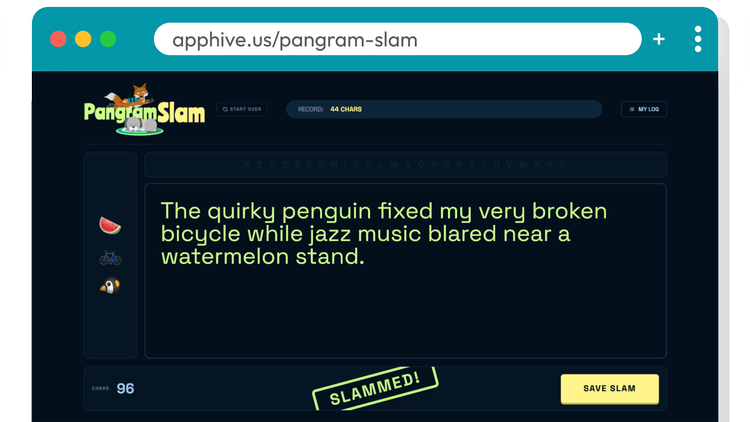
I’ve been having a great time building my own Digital Snacks with AI. Recently, I vibe coded Pangram Slam. A pangram is a clever sentence that uses every single letter of the alphabet. In this snack, students “slam” to generate three random emojis, then use them as inspiration to write their own pangram. When they click Let’s Go, the emojis appear next to a writing space. As students use letters, they disappear from the alphabet list. You know you’ve got a pangram when no letters remain. It’s a fun mix of cognitive and creative thinking. Of course, the most famous pangram is “The quick brown fox jumps over the lazy dog.” Students can also save their slams to a My Slam Log, which stores their work on the device. They can even download a PDF with their saved pangrams and emojis. Pangram Slam is the kind of digital snack that’s great for early finishers, brain breaks, or a quick writing warm-up.
|
|
A quick warning: once you start building your own apps with AI, it’s easy to get hooked. ⚠️ This spring, I watched teachers build their own classroom tools using AI. No coding experience needed. Just ideas and a willingness to try. Using tools like ChatGPT, Claude, and Gemini, they described what they wanted and created classroom games and helpful utilities. Want to learn to make your own digital snacks like Pangram Slam? I’d love to guide you as part of June’s Classy Vibing with AI cohort. Join a group of educators as we bring our ideas to life using free AI chatbots to build simple online apps. The first Classy Vibing cohort amazed me with their creations. From simple timers and randomizers to multi-level games and scaffolded activities, their vibe-coded apps were a delight. We’ll explore how to: Turn an idea into a working app with simple prompts Improve the look and feel so it’s clean and easy to use Add small touches that make your tools more engaging
You’ll be building your own projects, but you won’t be doing it alone. We’ll share ideas, swap prompts, and learn from each other along the way. Registration & Info: learninginhand.com/classyvibing
Early Bird: Save $15 if you register by April 29
Group Discount: Teams of 5+ can get a discount and pay with a purchase order You might get hooked, and you will surprise yourself with what you can make.
|
|
Teacher Hive is a place for educators to publish, share, and discover vibe-coded apps. As the developer of Teacher Hive, I’m delighted daily by what gets added. Here are a few worth checking out: Creative and generous teachers share awesomeness on Teacher Hive! Sign in or sign up to follow creators and get notified when they add new apps.
|
|
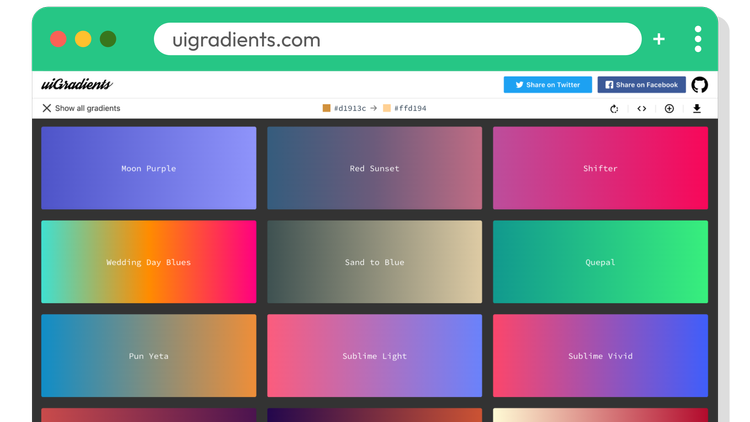
Whether you’re vibe coding an app, designing a web page, or creating a graphic, you might be tempted to add a gradient. I usually warn teachers and students to be careful. Gradients can look muddy, messy, and distracting. But when done well, they can really enhance a design. I’ve been using uiGradients for years. It features a hand-picked collection of 300 beautiful gradients. When you visit the site, you’re shown a random gradient. Click All Gradients to browse more and filter by color. Each gradient is made from two, three, or four colors, displayed at the top with their hex codes. Just click a color to copy it, or use your design app’s eyedropper tool to grab it. There’s also an option to download the gradient as a JPG, though I recommend using the hex codes when possible. uiGradients is a handy tool for upgrading the look of your next project.
|
Spotting AI WritingYou may have seen Wikipedia’s list of signs of AI writing. It’s a helpful reference, and a few patterns show up again and again. AI writing often sounds a little too polished and a little too predictable. You might notice: Overly formal phrases like “this plays a vital role” or “it is important to note” Repetitive transitions like “moreover,” “in addition,” or “however” Writing that feels generic or lacks specific details Lists or structures that feel formulaic A confident tone, even when the information is vague or slightly off
The tricky part is that humans write like this too. Students use filler phrases. They try to sound formal. They repeat structures. So even when something “feels like AI,” it’s not proof. That’s what makes this hard. Even with a checklist, you’re still guessing. And AI detectors are famously unreliable. Set the Expectation: No Copy and PasteI heard Joe Marquez share an idea in a recent FriED Tech webinar that really stuck with me. He suggests using a simple copy-and-paste policy to take the pressure off trying to “prove” AI use. Instead of debating whether a student used AI, the focus shifts to something much clearer: Did they follow the classroom rules? If students are told they may not copy and paste for an assignment, then any pasted work, whether from AI or anywhere else, simply doesn’t meet expectations. That changes the conversation. It’s no longer about catching students or playing detective. It’s about following agreed-upon norms. If the work was pasted in, it can’t be graded. Teachers can even use tools like revision history to see how a document was created. When something appears instantly instead of being written over time, it’s a clear sign the copy-and-paste rule wasn’t followed. It’s a small shift. It reframes AI concerns into something much more manageable and consistent. More from JoeJoe Marquez shared lots of golden nuggets in April 7th webinar, From Waiting to Leading: How One District Built the Best AI PD Program in California. Check out these AI posters for students and teachers.
|
|
Canva Education and Pro users have a new personalization option: custom links. Canva now includes its own URL shortener. Instead of sharing long default links, choose Create Custom Link. Your link will start with canva.link/, and you can customize the rest, as long as it hasn’t already been taken. Unlike Bitly or TinyURL, Canva’s links can be edited. However, changing a link deletes the original, so anyone using the old URL will lose access. The downside is that Education and Pro users are limited to just five custom links. If you reach the limit, you’ll need to delete one before creating another. Five feels pretty low, so I’m hoping Canva increases this.
|
|
I used Canva AI to vibe code a full-screen Simon Says widget that I used in the Presentation design. I customized the link to be canva.link/simonsays. It’s an easy link to say out loud, remember, and type.
|
|
If this whole vibe coding thing has you curious, Classy Vibing is a great online experience. And if you have a group of educators and some PD time available, an in-person vibe coding camp this summer could be a great fit. Send me an email and we can talk. Smiles from Iowa,
|
|
Subscribe at learninginhand.com AI gave me a hand with brainstorming, drafting, and polishing this issue. Of course, I reviewed and adjusted everything before sharing it with you.
|
|
|
|