|
$$PLAIN_TEXT_PREVIEW$$
|
I just posted the video and resources for Week 3 of Classy Vibing with AI, and the creativity in this cohort is something to see. Educators are building apps with AI (aka vibe coding) and sharing them with each other. The ideas are practical, playful, and ready for real classrooms. This workshop blends the technical, creative, and pedagogical sides of app design for teaching and learning. It is not just about making something that works. It is about making something that works for students. Registration closes March 9. Jumping in during Week 3 of this four-week experience is completely fine. Everything is self paced, and you get lifetime access to the Google Classroom, videos, and resources.
|
🐝 A Space for Simple Sharing
|
|
There are many ways to publish and share the things you build with AI. You can share directly from the chatbot or embed the code into a website. App Hive is another option for publishing your vibe coded creations. It is a free hosting service where you name your app, choose a URL slug, write a description, upload an icon, and paste your code. Click Save, and your app is instantly live at the link you created. There are no headers, no frames, no messy URLs, and no links to sites that might be blocked at school. Just your app at a clean, simple web address. The icon you upload becomes the favicon. If someone saves your app to their mobile Home Screen, that same image becomes the app icon. When you share the link, the image appears as the thumbnail preview. App Hive is just getting started, but there are already more than 80 public apps, with new ones added every day. Shana Ramin, a Technology Integration Specialist in Michigan, has been adding thoughtful and creative apps. Visit her profile page to see her public apps, including: Emoji Story Lab
A creative writing tool that generates randomized, school-safe emoji prompts to inspire students to brainstorm and write unique narrative adventures. Text Color Studio
Create gradient and patterned text and paste it into Google Docs, Slides, Gmail, Outlook, and more. Super Grammar Cat: Homophone Run
A fast-paced flying cat arcade game where students switch lanes to catch the correct homophone and dodge the wrong one. Magnetic Poetry Lab
A reflective magnetic poetry space for educators and students exploring AI.
|
|
Anyone can access apps on App Hive. To publish your own, you need a free account. Accounts are available to invited educators, and you can request an invite. If you are coding educational content, I would love for you to join us on App Hive.
|
|
While you can build custom games with an AI chatbot, you may not need to. Padlet Arcade uses AI to generate multiple choice, flashcards, memory tiles, matching, sorting, sequencing, and fill in the blank activities based on a topic, file, link, or video you provide.
|
|
Every Arcade game includes a built in leaderboard that tracks player performance. In the settings, you can control whether the leaderboard is visible to just the teacher or to all players. You can also limit the number of attempts before a score is locked in, which makes it easy to use as an assessment. Arcade games are not as customizable as something you would build from scratch with a chatbot. But the speed of creation, built in leaderboards, and simple sharing make it a strong option.
|
|
Arcade is separate from Padlet Boards and Sandboxes. A Padlet Board remains one of the most versatile teaching tools available. Students can post writing, images, files, audio, and video, often without needing to log in. Padlet is also my favorite replacement for the discontinued Flipgrid. It makes collecting audio and video responses simple. The main drawback is the free Neon plan. It includes only three total Padlets and limits video recordings to two minutes. Padlet offers several membership options ranging from $80 to $160 per year. I have created more than 300 Boards, so upgrading to unlimited has been worth it. If I had to pick just one classroom digital tool to pay for, Padlet would be it.
|
|
Padlet has given me a referral link that provides 60 days of unlimited access for free. If you choose to purchase a membership after that, Padlet pays me a commission.
|
|
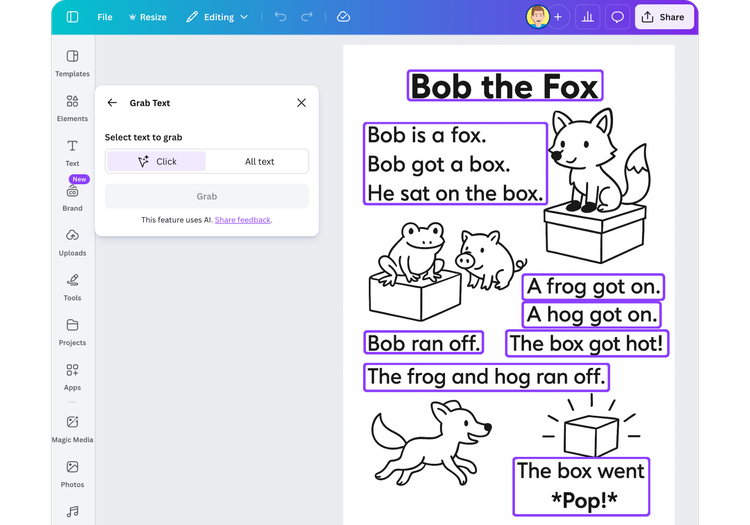
I worked with a primary grades reading interventionist who has been creating customized decodable readers with AI. She uses Gemini to generate simple one-page readers with both text and images. Sometimes the AI gets it right on the first try. Other times, she needs small wording changes, and that is where things fall apart. Image generators, especially Gemini, do not handle follow up edits well. You ask it to change one word, and it changes the illustration. Or nothing changes at all. In this case, she only needed to adjust a few words. The problem? The final product was an image. The text was baked in and could not be edited. Here is the fix. In Canva, select the image, click Edit, and choose Grab Text. Canva removes the original text and replaces it with editable text boxes, attempting to match the font and rebuild the background. Now you can fix a typo, change a sight word, update a date, or swap a name without starting over. Grab Text is useful anytime you have an image with text but no original file to edit.
|
|
Me, Myself, and AI is a student art experience and contest from Day of AI for grades 3 to 12. Students create two AI generated art pieces, one showing their community today and one imagining it 50 years in the future. Submissions are open February 3 through March 31, 2026. Fifteen selected student artists will win an all-expenses paid trip to MIT and present their work at the MIT Museum in Cambridge, Massachusetts. Their pieces will showcase AI inspired visions of their communities now and in the future. The site includes ready-to-use slides, planning sheets, and teacher guidance. If you are looking for a creative way to blend art, identity, and AI literacy, this is worth exploring with your students.
|
|
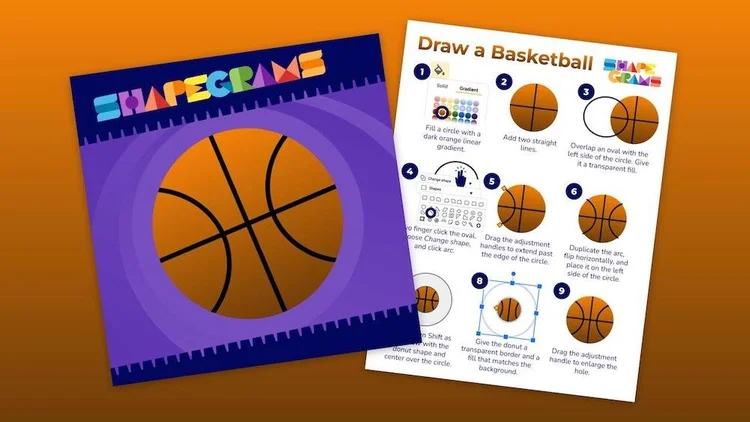
You might call a sad basketball player a “bawler.” But you’ll be smiling to know the Basketball Shapegram is free this month for Learning in Hand readers like you! This digital art challenge is designed for students in grades 3 to 8 and is packaged inside a Google Slides template with step-by-step instructions for drawing a basketball using shapes, lines, and a gradient. It is not the easiest design to recreate. One of the final steps uses a donut shape to give the lined ball a perfectly smooth outline. It is rated Progressing Purple, which means students should already be comfortable drawing with shapes in Google Slides. If they are just getting started, try a free Beginning Blue Shapegram first. Grab your free copy of the Basketball Shapegram. You can also download the instructions as a PDF. It is considered a “Zipper,” meaning students can move through it independently, but expect it to take about 10 to 20 minutes to complete all nine steps.
|
💻 Defending Digital Learning
|
|
Adam Sparks wrote a two part series called Edtech Is Worth Fighting For. It is a thoughtful response to the growing calls to strip technology from classrooms. I recommend reading Part 1 and Part 2.
|
|
Google Forms is one of the handiest teacher tools out there. You already know it works well for collecting responses and giving quizzes. But it can also be used to publish interactive creative writing. I have been guiding students to write Choose Your Own Adventure-style stories since 2003. Back then, students worked from an HTML template that was not very user friendly. Now I use a Google Forms template. With sections and the option to jump to a different section based on a multiple choice answer, students can build branching stories right inside a Form.
|
|
You can read School Day by Tony Vincent, a suspenseful interactive story where you play a 5th grade teacher who enters a school that is way too quiet. |
|
|
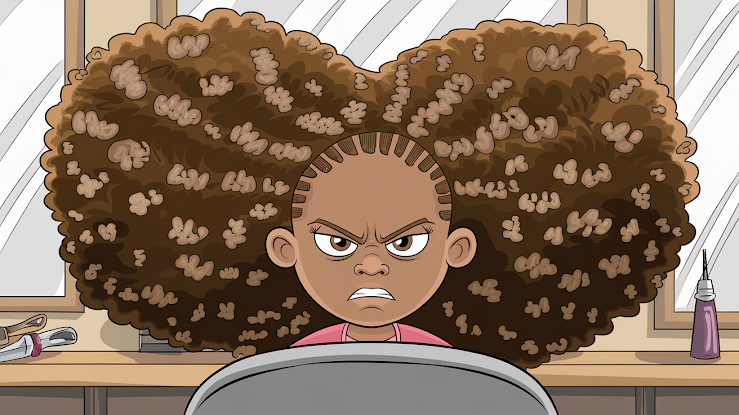
Or read Crazy Hairdo by Eboni, where you are an eleven year old whose hair turns out much bigger than expected after a visit to the salon. |
|
|
|
|
Writing stories with multiple endings and setting up the branching logic can feel overwhelming. That is why I created templates. The Pick Your Path Planner is a three page Google Slides organizer. It breaks a story into 10 choices and 5 different endings. Students can use it for planning or drafting. Each box is labeled with a code that matches the Form. The Pick Your Path Story Template is a Google Form with all the sections and branching logic already built. Students simply paste their writing into the matching sections.
|
|
Students who struggle to write a single ending often thrive when they can create multiple paths. When the story can twist, surprise, or even completely derail, motivation goes up. Google Forms turns those choices into an experience. Pick Your Path stories are just one of many ideas I share in my Google Forms Awesomeness and Funky Google Forms: Offbeat Ideas presentations and workshops.
|
|
I was so busy preparing for Classy Vibing with AI that I didn’t get the last newsletter sent out until Thursday. Switching from the usual Wednesday delivery cut the email opens in half. So if you’re a subscriber who didn’t read Issue 53, here’s a link to the web version. Smiles from Iowa,
|
|
Subscribe at learninginhand.com AI gave me a hand with brainstorming, drafting, and polishing this issue. Of course, I reviewed and adjusted everything before sharing it with you.
|
|
|
|