|
Valentine Ideas, Timers, AI Compared, Vibe-Coded Fun ͏ ͏ ͏ ͏ ͏ ͏ ͏ ͏ ͏ ͏ ͏ ͏ ͏ ͏ ͏ ͏ ͏ ͏ ͏ ͏ ͏ ͏ ͏ ͏ ͏ ͏ ͏ ͏ ͏ ͏ ͏ ͏ ͏ ͏ ͏ ͏ ͏ ͏ ͏ ͏ ͏ ͏ ͏ ͏ ͏ ͏ ͏ ͏ ͏ ͏ ͏ ͏ ͏ ͏ ͏ ͏ ͏ ͏ ͏ ͏ ͏ ͏ ͏ ͏ ͏ ͏ ͏ ͏ ͏ ͏ ͏ ͏ ͏ ͏ ͏ ͏ ͏ ͏ ͏ ͏ ͏ ͏ ͏ ͏ ͏ ͏ ͏ ͏ ͏ ͏ ͏ ͏ ͏ ͏ ͏ ͏ ͏ ͏ ͏ ͏ ͏ ͏ ͏ ͏ ͏ ͏ ͏ ͏ ͏ ͏ ͏ ͏ ͏ ͏ ͏ ͏ ͏ ͏ ͏ ͏ ͏ ͏ ͏ ͏ ͏ ͏ ͏ ͏ ͏ ͏ ͏ ͏ ͏ ͏ ͏ ͏ ͏ ͏ ͏ ͏ ͏ ͏ ͏ ͏ ͏ ͏ ͏ ͏ ͏ ͏ ͏ ͏ ͏ ͏ ͏ ͏ ͏ ͏ ͏ ͏ ͏ ͏ ͏ ͏ ͏ ͏ ͏ ͏ ͏ ͏ ͏ ͏ ͏ ͏ ͏ ͏ ͏ ͏ ͏ ͏ ͏ ͏ ͏ ͏ ͏ ͏ ͏ ͏ ͏ ͏ ͏ ͏ ͏ ͏ ͏ ͏ ͏ ͏ ͏ ͏ ͏ ͏ ͏ ͏ ͏ ͏ ͏ ͏ ͏ ͏ ͏ ͏ ͏ ͏ ͏ ͏ ͏ ͏ ͏ ͏ ͏ ͏ ͏ ͏ ͏ ͏ ͏ ͏ ͏ ͏ ͏ ͏ ͏ ͏ ͏ ͏ ͏ ͏ ͏ ͏ ͏ ͏ ͏ ͏ ͏ ͏ ͏ ͏ ͏ ͏ ͏ ͏ ͏ ͏ ͏
|
Issue 52 • February 4, 2026
|
|
Happy February! February gets its name from Februa, an ancient Roman festival tied to renewal, which feels about right for this time of year. A big part of my work is helping educators refresh their thinking and explore new ways to design engaging learning through keynotes, workshops, and sessions that blend practical ideas with the bigger picture of teaching and learning. If you help plan professional learning, or know someone who does, I’d love to be part of that conversation. In the spirit of renewal and fresh perspective, let’s start with a simple way to mentally step outside the classroom and take a walk somewhere new.
|
|
Take a walk around nearly 200 cities around the world with Citywalki. The site shows curated YouTube videos from the point of view of someone walking down the street, giving you a street-level view of everyday life in different places. When you visit, it opens to a random location, but it’s easy to switch cities. You can also change how you explore, choosing to walk, drive, or even fly. The video can be muted, and you can play a music station from that city to set the mood. Playing Citywalki on your classroom screen makes for a calming sensory brain break. It can also spark curiosity, inspire conversation, or serve as a gentle transition between activities. I’ve added Citywalki to my growing collection of yummy Digital Snacks.
|
|
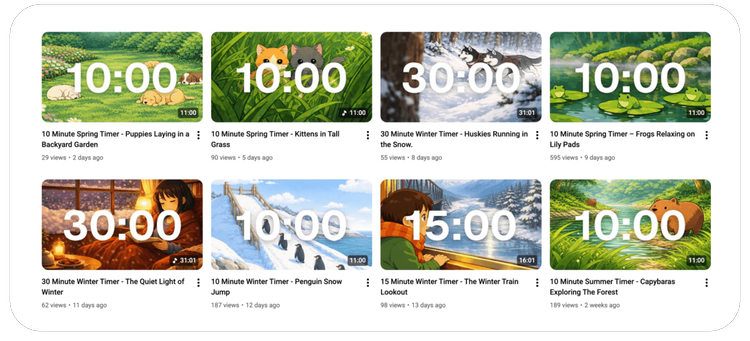
Something else you might want to show on your classroom screen is a timer. I learned about the Pass the Timer YouTube channel from Tricia Louis’ Tech Tuesday Tidbits newsletter. Pass the Timer is a father-daughter project featuring unique, chill countdown timers in a variety of lengths. You’ll find animal-themed timers along with seasonal playlists, making it easy to match the vibe of your classroom. Each timer includes a large, easy-to-see countdown with cute cartoon images in the background that change occasionally. The calming music makes these timers especially well suited for work time, transitions, or quiet focus moments.
|
💘 3 Valentine's Day Jeopardy Games for 2026 that Your Students Will Love
|
|
This issue is sponsored by Factile.
|
|
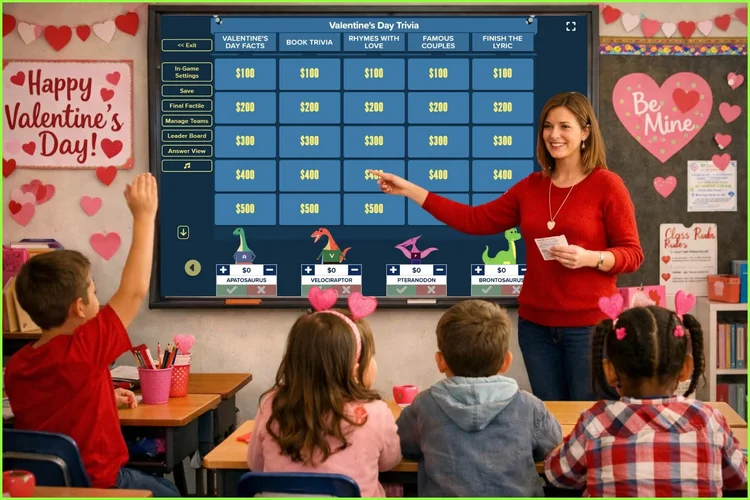
Valentine's Day is coming up, and if you're looking for a fun, low-prep way to celebrate with your class, Factile has got you covered. Here are three ready-to-play Valentine's-themed Jeopardy games on Factile that work great for different grade levels: Valentine's Day Trivia
Perfect for elementary classrooms with categories like "Rhymes with Love," "Famous Couples" (think Barbie & Ken, Simba & Nala), and Disney lyrics to finish. Preview Now →
Play Now → Valentine's Jeopardy
A nice mix of Disney love songs, chocolate facts, and February trivia. Did you know Hershey, PA, is also called Chocolatetown USA? Your students will love these! Preview Now →
Play Now → Valentine's Day!
Great for older students with categories covering romantic movies, love songs, candy facts, and fun random trivia (like which celebrity couple got engaged on Valentine's Day in 2019). Preview Now →
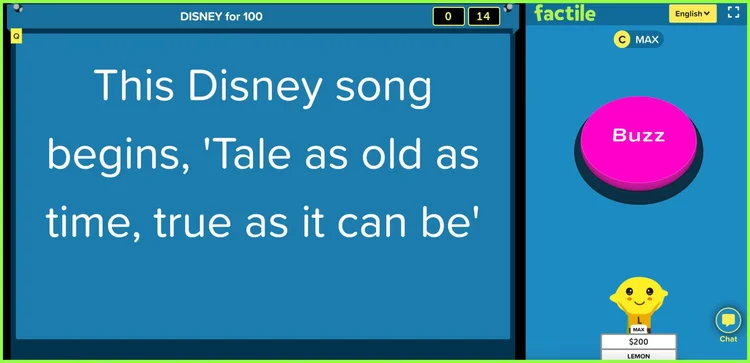
Play Now → 🎯 Tips to Make It Even More FunWant to turn up the excitement? Try using Virtual Buzzer mode so students can buzz in right from their devices - it brings that real game show energy to your classroom and gets everyone on the edge of their seats. And since this is meant to be a celebration, consider turning on Positive Scoring Mode. It keeps the game lighthearted by not deducting points for wrong answers - perfect for a fun holiday activity where the goal is participation and smiles, not stress.
|
|
Whether you use these games for a class party, an end-of-week reward, or just a brain break, they're ready to go whenever you are.
|
|
New to Factile? You can sign up for free and try it out. Paid plans come with a 7-day no-hassle refund policy if it's not the right fit.
|
|
Frank Andrade, author of Artificial Corner, recently wrote an article comparing generative AI chatbots. The three he highlights are ChatGPT, Gemini, and Claude, all tools I regularly use.
|
|
Each has its own strengths, and Frank’s article includes a clear chart summarizing how the chatbots compare. In his breakdown, Gemini stands out for audio and video analysis, especially with YouTube videos. ChatGPT’s voice mode is often preferred, and Claude tends to shine when it comes to coding. Frank also shares a Daily Limits chart showing how many messages you’re allowed on Plus or Pro plans, which cost about $20 per month. Even if you don’t pay for an upgraded plan, the chart offers a helpful sense of how much use you can expect before hitting a limit. In my experience, Claude is the easiest to hit a cap with, Gemini is the most generous, and ChatGPT falls somewhere in between.
|
|
Personal preference plays a role too. As chatbots build memory over time, they adapt to how you work, which means the “best” chatbot often depends on which one already understands your style. All of this could change quickly as these tools are updated. Frank notes that ChatGPT is still the most popular chatbot, but more people are realizing there are strong alternatives. In my school district, we encourage teachers to use Gemini. We’re a Google Workspace for Education district, Gemini is already part of that ecosystem, and Gemini for Education follows the same privacy and security protections as tools like Docs and Sheets. On top of that, it’s simply a solid chatbot with helpful features like Gems, Guided Learning, and strong image generation.
|
|
One reason I tend to vibe code with Gemini is how easy it is to preview the code it generates. Another bonus is the higher usage caps, which means I’m less likely to have to stop mid-project and wait for my usage to reset. Using Gemini, I’ve vibe coded two Valentine’s Day–themed apps. Valen-Times Chocolate Factor-y You know how little kids sometimes call it “Valentime’s Day”? Hearing that the other day inspired this Valentine’s Day multiplication game: Valen-Times Chocolate Factor-y. I didn’t want a basic facts quiz, so I brainstormed with a chatbot to come up with something more playful. The idea that stuck was filling a box of chocolates. Then I thought of the iconic I Love Lucy conveyor belt scene. In the game, chocolates roll by and the player’s job is to fill the box with the correct ones. Heart Tangram This app doesn’t have a clever name, but you do have to be a bit clever to use the pieces to form a heart shape: Heart Tangram. There are five levels, or “lovels,” each adding a twist to the puzzle. Complete all five lovels and you earn a spot in the Hall of Fame. Will You Be My Valentine Mike Davola, Technology Staff Developer K-12 at a Public School on Long Island in New York, vibe coded an app that makes me truly laugh out loud. I don’t want to spoil the surprise, but be sure you try clicking the No button. 😉
|
✨ Developing Digital Delights
|
|
Those Valentine apps didn’t start as polished products. They started as simple “what if” ideas, a few prompts, and some experimenting with an AI chatbot. That’s the part I find most interesting. That same process is what Classy Vibing with AI is built around. What if you could make the exact digital tool you wish already existed for your classroom? A game tailored to your students. A timer with the right vibe. A brain break that actually fits the moment. No coding required. Classy Vibing with AI is a new online workshop running February 18 through March 24 in Google Classroom. You’ll learn how to use free AI chatbots like Gemini, ChatGPT, Claude, or Canva to turn simple prompts into real, working web apps. You’ll build games, timers, randomizers, and quick classroom tools. Some will be one-and-done creations made for a specific lesson or moment. Other creations may become go-to tools you reuse and remix all year long. The focus isn’t perfection. It’s exploration, creativity, and building tools that actually fit your classroom. If that kind of creative tinkering sounds fun, you can read more about Classy Vibing with AI. Register by February 6 to save $15.
|
|
I love sharing quick tips, especially ones that save a few taps. 😍 After updating my iPhone to iOS 26, I kept looking for the All Tabs ⧉ button in Safari. It’s still there, but now it’s tucked inside the More ⋯ menu. I’m not happy about that extra step between me and my tabs! Luckily, there’s a faster way. You can swipe up from the address bar to see all your open tabs. Touch the web address field at the bottom of the screen and slide up. The current page shrinks into a thumbnail, revealing thumbnails of all your tabs. From there, you can quickly switch between them or close them. Here’s another handy trick. Instead of trying to tap the tiny X, just swipe left on a tab thumbnail to close it. One more tip for tab hoarders. If you have so many tabs open that closing them one by one feels impossible, press and hold on the address bar and choose Close All Tabs.
|
|
As I close out this love-filled issue, I want to remind you that Shapegrams, my series of digital art lessons and challenges, includes Valentine’s Day activities at your fingertips. You’ll find animals made from hearts, a heart built from right triangles, a love letter, a chocolate bar, and more. A Shapegrams membership is $35 per year and includes access to 100+ Shapegrams that you can share with your students.
|
|
Subscribe at learninginhand.com AI gave me a hand with brainstorming, drafting, and polishing this issue. Of course, I reviewed and adjusted everything before sharing it with you.
|
|
|
|