

That AI chatbot you use every day can do more than answer questions. It can build apps. Welcome to vibe coding, where you describe an idea and AI generates the code. No programming experience required.
Tony Vincent has built dozens of web apps with AI, from classroom games and interactive activities to handy tools for teachers. See how tools like ChatGPT, Gemini, Claude, and Canva turn plain-language instructions into working apps, and how conversation and iteration help shape the results. You'll discover how to start building apps of your own and explore a framework for designing learning apps that put learning goals, student experience, accessibility, and privacy front and center. Your next great classroom app might be just a conversation away.
Get started in a chat with Gemini, ChatGPT, Claude, or Canva AI. Describe the app you want to build. It’s helpful to include, “Ask no more than 5 questions one at a time until you have enough information to build the app.”
Ask AI for suggestions: “Review this app and suggest improvements to its functionality, usability, and design.
Update your chatbot’s memory. Prompt it:
Remember the following about me: For all current and future education apps I ask you to code, prioritize accessibility, privacy, security, and student safety. Ensure all features meet or exceed WCAG 2.1 AA standards, support keyboard and screen reader access, use sufficient color contrast, collect only the minimum data necessary, avoid unnecessary tracking or third-party data sharing, follow privacy-by-design principles, and use industry-standard security practices. When proposing or implementing features, proactively identify and address accessibility, privacy, security, and student-safety concerns.

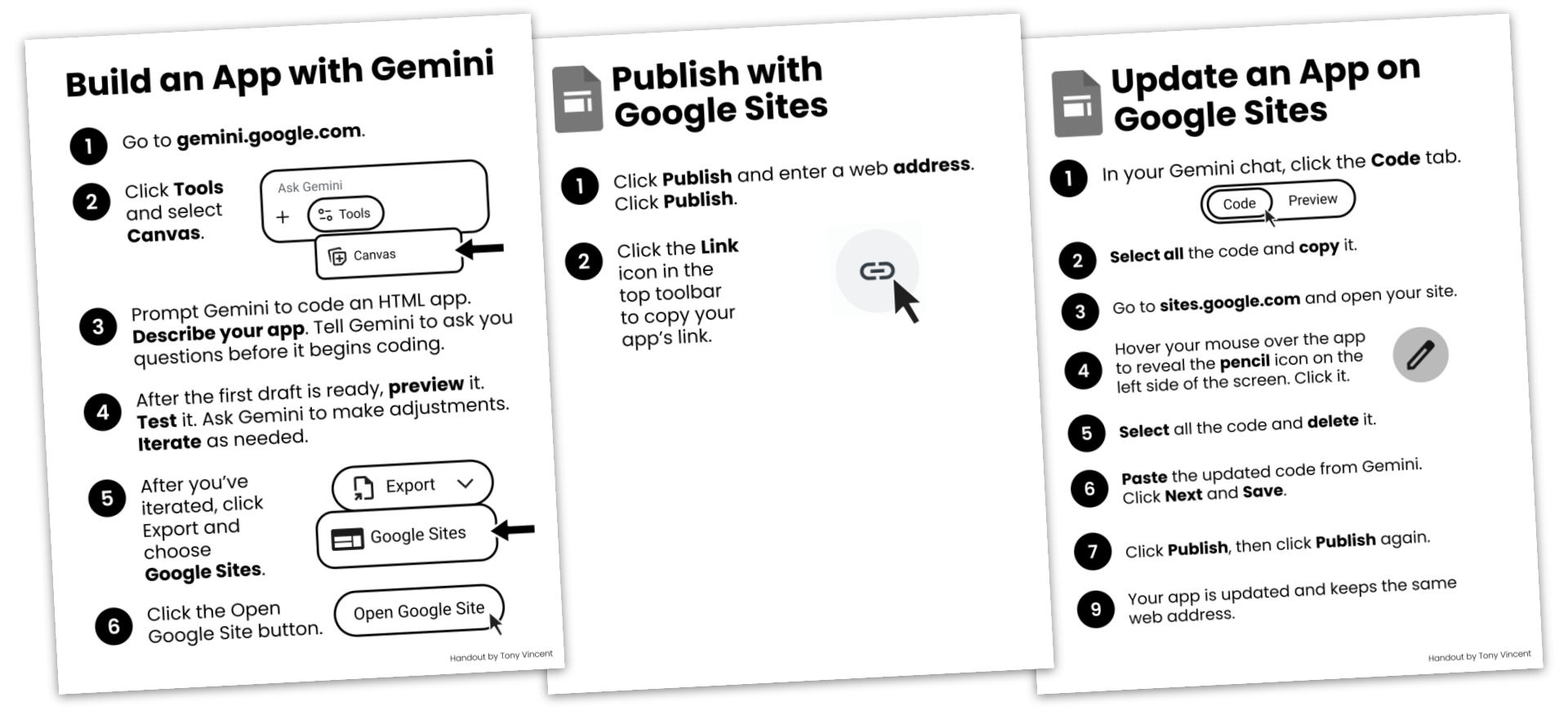
Teachers and students might use Google Gemini to write the code for an app export to Google Sites to publish the app. Read about some student vibe coded projects. Download a set of posters to guide students.
Find all of Tony’s vibe coded apps on his Teacher Hive Profile.
Search Teacher Hive for teacher-made apps. Create an account and follow creators you like, and consider adding your own apps to the Hive.
Read a list of 8 big ideas worth checking before you publish an app.